Indledning
The Behringer Xenyx X2222USB is a versatile 22-input, 2/2-bus analog mixer designed for studio and live applications. It features Xenyx mic preamps, compressors, a 24-bit multi-FX processor, and a built-in USB/audio interface, making it an ideal tool for high-quality audio mixing and recording. This manual provides essential information for the proper setup, operation, and maintenance of your Xenyx X2222USB mixer.
Opsætning
Udpakning og indledende inspektion
Carefully unpack your Xenyx X2222USB mixer and inspect it for any signs of damage that may have occurred during transit. Retain the original packaging materials for future transport or storage. Ensure all components listed in the packing list are present.
Placering og ventilation
Place the mixer on a stable, flat surface. Ensure adequate ventilation around the unit to prevent overheating. Avoid placing the mixer near heat sources or in direct sunlight. Consider the dimensions for proper integration into your setup.
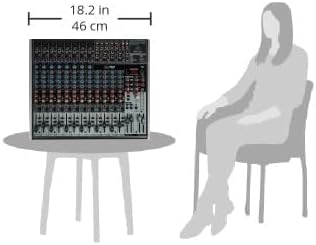
Figure 1: Approximate dimensions of the Behringer Xenyx X2222USB mixer, showing its compact size suitable for various setups.
Strømtilslutning
The Xenyx X2222USB operates on corded electric power. Connect the supplied power cable to the mixer's power input and then to a suitable AC power outlet. Ensure the mixer's power switch is in the OFF position before connecting to power.
Lydforbindelser
The mixer features 22 inputs, including Xenyx mic preamps for microphone connections and line inputs for instruments and other audio sources. Connect your microphones via XLR cables and line-level devices via 1/4" TRS or TS cables. Output connections include main mix outputs, control room outputs, and auxiliary sends for monitors or effects processors.
USB-forbindelse
Connect the mixer to your computer using a standard USB cable. This enables the built-in USB/audio interface for recording and playback. Ensure your computer's operating system recognizes the device; driver installation may be required depending on your system.

Figur 2: Top-down view of the Behringer Xenyx X2222USB mixer, illustrating the various input and output connections, and control layout.
Betjeningsvejledning
Basic Mixer Functions
The Xenyx X2222USB features intuitive controls for each channel and the master section. Each input channel typically includes gain control, a 3-band British EQ, auxiliary sends, pan control, and a channel fader. The master section controls the overall mix, effects, and monitoring.
Using Xenyx Mic Preamps and Compressors
The Xenyx mic preamps provide high headroom and dynamic range for clear audio. Engage the compressor on channels with dynamic sources like vocals or bass to smooth out volume peaks and enhance sustain. Adjust the compressor knob to achieve the desired effect.
24-Bit Multi-FX Processor
The built-in 24-bit multi-FX processor offers a variety of effects such as reverb, delay, chorus, and flanger. Use the FX send controls on individual channels to route audio to the effects processor, and adjust the FX return level in the master section to blend the effects into your mix.
USB Audio Interface Operation
When connected to a computer via USB, the mixer functions as a 2-in/2-out audio interface. This allows you to record the main stereo mix directly to your digital audio workstation (DAW) and play back audio from your computer through the mixer. Ensure your DAW is configured to use the Xenyx X2222USB as its audio input and output device.

Figur 3: Vinklet view of the Behringer Xenyx X2222USB mixer, highlighting the channel faders, EQ knobs, and effects controls for operational reference.
Opretholdelse
Rensning
To maintain the appearance and functionality of your mixer, regularly wipe the surface with a soft, dry cloth. For stubborn dirt, a slightly damp cloth with mild soap can be used, followed by a dry wipe. Avoid abrasive cleaners or solvents, as these can damage the finish and controls. Keep dust out of faders and knobs using compressed air.
Opbevaring
When not in use for extended periods, store the mixer in a cool, dry place, away from direct sunlight and extreme temperatures. It is recommended to use the original packaging or a protective case to prevent dust accumulation and physical damage.
Fejlfinding
- Ingen lydoutput:
- Kontroller alle strømtilslutninger, og sørg for, at mixeren er tændt.
- Verify that main mix faders and channel faders are raised.
- Ensure input sources are connected correctly and are active.
- Kontroller monitor- og hovedtelefonniveauer.
- Forvrænget lyd:
- Reduce input gain (trim) on channels to prevent clipping (indicated by peak LEDs).
- Lower main mix fader if the output is clipping.
- Kontroller kabler for skader eller forkert forbindelse.
- USB-forbindelsesproblemer:
- Ensure the USB cable is securely connected to both the mixer and the computer.
- Prøv en anden USB-port på din computer.
- Verify that the correct audio device is selected in your computer's sound settings and DAW.
- Check the Behringer website for the latest drivers if issues persist.
Specifikationer
| Feature | Detalje |
|---|---|
| Mærke | Behringer |
| Model | Xenyx X2222USB |
| Antal kanaler | 22 |
| Varens vægt | 14.04 pund |
| Forbindelsesteknologi | USB |
| Strømkilde | Elektrisk med ledning |
| Mic Preamps | Xenyx |
| EQ | Britiske EQ'er |
| Effekt processor | 24-Bit Multi-FX |
Garanti og support
Behringer products are covered by a limited warranty. For detailed information regarding warranty terms, registration, and technical support, please visit the official Behringer webwebstedet eller kontakt deres kundeservice. Behold din købskvittering som købsbevis.
For further assistance or to download the latest drivers and software, please visit: www.behringer.com


