1. Introduktion
This manual provides detailed instructions for the installation, configuration, and maintenance of your ASRock G41C-VS motherboard. Please read this manual thoroughly before installing the motherboard to ensure proper setup and operation. This motherboard supports Intel Core 2 Extreme, Core 2 Quad, Core 2 Duo, Pentium Dual Core, and Celeron processors with an LGA 775 socket, and features both DDR2 and DDR3 memory support.
2. Opsætning og installation
2.1 Bundkortlayout
Familiarize yourself with the components and connectors on the motherboard before proceeding with installation.
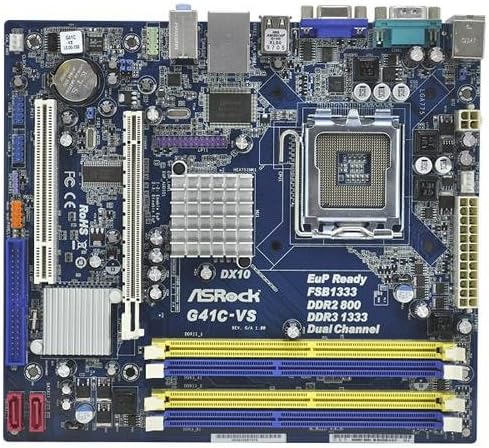
Billede 1: Overview of the ASRock G41C-VS motherboard, showing the CPU socket, memory slots, expansion slots, and various connectors.
2.2 Processor (CPU) installation
The ASRock G41C-VS motherboard uses an LGA 775 socket. Follow these steps to install your compatible Intel processor:
- Find LGA 775 CPU-sokkelen på bundkortet.
- Gently push down the load lever and pull it to the side to open the socket retention frame.
- Carefully align the CPU with the socket, ensuring the golden triangle on the CPU matches the triangle on the socket. Do not force the CPU into the socket.
- Lower the CPU into the socket.
- Close the retention frame and secure it by pushing the load lever back into its locked position.
- Apply a thin layer of thermal paste to the CPU surface, then install the CPU cooler according to its manufacturer's instructions.
2.3 Installation af hukommelse (RAM)
This motherboard supports both DDR2 and DDR3 memory modules. It features two DDR2 DIMM slots and two DDR3 DIMM slots, supporting dual channel memory architecture.
- Åbn klipsene i begge ender af DIMM-stikket.
- Juster hukommelsesmodulet med stikket, og sørg for, at hakket på modulet passer til nøglen i stikket.
- Tryk godt ned i begge ender af hukommelsesmodulet, indtil klipsene klikker på plads.
- Ensure both clips are fully closed and the module is securely seated.
2.4 Installation af udvidelseskort
The motherboard includes one PCI-Express x16 slot for graphics cards and one PCI slot for other expansion cards.
- Locate the desired expansion slot.
- Fjern det tilsvarende metalbeslag fra dit pc-kabinet.
- Juster udvidelseskortet med stikket, og tryk godt ned, indtil det sidder helt på plads.
- Fastgør kortet til pc-kabinettet med en skrue.
2.5 Tilslutning af periferiudstyr og strøm
Connect all necessary cables to the motherboard:
- Strømforbindelser: Connect the 24-pin ATX power connector and the 4-pin ATX 12V power connector from your power supply unit (PSU) to the motherboard.
- SATA-enheder: Connect your SATA hard drives or SSDs to the SATA ports on the motherboard using the provided SATA data cables.
- Frontpanelstik: Connect the power switch, reset switch, power LED, and HDD LED cables from your PC case to the front panel header on the motherboard. Refer to the motherboard diagram for correct pin assignments.
- USB-porte: Connect internal USB headers for front panel USB ports. Connect external USB devices to the rear USB 2.0 ports.
- Lyd: Connect front panel audio cables to the appropriate header. Connect speakers or headphones to the rear audio jacks.
- Video: Connect your monitor to the VGA port on the rear I/O panel if using integrated graphics.
- Netværk: Connect an Ethernet cable to the RJ45 LAN port for network access.
3. Betjeningsvejledning
3.1 Første opstart og BIOS-opsætning
After completing hardware installation, power on your system. During the initial boot sequence, you can access the BIOS (Basic Input/Output System) setup utility by pressing the DEL key (or as indicated on screen).
- BIOS-indstillinger: Configure boot order, date and time, and other system parameters as needed. Save changes before exiting the BIOS.
- Installation af operativsystem: Install your preferred operating system from a bootable USB drive or optical disc.
3.2 Driverinstallation
For optimal performance and stability, install the necessary drivers for your motherboard components. These drivers can be found on the included support CD or downloaded from the official ASRock webwebsted.
- Install chipset drivers.
- Install integrated graphics drivers (Intel GMA X4500).
- Install audio drivers.
- Install LAN drivers.
4. Vedligeholdelse
4.1 Rengøring
Regularly clean your computer's interior to prevent dust buildup, which can lead to overheating and component failure. Use compressed air to remove dust from fans, heatsinks, and other components. Ensure the system is powered off and unplugged before cleaning.
4.2 CMOS Battery Replacement
The motherboard uses a CR2032 lithium coin cell battery to power the CMOS (Complementary Metal-Oxide-Semiconductor) memory, which stores BIOS settings and the system clock. If your system consistently loses time or BIOS settings, the battery may need replacement. Locate the battery holder on the motherboard, gently remove the old battery, and insert a new CR2032 battery with the positive (+) side facing up.
5. Fejlfinding
Dette afsnit indeholder løsninger på almindelige problemer, du kan støde på.
- Ingen strøm: Ensure all power cables (24-pin ATX, 4-pin ATX 12V) are securely connected to the motherboard and PSU. Verify the PSU is switched on and connected to a working power outlet.
- Ingen visning: Check that the monitor is properly connected to the VGA port. If using a discrete graphics card, ensure it is correctly seated in the PCI-Express x16 slot and connected to power (if required). Try reseating RAM modules.
- Systemustabilitet/nedbrud: This can be caused by improperly seated RAM, overheating, or outdated drivers. Ensure RAM is correctly installed, CPU cooler is functioning, and all drivers are up-to-date.
- CMOS Reset: If you encounter issues after changing BIOS settings, you can reset the CMOS to default settings. This is typically done by briefly shorting a specific jumper on the motherboard (refer to the motherboard diagram for the CLRCMOS1 jumper) or by removing the CMOS battery for a few minutes.
6. Specifikationer
Below are the technical specifications for the ASRock G41C-VS motherboard:
| Komponent | Specifikation |
|---|---|
| Processorsupport | LGA 775 for Intel Core 2 Extreme, Core 2 Quad, Core 2 Duo, Pentium Dual Core, Celeron Processors |
| Chipsæt | Intel G41 + ICH7 |
| Hukommelse | 2 x DDR2 DIMM slots (DDR2 800/667 non-ECC, un-buffered, max 8GB) 2 x DDR3 DIMM slots (DDR3 1333(OC)/1066/800 non-ECC, un-buffered, max 8GB) Supports Dual Channel Memory Technology |
| Udvidelsesslots | 1 x PCI Express x16-slot 1 x PCI slot |
| Grafik | Integrated Intel GMA X4500 Graphics Max. shared memory 1759MB Supports DirectX 10, Pixel Shader 4.0 |
| Opbevaring | 4 x SATA2 3.0 Gb/s connectors |
| Lyd | 5.1 CH HD Audio (VIA VT1705 Audio Codec) |
| LAN | PCIE x1 Gigabit LAN 10/100/1000 Mb/s (Realtek RTL8111DL) |
| Bagpanel I / O | 1 x PS/2 museport 1 x PS/2-tastaturport 1 x seriel port: COM1 1 x VGA-port 4 x USB 2.0 porte 1 x RJ-45 LAN-port med LED HD-lydstik: Line in / fronthøjttaler / mikrofon |
| Interne stik | 2 x USB 2.0 Headers (support 4 USB 2.0 ports) 1 x CPU blæserstik 1 x Chassis Fan Connector 1 x 24-pin ATX-strømstik 1 x 4 ben 12V strømstik 1 x lydstik på frontpanelet 1 x SPDIF Out Header 1 x Clear CMOS Jumper |
| Formfaktor | Micro ATX Form Factor (8.9-in x 7.5-in, 22.6 cm x 19.1 cm) |
| Produktdimensioner | 8.8 x 7.8 x 1.9 tommer |
| Varens vægt | 1.81 pund |
7. Pakkens indhold
The ASRock G41C-VS motherboard package typically includes the following items:
- ASRock G41C-VS Motherboard
- Hurtig installationsvejledning
- Support-cd (til drivere og værktøjer)
- I / O-skjold
- 2 x SATA datakabler
8. Support og garanti
For technical support, driver updates, and further information, please visit the official ASRock website. Warranty terms and conditions are subject to regional policies and can be found on the ASRock support page or by contacting your local retailer.
For additional assistance, you may refer to the ASRock support resources available online.


