Indledning
The APC Smart-UPS SMX1500RM2UNC is a 1500VA/1200W line-interactive uninterruptible power supply (UPS) designed to provide reliable power protection for critical network devices, servers, and other sensitive electronics. This model features a pure sine wave output, an extended run option for additional battery packs, and an installed Network Management Card for remote monitoring and control. It is convertible between a 2U rackmount and a tower configuration.
This manual provides essential information for the safe and efficient installation, operation, maintenance, and troubleshooting of your APC Smart-UPS SMX1500RM2UNC.
Sikkerhedsoplysninger
Læs og forstå alle sikkerhedsinstruktioner, før du installerer eller bruger UPS'en. Manglende overholdelse af disse instruktioner kan resultere i elektrisk stød, brand eller alvorlig personskade.
- This UPS is heavy (approximately 54.6 pounds). Use proper lifting techniques and assistance when moving or installing the unit to prevent injury.
- The UPS contains internal batteries. Do not attempt to service the batteries yourself. Refer all servicing to qualified service personnel.
- Ensure the UPS is connected to a properly grounded outlet.
- Do not block ventilation openings. Maintain adequate airflow around the unit.
- Verify that the model number on your unit matches SMX1500RM2UNC to ensure you are using the correct manual and specifications.
Opsætning
1. Udpakning og inspektion
Carefully unpack the UPS and inspect it for any shipping damage. Retain the packaging for future use. The package should include the UPS unit, a rail kit for rackmount installation, and documentation.
2. Fysisk installation
The SMX1500RM2UNC can be installed in a 2U rackmount configuration or as a tower. The unit weighs approximately 54.6 pounds and measures 17.01 x 3.5 x 19.29 inches.
- Rackmonteret installation: Use the included rail kit to secure the UPS in a standard 19-inch rack. Ensure proper ventilation.
- Tårninstallation: If using as a tower, convert the unit from its rackmount configuration. This typically involves rotating the display panel and attaching stabilizing feet (if provided). Refer to the detailed instructions in the separate installation guide for specific steps.
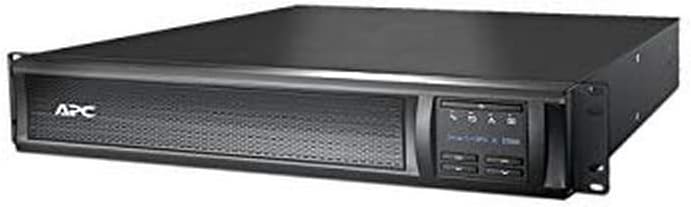
Billede 1: Front view of the APC Smart-UPS SMX1500RM2UNC, showing the LCD display and control buttons. This unit is designed for both rackmount and tower configurations.
3. Batteritilslutning
Before initial use, ensure the internal battery is properly connected. This usually involves connecting a battery cable that may be disconnected for shipping. Refer to the quick start guide for your specific model's battery connection procedure.
4. Strømforbindelser
- Indgangseffekt: Connect the UPS input power cord to a grounded NEMA 5-15P wall outlet.
- Udgangseffekt: Connect your equipment to the eight NEMA 5-15R output receptacles on the rear of the UPS. These outlets provide battery backup and surge protection.
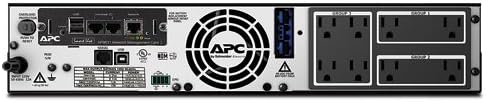
Billede 2: Bag view of the APC Smart-UPS SMX1500RM2UNC, illustrating the NEMA 5-15R output receptacles, NEMA 5-15P input, and network management card slot.
5. Network Management Card (NMC) Setup
This model includes a pre-installed Network Management Card. Connect an Ethernet cable from the NMC port to your network switch or router. Refer to the NMC documentation for initial network configuration, IP address assignment, and remote monitoring setup.
Betjeningsvejledning
1. Powering On the UPS
After connecting all cables, press the power button on the front panel. The UPS will perform a self-test, and the LCD display will illuminate, showing status information.
2. LCD-skærm og betjeningselementer
The front panel LCD provides real-time information such as input/output voltage, belastningsprocenttage, battery charge level, estimated runtime, and various status indicators. Use the navigation buttons to scroll through menus and configure settings.
3. Første batteriopladning
Allow the UPS to charge for at least 24 hours before connecting critical equipment to ensure maximum battery runtime. The battery charge level is displayed on the LCD.
4. PowerChute-software
For advanced management, monitoring, and graceful shutdown capabilities, install the APC PowerChute software. This software allows you to:
- Overvåg UPS-status og strømforhold.
- Configure UPS settings, including sensitivity levels.
- Perform scheduled shutdowns and startups.
- Modtag advarsler og meddelelser.
Download the latest version of PowerChute from the official APC webwebsted.
5. Extended Run Option
The SMX1500RM2UNC supports external battery packs (model SMX48RMBP2U, sold separately) to extend runtime during prolonged power outages. Connect external battery packs according to their respective installation guides.
Opretholdelse
1. Batteripleje og udskiftning
The UPS uses sealed lead-acid batteries. Batteries have a finite lifespan and will require replacement over time. The UPS LCD and PowerChute software will indicate when battery replacement is necessary. Always replace batteries with APC-approved replacement battery cartridges (RBCs) to ensure optimal performance and safety. Refer to the APC website or contact support for compatible RBC models and replacement procedures.
2. Rensning
Rengør UPS'ens yderside regelmæssigt med en blød, tør klud. Sørg for, at ventilationsåbningerne er fri for støv og snavs for at opretholde korrekt luftgennemstrømning og køling.
3. Selvtest
Regularly perform a self-test using the front panel controls or PowerChute software to verify the UPS's battery and internal components are functioning correctly.
Fejlfinding
This section addresses common issues you might encounter with your UPS. For more detailed troubleshooting, consult the PowerChute software or the APC support webwebsted.
| Problem | Mulig årsag | Løsning |
|---|---|---|
| UPS'en tænder ikke. | Battery not connected; no input power. | Ensure battery cable is securely connected. Verify input power cord is plugged into a live outlet. |
| UPS'en bipper ofte eller kontinuerligt. | On battery power; overload; low battery; internal fault. | Check input power. Reduce connected load. Allow battery to charge. Consult LCD for specific error codes. |
| Kort batterilevetid. | Battery not fully charged; battery nearing end of life; excessive load. | Allow UPS to charge for 24 hours. Consider battery replacement. Reduce connected load or add external battery packs. |
| UPS frequently switches to battery power. | Input power fluctuations; UPS sensitivity setting too high. | Adjust UPS sensitivity settings via the LCD or PowerChute software to a lower level if minor fluctuations are acceptable. |
Specifikationer
| Feature | Detalje |
|---|---|
| Modelnummer | SMX1500RM2UNC |
| Kapacitet | 1500VA / 1200W |
| Input bindtage | 120V |
| Indgangsforbindelse | NEMA 5-15P |
| Udgangsforbindelser | (8) NEMA 5-15R |
| Output bølgeform | Sinusbølge |
| Batteritype | Sealed Lead Acid (Note: Product spec also mentions Lithium Ion, but Sealed Lead Acid is the primary cell composition.) |
| Dimensioner (H x B x D) | 3.5 x 17.01 x 19.29 tommer (8.9 x 43.2 x 49 cm) |
| Vægt | 54.6 pund (24.77 kg) |
| Formfaktor | 2U Rackmount / Tower Convertible |
| Netværksstyring | Integrated Network Management Card |
Garanti og support
For warranty information, technical support, or service inquiries, please contact APC customer support. You can find contact details and additional resources on the official APC webwebsted (www.apc.com).
When contacting support, please have your UPS model number (SMX1500RM2UNC) and serial number readily available.


