Indledning
Tak for købetasing the Muse M-12 CR Radio Alarm Clock. This compact and versatile device combines an FM radio with a dual alarm clock, offering convenience and functionality for your daily routine. Featuring a clear red LED display and intuitive controls, the M-12 CR is designed for ease of use. Please read this manual carefully to ensure proper operation and to fully utilize all features of your new alarm clock.
Pakkens indhold
Kontroller venligst, at alle varer er til stede og i god stand:
- Muse M-12 CR Radio Alarm Clock Unit
- Strømadapter
- Brugervejledning (dette dokument)
Produkt overview og kontroller
Familiarize yourself with the various parts and controls of your Muse M-12 CR Radio Alarm Clock.

Figur 1: Front og top view of the Muse M-12 CR Radio Alarm Clock, highlighting the red LED display and the arrangement of control buttons.
Kontrolknapper (øverste panel):
- SNOOZE / DIMMER Button: Press to temporarily silence the alarm (snooze function). Press and hold to adjust display brightness.
- ALARM 1-knap: Press to activate/deactivate Alarm 1. Press and hold to set Alarm 1 time.
- ALARM 2-knap: Press to activate/deactivate Alarm 2. Press and hold to set Alarm 2 time.
- Knap til INDSTILLING AF TID: Press and hold to set the current time.
- HR (Time)-knap: Used to adjust the hour during time or alarm setting.
- MIN (Minut)-knap: Used to adjust the minute during time or alarm setting.
- VOL- / PREV Button: Decreases volume. In radio mode, short press for previous preset station, long press for backward auto-scan.
- VOL+ / NEXT Button: Increases volume. In radio mode, short press for next preset station, long press for forward auto-scan.
- FM / MEM Button: Press to switch to FM radio mode. Press and hold to automatically scan and store FM stations.
- SLEEP knap: Aktiverer sleeptimer-funktionen.
- NAP-knap: Activates the nap timer function.
Opsætning
1. Strømtilslutning
- Unpack the Muse M-12 CR unit and the power adapter.
- Insert the DC plug of the power adapter into the DC IN jack located at the back of the unit.
- Plug the power adapter into a standard AC wall outlet (100-240V, 50/60Hz). The display will light up, and the clock will be ready for time setting.
2. Batteribackup (valgfrit)
Sådan bevarer du tids- og alarmindstillinger under strømafbrydelsetage, you can install backup batteries (not supplied). The unit typically uses AAA batteries. Refer to the battery compartment on the bottom of the unit for correct battery type and polarity.
Betjeningsvejledning
Indstilling af tid
- Tryk og hold på TIDSINDSTILLING knappen, indtil timecifrene begynder at blinke.
- Tryk på HR knappen gentagne gange for at justere timetallet.
- Tryk på MIN knappen gentagne gange for at justere minuttallet.
- Tryk på TIDSINDSTILLING knappen igen for at bekræfte og afslutte tidsindstillingstilstanden.
Indstilling af alarmer (Alarm 1 og Alarm 2)
The M-12 CR features two independent alarms.
- Tryk og hold på ALARM 1 or ALARM 2 knappen, indtil alarmens timecifre blinker.
- Tryk på HR knappen for at indstille den ønskede alarmtime.
- Tryk på MIN knappen for at indstille det ønskede alarmminut.
- Tryk på ALARM 1 or ALARM 2 button again to select the alarm source (Radio or Buzzer). The corresponding indicator will light up.
- Tryk på ALARM 1 or ALARM 2 button one more time to confirm and activate the alarm. The alarm indicator (1 or 2) will appear on the display.
For at deaktivere en alarm skal du trykke på den tilsvarende knap ALARM 1 or ALARM 2 button until its indicator disappears from the display.
Radiobetjening (FM)
- Tryk på FM / MEM knappen for at skifte til FM-radiotilstand. Frekvensen vises.
- Automatisk scanning og lagring: Tryk og hold på FM / MEM button to automatically scan for and store available FM stations (up to 20 presets).
- Manuel indstilling: Brug VOL- / PREV og VOL+ / NEXT buttons to manually tune to a specific frequency. Long press for auto-scan to the next strong station.
- Valg af forudindstillinger: Tryk kort på VOL- / PREV or VOL+ / NEXT buttons to cycle through stored preset stations.
- Justering af lydstyrke: Brug VOL- / PREV og VOL+ / NEXT buttons (when not in tuning mode) to adjust the radio volume.
Snooze funktion
Når alarmen lyder, skal du trykke på SNOOZE / DIMMER button to temporarily silence the alarm. The alarm will sound again after a few minutes (default snooze time is usually 9 minutes, refer to specific product behavior if different).
Sleep Timer funktion
Sleep-timeren giver dig mulighed for at falde i søvn til radioen, som automatisk slukker efter et bestemt tidsrum.
- Mens radioen spiller, skal du trykke på SOVE button repeatedly to cycle through available sleep timer durations (e.g., 120, 90, 60, 30, 15, 10, 5 minutes, or OFF).
- Radioen slukker automatisk efter det valgte tidspunkt.
Nap Timer funktion
The nap timer sets an alarm to sound after a short, predefined period.
- Tryk på LUR button repeatedly to select a nap duration (e.g., 120, 90, 60, 30, 15, 10, 5 minutes, or OFF).
- The alarm will sound after the selected nap time has elapsed.
Display lysdæmper
Sådan justerer du lysstyrken på LED-skærmen:
- Tryk på SNOOZE / DIMMER button (when the alarm is not sounding) to cycle through different brightness levels (e.g., High, Medium, Low, Off).
Opretholdelse
- Rensning: Brug en blød, tør klud til at rengøre enhedens yderside. Brug ikke slibende rengøringsmidler, voks eller opløsningsmidler, da de kan beskadige overfladen.
- Placering: Placer enheden på en stabil, plan overflade væk fra direkte sollys, varmekilder og for meget støv eller fugt.
- Ventilation: Sørg for tilstrækkelig ventilation omkring enheden for at forhindre overophedning. Bloker ikke ventilationsåbningerne.
- Strømafbrydelse: If the unit is not going to be used for a long period, unplug the power adapter from the wall outlet.
Fejlfinding
| Problem | Mulig årsag | Løsning |
|---|---|---|
| Ingen strøm / Skærm slukket | Strømadapteren er ikke tilsluttet eller defekt. Strømudtaget er ikke aktivt. | Sørg for, at strømadapteren er korrekt tilsluttet enheden og en fungerende stikkontakt. Prøv en anden stikkontakt. |
| Alarmen lyder ikke | Alarm not activated. Alarm volume too low (for radio alarm). Incorrect alarm time set. | Ensure the alarm indicator (1 or 2) is visible on the display. Increase radio volume if using radio alarm. Verify alarm time is correctly set. |
| Dårlig radiomodtagelse | Antenna not extended or positioned correctly. Interference from other electronic devices. Weak signal in the area. | Fully extend and adjust the FM wire antenna for best reception. Move the unit away from other electronics. Try auto-scanning for stronger stations. |
| Knapperne reagerer ikke | Midlertidig systemfejl. | Unplug the unit from power for a few minutes, then plug it back in to reset. |
Specifikationer
| Model | M-12 CR |
| Display Type | LED (rød) |
| Skærmstørrelse | 1.5 cm (0.6 tommer) |
| Radiofrekvens | FM (with 20 preset stations) |
| Alarmfunktioner | Dual Alarm (Radio or Buzzer), Snooze, Sleep, Timer (Nap) |
| Strømkilde | Wired (AC Power Adapter) |
| Dimensioner (L x B x H) | 12.9 x 5.3 x 6.5 cm (ca.) |
| Vægt | 290 g (ca.) |
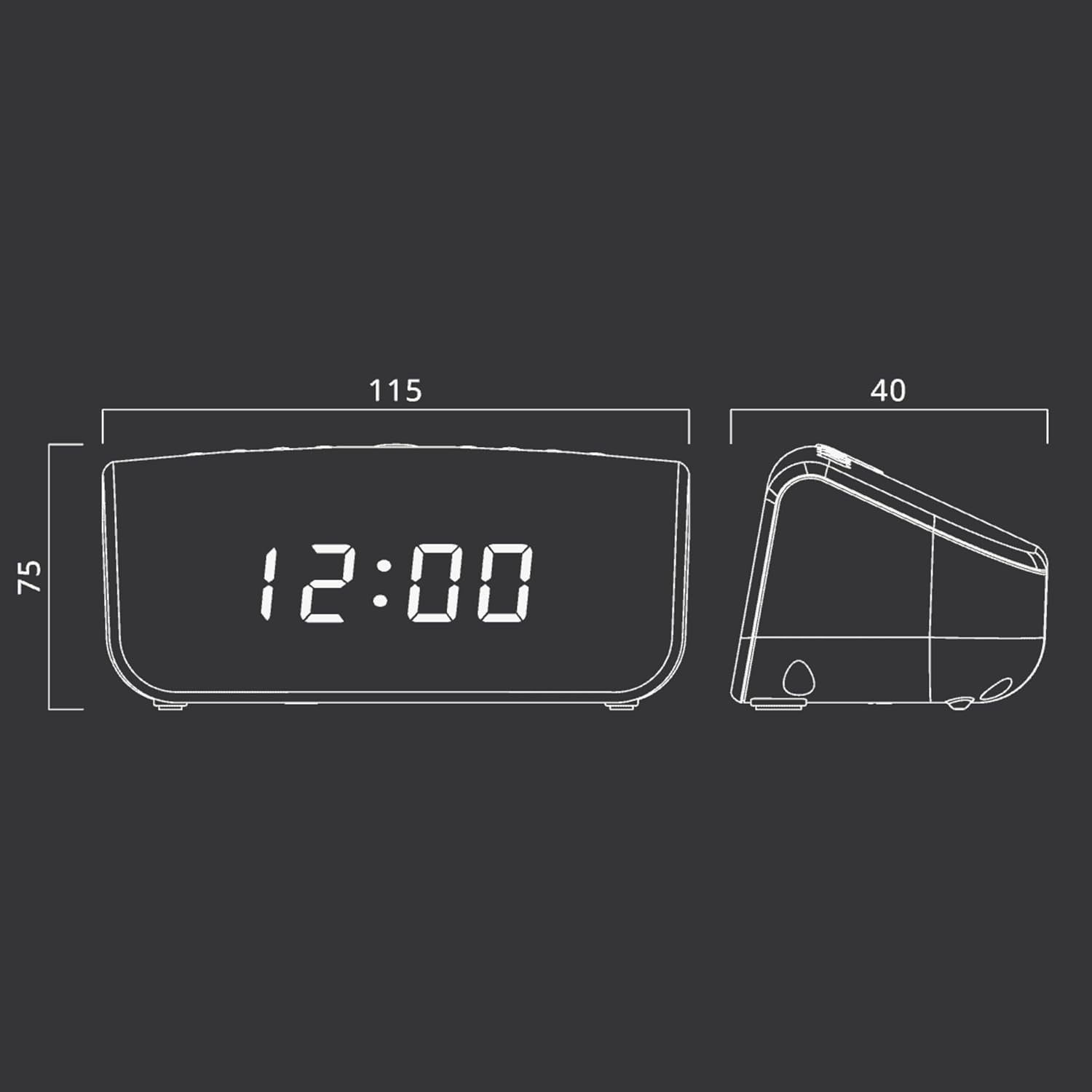
Figur 2: Approximate dimensions of the Muse M-12 CR unit.
Garanti og support
For garantioplysninger og teknisk support henvises til garantikortet, der følger med dit produkt, eller besøg den officielle Muse webwebsted. Gem din købskvittering som købsbevis i tilfælde af garantikrav.
For further assistance, please contact Muse customer service.


