Indledning
The Altec Lansing M302 Moondance Home is a versatile alarm clock radio and speaker system designed for use with iPod and MP3 players. It offers clear audio, multiple alarm options, and a compact design suitable for various spaces. This manual provides detailed instructions for setting up, operating, and maintaining your device.
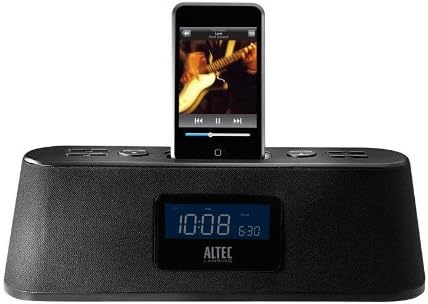
Figure 1: Altec Lansing M302 Moondance Home Alarm Clock Radio with an iPod docked. The front display shows the current time and alarm setting, while the top panel features control buttons.
Pakkens indhold
Før du begynder, skal du sørge for at alle komponenter er til stede:
- Altec Lansing Moondance Home speaker system
- Adapters for iPod (various sizes)
- AC adapter
- FM radio antenne
- Wireless remote control (includes 2 batteries)
- Brugervejledning
- Quick connect instructions
Opsætning
1. Strømtilslutning
- Connect the AC adapter to the DC IN port on the back of the Moondance Home unit.
- Sæt AC-adapteren i en almindelig stikkontakt.
- Enheden tændes, og displayet lyser.
2. FM Antenna Connection
- Locate the FM antenna port on the back of the unit.
- Connect the provided FM wire antenna to this port.
- Extend the antenna for optimal radio reception.
3. iPod/iPhone Docking
- Select the appropriate iPod adapter for your specific iPod or iPhone model.
- Insert the adapter into the docking well on top of the Moondance Home.
- Carefully place your iPod or iPhone onto the dock connector within the adapter. Ensure it is seated firmly.
- Enheden vil begynde at oplade automatisk.
Note: While adapters provide better support, some iPod/iPhone models may function without a specific adapter by directly connecting to the dock connector. However, using the correct adapter is recommended for stability and protection of the dock connector. This unit is not compatible with the newest iPhone/iPod units without an extension purchased separately.
4. Tilslutning af hjælpeindgang
To connect other audio devices (CD player, DVD player, other MP3 players):
- Use a standard 3.5mm audio cable (not included).
- Connect one end of the cable to the headphone jack or line-out port of your external audio device.
- Connect the other end to the AUX IN port on the back of the Moondance Home unit.
Betjeningsvejledning
Basic Controls (Onboard and Remote)
The Moondance Home can be operated using the buttons on the unit's top panel or the included wireless remote control. The remote offers full functionality for convenience.
- Power knap: Tænder eller slukker for enheden.
- Lydstyrke op/ned: Justerer lydudgangsniveauet.
- Mode knap: Switches between iPod, FM Radio, and Auxiliary input modes.
- Snooze/Dimmer-knap: Activates snooze during an alarm; also adjusts display brightness.
- Alarmsæt: Går i alarmindstillingstilstand.
- Tid indstillet: Går i tidsindstillingstilstand.
- Tuning/Track Skip: Navigates radio frequencies or skips tracks on iPod.
Indstilling af tid
- Tryk på Indstil tid knappen. Timevisningen blinker.
- Brug Tuning/Track Skip buttons (or Up/Down on remote) to adjust the hour.
- Trykke Indstil tid igen for at bekræfte timen og gå til minutterne.
- Adjust minutes using the Tuning/Track Skip knapper.
- Trykke Indstil tid endnu en gang for at spare tid.
Setting Alarms (Dual Alarms)
The unit supports two independent alarms (Alarm 1 and Alarm 2).
- Tryk på Alarmsæt button. "AL1" will appear, and the hour will flash.
- Brug Tuning/Track Skip knapperne for at indstille den ønskede alarmtime.
- Trykke Alarmsæt for at bekræfte timen og gå til minutter.
- Adjust minutes using the Tuning/Track Skip knapper.
- Trykke Alarmsæt to select the alarm source (iPod, Radio, or Buzzer). Use Tuning/Track Skip for at gennemgå mulighederne.
- Trykke Alarmsæt igen for at gemme indstillingerne for Alarm 1.
- To set Alarm 2, repeat steps 1-6, pressing Alarmsæt until "AL2" appears.
- To activate/deactivate an alarm, press the corresponding Alarm button (e.g., AL1 or AL2 on remote) until the alarm icon appears/disappears on the display.
Note: Alarms feature progressive alert volume, starting softly and gradually increasing.
Brug af FM-radio
- Tryk på Mode knappen, indtil "FM" vises på displayet.
- Brug Tuning/Track Skip knapperne til manuelt at indstille til den ønskede frekvens.
- For at automatisk scanne efter stationer skal du trykke på og holde Tuning/Track Skip knapper.
- To save a preset station, tune to the station, then press and hold a Forudindstillet nummer button (on remote) until the display flashes. Use Tuning/Track Skip to select a preset number, then press the Forudindstillet nummer knappen igen for at gemme.
- For at genkalde en forudindstilling skal du blot trykke på den tilsvarende knap Forudindstillet nummer knap.
Brug af iPod/iPhone
- Ensure your iPod/iPhone is properly docked.
- Tryk på Mode button until "iPod" appears on the display.
- Brug Afspil/pause, Næste spor, og Forrige spor buttons (on unit or remote) to control playback.
- Volume is controlled by the unit's volume buttons.
Brug af Aux-indgang
- Ensure your external audio device is connected to the AUX IN port.
- Tryk på Mode knappen, indtil "AUX" vises på displayet.
- Control playback directly from your external audio device.
- Volume is controlled by the Moondance Home unit's volume buttons.
Sleep Timer
Sleep-timeren giver dig mulighed for at falde i søvn til musik, hvor enheden automatisk slukker efter et bestemt tidsrum.
- Mens enheden afspiller, skal du trykke på Sove button (on remote).
- Hvert tryk vil gennemgå de tilgængelige sovetider (f.eks. 15, 30, 60, 90 minutter, SLUK).
- Select your desired sleep duration. The unit will turn off automatically after this time.
Display lysdæmper
Adjust the brightness of the LCD display to your preference.
- Tryk på Snooze/dæmper button repeatedly to cycle through different brightness levels, including off.
- Note: Some users may find the lowest setting still too bright or the contrast difficult to read at very low brightness. Adjust to a comfortable level.
Opretholdelse
Rensning
- Frakobl strømadapteren før rengøring.
- Brug en blød, tør klud til at tørre enhedens udvendige overflader af.
- Do not use liquid cleaners, aerosols, or abrasive cleaning agents.
- Keep the docking connector free of dust and debris.
Udskiftning af fjernbetjeningsbatteri
The remote control uses two AAA batteries (included). Replace them when the remote's range or responsiveness decreases.
- Åbn batterirummet på bagsiden af fjernbetjeningen.
- Fjern de gamle batterier.
- Isæt to nye AAA-batterier, og overhold den korrekte polaritet (+/-).
- Luk batterirummet forsvarligt.
Fejlfinding
| Problem | Mulig årsag | Løsning |
|---|---|---|
| Enheden tænder ikke. | Netadapteren er ikke tilsluttet eller defekt. | Sørg for, at AC-adapteren er korrekt tilsluttet enheden og en fungerende stikkontakt. Prøv en anden stikkontakt. |
| No sound from iPod/iPhone. | iPod/iPhone not properly docked; unit in wrong mode; volume too low. | Re-seat iPod/iPhone firmly. Press Mode button to select iPod mode. Increase unit volume. Ensure iPod/iPhone volume is not muted or too low. |
| Dårlig FM-radiomodtagelse. | Antenna not extended or positioned incorrectly; weak signal. | Træk FM-ledningsantennen helt ud, og flyt den for bedre modtagelse. Prøv automatisk scanning efter stationer. |
| Fjernbetjening virker ikke. | Batteries dead or incorrectly inserted; obstruction between remote and unit. | Replace remote batteries, ensuring correct polarity. Remove any obstructions. Point remote directly at the unit. |
| Alarmen lyder ikke. | Alarm ikke indstillet eller aktiveret; lydstyrken er for lav. | Verify alarm time and source are correctly set. Ensure alarm icon is visible on display. Increase unit volume. |
| Skærmen er for lys eller for svag. | Dæmperindstillingen skal justeres. | Tryk på Snooze/dæmper button repeatedly to cycle through brightness levels until desired setting is reached. |
| Buttons are confusing/non-intuitive. | Unfamiliarity with control logic. | Refer to the "Operating Instructions" section of this manual for detailed steps on specific functions. Practice using the controls. |
Specifikationer
- Model: M302 Moondance Home
- Mærke: Altec Lansing
- Produktdimensioner: 2.3 x 11 x 3.5 tommer (H x B x D)
- Varens vægt: 2 pund
- Farve: Sort
- Kompatible enheder: iPhone, iPod (models with Universal Dock Connector; newer models may require adapter)
- Hardwaregrænseflade: Lyn
- Antal porte: 1 (Docking) + Auxiliary Input
- Wattage: 100.00 W
- UPC: 021986800088
- Fabrikant: Altec Lansing
- Første tilgængelige dato: 23. september 2008
Garanti og support
Begrænset garanti
The Altec Lansing M302 Moondance Home comes with a 1 års begrænset garantiDenne garanti dækker materiale- og fabrikationsfejl ved normal brug. Gem venligst din købsbevis i tilfælde af garantikrav.
Juridisk ansvarsfraskrivelse
This item is not compatible with the newest iPhone/iPod units. An extension must be purchased separately for compatibility with newer models.
Kundesupport
For technical assistance, warranty inquiries, or additional support, please visit the official Altec Lansing website or contact their customer service department. Refer to the packaging or the Altec Lansing webhjemmeside for de seneste kontaktoplysninger.
Note: While Altec Lansing aims to provide adapters for common models, not all iPod/iPhone models may have a perfectly fitting adapter included. Direct connection to the dock connector is often possible, but an adapter provides better physical support.


