1. Introduktion
This manual provides essential information for the safe and effective installation, operation, and maintenance of the IDEC ABN201-R Round Extended Momentary Pushbutton. Please read this manual thoroughly before attempting any installation or operation.
The IDEC ABN201-R is a robust, round, extended momentary pushbutton designed for industrial control applications. It features a momentary action, meaning the switch returns to its original state when the button is released.
2. Sikkerhedsoplysninger
ADVARSEL: Fare for elektrisk stød. Afbryd altid strømmen, før du installerer, servicerer eller fjerner denne enhed.
- Installation bør kun udføres af kvalificeret personale i overensstemmelse med alle lokale og nationale el-forskrifter.
- Ensure the power supply matches the specifications of the pushbutton.
- Brug ikke enheden, hvis den ser ud til at være beskadiget.
- Brug passende personlige værnemidler (PPE) under installation og vedligeholdelse.
3. Opsætning og installation
Follow these steps for proper installation of the IDEC ABN201-R pushbutton.
- Panelforberedelse: Create a round cutout in the control panel according to the manufacturer's specified diameter for the ABN series.
- Montering: Insert the pushbutton assembly through the cutout from the front of the panel. Secure it in place using the provided mounting nut or ring on the rear side of the panel. Tighten securely but do not overtighten.
- Ledningsføring: Connect the control circuit wires to the terminals on the switch block. The ABN201-R features an ON-NONE-OFF operation mode, which refers to its contact configuration. Ensure correct polarity and secure connections. Refer to your system's wiring diagram for specific connections. This pushbutton is rated for 10 Amps.

Figur 1: Front view of the IDEC ABN201-R Round Extended Momentary Pushbutton. This image shows the red button actuator and the silver mounting ring, indicating its design for panel integration.
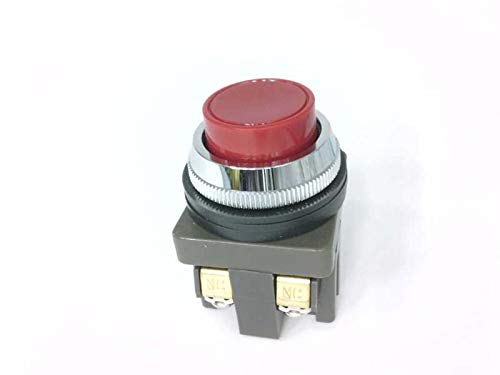
Figur 2: Side view of the IDEC ABN201-R Pushbutton, illustrating the switch block and terminal connections. This perspective highlights the components behind the panel for wiring purposes.
4. Betjeningsvejledning
The IDEC ABN201-R is a momentary action pushbutton. To operate:
- Ensure the pushbutton is correctly installed and wired, and power is supplied to the circuit.
- Press the red button actuator to activate the switch contacts. The contacts will change state (e.g., from normally open to closed, or normally closed to open).
- Release the button. The actuator will return to its original extended position, and the switch contacts will revert to their initial state.
This momentary action is suitable for applications requiring a temporary signal or control input, such as starting a motor, activating a solenoid, or signaling an event.
5. Vedligeholdelse
The IDEC ABN201-R pushbutton is designed for durability and requires minimal maintenance.
- Rensning: Periodically clean the surface of the pushbutton with a soft, dry cloth. For stubborn dirt, a slightly damp cloth with mild detergent can be used, ensuring no liquid enters the switch mechanism.
- Inspektion: Regularly inspect the pushbutton for any signs of physical damage, loose connections, or excessive wear. Ensure the button's momentary action is smooth and consistent.
- Ingen dele, der kan serviceres af brugeren: The internal components of the pushbutton are not user-serviceable. Do not attempt to disassemble the unit, as this may void any warranty and could lead to damage or unsafe operation.
6. Fejlfinding
If you encounter issues with your IDEC ABN201-R pushbutton, consider the following troubleshooting steps:
- Pushbutton Not Responding:
- Verify that power is supplied to the control circuit.
- Kontrollér alle ledningsforbindelser for løse eller korrosion.
- Ensure the pushbutton is correctly mounted and not obstructed.
- Intermitterende drift:
- Inspect wiring for any frayed or damaged insulation.
- Confirm that the button mechanism moves freely without sticking.
- Fysisk skade: If the pushbutton shows signs of physical damage (e.g., cracked housing, bent terminals), it should be replaced immediately.
If problems persist after performing these checks, contact a qualified electrician or IDEC technical support for further assistance.
7. Specifikationer
| Specifikation | Detalje |
|---|---|
| Mærke | Idec |
| Model | ABN201-R |
| Aktuator type | Tryk knap |
| Driftstilstand | ON-NONE-OFF (Momentary) |
| Nuværende vurdering | 10 Amps |
| Antal enheder | 1 tæller |
| ASIN | B0010WKEE4 |
| Fabrikant | IDEC |
8. Garanti og support
For information regarding the product warranty, please refer to the documentation provided with your purchase or visit the official IDEC webwebsted. Garantivilkår og -betingelser kan variere.
For technical support or further inquiries, please contact your authorized IDEC distributor or the manufacturer directly.


