1. Sikkerhedsinstruktioner
Please read these safety instructions carefully before operating the device.
- Changes serving technical progress may be made by the manufacturer without prior notice and may not yet be included in this manual.
- Check the device for completeness and function before commissioning.
- Never operate a defective or inoperable device! Contact the manufacturer or have the device checked by a qualified mechanic.
- Brug kun enheden til dets tilsigtede formål.
- Do not burn the briquettes in the oven!
- Ensure the press stands on a level surface.
- Ensure no body parts are inside the press during the pressing process!
- Always work carefully and with the necessary caution.
- Hold arbejdsområdet rent og ryddeligt.
- Never apply excessive force.
- Keep children and unauthorized third parties away from the work area.
- Never work when tired or under the influence of drugs, medication, or alcohol.
- Store packaging materials (foils, plastic bags, styrofoam, etc.) only in places inaccessible to children, especially infants, as packaging parts often pose unrecognized dangers (e.g., choking hazard).
2. Tilsigtet brug
The DEMA 4-Compartment Quattro Briquette Press is designed exclusively for the purpose of pressing paper into briquettes. It is not intended for pressing other materials.
3. Opsætning
Follow these steps to set up your briquette press:
Place the Frame: Carefully place the main frame of the briquette press on a stable, level surface. Ensure it is secure and does not wobble.
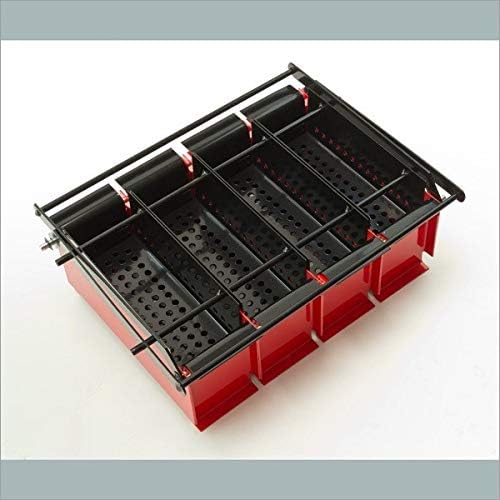
Figure 1: The main frame of the briquette press positioned on a flat surface.
Insert the Sieves: Place the perforated sieves into the designated compartments within the frame. Ensure they fit snugly and are properly aligned at the bottom of each chamber.
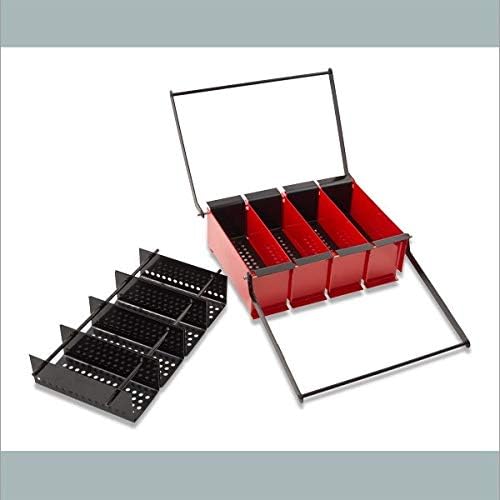
Figure 2: Inserting the perforated sieves into the press chambers.
Assemble Pressing Grid (if separate): If your model has a separate pressing grid, ensure it is ready to be placed on top of the soaked paper material. Some models may have this integrated with the handles.
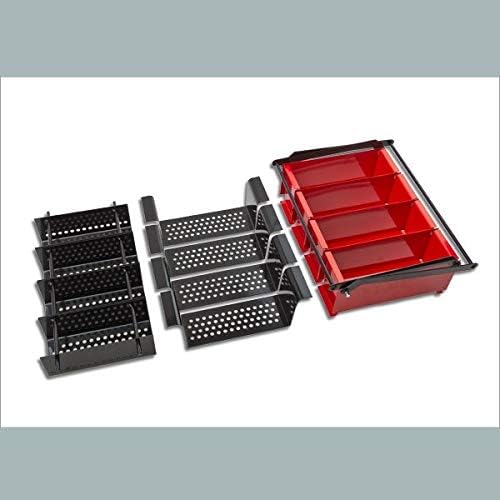
Figur 3: Overview of press components, including the pressing grid.
4. Betjeningsvejledning
Follow these steps to create briquettes from waste paper:
Prepare Paper Material: Soak waste paper (e.g., newspapers, cardboard) thoroughly in water. For best results, soak the paper overnight until it forms a soft pulp. Ensure the paper is completely saturated.
Fill the Chambers: Completely fill each of the four pressing chambers with the soaked paper pulp. Ensure the material is evenly distributed within each chamber.

Figure 4: Filling the press chambers with prepared paper pulp.
Tøm overskydende vand af: Gently pour off any significant excess water from the chambers before pressing. The goal is to have a dense, wet pulp.
Press the Briquettes: Place the pressing grid on top of the paper pulp in the chambers. Firmly press both handles downwards with steady, even pressure. This action will compress the paper and force out the remaining liquid through the perforated sieves. CAUTION: Be aware of pinch hazards when pressing down the handles. Keep hands clear of moving parts.

Figure 5: Applying pressure to compress the paper pulp and extract water.
Remove and Dry Briquettes: Once the liquid has been pressed out, carefully remove the still damp briquettes from the chambers. Place them in a well-ventilated area to dry for several days. Drying time may vary depending on humidity and temperature. The resulting briquettes are stackable, minimizing storage space for your recycled paper.
5. Vedligeholdelse
Proper maintenance ensures the longevity and optimal performance of your DEMA Briquette Press:
- Rensning: After each use, clean the press thoroughly. Remove any residual paper pulp from the chambers and sieves. Rinse with water and wipe dry to prevent rust, especially on metal components.
- Inspektion: Regularly inspect all parts of the press for signs of wear, damage, or bending. Pay close attention to the pressing mechanism, handles, and the frame.
- Opbevaring: Store the briquette press in a dry, clean environment when not in use. This will protect it from moisture and potential corrosion.
- Smøring: If any moving parts (e.g., pivot points of the handles) become stiff, apply a small amount of appropriate lubricant to ensure smooth operation.
6. Fejlfinding
Dette afsnit omhandler almindelige problemer, du kan støde på:
| Problem | Mulig årsag | Løsning |
|---|---|---|
| Briquettes are too wet or fall apart. | Insufficient pressure applied; paper not soaked enough; too much water in pulp. | Ensure paper is thoroughly soaked to a fine pulp. Apply firm, steady pressure until no more water drains. Allow briquettes to dry for a longer period. |
| Handles or frame bend during pressing. | Excessive force applied; material too dense; structural weakness. | Do not apply excessive force. Ensure paper is properly pulped and not too thick. If bending persists, contact manufacturer for support. |
| Difficulty pressing down handles. | Paper pulp too dense or dry; mechanism stiff. | Ensure paper is adequately soaked. Check for any obstructions. Apply lubricant to pivot points if necessary. |
7. Specifikationer
- Konstruktion: Stable Metal Construction
- Briquette Dimensions (max.): 22 cm (L) x 8 cm (B) x 6 cm (H)
- Press Dimensions (approx. LxWxH): 42 cm x 30 cm x 18 cm
- Vægt (ca.): 7.5 kg
- Materiale: Metal
- Briquette Form: Rektangulær
8. Garanti og support
For information regarding product warranty, please refer to the terms and conditions provided at the time of purchase or contact your retailer. DEMA stands behind the quality of its products.
Should you require technical support, have questions about operation, or need to report a defect, please contact DEMA customer service or the authorized dealer from whom you purchased the product. Please have your model number (41180 or 41181) and purchase details ready when contacting support.
You can find more information and contact details on the official DEMA webwebsted eller via din købsplatform.


