1. Introduktion
Thank you for choosing the Mac Audio MPX 2000 2-Channel Amplifier. Det her amplifier is designed to deliver powerful and clear audio performance for your car audio system. This manual provides essential information for the correct installation, operation, and maintenance of your amplifier. Please read it thoroughly before installation and use to ensure optimal performance and safety.
2. Sikkerhedsinstruktioner
For at forhindre skade eller skade på ampLifier, bedes du overholde følgende sikkerhedsforanstaltninger:
- Professionel installation: Installation should ideally be performed by a qualified technician. Incorrect wiring can cause damage to the amplift eller køretøj.
- Strømafbrydelse: Frakobl altid bilens negative batteripol, inden du påbegynder installationsarbejde.
- Korrekt ledningsføring: Ensure all power, ground, and speaker wires are of adequate gauge and properly insulated to prevent short circuits.
- Sikringsbeskyttelse: Install an appropriate fuse on the main power cable close to the battery.
- Ventilation: Monter amplifier in a location that allows for sufficient airflow to prevent overheating. Avoid mounting in enclosed spaces without ventilation.
- Fugt og varme: Behold amplifier away from moisture, water, and direct sunlight or excessive heat sources.
- Lydstyrkekontrol: Avoid prolonged listening at extremely high volume levels to prevent hearing damage.
- Sikker montering: Monter sikkert amplifier to prevent it from becoming a projectile in case of sudden stops or accidents.
3. Produktfunktioner
The Mac Audio MPX 2000 amplifier is equipped with several features designed for enhanced audio performance and reliability:
- 2-Channel Design: Provides two channels for stereo sound or can be bridged for mono operation.
- Høj effekt: Capable of delivering up to 2 x 250 watts maximum output.
- 2 Ohm Stable: Designed for stable operation with speaker loads down to 2 ohms.
- Variable Full-Feature Filter: Includes adjustable high-pass and low-pass filters for precise sound tuning.
- Bass Boost: Integrated bass boost function for enhanced low-frequency response.
- Beskyttelseskredsløb: Features effective protection against short circuits, DC offset, and excessive temperature.
- Bridge/Tri-Mode Operation: Allows for flexible configuration options.
- Channel Mode Switch: For selecting stereo or mono operation.
- Udgange på lavt niveau: For connecting additional amplivførere.

Figur 1: Øverst view of the Mac Audio MPX 2000 ampløfter, showcasing its sleek design and branding.
4. Opsætning og installation
Korrekt installation er afgørende for din ydeevne og levetid amplifier. Follow these general steps:
4.1 Monteringssted
- Choose a dry, well-ventilated area, away from direct heat and moisture.
- Ensure the mounting surface is sturdy and can support the ampliferens vægt.
- Allow at least 5-10 cm (2-4 inches) of clear space around the ampvarmeafledning til korrekt varmeafledning.
- Common locations include the trunk, under seats, or behind rear seats.
4.2 Ledningsforbindelser
Refer to the connection panel on your amplifier for specific terminal locations.
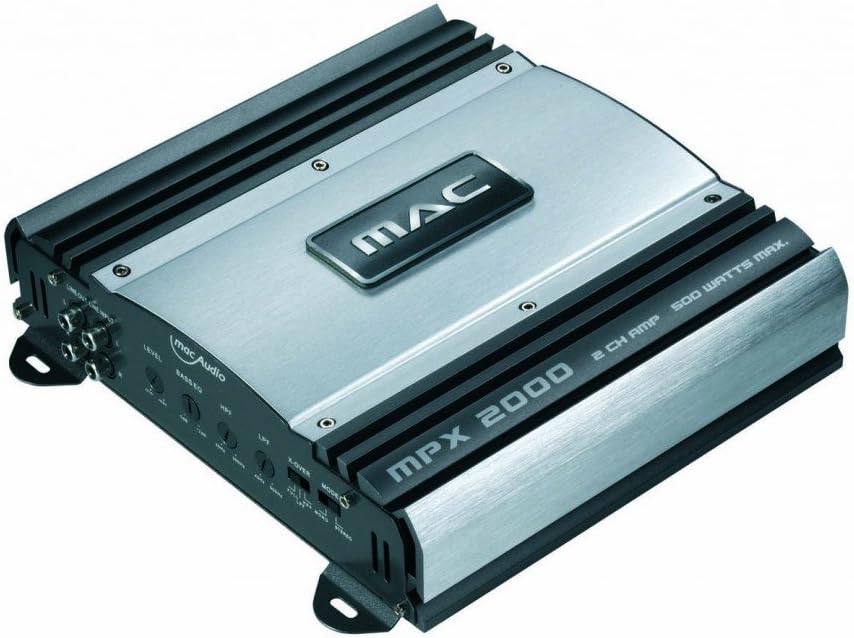
Figur 2: Vinklet view of the Mac Audio MPX 2000, highlighting the input and output terminals for wiring.
- Strøm (BATT+): Connect a heavy-gauge power cable (e.g., 8 AWG or 4 AWG depending on total system power) from the amplifier's BATT+ terminal directly to the positive terminal of the vehicle's battery. Install an inline fuse holder within 30 cm (12 inches) of the battery.
- Jord (GND): Tilslut et kraftigt jordkabel af samme størrelse som strømkablet fra ampForbind GND-terminalen på forsyningen til en ren, umalet metaloverflade på køretøjets chassis. Sørg for en god elektrisk forbindelse.
- Fjernbetjening (REM): Connect a thinner wire (e.g., 18 AWG) from the amplifier's REM terminal to the remote turn-on output of your car stereo. This wire tells the amplifier for at tænde og slukke med stereoanlægget.
- RCA Inputs (INPUT): Tilslut RCA-kabler fra for-amp outputs of your car stereo to the RCA input jacks on the amplivligere.
- Speaker Outputs (SPEAKER): Tilslut dine højttalere til amplifier's speaker output terminals. Ensure correct polarity (+ to + and - to -). For 2-channel stereo operation, connect one speaker per channel. For bridged mono operation (e.g., for a subwoofer), refer to the amplifier's specific bridging instructions, typically using the + terminal of one channel and the - terminal of the other.
5. Betjeningsvejledning
Når den er installeret, skal du justere ampLifier-indstillinger for optimal lydkvalitet.
5.1 Gain Adjustment (LEVEL)
- The gain control (often labeled "LEVEL") matches the amptransformerens indgangsfølsomhed i forhold til udgangsvolumentage of your car stereo.
- Start with the gain control set to minimum.
- Turn your car stereo volume up to about 75-80% of its maximum.
- Langsomt øge ampSkru derefter lidt ned forstærkningskontrol på høreapparatet, indtil du hører forvrængning, og skru derefter lidt ned, indtil lyden er klar.
- Do not use the gain control as a volume knob. It is for matching signal levels.
5.2 Filter Settings (LPF/HPF)
The MPX 2000 features variable high-pass (HPF) and low-pass (LPF) filters:
- Lavpasfilter (LPF): Tillader frekvenser under the set point to pass through. Typically used for subwoofers. Adjust the LPF frequency to blend with your main speakers (e.g., 80-120 Hz).
- Højpasfilter (HPF): Tillader frekvenser over the set point to pass through. Typically used for full-range speakers to prevent them from playing low bass, which can cause distortion and damage. Adjust the HPF frequency to protect your speakers (e.g., 60-100 Hz).
- Hele udvalget: If no filtering is desired, set the filter switch to "FULL" or "FLAT".
5.3 basforstærkning
- The bass boost control increases the output at a specific low frequency.
- Use sparingly and adjust carefully to avoid distortion and speaker damage.
- Start with the bass boost off and only increase if more low-end impact is desired, ensuring the sound remains clean.
5.4 Channel Mode Switch
- This switch allows you to select between 2-channel (stereo) or bridged (mono) operation.
- Ensure this switch matches your speaker wiring configuration.
6. Vedligeholdelse
The Mac Audio MPX 2000 ampLifier kræver minimal vedligeholdelse:
- Rensning: Tør regelmæssigt af ampRengør ydersiden af apparatet med en blød, tør klud. Brug ikke skrappe kemikalier eller slibende rengøringsmidler.
- Ventilation: Ensure that the ventilation openings are not blocked by dust or debris. Clean gently with a soft brush or compressed air if necessary.
- Forbindelser: Kontrollér lejlighedsvis alle ledningsforbindelser for at sikre, at de er fastgjorte og fri for korrosion.
7. Fejlfinding
Hvis du oplever problemer med din amplifier, consult this section before seeking professional service.
7.1 No Power / Amplifer tænder ikke
- Check the inline fuse on the power cable near the battery. Replace if blown.
- Verify that the power (BATT+), ground (GND), and remote (REM) wires are securely connected and have proper voltage.
- Ensure the remote wire is receiving 12V from the head unit when the stereo is on.
- Tjek amplifier's internal fuses (if accessible and present).
7.2 Ingen lydudgang
- Bekræft amplifier is powered on (indicator light should be lit).
- Check RCA input cables for secure connection and damage.
- Kontroller, at højttalerledningerne er korrekt tilsluttet til amplifier and speakers, with correct polarity.
- Ensure the head unit's volume is up and not muted.
- Tjek amplifier's gain (LEVEL) setting.
7.3 Forvrænget lyd
- Reducer amplifier's gain (LEVEL) setting.
- Check speaker impedance. Ensure it is within the amplifier's supported range (e.g., 2 ohms stable).
- Adjust filter settings (LPF/HPF) to prevent speakers from playing frequencies they cannot handle.
- Reduce bass boost if it's causing distortion.
- Kontroller for beskadigede højttalerledninger eller højttalere.
7.4 AmpOverophedning af kølemiddel (beskyttelsestilstand)
- Sørg for tilstrækkelig ventilation omkring ampFjern eventuelle forhindringer.
- Check speaker impedance. Running below the minimum supported impedance (e.g., below 2 ohms) can cause overheating.
- Reducer forstærkningsindstillingen.
- Tillad amplifier to cool down. If it frequently overheats, re-evaluate the installation and speaker load.
8. Specifikationer
The following are the technical specifications for the Mac Audio MPX 2000 2-Channel Amplivligere:
| Feature | Specifikation |
|---|---|
| Mærke | MAC AUDIO |
| Modelnummer | MPX2000 |
| Antal kanaler | 2 |
| Udgangseffekt | 180 Watts (RMS, typical) / 2 x 250 Watts (Max) |
| Varens vægt | 1.9 kilo |
| Produktmål (L x B x H) | 5.9 x 23.9 x 22.6 cm |
| Monteringstype | Overflademontering |
| Overholdelse | CE |
| GTIN | 04023037041200 |
9. Garanti og support
Specific warranty terms and conditions for the Mac Audio MPX 2000 amplifier are provided by the manufacturer or your retailer at the time of purchase. Please retain your proof of purchase for warranty claims.
For technical support or service inquiries, please contact your authorized Mac Audio dealer or visit the official Mac Audio webwebsted for kontaktoplysninger.


