Indledning
Tak for købetasing the Genius MaxFire Blaze2 Vibration Gamepad. This manual provides detailed instructions for setting up, operating, and maintaining your gamepad to ensure optimal performance and longevity. The MaxFire Blaze2 is designed to provide superior control and an immersive gaming experience on both PlayStation 2 consoles and compatible Windows PC systems.
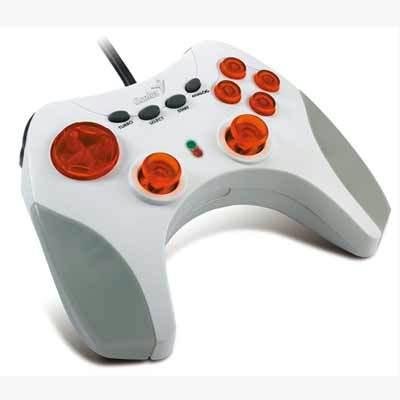
Image: The Genius MaxFire Blaze2 Gamepad, featuring a white and grey body with prominent orange translucent buttons and black control buttons. A black cable extends from the top.
Opsætning
Follow these steps to connect your Genius MaxFire Blaze2 Gamepad to your gaming system.
Forbinder til PlayStation 2:
- Ensure your PlayStation 2 console is powered off.
- Locate an available controller port on the front of your PlayStation 2 console.
- Insert the gamepad's connector plug firmly into the controller port.
- Power on your PlayStation 2 console. The gamepad should be automatically recognized.
Connecting to PC (Windows XP/2000/ME/98SE):
- Sørg for, at din pc er tændt.
- Find en ledig USB-port på din pc.
- Insert the gamepad's USB connector plug firmly into the USB port.
- Your operating system (Windows XP/2000/ME/98SE) should detect the new hardware and attempt to install the necessary drivers automatically.
- If prompted, follow the on-screen instructions to complete driver installation. In most cases, standard HID (Human Interface Device) drivers will be used.
- After installation, you can verify the gamepad's functionality through your operating system's Game Controllers settings (e.g., in Windows, go to Control Panel > Game Controllers or Devices and Printers).
Betjeningsvejledning
The Genius MaxFire Blaze2 Gamepad features a standard layout for intuitive control.
Grundlæggende kontroller:
- Retningstastatur (D-pad): Located on the left, used for precise directional movement.
- Analoge pinde: Two analog sticks provide 360-degree movement for finer control in games.
- Handlingsknapper: Typically located on the right (e.g., Triangle, Circle, Cross, Square for PlayStation; A, B, X, Y for PC games).
- Skulderknapper (L1, L2, R1, R2): Located on the top edge of the gamepad, used for various in-game actions like aiming, firing, or switching items.
- START-knap: Bruges til at sætte spil på pause eller tilgå menuer i spillet.
- SELECT -knap: Bruges ofte til kortadgang, inventar eller andre sekundære funktioner.
- ANALOG-knap: Toggles the analog stick mode on/off. An indicator light may illuminate when analog mode is active.
Turbofunktion:
The Turbo function allows a button to be pressed repeatedly with a single hold, which is particularly useful in action or shooting games for rapid firing.
- To activate Turbo for a specific button: Press and hold the TURBO button, then press the desired action button (e.g., Fire button). The Turbo function is now assigned to that button.
- To deactivate Turbo for a specific button: Press and hold the TURBO button again, then press the same action button. The Turbo function will be removed from that button.
Vibrationsfeedback:
The MaxFire Blaze2 features vibration feedback, which enhances immersion by providing tactile sensations during gameplay (e.g., explosions, impacts). This feature is automatically enabled when supported by the game and system.
Opretholdelse
Proper care will extend the life of your gamepad.
- Rensning: Brug en blød, tør klud til at tørre overfladen af gamepad'en af. Ved genstridigt snavs, tør letampRengør kluden med vand. Brug ikke skrappe kemikalier eller slibende rengøringsmidler.
- Opbevaring: Store the gamepad in a cool, dry place away from direct sunlight and extreme temperatures. Avoid tangling the cable.
- Håndtering: Do not drop the gamepad or subject it to strong impacts. Avoid pulling the cable forcefully when disconnecting.
Fejlfinding
If you encounter issues with your Genius MaxFire Blaze2 Gamepad, try the following solutions:
- Gamepad not recognized:
- Ensure the cable is securely plugged into the console or PC's port.
- Try a different controller port or USB port.
- Genstart din konsol eller pc.
- For PC, check Device Manager to see if the device is listed and if there are any driver issues. Reinstall drivers if necessary.
- Buttons or Analog Sticks unresponsive:
- Sørg for, at gamepad'en er korrekt tilsluttet.
- Test the gamepad in a different game or application to rule out game-specific issues.
- For PC, calibrate the gamepad through the Game Controllers settings in your operating system.
- Vibration virker ikke:
- Bekræft, at det spil, du spiller, understøtter vibrationsfeedback.
- Tjek indstillingerne i spillet for at sikre, at vibration er aktiveret.
- For PC, ensure the vibration feature is enabled in the gamepad's driver settings (if applicable).
Specifikationer
| Mærke | Genialt |
| Modelnummer | Blaze2 |
| Platform kompatibilitet | PlayStation 2, PC (Windows XP/2000/ME/98SE) |
| Antal knapper | 14 |
| Funktioner | Vibration Feedback, Turbo Function, Analog Sticks |
| Dimensioner (L x B x H) | 73.66 x 45.72 x 60.96 cm (29 x 18 x 24 tommer) |
| Vægt | 19.5 kg (43 lbs) |
Note: Dimensions and weight may refer to packaging or shipping weight. Product weight is typically much lower.
Garanti og support
For warranty information or technical support, please refer to the documentation included with your purchase or visit the official Genius webwebsted.
Fabrikant: Genialt


