1. Introduktion
The SIIG PCI-to-PC Card Pro RoHS Compliant adapter is designed to integrate PC Card (PCMCIA) and CardBus functionality into a desktop computer system. This adapter allows users to utilize various 16-bit PCMCIA and 32-bit CardBus PC cards, such as wireless network cards (802.11 a/b/g), Bluetooth adapters, USB expansion cards, and FireWire cards, within a standard PCI slot on their desktop PC. It provides a convenient solution for sharing notebook PC Card adapters with a desktop environment, enhancing system versatility.
2. Pakkens indhold
- SIIG PCI-to-PC Card Pro Adapter (Model: JJ-PC1012-S2)
- Driver CD (if applicable, for older operating systems)
- Brugervejledning (dette dokument)
3. Systemkrav
- Desktop PC with an available 32-bit PCI expansion slot.
- Compatible Operating System: Windows XP, Windows 7 (32-bit or 64-bit), or later versions of Windows that support PCI devices and PC Card drivers.
- PC Card (PCMCIA) or CardBus card for use with the adapter.
4. Installation
4.1. Trin før installation
- Power off your computer and unplug the power cord from the wall outlet.
- Open the computer case. Refer to your computer's manual for instructions on how to safely open the case.
- Discharge any static electricity by touching a grounded metal object, such as the computer's metal chassis.
4.2. Hardwareinstallation
- Locate an available 32-bit PCI expansion slot on your motherboard.
- Remove the metal slot cover from the chosen PCI slot on the back of your computer case.
- Carefully align the SIIG PCI-to-PC Card adapter with the PCI slot. Apply even, firm pressure to insert the card fully into the slot until it is securely seated.
- Secure the adapter's metal bracket to the computer case using the screw removed from the slot cover, or a new screw if provided with your case.
- Luk computerkabinettet og tilslut alle kabler igen.
- Plug the power cord back into the wall outlet and power on your computer.
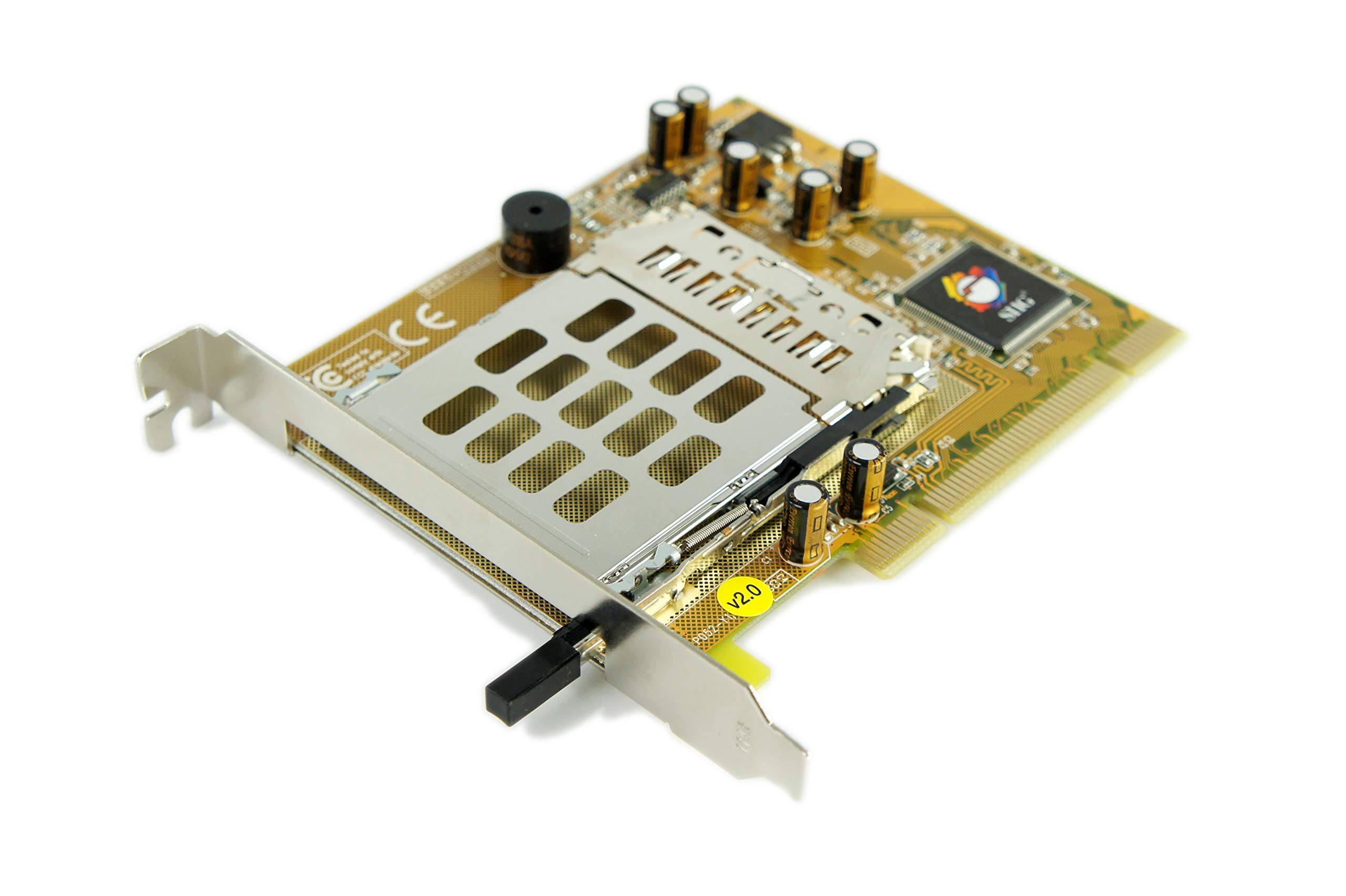
Figure 1: The SIIG PCI-to-PC Card Pro adapter. This image displays the full card, highlighting the PCI interface for desktop integration and the dedicated slot for inserting PC Card (PCMCIA) or CardBus devices.
4.3. Driver installation
Upon booting your computer, the operating system may automatically detect and install the necessary drivers for the PCI-to-PC Card adapter. If automatic installation does not occur, or if prompted, follow these steps:
- Insert the provided driver CD into your computer's optical drive.
- Follow the on-screen instructions to install the drivers. If an auto-run program does not start, navigate to the CD drive in "My Computer" or "This PC" and run the setup file (e.g., setup.exe or install.exe).
- Alternatively, visit the official SIIG website and download the latest drivers for model JJ-PC1012-S2.
- After driver installation, a system restart may be required.
5. Betjening
Once the SIIG PCI-to-PC Card adapter is successfully installed and its drivers are loaded, it functions as a standard PC Card slot within your desktop system. To use a PC Card:
- Gently insert your PC Card (e.g., wireless adapter, USB expansion card) into the PC Card slot on the SIIG adapter. Ensure the card is oriented correctly.
- Push the card firmly until it clicks into place.
- Your operating system should detect the inserted PC Card and either automatically install its drivers or prompt you to do so.
- To remove a PC Card, locate the eject button or lever next to the slot on the SIIG adapter. Press or slide it to release the card, then carefully pull the card out.
6. Vedligeholdelse
The SIIG PCI-to-PC Card adapter is a low-maintenance component. To ensure optimal performance and longevity:
- Keep the interior of your computer case clean and free of dust to prevent overheating and component damage.
- Undgå at udsætte adapteren for ekstreme temperaturer eller fugtighed.
- Handle the card by its edges to prevent damage to the circuit board and components.
- Ensure proper airflow within your computer case.
7. Fejlfinding
7.1. Adapter Not Detected
- Ensure the adapter is fully seated in the PCI slot. Power off the PC, open the case, and re-seat the card firmly.
- Try installing the adapter in a different available PCI slot.
- Verify that your motherboard's BIOS settings allow for PCI device detection and resource allocation.
7.2. PC Card Not Recognized
- Ensure the PC Card is fully inserted into the SIIG adapter's slot.
- Verify that the correct drivers for the specific PC Card are installed on your operating system.
- Test the PC Card in another compatible device (e.g., a laptop with a PC Card slot) to confirm its functionality.
- Check Device Manager in Windows for any yellow exclamation marks next to the SIIG adapter or the inserted PC Card, indicating a driver issue. Reinstall drivers if necessary.
7.3. Driver Installation Issues
- Ensure you are installing the correct drivers for your operating system version (32-bit or 64-bit).
- Deaktiver midlertidigt antivirussoftware under driverinstallation, hvis det forstyrrer.
- Download the latest drivers directly from the SIIG official website if the provided CD drivers are outdated or problematic.
8. Specifikationer
| Feature | Detalje |
|---|---|
| Produkttype | PCI-to-PC Card Adapter |
| Modelnummer | JJ-PC1012-S2 |
| Bustype | 32-bit PCI |
| Expansion Slots Total | 1 (PC Card / CardBus) |
| Compatible PC Cards | 16-bit PCMCIA, 32-bit CardBus |
| Hardware-interface | PCI |
| Kompatible enheder | Stationære computere |
| Produktdimensioner | 8.75 x 6.75 x 2 tommer |
| Varens vægt | 8 ounces (0.5 pund) |
| RoHS-kompatibel | Ja |
9. Garanti og support
SIIG products are backed by a manufacturer's warranty. For specific warranty terms and conditions, please refer to the warranty information included with your product or visit the official SIIG website. For technical support, driver downloads, or further assistance, please visit the SIIG support page or contact their customer service department.
Official SIIG Webwebsted: www.siig.com


