1. Introduktion
The Behringer T1951 Ultra-Gain Vacuum Tube Stereo 4-band Parametric Equalizer is a professional audio processing unit designed to provide precise tonal shaping and enhancement for various audio applications. Featuring a 12AX7A-based Ultra Tube circuit, it offers warm, musical equalization with four parametric bands per channel, allowing for detailed frequency attenuation and boosting. Its parallel architecture minimizes phase-shifting problems, ensuring high-fidelity audio reproduction.
This manual provides essential information for the safe and efficient operation of your T1951 equalizer, including setup, operation, maintenance, and troubleshooting.
2. Vigtige sikkerhedsinstruktioner
- Læs disse instruktioner.
- Gem disse instruktioner.
- Overhold alle advarsler.
- Følg alle instruktioner.
- Brug ikke dette apparat i nærheden af vand.
- Rengør kun med en tør klud.
- Bloker ikke nogen ventilationsåbninger. Installer i overensstemmelse med producentens anvisninger.
- Må ikke installeres i nærheden af varmekilder såsom radiatorer, varmeapparater, komfurer eller andre apparater (inklusive ampløftere), der producerer varme.
- Undgå at omgå sikkerhedsformålet med det polariserede stik eller stik med jordforbindelse. Et polariseret stik har to knive, hvor den ene er bredere end den anden. Et stik med jordforbindelse har to knive og et tredje jordstik. Det brede blad eller det tredje ben er tilvejebragt for din sikkerhed. Hvis det medfølgende stik ikke passer i din stikkontakt, skal du kontakte en elektriker for at få udskiftet den forældede stikkontakt.
- Beskyt netledningen mod at blive trådt på eller klemt, især ved stik, stikkontakter og det punkt, hvor de kommer ud af apparatet.
- Brug kun tilbehør/tilbehør specificeret af producenten.
- Brug kun den vogn, stativ, stativ, beslag eller bord, der er specificeret af producenten eller solgt sammen med apparatet. Når en vogn bruges, skal du være forsigtig, når du flytter kombinationen af vognen/apparatet for at undgå skader ved at vælte.
- Træk stikket ud af dette apparat under tordenvejr, eller når det ikke skal bruges i længere perioder.
- Overlad al service til kvalificeret servicepersonale. Service er påkrævet, når apparatet er blevet beskadiget på nogen måde, såsom strømforsyningsledning eller stik er beskadiget, væske er blevet spildt, eller genstande er faldet ind i apparatet, apparatet har været udsat for regn eller fugt, ikke fungerer normalt , eller er blevet droppet.
3. Opsætning og forbindelser
The T1951 is designed for integration into various audio setups, including studio recording, live sound, and broadcast environments. Ensure all connections are secure before powering on the unit.
3.1 Rackmontering
The T1951 is a standard 19-inch rack-mountable unit. Ensure adequate ventilation around the unit when installing it in a rack. Leave at least one rack space above and below the unit if possible, especially if other heat-generating equipment is present.

Figure 3.1: The Behringer T1951 equalizer integrated into a professional audio rack setup.
3.2 Lydforbindelser
The T1951 features balanced XLR and 1/4" TRS connectors for both audio input and output, ensuring compatibility with professional audio equipment. Connect your audio source (e.g., mixer, preamplifier) to the T1951's inputs and the T1951's outputs to your next device in the signal chain (e.g., amplifer, optagelsesgrænseflade).
- Indgange: Use XLR or 1/4" TRS cables to connect your audio source to the T1951's INPUT L and R jacks.
- Udgange: Use XLR or 1/4" TRS cables to connect the T1951's OUTPUT L and R jacks to your amplifier, recording device, or other destination.
3.3 Strømtilslutning
Connect the supplied IEC power cable to the rear panel of the T1951 and then to a suitable AC power outlet. Ensure the voltage matches the unit's requirements (100-240V AC, 50/60 Hz, auto-sensing).
4. Betjeningsvejledning
The T1951 offers comprehensive control over your audio's frequency spectrum. Familiarize yourself with the front panel controls to achieve optimal results.
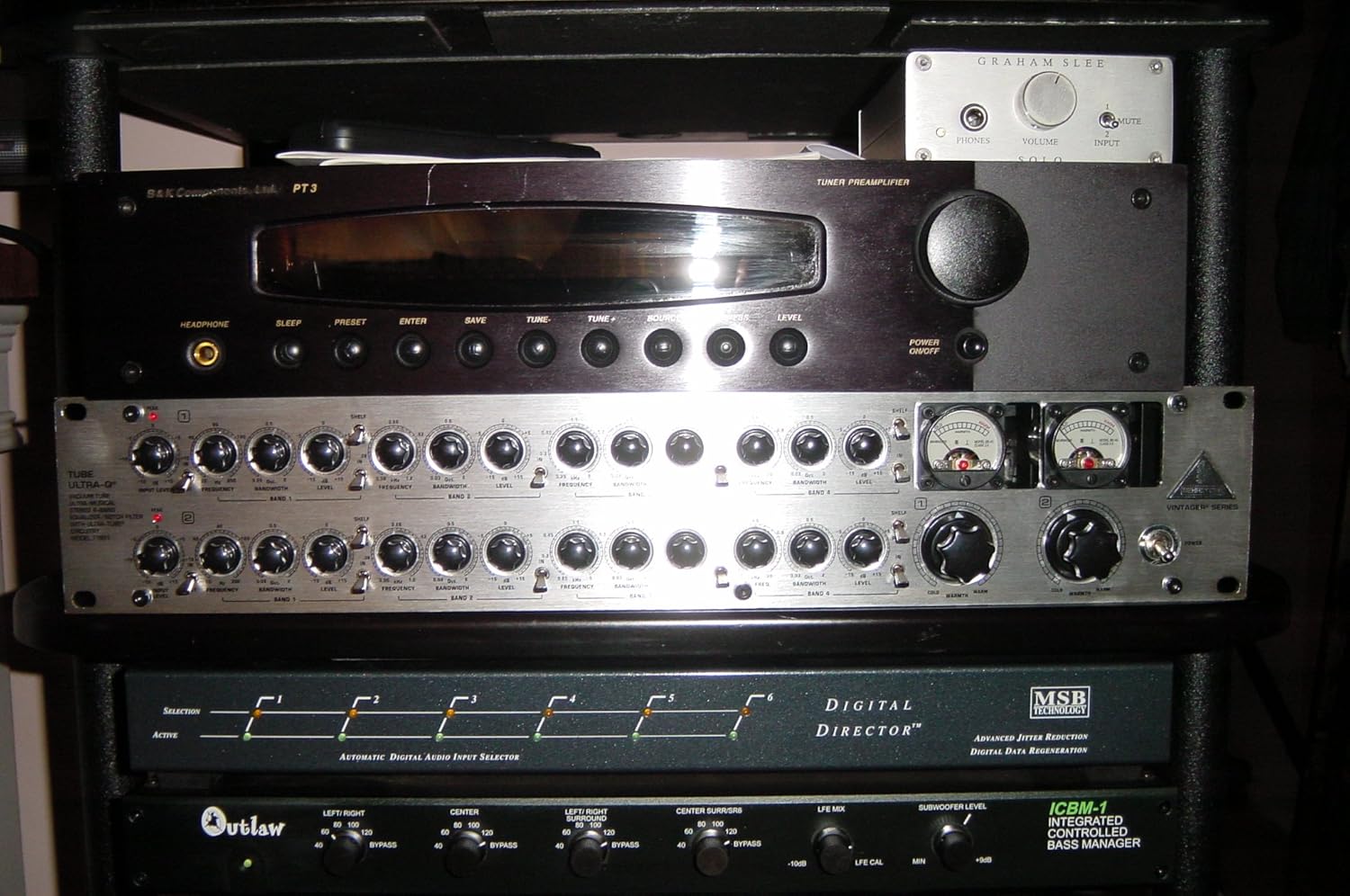
Figure 4.1: Front panel controls of the Behringer T1951.
4.1 Front Panel Controls Overview
- Input/Output niveaukontroller: Adjust the overall signal level entering and exiting the unit.
- VU målere: Provide visual indication of the output signal level. Aim for levels that do not consistently peak into the red.
- Parametric EQ Bands (1-4): Each band features controls for:
- Frekvens: Selects the center frequency of the band.
- Niveau: Boosts or cuts the selected frequency.
- Bandwidth (Q): Adjusts the width of the frequency band affected. A higher Q value means a narrower, more precise band.
- Shelf/Peak Switches: For the lo- and hi-frequency bands, these switches allow you to select between a shelving filter (affecting all frequencies above/below the set point) or a peak filter (affecting a specific band).
- In/Out Switch: Engages or bypasses the equalization for each channel.
- Peak LED: Illuminates when the signal level is too high, indicating potential clipping.
- Warmth Control: Adjusts the amount of tube saturation for added harmonic richness.
4.2 Grundlæggende betjening
- Tænd: Ensure all connections are made, then power on the T1951.
- Set Levels: Start with input and output levels at unity gain (0 dB) or a neutral position. Adjust as needed to achieve optimal signal-to-noise ratio without clipping.
- Engage EQ: Press the "In/Out" switch for the channels you wish to equalize.
- Adjust Frequencies: For each band, select the desired frequency using the "Frequency" knob.
- Apply Boost/Cut: Use the "Level" knob to boost or cut the selected frequency.
- Shape Bandwidth: Adjust the "Bandwidth (Q)" knob to make the equalization effect wider or narrower.
- Utilize Warmth: Experiment with the "Warmth" control to add tube character to your sound.
5. Vedligeholdelse
The Behringer T1951 is designed for reliable operation. Regular, simple maintenance will help ensure its longevity.
- Rensning: Disconnect the unit from power before cleaning. Use a soft, dry cloth to wipe down the exterior. Do not use liquid cleaners or solvents.
- Ventilation: Ensure that the ventilation openings are not blocked. Proper airflow is crucial for preventing overheating, especially for tube-based equipment.
- Udskiftning af rør: The 12AX7A vacuum tubes have a finite lifespan. If you notice a degradation in sound quality (e.g., reduced warmth, increased noise), the tubes may need replacement. This should be performed by qualified service personnel.
- Opbevaring: If storing the unit for an extended period, keep it in a dry, temperature-controlled environment, away from direct sunlight and extreme temperatures.
6. Fejlfinding
This section addresses common issues you might encounter with your T1951 equalizer.
| Problem | Mulig årsag | Løsning |
|---|---|---|
| Ingen lydudgang |
|
|
| Distorted sound / Peak LED constantly on |
|
|
| Brummen eller støj |
|
|
7. Tekniske specifikationer
The following specifications are based on the manufacturer's data for the Behringer T1951.

Figure 7.1: Detailed technical specifications for the Behringer T1951.
7.1 Lydindgang
- Forbindelser: XLR and 1/4" TRS
- Type: RF-filtreret, servobalanceret indgangtage
- Impedans: 50 kOhm balanceret, 25 kOhm ubalanceret
- Maks. input niveau: +21 dBu afbalanceret og ubalanceret
- CMRR: typ. 40 dB, >55 dB @ 1 kHz
7.2 Lydudgang
- Forbindelser: XLR and 1/4" TRS
- Type: electronically servo-balanced output stage
- Impedans: 60 Ohm balanceret, 30 Ohm ubalanceret
- Maks. outputniveau: +21 dBu, +20 dBm balanced and unbalanced
7.3 Systemspecifikationer
- Båndbredde: 18 Hz til 30 kHz, +/- 3 dB
- Signal-til-støj-forhold: >100 dB, uvægtet, 22 Hz til 22 kHz
- THD: 0.002 % type. @ +4 dBu, 1 kHz, enhedsforstærkning
- IMD: 0.01 % typ. SMPTE
7.4 Filtersektion
- Type: state-variable parametric filter
- Niveau: variable (-15 dB to +15 dB)
- Frekvens:
- Band 1: 20 Hz to 300 Hz
- Band 2: 60 Hz to 1.2 kHz
- Band 3: 250 Hz to 5 kHz
- Band 4: 1 kHz to 20 kHz
- Båndbredde: variable (0.03 to 2 octaves)
7.5 Function Switches/Indicators
- Lyd ind/ud: relay-controlled hard-wire bypass
- Shelf/Peak: switches outer bands from shelving to parametric
- Ind ud: activates each filter bank
- Peak LED: LED indicator of input overload
- Varme: variable (+10 dB to +60 dB)
7.6 Strømforsyning
- Netværk voltages:
- USA/Canada: 120 V~, 60 Hz
- U.K./Australia: 240 V~, 50 Hz
- Europe: 230 V~, 50 Hz
- General Export Model: 100 - 120 V~, 200 - 240 V~, 50 - 60 Hz
- Strømforbrug: 35 watt maks.
- Sikring: 100 - 120 V~: T 1 A H; 200 - 240 V~: T 500 mA H
- Nettilslutning: standard IEC-stik
7.7 Fysisk
- Dimensioner (H x B x D): 3 1/2" (89.5 mm) x 19" (482.6 mm) x 8 1/2" (217 mm)
- Nettovægt: ca. 8 kg
- Forsendelsesvægt: ca. 10 kg
8. Garanti og support
Behringer products are built to high standards and undergo rigorous quality control. For detailed warranty information, please refer to the warranty card included with your product or visit the official Behringer webwebsted.
For technical support, service, or spare parts, please contact your authorized Behringer dealer or distributor. You can also find support resources, FAQs, and contact information on the official Behringer webwebsted: www.behringer.com
When contacting support, please have your product model (T1951) and serial number ready.


