1. Introduktion
Thank you for choosing the Escali Primo Digital Food Scale. This manual provides essential information for the proper setup, operation, and maintenance of your new scale. Designed for accuracy and ease of use, the Escali Primo is ideal for various kitchen tasks, including food preparation, baking, and portion control.
The Escali Primo Digital Food Scale features a simple two-button operation, a sealed control panel for easy cleaning, and an automatic shut-off function to conserve battery life. It measures weights up to 11 lb (5,000 g) with precision.

Image: Escali Primo Digital Food Scale, Metallic.
2. Produktkomponenter
The Escali Primo Digital Food Scale consists of the following main components:
- Vejeplatform: Den overflade, hvor genstande placeres til måling.
- Digital skærm: Shows weight readings and unit indicators.
- On/Tare/Off Button: Used to power the scale on/off and activate the tare function.
- Unit (g/oz) Button: Used to switch between measurement units (grams, ounces, pounds:ounces).
- Batterirum: Located on the underside, holds two AA batteries.
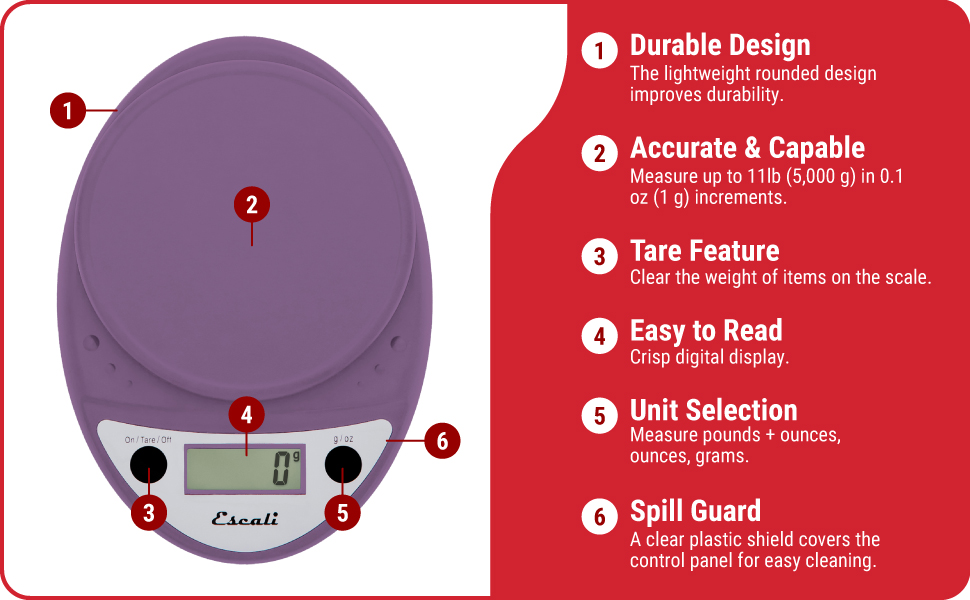
Image: Key features of the Escali Primo Digital Food Scale.
3. Opsætning
3.1 Batteriinstallation
- Find batterirummet på undersiden af vægten.
- Åbn batterirummets dæksel.
- Isæt to AA-batterier, og sørg for at polerne (+/-) vender korrekt som angivet i batterirummet.
- Luk batterirummets dæksel forsvarligt.
3.2 Indledende placering
Place the scale on a flat, stable, and level surface. Avoid placing it on soft or uneven surfaces, which can affect accuracy.
4. Betjeningsvejledning
4.1 Tænd/sluk
- For at tænde: Tryk på On/Tare/Off knappen. Displayet viser "0", når den er klar.
- For at slukke: Tryk og hold på On/Tare/Off button for approximately 3 seconds. The scale will also automatically shut off after four minutes of inactivity to conserve battery life.
4.2 Valg af enhed
To change the unit of measurement (grams, ounces, pounds:ounces), press the g/oz button while the scale is on. The display will cycle through the available units.

Image: Display and unit selection button.
4.3 Tara funktion
The tare function allows you to subtract the weight of a container or to measure multiple ingredients consecutively.
- Placer en tom beholder på vejeplatformen. Displayet viser dens vægt.
- Tryk på On/Tare/Off knappen. Displayet nulstilles til "0".
- Tilføj din ingrediens til beholderen. Displayet viser kun ingrediensens vægt.
- Repeat the tare process for additional ingredients if needed.

Image: Using the scale for portion control with meal prep.
4.4 Vejning af genstande
Once the scale is on and set to your desired unit, simply place the item(s) to be weighed directly onto the weighing platform or into a tared container. The weight will be displayed instantly.

Image: Weighing ingredients for baking.
5. Vedligeholdelse
5.1 Rengøring
The sealed control panel and rounded design make the Escali Primo scale easy to clean. Wipe the scale with a damp klæde. Nedsænk ikke vægten i vand, og brug ikke slibende rengøringsmidler.
5.2 Opbevaring
Store the scale in a dry place at room temperature. Avoid placing heavy objects on the scale when not in use, as this may affect its calibration over time.
6. Fejlfinding
| Problem | Mulig årsag | Løsning |
|---|---|---|
| Skalaen tænder ikke | Døde eller forkert installerede batterier. | Udskift batterierne med nye AA-batterier, og sørg for at polariteten vender korrekt. |
| Unøjagtige aflæsninger | Scale not on a flat, stable surface; scale overloaded; debris under platform. | Place scale on a firm, level surface. Ensure weight does not exceed 11 lb (5000 g). Clean any debris from under the platform. |
| Displayet viser "Err" | Vægten er overbelastet. | Remove items from the scale. Ensure total weight is within the 11 lb (5000 g) capacity. |
| Automatic shut-off too soon | Normal operation (4 minutes of inactivity). | This is a battery-saving feature. Press the On/Tare/Off button to restart. |
7. Specifikationer
- Model: P115
- Kapacitet: 11 g
- intervaller: 0.05 oz (1 g)
- Måleenheder: oz, lb:oz, g
- Magt: 2 AA batterier (medfølger)
- Produktdimensioner: 8.5 x 6 x 1.5 tommer (ca.)
- Skærmtype: Digital LED
- Særlige funktioner: Auto Shut Off, Tare Function, Sealed Control Panel
8. Garantioplysninger
The Escali Primo Digital Food Scale comes with a Livstidsgaranti. For detailed warranty terms and conditions, please refer to the official Escali webwebsted eller kontakt kundesupport.
9. Kundesupport
For further assistance, product information, or support, please visit the official Escali webwebstedet eller kontakt deres kundeserviceafdeling. Kontaktoplysninger kan typisk findes på produktemballagen eller i producentens webwebsted.
Du kan finde mere information og support på Escali-butik på Amazon.


