1. Introduktion
Thank you for choosing the Nortek Soundream 2.1 Attive Minispeaker system. This manual provides essential information for the proper setup, operation, and maintenance of your new audio system. Please read this manual thoroughly before using the product to ensure optimal performance and safety.
2. Sikkerhedsoplysninger
For at forhindre brand, elektrisk stød eller produktskade skal du overholde følgende sikkerhedsforanstaltninger:
- Udsæt ikke dette apparat for regn eller fugt.
- Placer ikke genstande fyldt med væske, såsom vaser, oven på apparatet.
- Sørg for tilstrækkelig ventilation. Bloker ikke ventilationsåbninger.
- Må ikke installeres i nærheden af varmekilder såsom radiatorer, varmeapparater, komfurer eller andre apparater (inklusive ampløftere), der producerer varme.
- Beskyt netledningen mod at blive gået på eller klemt, især ved stik, stikkontakter og det punkt, hvor de kommer ud af apparatet.
- Brug kun tilbehør/tilbehør specificeret af producenten.
- Træk stikket ud af apparatet under tordenvejr, eller når det ikke skal bruges i længere perioder.
3. Pakkens indhold
Kontroller venligst, at alle varer er til stede i pakken:
- 1 x Nortek Soundream 2.1 Subwoofer
- 2 x satellithøjttalere
- 1 x Power Cable (Corded Electric)
- 1 x Audio Input Cable (e.g., 3.5mm stereo jack)
- 1 x Brugermanual (dette dokument)
4. Produktet er slutview
The Nortek Soundream 2.1 system consists of a subwoofer and two satellite speakers designed to deliver enhanced audio for various devices.
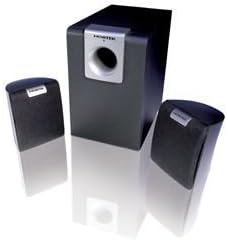
Image: The Nortek Soundream 2.1 Attive Minispeaker system, featuring a central subwoofer unit and two compact satellite speakers.
Komponenter:
- subwoofer: The main unit containing the amplifier, bass driver, and primary controls.
- Satellithøjttalere: To kompakte højttalere til mellemtone- og diskantlyd.
- Kontrolelementer: Typically located on the subwoofer, these include power on/off, master volume, and potentially bass level adjustment.
5. Opsætning
Follow these steps to set up your Nortek Soundream 2.1 system:
- Placering:
- Place the subwoofer on the floor, preferably near a wall or in a corner for optimal bass response.
- Position the two satellite speakers on either side of your listening area, facing towards you. Ensure they are equidistant from your listening position for balanced stereo sound.
- Tilslut satellithøjttalere:
- Connect the cables from the satellite speakers to the corresponding output jacks on the back of the subwoofer. Ensure correct polarity if applicable (e.g., red to red, black to black).
- Tilslut lydkilde:
- Connect one end of the audio input cable (e.g., 3.5mm stereo jack) to the 'Audio In' port on the subwoofer.
- Connect the other end of the audio input cable to the audio output jack of your device (e.g., computer, smartphone, MP3 player, TV).
- Tilslut strøm:
- Plug the power cable into the power input on the subwoofer.
- Sæt den anden ende af strømkablet i en almindelig stikkontakt.
6. Betjeningsvejledning
Once the system is set up, follow these steps to operate your speakers:
- Tænd: Locate the power button or switch on the subwoofer and turn it to the 'ON' position. An indicator light may illuminate.
- Lydstyrkekontrol: Turn the master volume knob on the subwoofer to a low setting before playing audio. Gradually increase the volume to your desired listening level.
- Bass Adjustment (if available): If your subwoofer has a separate bass control knob, adjust it to achieve your preferred bass level.
- Afspil lyd: Start playing audio from your connected device.
- Sluk: When finished, turn the power switch on the subwoofer to the 'OFF' position. For extended periods of non-use, it is recommended to unplug the system from the power outlet.
7. Vedligeholdelse
Proper maintenance ensures the longevity and performance of your speaker system:
- Rensning: Disconnect the power before cleaning. Use a soft, dry cloth to wipe the surfaces of the speakers and subwoofer. Do not use liquid cleaners or abrasive materials.
- Ventilation: Ensure that the ventilation openings on the subwoofer are not blocked by dust or other objects.
- Opbevaring: If storing the system for an extended period, unplug it and store it in a cool, dry place away from direct sunlight and extreme temperatures.
- Kabelpleje: Avoid bending or crimping the audio and power cables excessively.
8. Fejlfinding
If you encounter issues with your Nortek Soundream 2.1 system, refer to the following common problems and solutions:
- Ingen lyd:
- Ensure the power cable is securely plugged into both the subwoofer and the wall outlet.
- Verify the power switch on the subwoofer is in the 'ON' position.
- Check that the audio input cable is securely connected to both the subwoofer and your audio source.
- Increase the master volume on the subwoofer and the volume on your audio source device.
- Test with a different audio source or cable to rule out a faulty source or cable.
- Forvrænget lyd:
- Reduce the volume on both the subwoofer and your audio source.
- Ensure the audio input cable is fully inserted and not damaged.
- Tjek for interferens fra andre elektroniske enheder.
- Only One Satellite Speaker Working:
- Kontroller forbindelsen mellem den ikke-fungerende satellithøjttaler og subwooferen.
- Ensure the audio source is outputting stereo sound.
9. Specifikationer
- Model: Nortek Soundream 2.1
- Konfiguration: 2.1 Channel (Subwoofer + 2 Satellite Speakers)
- Effekt (Watt)tage): 2 watt
- Strømkilde: Elektrisk med ledning
- Varens vægt: Cirka 1.5 kg (3.31 pund)
- ASIN: B000CFYA2C
- Fabrikant: Nortek
10. Garanti og support
For warranty information and technical support, please refer to the warranty card included with your product or visit the official Nortek webwebsted. Gem din købskvittering som købsbevis i tilfælde af garantikrav.


