Indledning
This manual provides detailed instructions for the setup, operation, and maintenance of your ALESIS MultiMix 8FX Audio Mixer. Please read this manual thoroughly before using the device to ensure proper functionality and to maximize your experience.
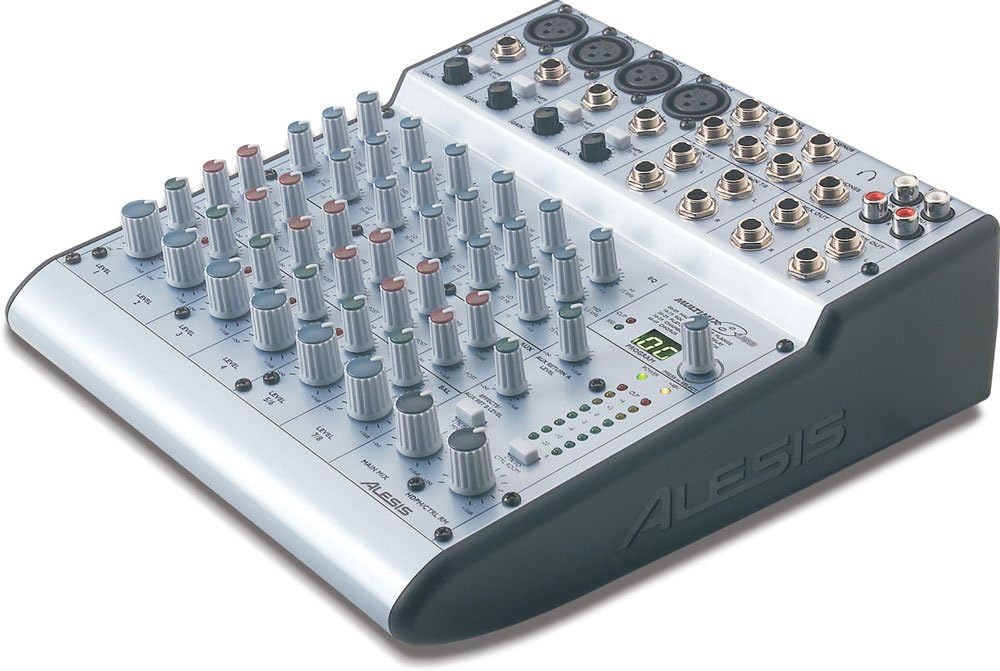
Billede: The ALESIS MultiMix 8FX Audio Mixer, showcasing its compact design with multiple input channels, control knobs, and various audio ports on the top panel. The main image displays the mixer from a slightly elevated angle, highlighting the layout of its controls and connectors.
Opsætning
Follow these steps to set up your MultiMix 8FX Audio Mixer:
- Strømtilslutning: Connect the included 18V AC external transformer to the mixer's power input and then to a suitable power outlet.
- Lydindgange: Connect your microphones (XLR) and line-level instruments/devices (1/4" TRS) to the respective input channels. The mixer features 4 mic/line channels and 4 stereo line-in channels.
- Lydudgange: Connect your main speakers to the stereo main out (1/4" TRS). For monitoring, connect headphones to the headphone out or control room monitors to the stereo control room out.
- USB-forbindelse: For computer recording or playback, connect the mixer to your PC or Mac using a USB 1.1 cable.
- 2-Track Connections: Use the RCA 2-track stereo in and out for connecting external recording devices or playback sources.
Betjeningsvejledning
Channel Controls (Channels 1-4 Mic/Line, Channels 5-8 Stereo Line)
- Mic/Line Gain: Adjust the input sensitivity for microphones and line-level signals.
- 75Hz Highpass Filter Switch: Activates a filter to reduce low-frequency rumble on mic/line channels.
- 3-bånds EQ: Each channel includes High (shelving at 12kHz), Mid (bandpass/reject at 2.5kHz), and Low (shelving at 80Hz) equalization controls for tone shaping.
- Aux Send A (Pre-Fader): Controls the level sent to Aux Send A, typically used for monitor mixes.
- Aux Send B (Post-Fader): Controls the level sent to Aux Send B, used for onboard or external effects.
- Pan/Balance: Justerer stereopositionen for kanalsignalet.
- Niveau: Sets the overall output level of the channel to the main mix.
Master Section Controls
- Effect Section: Features a selector for 100 studio-grade 28-bit digital effects, with clip and signal LEDs to indicate activity.
- Aux Return A Level: Adjusts the level of the signal returning from Aux Send A.
- Effects/Aux Return B Level: Adjusts the level of the signal returning from Aux Send B (for effects).
- Hovedudgangsniveau: Styrer det samlede udgangsniveau for hovedstereomixet.
- 2-Track to Mix Switch: Routes the 2-track input to the main mix.
- Headphone/Control Room Out Level: Adjusts the volume for headphones and control room monitors.
- 2-Track to Control Room Switch: Routes the 2-track input to the control room/headphone output.
- Stereo 8-Segment LED Meters: Provides visual indication of the main output level.
Opretholdelse
- Rensning: Use a soft, dry cloth to clean the mixer's surface. Avoid liquid cleaners or solvents.
- Ventilation: Ensure adequate airflow around the unit to prevent overheating. Do not block ventilation openings.
- Opbevaring: Store the mixer in a cool, dry place away from direct sunlight and extreme temperatures when not in use.
- Strømforsyning: Always use the original 18V AC external transformer provided with the unit.
Fejlfinding
- Ingen strøm: Ensure the power adapter is securely connected to both the mixer and a working power outlet. Verify the power switch is in the 'ON' position.
- Ingen lydoutput: Check all cable connections to speakers and headphones. Verify main output levels and individual channel levels are appropriately set. Ensure the 2-track to mix switch is correctly engaged if using 2-track input.
- Brummen eller støj: Check all audio cables for proper connection and integrity. Ensure proper grounding for all connected equipment. If using USB, some users have reported high-pitched noise or hiss, which may be related to computer grounding issues. Try connecting to a different USB port or a different computer, or consider using an external audio interface if the issue persists with USB.
- Forvrænget lyd: Reduce input gain levels on channels and the main output level. Check for clipping indicators (LEDs) and adjust accordingly.
- Effekter virker ikke: Ensure the effect section is enabled, an effect program is selected, and the Aux Send B and Effects/Aux Return B levels are adjusted.
Specifikationer
- Modelnummer: multimix8USB
- Kanaler: 8 (4 Mic/Line, 4 Stereo Line)
- Forbindelse: USB 1.1 Stereo Input/Output (PC and Mac compatible)
- Indgange: 4 x XLR Mic, 4 x 1/4" TRS Mono Line, 4 x 1/4" TRS Stereo Line, 2-track Stereo RCA
- Udgange: Stereo Main Out (1/4" TRS), Stereo Control Room Out (1/4" TRS), Headphone Out (1/4" TRS), 2-track Stereo RCA
- Effekter: 100 studio-grade 28-bit digital effects
- EQ: 3-band per channel (High 12kHz, Mid 2.5kHz, Low 80Hz)
- Magt: 18V AC external transformer
- Dimensioner (H x B x D): 3.5 x 9.25 x 10.25 tommer
- Vægt: 4.5 lbs (Unit), 7 lbs (Shipping)
Garanti og support
For garantioplysninger og teknisk support henvises til den officielle Alesis webwebstedet eller kontakt deres kundeservice. Behold din købskvittering som købsbevis.
Alesis Official Webwebsted: www.alesis.com


