1. Introduktion
This instruction manual provides comprehensive guidance for the safe and effective use of your JVC UX-QD7-S Micro Component DVD/MD System. Please read this manual thoroughly before operating the system and retain it for future reference. This system integrates a DVD video player, an MD deck, and a 3-way speaker setup, designed to deliver a high-quality audio and video experience.
2. Sikkerhedsoplysninger
- Strømforsyning: Ensure the system is connected to a power source that matches the voltage angivet på enheden.
- Ventilation: Bloker ikke ventilationsåbningerne. Sørg for tilstrækkelig plads omkring enheden til korrekt luftgennemstrømning for at forhindre overophedning.
- Fugtighed: Do not expose the unit to rain, moisture, or excessive humidity. Keep liquids away from the system.
- Fremmedobjekter: Indsæt ikke genstande i enhedens åbninger.
- Service: Forsøg ikke selv at servicere dette produkt. Overlad al service til kvalificeret servicepersonale.
- Placering: Placer enheden på en stabil, plan overflade. Undgå at placere den i nærheden af varmekilder eller i direkte sollys.
3. System overview og pakkeindhold
The JVC UX-QD7-S system consists of a central main unit, two stereo speakers, and a remote control. The main unit houses the DVD player, MD deck, and amplifier. The speakers are designed for optimal sound reproduction, and the remote control provides convenient operation from a distance.
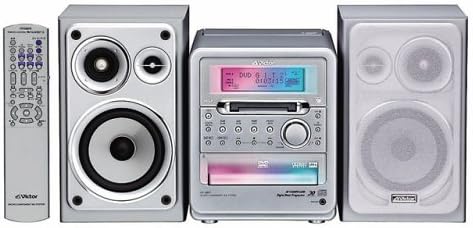
Pakkeindhold:
- Main Unit (DVD/MD Player)
- venstre taler
- Højre højttaler
- Fjernbetjening
- Strømledning
- Højttaler kabler
- Instruktionsmanual (dette dokument)
4. Opsætning
4.1 Højttalertilslutning
- Connect the speaker cables from the main unit's speaker terminals to the corresponding terminals on each speaker. Ensure correct polarity (red to red, black to black) for optimal sound.
- Position the speakers to the left and right of the main unit for stereo sound.
4.2 Strømtilslutning
- Plug the power cord into the AC inlet on the rear of the main unit.
- Insert the other end of the power cord into a wall outlet.
4.3 Connecting to a Television (for DVD Video)
Til view DVD video content, connect the system to your television using appropriate video cables (e.g., composite video, S-video, or component video, depending on available ports on both devices). Refer to your TV's manual for specific input connections.
4.4 Connecting External Audio Sources (AUX)
To connect an external audio device (e.g., a portable music player), use an audio cable to connect the device's audio output to the AUX input jacks on the JVC UX-QD7-S main unit.
5. Betjeningsvejledning
5.1 Grundlæggende betjening
- Tænd/sluk: Tryk på MAGT knappen på hovedenheden eller fjernbetjeningen.
- Lydstyrkekontrol: Brug LYDSTYRKE +/- buttons on the main unit or remote control to adjust the sound level.
- Kildevalg: Tryk på FUNGERE or KILDE button to cycle through DVD, MD, AUX, and Tuner (if available) inputs.
5.2 DVD-afspilning
- Select the DVD function.
- Tryk på ÅBN/LUK knappen for at åbne diskskuffen.
- Place a DVD video or DVD audio disc onto the tray with the label side up.
- Trykke ÅBN/LUK igen for at lukke bakken. Afspilningen starter normalt automatisk.
- Bruge SPIL, PAUSE, STOP, SPRINGE, og SØGE knapperne på fjernbetjeningen til styring.
- The system supports 5.1ch surround sound reproduction with 3D phonics and is compatible with DVD Audio discs for high-quality audio playback.
5.3 MD Deck Operation
- Select the MD function.
- Insert a MiniDisc (MD) into the MD slot.
- Afspilning: Tryk på SPIL knap.
- Indspilning: The MD deck supports MDLP (MiniDisc Long Play) for extended recording times. Refer to the detailed MD recording section in the full manual for specific instructions on recording modes and procedures.
- Slette: Follow the instructions in the full manual to erase tracks or entire MDs.
5.4 External Input (AUX)
To listen to an external device connected to the AUX input, select the AUX function using the FUNGERE or KILDE knap.
6. Vedligeholdelse
- Rengøring af enheden: Tør enheden af med en blød, tør klud. Til genstridige pletter skal du bruge en let tør klud.ampened with a mild detergent solution, then wipe dry. Do not use abrasive cleaners or solvents.
- Disc/MD Handling: Handle discs and MDs by their edges. Keep them clean and free from scratches. Store them in their cases when not in use.
- Højttalerpleje: Hold højttalerne fri for støv. Tryk ikke på højttalermembranerne.
7. Fejlfinding
| Problem | Mulig årsag | Løsning |
|---|---|---|
| Ingen strøm | Netledning ikke tilsluttet; stikkontakt defekt | Kontroller strømkablets forbindelse; prøv en anden stikkontakt |
| Ingen lyd | Lydstyrken er for lav; Højttalere er ikke tilsluttet; Forkert kilde valgt | Increase volume; Check speaker connections; Select correct input source |
| Disken afspilles ikke | Disk forkert isat; Disk snavset eller ridset; Diskformat ikke understøttet | Insert disc correctly; Clean or replace disc; Ensure disc is DVD video or DVD audio |
| MD not recording | MD is full or protected; Incorrect recording mode | Use a blank MD or erase existing content; Check recording settings |
| Fjernbetjening virker ikke | Batterierne er opbrugt; Blokering mellem fjernbetjening og enhed | Replace batteries; Remove any obstructions |
Hvis problemet fortsætter efter at have forsøgt disse løsninger, bedes du kontakte JVC kundesupport eller en kvalificeret servicetekniker.
8. Specifikationer
- Modelnummer: UX-QD7-S
- Mærke: JVC
- Forbindelse teknologi: AUX
- Højttalertype: Omgive
- Lydudgangstilstand: Omgive
- Produktvægt: Cirka 6151 gram
- Understøttede medier: DVD Video, DVD Audio, MiniDisc (MD, MDLP)
- Platform: Desktop lydsystem
9. Garanti og support
For garantioplysninger henvises til garantikortet, der følger med dit produkt, eller besøg den officielle JVC-side. webwebsted. Behold din købskvittering som købsbevis i tilfælde af garantikrav.
For technical support or service inquiries, please contact JVC customer service. Contact details can typically be found on the official JVC webwebsted eller i produktemballagen.


