1. Introduktion
The QSC RMX5050 Power Amplifier is designed for professional audio applications, delivering high levels of sustained power and audio performance. It features a three-tier, Class H design for efficiency and reliability, making it suitable for touring, live sound, and mobile entertainment setups.

Figur 1.1: Forside view of the QSC RMX5050 Power Amplifer. Dette billede viser amplifier's front panel with the QSC logo, power switch, gain controls for Channel 1 and Channel 2, and various LED indicators.
2. Sikkerhedsoplysninger
Please read and understand all safety instructions before operating the QSC RMX5050 Power AmpBehold denne manual til senere brug.
- Strømkilde: Tilslut amplifier only to the specified voltage and frequency as indicated on the rear panel.
- Ventilation: Sørg for tilstrækkelig luftgennemstrømning omkring ampBloker ikke ventilationsåbningerne.
- Fugtighed: Udsæt ikke amplifier to rain or moisture. Do not place objects filled with liquids on the amplivligere.
- Service: Refer all servicing to qualified service personnel. Do not attempt to service this unit yourself.
- Jording: Sørg altid for amplifier is properly grounded to prevent electric shock.
3. Opsætning
3.1 Udpakning
Fjern forsigtigt amplifier from its packaging. Inspect the unit for any signs of damage that may have occurred during transit. Retain the original packaging for future shipping or storage.
3.2 Placering og montering
The RMX5050 is designed for standard 19-inch rack mounting and occupies 3U of rack space. Ensure the rack provides sufficient ventilation and structural support for the amplifier's weight (approximately 75 pounds).
3.3 Forbindelser
Før du foretager nogen tilslutninger, skal du sørge for, at amplifier is powered off and disconnected from the AC mains.
3.3.1 Indgangsforbindelser
The RMX5050 features balanced 1/4" TRS, XLR, and barrier strip inputs for flexible connectivity. Connect your audio source (mixer, preamplifier, etc.) to the appropriate input connectors for Channel 1 and Channel 2.
3.3.2 Udgangsforbindelser
Tilslut dine højttalere til amplifier's outputs using either binding posts or Neutrik Speakon connectors. Ensure correct polarity and impedance matching for optimal performance and to prevent damage to speakers or the amplivligere.

Figure 3.1: Rear panel of the QSC RMX5050 Power Amplifier. This image highlights the various input options (XLR, TRS, barrier strip), output connectors (Speakon, binding posts), DIP switches for configuration, and the AC power inlet.
3.3.3 Strømtilslutning
Tilslut det medfølgende netkabel til amplifier's power inlet and then to a grounded AC outlet. Verify that the power source matches the amplifiers voltage krav.
3.4 Indledende opstart
- Sørg for, at alle lydforbindelser er sikre.
- Set the front panel gain controls to their minimum (fully counter-clockwise) position.
- Power on your audio source equipment first.
- Flip the power switch on the RMX5050 to the "ON" position. The power indicator LED should illuminate.
- Slowly increase the gain controls to the desired level.
4. Betjening af Amplivligere
4.1 Kontrol og indikatorer på frontpanelet
- Afbryderen: Skifter mellem amplifter tænd/sluk.
- Power LED: Illuminates green when the ampkøleren er tændt.
- Gain Controls (Channel 1 & 2): Rotary knobs to adjust the input sensitivity for each channel.
- Signal LED: Illuminates green when an audio signal is present at the input.
- Clip LED: Illuminates red when the output signal is clipping (distorting). Reduce input level or gain if this LED frequently illuminates.
- Protect LED: Illuminates red if the ampLifier går i beskyttelsestilstand på grund af overophedning, kortslutning eller andre fejltilstande.

Figure 4.1: Front panel of the QSC RMX5050 Power Amplifier with the power indicator illuminated. This view clearly shows the power switch, gain knobs, and the Signal, Clip, and Protect LEDs for both channels.
4.2 Rear Panel DIP Switches
The rear panel features DIP switches that allow configuration of various operating parameters. Always power off the amplifier before changing DIP switch settings.
- Clip Limiter: Engages a circuit that prevents severe clipping and protects speakers.
- Low-Frequency Filters: High-pass filters (e.g., 30 Hz, 50 Hz) to remove unwanted low-frequency content, protecting speakers and improving clarity.
- Driftstilstand: Selects between Stereo, Parallel, or Bridged Mono operation.
4.3 driftstilstande
4.3.1 Stereotilstand
In stereo mode, each channel operates independently, amplifying its respective input signal and sending it to its dedicated output. This is the standard mode for two-channel sound reinforcement.
4.3.2 Parallel tilstand
In parallel mode, a single input signal is fed to both amplifier channels, which then drive separate speaker loads. This is useful for driving multiple speakers with the same mono signal.
4.3.3 Bridged Mono Mode
Bridged mono-tilstand kombinerer kraften fra begge amplifier channels into a single, higher-power output. This mode is typically used to drive a single, high-power loudspeaker or subwoofer. Consult the manual for specific wiring instructions for bridged mono operation.
5. Vedligeholdelse
5.1 Rengøring
Rengør jævnligt ydersiden af amplifier with a soft, dry cloth. Do not use abrasive cleaners or solvents. Ensure ventilation grilles are free from dust and debris.
5.2 Ventilation
The RMX5050 relies on internal fans for cooling. Regularly check that the air intake and exhaust vents are not obstructed. Operating the amplifier in poorly ventilated spaces can lead to overheating and activation of protection circuits.
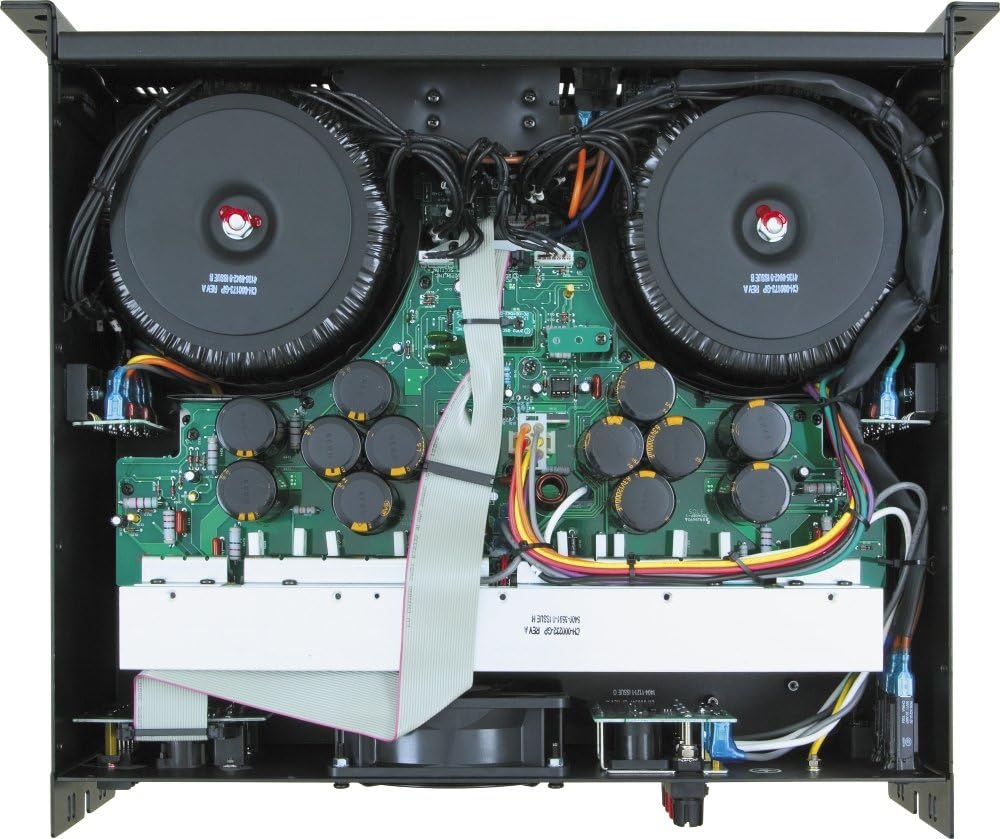
Figur 5.1: Intern view of the QSC RMX5050 Power Amplifier. This image shows the large toroidal transformers, circuit boards, capacitors, and the central cooling fan, emphasizing the robust internal design and the importance of clear airflow.
5.3 Opbevaring
Hvis du opbevarer amplifier for an extended period, ensure it is kept in a dry, temperature-controlled environment, away from direct sunlight and extreme temperatures. It is recommended to use the original packaging for protection.
6. Fejlfinding
This section provides solutions to common issues you might encounter. If the problem persists, contact QSC customer support or a qualified service technician.
| Problem | Mulig årsag | Løsning |
|---|---|---|
| Ingen strøm | Power cord disconnected, AC outlet faulty, internal fuse blown. | Check power cord connection. Test AC outlet. If fuse is suspected, contact service. |
| Ingen lydudgang | Input cables disconnected, speaker cables disconnected, gain controls at minimum, amplifer i beskyttelsestilstand. | Verify all cable connections. Increase gain. Check Protect LED; if illuminated, refer to manual for fault conditions. |
| Distorted Sound (Clip LED on) | Input signal too high, gain set too high, speaker impedance too low. | Reduce input signal level from source. Decrease amplifier gain. Verify speaker impedance matches amplifiers muligheder. |
| Amplifier Overheating (Protect LED on) | Insufficient ventilation, blocked vents, excessive load. | Ensure proper airflow. Clear any obstructions from vents. Reduce load or operating time. Allow ampvarmebeholder til afkøling. |
7. Specifikationer
Key technical specifications for the QSC RMX5050 Power Amplivligere:
- Varens vægt: 75 pund
- Modelnummer: RMX 5050, 120V
- Kompatible enheder: Monitor (general audio monitoring)
- Connector Type: Speakon, binding post (outputs); 1/4" TRS, XLR, barrier strip (inputs)
- Output Wattage: 2000 Watts (specific configurations may vary, refer to full power ratings)
- Wattage (RMS): 1600 watts (typical rating, specific configurations may vary)
- Mærke: QSC
- Formfaktor: ATX (This seems like a miscategorization from the source data, typically refers to computer motherboards. For amplifiers, it's usually rack-mount or chassis type. The RMX5050 is a 3U rack-mount amplivligere.)
- Afkølingsmetode: Air (Fan-cooled)
- Antal stik: 5 (This is likely a count of specific types, not total)
- Antal fans: 1 (Main cooling fan)
8. Garanti og support
For detailed warranty information and technical support, please refer to the official QSC website or contact QSC customer service directly. Keep your purchase receipt as proof of purchase for warranty claims.
You can visit the official QSC Store for more information: QSC Official Store


