Indledning
This manual provides essential information for the safe and efficient operation of your Thomson TM 9850 Radio. Please read it thoroughly before using the device and keep it for future reference.
Sikkerhedsoplysninger
- Udsæt ikke enheden for regn eller fugt for at forhindre brand eller elektrisk stød.
- Bloker ikke ventilationsåbningerne. Sørg for tilstrækkelig plads omkring enheden for korrekt luftgennemstrømning.
- Brug kun den strømforsyning, der er angivet til denne enhed.
- Åbn ikke c'enasing. Overlad al service til kvalificeret personale.
- Hold enheden væk fra direkte sollys, varmekilder og stærke magnetfelter.
Produkt overview
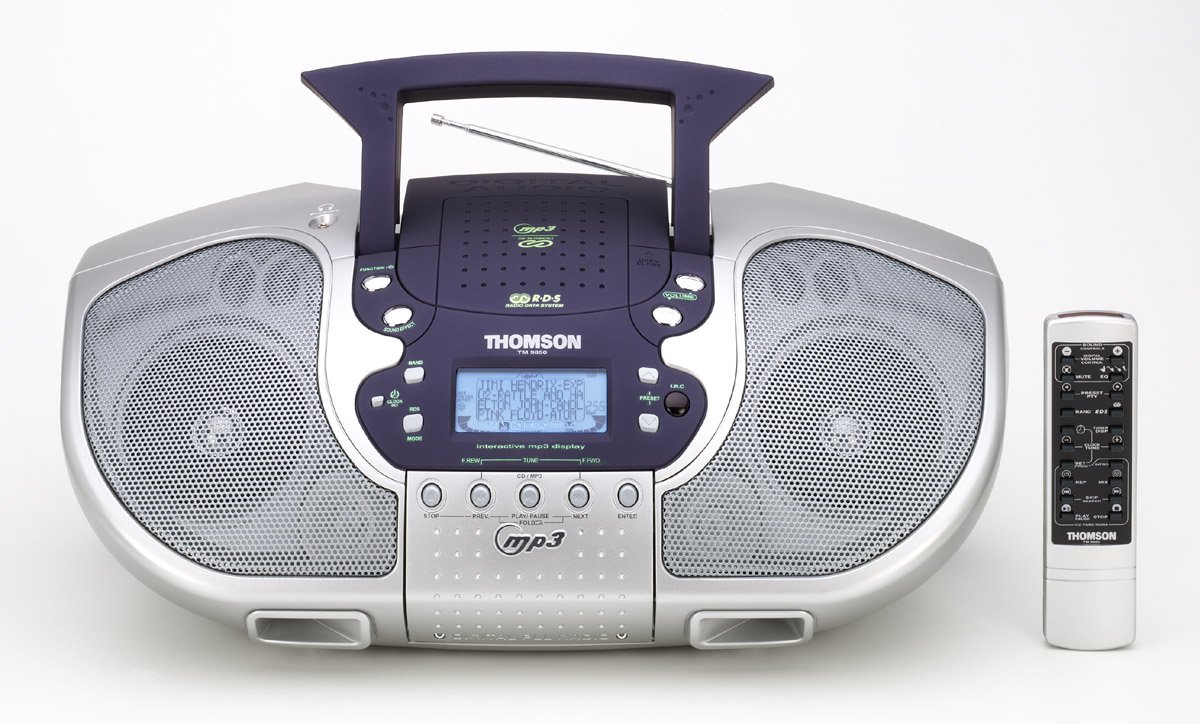
Figur 1: Forside view of the Thomson TM 9850 Radio with its accompanying remote control. The radio features dual speakers, a central control panel with an LCD display, and a top-mounted handle and telescopic antenna. The remote control is slender and white with various function buttons.
The Thomson TM 9850 is a portable radio designed for versatile audio playback. It features an integrated CD/MP3 player, an FM/AM radio tuner, and a clear LCD display for easy navigation. The unit also includes a remote control for convenient operation from a distance.
Opsætning
Strømtilslutning
- Sørg for, at enheden er placeret på en stabil, plan overflade.
- Tilslut netledningen til AC IN-stikket på bagsiden af enheden.
- Sæt den anden ende af netledningen i en almindelig stikkontakt (AC 230V ~ 50Hz).
- Alternatively, for portable use, insert 8 x "C" size batteries (not included) into the battery compartment located on the bottom of the unit, observing correct polarity.
Antennejustering
- For FM reception, extend the telescopic antenna fully. Adjust its position for optimal signal reception.
- For AM reception, the unit has a built-in ferrite bar antenna. Rotate the unit itself for best reception.
Betjeningsvejledning
Grundlæggende betjening
- Tænd/sluk: Tryk på MAGT knappen for at tænde eller slukke for enheden.
- Lydstyrkekontrol: Drej på BIND med uret for at øge lydstyrken, mod uret for at sænke den.
- Funktionsvalg: Tryk på FUNGERE button to switch between CD/MP3, FM, and AM modes.
Radiobetjening (FM/AM)
- Select FM or AM mode using the FUNGERE knap.
- Tryk på BAND button to select the desired frequency band (FM or AM).
- Brug TUNE +/- buttons to manually tune to a station. Press and hold for automatic scanning.
- To store a preset station: Tune to the desired station, press PROGRAM, og brug derefter FORUDINDSTILLING +/- for at vælge et forudindstillet nummer, og tryk på PROGRAM igen for at bekræfte.
- To recall a preset station: Press FORUDINDSTILLING +/- to cycle through stored stations.
CD/MP3-afspilning
- Åbn dækslet til cd-rummet.
- Place a CD or MP3 CD with the label side facing up.
- Luk dækslet til cd-rummet.
- Select CD/MP3 mode using the FUNGERE button. The display will show "READING" then the total number of tracks/folders.
- Trykke AFSPIL/PAUSE to start playback. Press again to pause.
- Trykke NÆSTE to skip to the next track/file. Trykke FORR for at gå til begyndelsen af det aktuelle nummer eller det forrige nummer.
- Trykke STOP for at stoppe afspilningen.
- For MP3 CDs, use MAPPE +/- buttons to navigate between folders.
Opretholdelse
- Rensning: Tør enheden af med en blød, tør klud. Brug ikke slibende rengøringsmidler eller opløsningsmidler.
- CD-linsepleje: If the CD lens gets dirty, use a commercially available CD lens cleaner. Do not touch the lens.
- Opbevaring: If not using the unit for an extended period, remove the batteries and store it in a cool, dry place.
Fejlfinding
| Problem | Mulig årsag | Løsning |
|---|---|---|
| Ingen strøm | Netledningen er ikke tilsluttet; Batterierne er opbrugt eller er isat forkert. | Check power cord connection; Replace batteries or ensure correct polarity. |
| Ingen lyd | Volume too low; Mute function activated. | Increase volume; Deactivate mute. |
| Dårlig radiomodtagelse | Antenna not extended/adjusted; Weak signal. | Extend and adjust telescopic antenna (FM); Rotate unit (AM); Try moving the unit to a different location. |
| CD/MP3 not playing | Disc inserted incorrectly; Disc dirty or scratched; Incorrect function mode. | Insert disc with label side up; Clean or replace disc; Select CD/MP3 function mode. |
Specifikationer
- Model: TM 9850
- Strømkilde: AC 230V ~ 50Hz or 8 x "C" size batteries (UM-2)
- Frekvensområde: FM 87.5 - 108 MHz, AM 522 - 1620 kHz
- Understøttede diskformater: CD, CD-R/RW, MP3-CD
- Lydudgang: Stereoanlæg
- Dimensioner (B x H x D): (Approximate, based on typical boombox size) 400 mm x 200 mm x 250 mm
- Vægt: (Approximate, based on typical boombox weight) 2.5 kg
Note: Specifications are subject to change without notice for improvement.
Garanti og support
This Thomson TM 9850 Radio comes with a standard manufacturer's warranty. Please refer to the warranty card included in the original packaging for detailed terms and conditions. For technical support, service, or inquiries, please contact Thomson customer service through their official webwebstedet eller de kontaktoplysninger, der er angivet med dit køb.
For the latest information and support resources, please visit the official Thomson webwebsted: www.thomsonconsumer.com


