1. Introduktion og overview
This manual provides detailed instructions for the safe and efficient operation of your Sanyo Fisher DCS-DA350 Executive Microsystem. Please read this manual thoroughly before using the unit and retain it for future reference.
The DCS-DA350 is a compact audio system featuring a top-loading CD player, a full logic cassette deck, and integrated speakers, designed for versatile audio playback.
Nøglefunktioner:
- Top-loading CD player with 24-track programmability, repeat, and random play functions.
- 1-bit Digital-to-Analog Converter for enhanced audio quality.
- Full logic cassette deck with auto reverse capability.
- Synchronous CD dubbing for easy recording from CD to cassette.
- Jog dial electronic volume control for precise audio level adjustment.
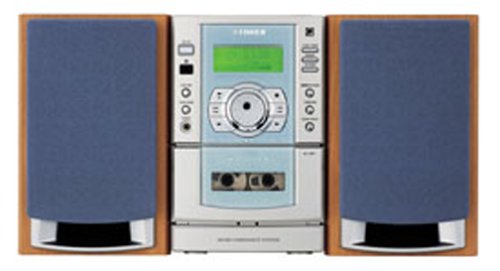
Figur 1: Forside view of the Sanyo Fisher DCS-DA350 Executive Microsystem. The central unit features a display, CD compartment, and cassette deck, flanked by two detachable speakers with blue grilles.
2. Opsætning
2.1 Udpakning
Carefully remove all components from the packaging. Ensure all parts are present: main unit, two speakers, power cord, and remote control (if included). Retain packaging for potential future transport or service.
2.2 Højttalertilslutning
Connect the speaker wires from each speaker to the corresponding speaker terminals on the rear of the main unit. Ensure correct polarity (positive to positive, negative to negative) for optimal sound reproduction.
2.3 Strømtilslutning
Plug the power cord into the AC inlet on the rear of the main unit, then plug the other end into a standard AC wall outlet (120V AC, 60Hz). The unit is now ready for operation.
2.4 Batteriinstallation (fjernbetjening)
If your unit includes a remote control, open the battery compartment on the back of the remote. Insert two AA batteries, ensuring correct polarity (+ and -). Close the compartment securely.
3. Betjeningsvejledning
3.1 Grundlæggende betjening
- Tænd/sluk: Tryk på MAGT knappen på frontpanelet eller fjernbetjeningen for at tænde eller slukke enheden.
- Funktionsvalg: Tryk på FUNGERE button to cycle through available modes: CD, TAPE, TUNER (if applicable), AUX (if applicable).
- Lydstyrkekontrol: Drej på JOG DIAL på frontpanelet eller brug LYDSTYRKE +/- knapperne på fjernbetjeningen til at justere lydniveauet.
3.2 Betjening af cd-afspilleren
- Tryk på FUNGERE button until "CD" is selected.
- Åbn dækslet til cd-rummet med topåbning.
- Placer en CD med etiketsiden opad på spindlen.
- Close the CD compartment cover. The display will show the total number of tracks.
- Tryk på PLAY/PAUSE (►/−) knappen for at starte afspilningen.
- Brug SPRING OVER (►►| / |◄◄) knapper til at springe spor over.
- Tryk på STOP (■) for at stoppe afspilning.
Programafspilning: Tryk på knappen i stoptilstand PROGRAM button to select tracks in a desired order. Refer to the display for programming steps.
Repeat/Random Play: Tryk på GENTAGE or TILFÆLDIG button to activate these playback modes.
3.3 Betjening af kassettebåndoptager
- Tryk på FUNGERE button until "TAPE" is selected.
- Tryk på ÅBN/UDKØB knappen for at åbne kassetterummet.
- Isæt et kassettebånd med den åbne kant opad.
- Luk kassetterummet.
- Tryk på SPIL (►) knappen for at starte afspilningen.
- Brug SPOL FREM (►►) or SPOL TILBAGE (◄◄) buttons to quickly advance or rewind the tape.
- Tryk på STOP (■) for at stoppe afspilning.
Automatisk omvendt: The cassette deck features auto reverse, allowing continuous playback of both sides of a tape without manual flipping.
Synchronous CD Dubbing: To record from a CD to a cassette, ensure a blank tape is inserted. Select the CD function, then press the CD SYNC DUBBING button (or similar, refer to unit controls) while the CD is playing. The unit will automatically start recording.
4. Vedligeholdelse
4.1 Rengøring af enheden
Tør enhedens yderside af med en blød, tør klud. Brug en let tør klud til genstridige pletter.ampened with a mild detergent solution, then wipe dry. Do not use abrasive cleaners, waxes, or solvents as they can damage the finish.
4.2 CD and Cassette Care
- Handle CDs by their edges to avoid fingerprints. Clean CDs with a soft, lint-free cloth, wiping from the center outwards.
- Store cassette tapes away from direct sunlight, heat, and magnetic fields. Periodically clean the cassette deck's heads and pinch rollers with a specialized cleaning kit for optimal performance.
5. Fejlfinding
Før du kontakter service, bedes du kontrollere følgende almindelige problemer og løsninger:
| Problem | Mulig årsag | Løsning |
|---|---|---|
| Ingen strøm | Netledningen er ikke korrekt tilsluttet. | Sørg for, at netledningen er korrekt tilsluttet enheden og stikkontakten. |
| Ingen lyd | Lydstyrken er for lav eller slået fra. Højttalerne er ikke tilsluttet korrekt. | Increase volume. Check speaker connections and polarity. |
| CD'en afspiller ikke | CD'en er isat forkert eller snavset/ridset. | Reinsert CD correctly. Clean CD. Try another CD. |
| Kassettebåndet afspiller/optager ikke | Tape inserted incorrectly. Tape heads are dirty. | Reinsert tape correctly. Clean tape heads and pinch rollers. |
| Fjernbetjening virker ikke | Batteries are depleted or inserted incorrectly. Obstruction between remote and unit. | Replace batteries. Ensure correct polarity. Remove obstructions. Point remote directly at the unit's sensor. |
6. Specifikationer
| Feature | Detalje |
|---|---|
| Mærke | Sanyo |
| Modelnummer | DCS-DA350 |
| Produktmål (LxBxH) | 32 x 21.6 x 24.9 cm (12.6 x 8.5 x 9.8 tommer) |
| Varens vægt | 8.66 kg (19.1 lbs) |
| CD-afspiller | Top-loading, 24-track programmability, repeat/random play, 1-bit D/A Converter |
| kassette Deck | Full logic, auto reverse, synchronous CD dubbing |
| Lydstyrkekontrol | Jog dial electronic control |
| Batterier (til fjernbetjening) | 2 AA batterier (medfølger) |
7. Garanti og support
For detailed warranty information and customer support, please refer to the warranty card included with your product or visit the official Sanyo webwebsted. Behold din købskvittering som købsbevis i tilfælde af garantikrav.


