Indledning
The Polaroid i-zone Digital and Instant Combo Camera offers dual functionality, combining a traditional i-zone instant camera with a basic digital camera. This manual provides essential instructions for setting up, operating, maintaining, and troubleshooting your device to ensure optimal performance.
The camera allows users to capture instant postage-stamp sized photos and simultaneously take digital images at a resolution of 640 x 480 pixels. It features fixed-focus lenses for both camera types, simplifying operation by eliminating the need for manual focusing. The digital camera includes 1 MB of internal memory, capable of storing approximately 18 images.
Opsætning
1. Udpakning af kameraet
Fjern forsigtigt alle komponenter fra emballagen. Kassen skal indeholde:
- Polaroid i-zone Digital and Instant Combo Camera
- Serial Image Transfer Cable
- 4 AAA batterier
- i-zone Sticky Film Pack
- Assorted Software CD

Image: Included accessories for the Polaroid i-zone camera, featuring the software installation CD, a pack of i-zone sticky film, and the serial image transfer cable.
2. Batteriinstallation
The camera requires 4 AAA batteries for operation. Locate the battery compartment, typically on the side or bottom of the camera. Open the compartment, insert the batteries according to the polarity indicators (+/-), and securely close the cover.
3. Loading i-zone Instant Film
Refer to the instructions provided with your i-zone film pack for proper loading into the instant camera section. Ensure the film pack is inserted correctly to avoid jams or exposure issues.
4. Software Installation (for Digital Camera Functionality)
Insert the included software CD into your computer's CD-ROM drive. Follow the on-screen prompts to install the necessary drivers and image management software. This software is required to transfer and manage digital images from the camera to your PC via the serial cable.
Betjening af kameraet
1. Instant Camera Operation
To take an instant photo, ensure the camera is powered on and the i-zone film is loaded. Point the camera at your subject and press the shutter button for the instant camera. The camera will automatically eject the postage-stamp sized photo.

Billede: Top view of the Polaroid i-zone Combo Camera, highlighting the distinct sections for digital and instant photography.
2. Digital Camera Operation
To capture a digital image, turn the camera to the digital camera side. Ensure the camera is powered on. Point the digital lens at your subject and press the digital shutter button. The camera will capture a 640 x 480 pixel image and store it in its internal 1 MB memory.
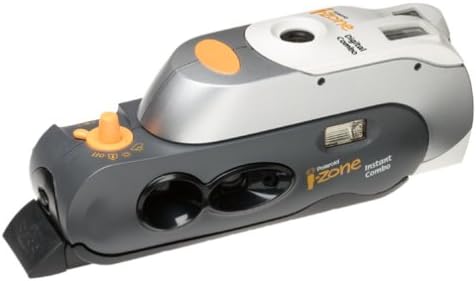
Billede: Bund view of the Polaroid i-zone Combo Camera, illustrating the instant camera's film ejection slot and the digital camera's lens.
3. Image Storage and Capacity
The digital camera has 1 MB of built-in memory, which can store approximately 18 images at the default resolution. Once the memory is full, you will need to transfer images to a computer to free up space.
4. Transferring Digital Images to a PC
Connect the camera to your computer using the provided serial image transfer cable. Ensure the camera is powered on. Launch the installed image management software on your PC. Follow the software's instructions to download images from the camera's memory to your computer. Images are typically saved as JPEG files.
Opretholdelse
1. Rengøring af linserne
Use a soft, lint-free cloth specifically designed for camera lenses to gently wipe the lenses of both the instant and digital cameras. Avoid using abrasive materials or harsh cleaning solutions, which can scratch the lens surface.
2. Batteripleje
Remove batteries from the camera if it will not be used for an extended period to prevent leakage. Use fresh, high-quality AAA alkaline batteries for optimal performance.
3. Opbevaring
Store the camera in a cool, dry place away from direct sunlight, extreme temperatures, and high humidity. Protect it from dust and physical impact.
Fejlfinding
1. Kameraet tænder ikke
- Check if the batteries are correctly inserted with the proper polarity.
- Replace old or depleted batteries with new ones.
2. Instant Photos Not Ejecting or Developing Properly
- Ensure there is film loaded in the instant camera section.
- Check the film pack's expiration date.
- Verify that the film pack is inserted correctly.
3. Digital Images Not Transferring to PC
- Confirm the serial cable is securely connected to both the camera and the computer's serial port.
- Ensure the camera is powered on during transfer.
- Verify that the image management software is correctly installed and running on your computer.
- Check your computer's device manager to ensure the serial port is functioning correctly and drivers are installed.
4. Poor Digital Image Quality
- Ensure adequate lighting when taking photos, as the camera has a 0.3MP sensor.
- Clean the digital camera lens if it appears smudged.
- Note that the camera has fixed-focus lenses; ensure subjects are within the optimal focus range.
Specifikationer
| Feature | Specifikation |
|---|---|
| Modelnavn | Polaroid i-zone |
| Modelnummer | 21496F |
| Digital Photo Sensor Resolution | 0.3 MP |
| Maximum Digital Image Resolution | 640 x 480 pixels |
| Linsetype | Fast fokus |
| Intern hukommelse | 1 MB (stores approx. 18 images) |
| Forbindelse | Serial Port (cable included) |
| Strømkilde | 4 AAA-batterier (medfølger) |
| Understøttet File Format | JPEG |
| Billedstabilisering | Digital |
| Flash-tilstande | Automatisk |
Garantioplysninger
Warranty details for the Polaroid i-zone Digital and Instant Combo Camera are typically included with the product packaging or available on the official Polaroid website. Please refer to these resources for specific terms, conditions, and duration of your product's warranty.
Støtte
For further assistance, technical support, or to access updated drivers and software, please visit the official Polaroid support website. You may also find frequently asked questions (FAQs) and additional resources there.
Note: This manual provides general guidance. Specific features and software compatibility may vary.


