1. Introduktion
Thank you for choosing the ieGeek 2K Wireless WiFi Surveillance Camera S1. This manual provides essential information for setting up, operating, and maintaining your camera to ensure optimal performance and security. The ieGeek S1 is a 100% wireless outdoor security camera featuring 2K QHD resolution, integrated solar charging, color night vision, PIR human detection, and two-way audio communication.

Figure 1: ieGeek S1 Camera with 2K Live View på smartphone
2. Sikkerhedsoplysninger
- Læs alle instruktioner omhyggeligt før brug.
- Udsæt ikke kameraet for ekstreme temperaturer uden for dets driftsområde (-20 °C til 60 °C).
- Sørg for, at kameraet er sikkert monteret for at forhindre det i at falde.
- Hold kameraet væk fra stærke magnetfelter.
- Brug kun godkendt opladningstilbehør.
- Forsøg ikke at skille kameraet ad eller ændre det.
3. Pakkens indhold
Tjek venligst din pakke for følgende varer:
- ieGeek S1 Wireless WiFi Surveillance Camera
- Monteringsbeslag
- Monteringsskruer og vægdyvler
- USB opladningskabel
- Brugervejledning (dette dokument)
- Mounting Location Sticker
4. Specifikationer
| Feature | Specifikation |
|---|---|
| Mærkenavn | IEGEEK |
| Modelnummer | S1 |
| Forbindelse | IP/Network Wireless (2.4GHz WiFi only) |
| High Definition | 2K (3MP, 2304 x 1296) |
| Megapixel | 2 MP |
| Linse (mm) | 3.6 mm |
| Viewi vinkel | 110 grader |
| Farve Nattesyn | Yes (18 White LEDs + 4 PIR LEDs, up to 15m) |
| AI funktioner | Smart Tracking, PIR Human Detection |
| Strømtilstand | Batteridrevet (indbygget genopladeligt batteri) |
| Strømforsyning | Normal (Integrated Solar Panel) |
| TF-kortstøtte | Op til 128G |
| Videokomprimeringsformat | H.265 |
| Understøttede mobile systemer | Android, iOS |
| Særlige funktioner | Vandtæt / Vejrbestandig (IP66) |
| Driftstemperatur | -20°C til 60°C |
| Mål (L x B x D) | 11.5cm*9.5cm*7.5cm |
| Certificeringer | CE, FCC |
5. Opsætning og installation
5.1 Indledende opladning
Before first use, fully charge the camera's built-in battery using the provided USB cable. This ensures the camera has sufficient power for initial setup and optimal performance.
5.2 Download af app og oprettelse af konto
Download the official ieGeek Cam app from your smartphone's app store (available for Android and iOS). Follow the in-app instructions to create an account and add your new camera.
5.3 Montering af kameraet
The ieGeek S1 camera is 100% wireless, offering flexible installation. It features an integrated solar panel for continuous charging. For best results, choose a location with ampudsættelse for sollys.
- Vælg en placering: Vælg en udendørs placering, der giver den ønskede viewing angle and receives direct sunlight for the integrated solar panel.
- Marker borehuller: Use the included mounting location sticker to accurately mark the positions for drilling.
- Bore huller: Bor huller på de markerede steder. Isæt rawlplugs ved montering på murværk.
- Fastgør monteringsbeslag: Fastgør monteringsbeslaget til væggen med de medfølgende skruer.
- Tilslut kamera: Screw the camera onto the mounting bracket. Adjust the camera angle as needed.
Video 1: ieGeek S1 Camera Installation and Features Overview

Figure 2: Solar Panel Charging (Note: Separate solar panels are not included with this model, but the camera has an integrated one).

Figure 3: Integrated Solar Panel Efficiency
6. Betjeningsvejledning
6.1 Live View og afspilning
Access the live feed from your camera anytime via the ieGeek Cam app. The camera records in 2K QHD resolution, providing clear images day and night. You can also review optaget footage gennem appen.

Figure 4: 2K QHD Day and Night Vision

Figure 5: Smart Playback Features
6.2 Farve nattesyn
The camera is equipped with 18 white LEDs and 4 PIR LEDs, enabling full-color night vision up to 15 meters (50 feet). This provides enhanced visibility and detail in low-light conditions.

Figure 6: Enhanced Night Vision with LEDs
6.3 PIR-detektion og -advarsler for mennesker
The camera uses a PIR motion sensor to detect human and animal movement. Upon detection, it automatically starts recording to the free cloud storage (6-second clips, 7-day cycle) and sends instant alerts to your smartphone. You can customize detection zones and sensitivity levels (10 levels) within the app to minimize false alarms.

Figure 7: Instant Alerts and Security Features

Figure 8: Smart Detection Capabilities

Figur 9: Tilpassede detektionszoner
6.4 Tovejslyd
Communicate with visitors or deter intruders using the camera's built-in microphone and speaker. This feature allows for clear two-way conversations via the ieGeek Cam app.
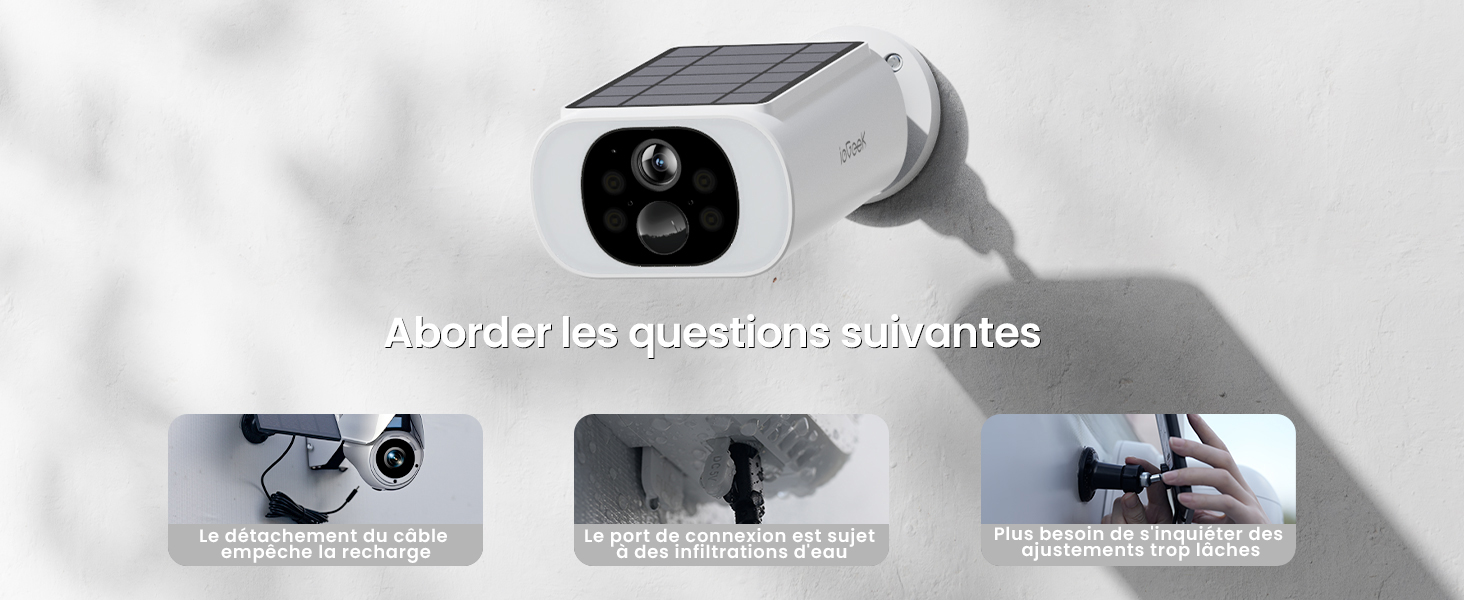
Figure 10: Clear Two-Way Audio
6.5 Lagringsmuligheder
The camera supports local storage via a TF card (up to 128GB, not included) and offers free cloud storage for motion-triggered recordings (6-second clips, 7-day cycle).

Figure 11: Local and Cloud Storage Options
6.6 Stemmekontrol
The ieGeek S1 camera is compatible with Alexa, allowing for convenient voice control commands.

Figur 12: Alexa stemmestyring
6.7 Digital zoom
The camera supports 4X digital zoom, allowing you to magnify details in the live view eller indspillet madtage.

Figur 13: 4X digital zoom
7. Vedligeholdelse
7.1 Rengøring
- Tør regelmæssigt kameralinsen og solpanelet af med en blød klud.amp klud for at sikre klart udsyn og effektiv opladning.
- Brug ikke hårde kemikalier eller slibende rengøringsmidler.
7.2 Pleje af batterier
- Ensure the integrated solar panel receives adequate sunlight to maintain battery charge.
- If the camera is installed in a shaded area or during prolonged periods of low sunlight, periodically charge the camera via the USB port.
7.3 Vejrbeskyttelse
The camera has an IP66 waterproof rating, making it suitable for outdoor use in various weather conditions (snow, rain, hurricane, -20°C to 60°C).

Figur 14: IP66 vejrbestandigt design
8. Fejlfinding
8.1 Fælles problemer
- Kameraet opretter ikke forbindelse til WiFi: Ensure your WiFi network is 2.4GHz. This camera does not support 5GHz WiFi. Check your router settings or contact your internet service provider if unsure.
- Kamera tænder ikke: Ensure the battery is fully charged. Connect the camera to a USB power source for at least 2 hours.
- Hyppige falske alarmer: Adjust the PIR detection sensitivity levels in the app. You can also define specific detection zones to focus on critical areas and ignore irrelevant movements.
- Dårligt nattesyn: Ensure the camera lens and the white/PIR LEDs are clean and unobstructed.
- Lydproblemer: Check the microphone and speaker settings in the app. Ensure there are no obstructions blocking the microphone or speaker on the camera.

Figure 15: Addressing Common Installation and Usage Concerns
9. Brugertips
- Optimal solopladning: Position the camera where its integrated solar panel receives at least 2 hours of direct sunlight daily to ensure continuous power.
- App til kontrol: The primary application for controlling the camera and viewing footage is the ieGeek Cam app.
- Netværkskompatibilitet: Remember that the camera operates on 2.4GHz WiFi networks only. If you have a dual-band router, ensure your phone is connected to the 2.4GHz band during setup.
10. Garanti og support
The ieGeek S1 camera comes with a 2-year warranty. For technical support, troubleshooting assistance, or warranty claims, please contact ieGeek customer service through their official website or the ieGeek Cam app.

Figure 16: ieGeek Brand Trust and Support
Certificeringer
This product is certified with CE and FCC standards, ensuring compliance with health, safety, and environmental protection standards.

Figur 17: Produktcertificeringer


