1. Introduktion
The Elitech ETC-3000A is a versatile digital temperature controller designed for refrigeration equipment. It is widely used in various settings such as supermarket fridges, island freezers, walk-in coolers, bar refrigeration, refrigerated display cases, ice machines, and worktop freezers.
This controller provides universal temperature control for cooling, defrosting, and fan operations. Key functionalities include temperature measurement, display, control, temperature calibration, sensor failure alarms, and over-temperature alarms.
The ETC-3000A features two-way input for a room-temperature sensor and a defrosting sensor, and three-way output for cooling, defrosting, and fan control.

Figure 1: Elitech ETC-3000A Digital Temperature Controller
2. Tekniske specifikationer
| Parameter | Værdi |
|---|---|
| Måleområde | -50~99℃ / -58℉~210℉ |
| Temperatur nøjagtighed | -40℃~50℃, ±1℃; 50℃~70℃, ±2℃; others: ±3℃ |
| Temperature Controlling Range | -50~99℃ / -58℉~210℉ |
| Strømforsyning | 110±10%(VAC), 50/60Hz |
| Strømforbrug | <3W |
| Front Panel Water-proof Level | IP65 |
| Driftstilstand | -0℉~55℃ / 32℉~58℉ |
| Opbevaringstilstand | -25℉~75℃ / -13℉~167℉ |
| Monteringsstørrelse | 71 mm x 29 mm / 2.79 tommer x 1.14 tommer |
| Kabellængde | 2m |
| Certificering | CE |

Figure 2: ETC-3000A Dimensions (3.35" x 2.95" x 1.36")
3. Funktioner
- Multi-functional Control: Supports refrigeration, defrosting, and fan control.
- Dobbelte temperatursensorer: Equipped with two temperature sensors for room temperature and defrosting.
- Høj nøjagtighed: Features high-precision chips capable of withstanding 3000 times high and low temperature shocks.
- Sikker og pålidelig: Undergoes up to 32 tests including lightning surge, cycle drop, electrostatic discharge, and anti-interference, achieving industrial level four reliability.
- Copy Card Functionality: Allows users to quickly set parameters or batch modify parameters using a copy card.
- Alarmfunktioner: Includes sensor failure alarm and over-temperature alarm.

Høj nøjagtighed

Sikker og pålidelig

Copy Card Function

Figure 3: Key functions of the ETC-3000A
4. Ansøgninger
The Elitech ETC-3000A is suitable for a wide range of temperature control applications, including but not limited to:
- Greenhouses and Grow Tents
- Inkubatorer
- Supermarket Refrigeration (fridges, island freezers, display cases)
- Walk-in Coolers
- Bar Refrigeration
- Ismaskiner
- Worktop Freezers

Greenhouse / Grow Tent
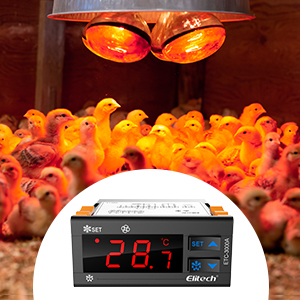
Inkubator
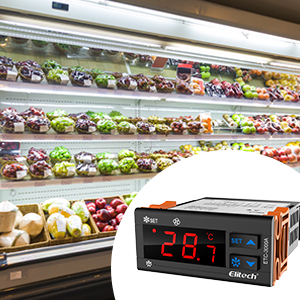
Køleudstyr
5. Opsætning og installation
The ETC-3000A is designed for embedded mounting. Ensure the mounting hole dimensions are 71mm x 29mm (2.79 inches x 1.14 inches).
5.1 Ledningsdiagram
Refer to the wiring diagram below for proper electrical connections. All wiring should be performed by a qualified electrician and comply with local electrical codes.

Figure 4: ETC-3000A Wiring Diagram
Beskrivelser af ledningsterminaler:
- Terminals 1-4: Output relays for Compressor, Defrosting, and Fan.
- Terminals 5-6: Power input (110VAC).
- Terminals 7-8: Room temperature probe connection.
- Terminals 8-9: Defrost probe connection.
- Copy Key Port: For connecting a copy key device to transfer parameters.
Vigtige sikkerhedsbemærkninger:
- Disconnect power before wiring to prevent electric shock.
- Ensure all connections are secure and correct according to the diagram.
- Do not exceed the maximum current ratings for the output relays.

Figur 5: Bagside view of ETC-3000A with wiring terminals
6. Betjening
The ETC-3000A features a digital display and control buttons for easy operation.
6.1 Frontpanel overview

Figure 6: ETC-3000A Front Panel
- Digital skærm: Shows current temperature, parameters, and error codes.
- SET -knap: Bruges til at gå ind i parameterindstillingstilstand og bekræfte valg.
- Up Arrow Button (▲): Bruges til at øge værdier eller navigere i menuer.
- Down Arrow Button (▼) / Defrost Button: Used to decrease values, navigate menus, or manually initiate defrosting.
6.2 Basic Temperature Setting
Detailed instructions for setting specific parameters (e.g., set point, differential, defrost cycle) are typically found in the full product manual. Generally, the process involves:
- Pressing the SET button to enter the setting mode.
- Using the Up/Down arrow buttons to select the desired parameter.
- Pressing SET again to view/edit the parameter value.
- Using Up/Down arrow buttons to adjust the value.
- Pressing SET to confirm the new value and exit.
The controller will automatically manage cooling, defrosting, and fan operations based on the configured parameters and sensor readings.
7. Vedligeholdelse
To ensure optimal performance and longevity of your Elitech ETC-3000A temperature controller, follow these general maintenance guidelines:
- Rensning: Periodically wipe the front panel with a soft, dry cloth. Do not use abrasive cleaners or solvents.
- Sensor inspektion: Regularly check the temperature probes for any physical damage or corrosion. Ensure they are securely connected.
- Ventilation: Ensure that the controller's ventilation openings are not obstructed to prevent overheating.
- Strømforsyning: Verify that the power supply remains stable and within the specified voltage range (110±10% VAC).
For any internal maintenance or repairs, contact qualified service personnel.
8. Fejlfinding
The ETC-3000A is equipped with error codes to help diagnose common issues:
| Fejlkode | Beskrivelse | Mulig løsning |
|---|---|---|
| P1 | Cabinet sensor failure | Check the connection of the room temperature sensor. Replace if damaged. |
| P2 | Fejl på fordampersensor | Check the connection of the defrosting sensor. Replace if damaged. |
| HA | Alarm for høj skabstemperatur | Check cooling system, door seals, or ambient temperature. Adjust set point if necessary. |
| LA | Alarm for lav skabstemperatur | Check heating system (if applicable), or ambient temperature. Adjust set point if necessary. |
| Er | Programmeringsfejl på kopikort | Re-attempt programming with the copy card. Ensure the card is inserted correctly and is compatible. |
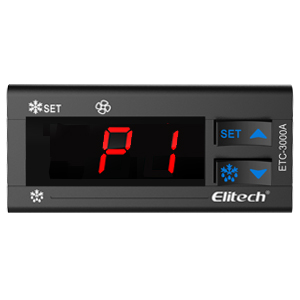
P1/P2 Error Display
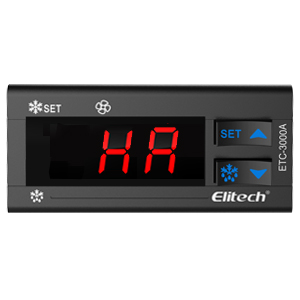
HA/LA Error Display

Er Error Display
9. Brugertips
- When installing, ensure the temperature probes are placed in locations that accurately reflect the temperature you wish to control, away from direct airflow or heat sources that could skew readings.
- For applications requiring precise temperature control, consider calibrating the sensors periodically to maintain accuracy.
- Utilize the copy card feature for quick and consistent parameter setup across multiple units or after a reset.
10. Garanti og support
For garantioplysninger, teknisk support eller serviceforespørgsler, kontakt venligst Elitechs kundeservice eller se den officielle Elitech-side. webwebsted. Behold din købskvittering som købsbevis i tilfælde af garantikrav.


