
1. Introduktion
Tak for købetasing the AIWA MSBTU-900DAB HiFi System. This all-in-one audio system delivers powerful stereo sound with 100W RMS output, featuring a Class D amplifier. It offers a wide range of audio sources including Internet Radio, DAB+, FM RDS, Bluetooth 5.2, CD MP3, and USB playback. Multiple connectivity options such as HDMI ARC, Phono input, Optical, RCA, and AUX ensure compatibility with various devices. This manual provides detailed instructions for setup, operation, and maintenance to help you get the most out of your new system.
2. Sikkerhedsoplysninger
Please read all safety instructions carefully before operating the unit and retain them for future reference. Failure to follow these instructions may result in electric shock, fire, or damage to the unit.
- Strømkilde: Tilslut kun enheden til en stikkontakt med vekselstrøm med den angivne lydstyrke.tage. Ensure the power plug is fully inserted.
- Ventilation: Do not block any ventilation openings. Allow sufficient space around the unit for proper airflow to prevent overheating.
- Vand og fugt: Udsæt ikke enheden for regn, fugt, dryp eller stænk. Placer ikke genstande fyldt med væsker, såsom vaser, på enheden.
- Varme: Hold enheden væk fra varmekilder såsom radiatorer, varmeapparater, komfurer eller andre apparater (herunder ampløftere), der producerer varme.
- Rensning: Tag stikket ud af stikkontakten før rengøring. Brug kun en blød, tør klud. Brug ikke flydende rengøringsmidler eller sprayrengøringsmidler.
- Service: Forsøg ikke selv at servicere dette produkt. Overlad al service til kvalificeret servicepersonale.
- Placering: Placer enheden på en stabil, plan overflade. Undgå at placere den i direkte sollys eller i nærheden af stærke magnetfelter.
3. Pakkens indhold
Kontroller venligst, at alle varer er til stede i emballagen:
- Main Unit (AIWA MSBTU-900DAB)
- To højttalerenheder
- Fjernbetjening
- Strømkabel
- Brugervejledning (dette dokument)
- FM antenne
4. Produktet er slutview
4.1 Frontpanel

Billede: Forside view of the AIWA MSBTU-900DAB main unit.
The front panel features the main display, a large multifunction controller for navigation and volume, and various control buttons:
- STÅ VED: Tænd/sluk for enheden.
- KILDE: Select input source (CD, USB, Bluetooth, Internet Radio, DAB+, FM, HDMI ARC, Phono, AUX).
- BT PAR: Start Bluetooth-parringstilstand.
- Forudindstillet: Access preset stations.
- BACK/PLAY/PAUSE/NEXT/STOP/EJECT: CD/USB playback controls.
- MENU: Adgang til systemmenuer.
- BAS/TREBLE: Adjust bass and treble levels.
- Multifunction Controller: Rotate to adjust volume or navigate menus; press to confirm.
- TELEFON: 3.5 mm hovedtelefonudgang.
- AUX-IN: 3.5 mm ekstra indgang.
- USB MP3: USB-port til MP3-afspilning.
4.2 Bagpanel
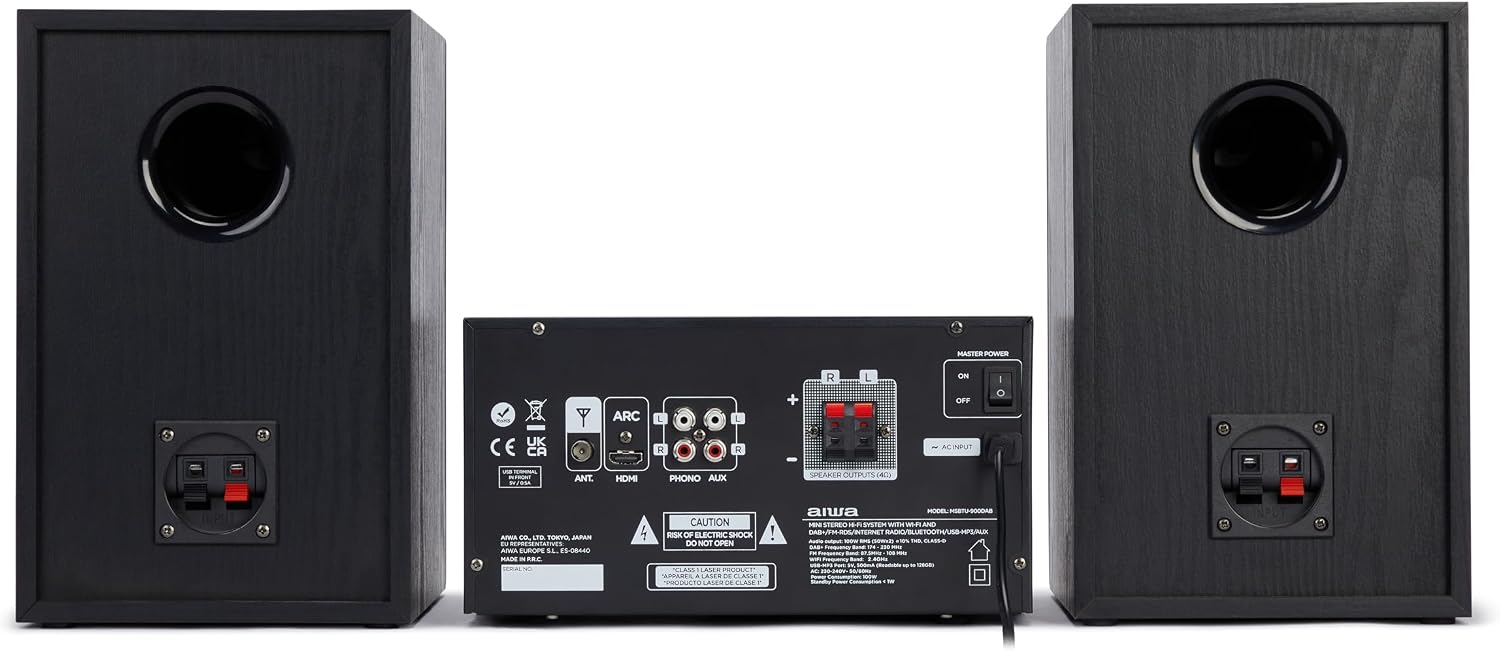
Billede: Bagside view of the AIWA MSBTU-900DAB main unit.
The rear panel provides various connection ports:
- MYRE: FM/DAB+ antenna input.
- HDMI ARC: HDMI Audio Return Channel til TV-tilslutning.
- OPTISK: Optisk digital lydindgang.
- PHONO (L/R): RCA input for turntable with RIAA equalizer.
- AUX (L/R): RCA auxiliary input.
- SPEAKER OUTPUTS (L/R): Terminals for connecting passive speakers.
- AC-INDGANG: Tilslutning af strømkabel.
- MASTERKRAFT: Hovedafbryder.
4.3 Fjernbetjening

Image: AIWA MSBTU-900DAB remote control.
Fjernbetjeningen giver nem adgang til alle funktioner:
- MAGT: Tænd / sluk for enheden.
- KØRSELSVEJLEDNING: Switch between different playback modes/sources.
- STOP/SHUFFLE/PROG/PRESET/EJECT/REPEAT: CD/USB playback and radio functions.
- MENU/INFO: Access menus and display information.
- Navigationsknapper (Op/Ned/Venstre/Højre/OK): Navigate menus and control playback.
- SPIL/PAUSE: Afspil eller sæt medier på pause.
- EQ: Vælg equalizer-forudindstillinger.
- BAS/TREBLE: Adjust bass and treble.
- STUM: Slå lyd til/fra.
- VOL +/-: Juster lydstyrken.
- Nummerknapper (0-9): Direct input for radio stations or tracks.
- ALARM/SLEEP/SNOOZE: Timer functions.
5. Opsætning
5.1 Udpakning
Carefully remove all components from the packaging. Keep the packaging materials for future transport or storage.
5.2 Højttalertilslutning

Image: AIWA MSBTU-900DAB HiFi System with main unit and speakers.
Connect the speaker cables from the speaker units to the corresponding SPEAKER OUTPUTS (L/R) terminals on the rear of the main unit. Ensure correct polarity (+ to + and - to -) for optimal sound quality.
5.3 Antenneforbindelse
Connect the supplied FM antenna to the ANT terminal on the rear panel. Extend the antenna fully for best FM/DAB+ reception.
5.4 Strømtilslutning
Plug the power cable into the AC INPUT on the rear panel of the main unit, then plug the other end into a suitable wall power outlet.
5.5 Indledende tænding
Flip the MASTER POWER switch on the rear panel to the 'ON' position. Press the STANDBY button on the front panel or remote control to turn on the unit.
5.6 Network Setup (WLAN)
For Internet Radio and app compatibility, connect the system to your Wi-Fi network:
- Tryk på knappen MENU.
- Navigate to 'Network' or 'System Settings' and select 'Network Wizard' or 'Wi-Fi Setup'.
- The system will scan for available Wi-Fi networks. Select your network from the list.
- Enter your Wi-Fi password using the multifunction controller or remote control.
- Bekræft forbindelsen. Når forbindelsen er oprettet, vises Wi-Fi-ikonet på displayet.
6. Betjeningsvejledning
6.1 Kildevalg
Press the SOURCE button on the front panel or remote control repeatedly to cycle through available input sources: Internet Radio, DAB+, FM, CD, USB, Bluetooth, HDMI ARC, Phono, AUX.
6.2 Internetradio
Once connected to Wi-Fi:
- Select 'Internet Radio' as the source.
- Use the multifunction controller or navigation buttons to browse stations by location, genre, or search.
- Vælg en station for at starte afspilningen.
- To save a station as a preset, refer to the 'Presets' section in the full manual.
6.3 DAB+ radio
Ensure the FM/DAB+ antenna is connected.
- Select 'DAB+' as the source.
- Systemet scanner automatisk efter tilgængelige DAB+-stationer ved første brug.
- Use the navigation buttons to select a station from the list.
6.4 FM RDS-radio
Ensure the FM/DAB+ antenna is connected.
- Select 'FM' as the source.
- Press and hold the NEXT/PREVIOUS buttons to auto-scan for stations.
- Press briefly to fine-tune. RDS information (station name, program type) will be displayed if available.
6.5 Bluetooth-betjening
Parring af en Bluetooth-enhed:
- Select 'Bluetooth' as the source. The display will show 'BT Pairing' or similar.
- On your smartphone, tablet, or computer, enable Bluetooth and search for devices.
- Select 'AIWA MSBTU-900DAB' from the list of found devices.
- Once paired, you can stream audio from your device to the HiFi system.
6.6 CD-afspilning

Image: AIWA MSBTU-900DAB with CD tray open.
The system supports CD, CD-R, CD-RW, and CD-MP3 discs.
- Vælg 'CD' som kilde.
- Press the EJECT button to open the motorized CD tray.
- Place a disc gently into the tray with the label side facing up.
- Press EJECT again to close the tray. Playback will start automatically or can be initiated with the PLAY/PAUSE button.
6.7 USB-afspilning
The USB port supports MP3 playback from USB drives up to 128GB.
- Insert a USB drive into the USB MP3 port on the front panel.
- Vælg 'USB' som kilde.
- Use the navigation buttons to browse folders and files. Press PLAY/PAUSE to start playback.
6.8 HDMI ARC
Connect your TV's HDMI ARC output to the HDMI ARC input on the rear panel of the HiFi system. Select 'HDMI ARC' as the source to output TV audio through the system's speakers. Ensure ARC is enabled on your TV settings.
6.9 Phono-indgang
Connect a turntable to the PHONO (L/R) RCA inputs on the rear panel. Select 'Phono' as the source. The built-in RIAA equalizer will process the audio signal.
6.10 AUX-indgang
Connect external audio devices (e.g., MP3 player, smartphone) to the front 3.5mm AUX-IN port or the rear RCA AUX (L/R) inputs. Select 'AUX' as the source.
6.11 Lydjusteringer
Use the BASS and TREBLE buttons on the front panel or remote control to adjust the sound characteristics. The remote also offers an EQ button for preset equalizer modes.
7. Vedligeholdelse
7.1 Rengøring af enheden
Always unplug the unit from the power outlet before cleaning. Use a soft, dry, lint-free cloth to wipe the surfaces. Do not use abrasive cleaners, waxes, or solvents as they may damage the finish.
7.2 Rengøring af CD-linse
Hvis CD-afspilningen bliver ujævn, kan CD-linsen være snavset. Brug en almindelig CD-linserenser til at rengøre linsen. Forsøg ikke at rengøre linsen manuelt.
8. Fejlfinding
If you encounter problems with your HiFi system, please refer to the following common issues and solutions before contacting support.
| Problem | Mulig årsag | Løsning |
|---|---|---|
| Ingen strøm | Power cable not connected; Master Power switch off | Ensure power cable is securely connected. Turn Master Power switch ON. Press STANDBY button. |
| Ingen lyd | Volume too low; Mute activated; Incorrect source selected; Speakers not connected | Increase volume. Deactivate Mute. Select correct input source. Check speaker connections. |
| Dårlig radiomodtagelse | Antenna not extended or poorly positioned | Extend and reposition the FM/DAB+ antenna for better signal. |
| Problemer med Bluetooth-forbindelse | Enhed ikke i parringstilstand; Uden for rækkevidde; Interferens | Ensure unit is in Bluetooth pairing mode. Move device closer. Avoid obstacles. Try re-pairing. |
| CD'en afspiller ikke | Disk forkert isat; Disk snavset/ridset; Ikke-understøttet diskformat | Insert disc correctly (label side up). Clean disc. Use supported CD formats. |
9. Specifikationer
- Model: MSBTU-900DAB
- Strømudgang: 100 W RMS (2 x 50 W RMS)
- Amplivligere Type: Klasse D
- Bluetooth version: 5.2
- Trådløs forbindelse: WLAN (Wi-Fi)
- Radiotunere: Internet Radio, DAB+, FM RDS (40 preset stations)
- CD-kompatibilitet: CD, CD-R, CD-RW, CD-MP3 (with ID3 tag Skærm)
- USB-afspilning: MP3 (supports up to 128 GB)
- Indgange: HDMI ARC, Optical, Phono (RIAA equalizer), RCA AUX (rear), 3.5mm AUX-IN (front), USB
- Udgange: 3.5 mm hovedtelefon
- Højttalertype: Stereoanlæg
- Farve: Sort
- Dimensioner (pakke): 75.59 x 37.29 x 35.5 cm
- Vægt (pakke): 10.92 kg
- Strømkilde: Elektrisk med ledning
10. Garanti og support
10.1 Garantioplysninger
This AIWA MSBTU-900DAB HiFi System comes with a 2 års producentgaranti from the date of purchase. This warranty covers manufacturing defects and faulty materials under normal use. Please retain your proof of purchase for warranty claims.
Garantien dækker ikke:
- Damage caused by accident, misuse, abuse, neglect, or unauthorized modification.
- Almindelig slitage.
- Damage caused by power surges or improper voltage forbindelse.
- Skader forårsaget af manglende overholdelse af instruktionerne i denne manual.
10.2 Kundesupport
For technical assistance, warranty service, or general inquiries, please contact your local AIWA dealer or visit the official AIWA webwebsted for supportkontaktoplysninger.