
1. Introduktion
This manual provides essential instructions for the safe and efficient operation, maintenance, and troubleshooting of your Proscenic Q20 Plus Robot Vacuum and Mop. Please read this manual thoroughly before using the product and retain it for future reference.
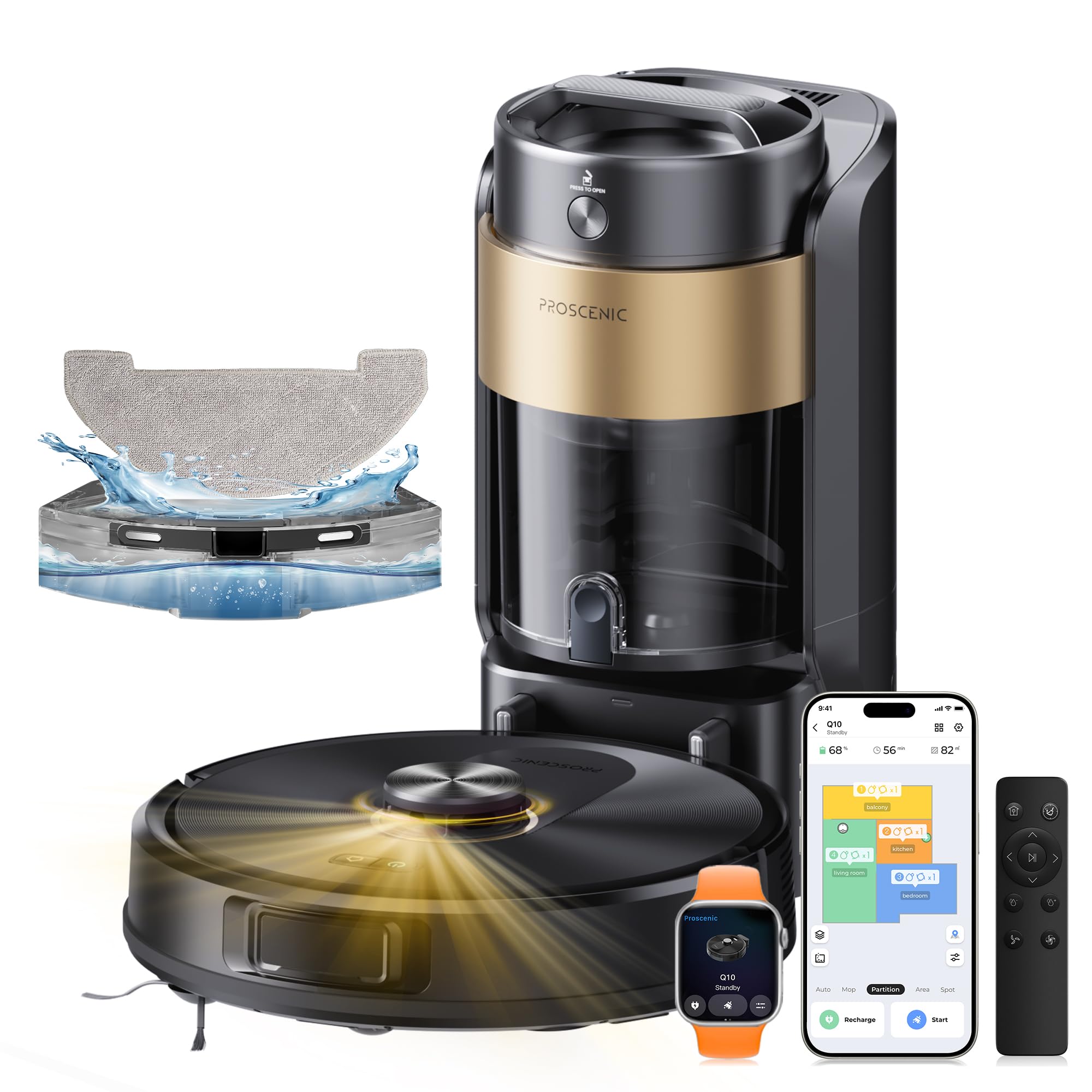
Image 1.1: Proscenic Q20 Plus Robot Vacuum and Mop with Auto-Empty Station.
2. Produktet er slutview
2.1 Nøglefunktioner
- Automatisk tømningsstation: The Q20 Plus features an optimized auto-empty station with a 4-liter dustbin, allowing up to 90 days of hands-free dust collection. This bagless system prevents particle dispersion and direct contact with dirt, offering an ecological and economical solution.
- Kraftig sugning: Equipped with 10000Pa suction power, the robot effectively removes dust, debris, pet hair, and dirt from various surfaces, including hard floors and carpets. It includes an automatic power boost function for carpets.
- Avanceret navigation: Integrated LiDAR technology combined with AI provides precise mapping and navigation. A dual-laser system detects obstacles at a distance, reacting quickly to cables, low furniture, and stairs.
- 3-i-1 rengøring: Offers vacuuming, sweeping, and mopping functionalities. The dustbin and water tank are combined into a single module for comprehensive cleaning. Features three suction levels and three water flow levels.
- Forlænget batterilevetid: A 3200 mAh battery provides up to 200 minutes of cleaning time, covering areas up to 230 m². The robot automatically recharges when the battery is below 15% and resumes cleaning from where it left off.
- Multi-Map Memory: Capable of saving up to 5 editable maps, allowing customized cleaning settings for different floors and environments. Virtual walls can be created to avoid specific areas.
2.2 Komponenter
The Proscenic Q20 Plus package includes the following components:
- Robotstøvsuger
- Auto-Empty and Charging Base
- Sidebørste
- Strømadapter
- HEPA-filter (x2)
- Rengøringsbørste
- Moppepuder (x2)
- Brugervejledning (dette dokument)
3. Opsætning
3.1 Udpakning og placering
- Fjern forsigtigt alle komponenter fra emballagen.
- Choose a suitable location for the auto-empty and charging base. Ensure it is placed against a wall, with at least 0.5 meters of clear space on either side and 1.5 meters in front. Avoid areas with direct sunlight or strong Wi-Fi signals.
- Connect the power adapter to the charging base and plug it into a wall outlet. Ensure the cable is neatly tucked away to prevent entanglement.

Image 3.1: Placing the auto-empty station and connecting power.
3.2 Indledende opladning
Place the robot vacuum onto the charging base. The robot will automatically align and begin charging. For first-time use, ensure the robot is fully charged before its initial cleaning cycle. This typically takes 4-6 hours.
3.3 Appinstallation og -forbindelse
- Download the Proscenic app from your smartphone's app store (iOS or Android).
- Åbn appen, og opret en konto, eller log ind.
- Follow the in-app instructions to add your Q20 Plus robot. This usually involves connecting to the robot's Wi-Fi hotspot temporarily and then connecting the robot to your home Wi-Fi network (2.4GHz only).
- Når du er tilsluttet, har du adgang til alle smarte funktioner, herunder kortlægning, planlægning og valg af rengøringstilstand.
4. Betjeningsvejledning
4.1 Start af en rengøringscyklus
- Via robotknap: Tryk én gang på tænd/sluk-knappen på robotten for at starte en automatisk rengøringscyklus. Tryk igen for at sætte den på pause.
- Via Proscenic App: Open the app, select your Q20 Plus, and tap "Start Cleaning" or choose a specific cleaning mode.
- Via Voice Assistant: If integrated with Amazon Echo or Google Home, use voice commands (e.g., "Alexa, start cleaning with Proscenic").

Image 4.1: The robot vacuum in operation, demonstrating powerful suction.
4.2 Rengøringstilstande
The Q20 Plus offers various cleaning modes accessible through the Proscenic app:
- Auto rengøring: Robotten kortlægger og rengør intelligent hele dit hjem.
- Zone rengøring: Definer specifikke områder på kortet, som robotten skal rengøre.
- Rengøring af pletter: Direct the robot to clean a concentrated area of dirt.
- Y-Shape Mopping: Simulates manual mopping for a deeper clean.
- Kantrensning: Robotten rengør langs vægge og møbelkanter.
4.3 Moppefunktion
Sådan bruger du moppefunktionen:
- Fyld vandtanken (integreret med støvbeholderen) med rent vand.
- Attach the mop pad to the designated slot on the robot.
- Select a mopping mode or a combined vacuum and mop mode via the app. Adjust water flow levels as needed.
4.4 Mapping and Virtual Walls
During its first cleaning cycle, the robot will create a map of your home using its LiDAR navigation. You can then use the app to:
- Edit and save up to 5 different maps for multi-floor homes.
- Set virtual walls or no-go zones to restrict the robot from entering certain areas.
- Divide or merge rooms for customized cleaning.

Image 4.2: Illustration of the Lidar navigation system mapping a room.
5. Vedligeholdelse
Regelmæssig vedligeholdelse sikrer optimal ydeevne og forlænger levetiden på din robotstøvsuger.
5.1 Auto-Empty Station Dustbin
The 4-liter dustbin in the auto-empty station requires emptying approximately every 90 days, depending on usage.
- Open the lid of the auto-empty station.
- Pull out the internal dustbin.
- Empty the collected debris into a trash can.
- The dustbin is fully washable; rinse it with clean water and allow it to air dry completely before reinserting.

Image 5.1: The 4-liter dustbin of the auto-empty station.
5.2 Robotstøvbeholder og filter
The robot's internal dustbin and HEPA filter should be cleaned weekly.
- Fjern støvbeholderen fra robotten.
- Tøm indholdet i en skraldespand.
- Fjern HEPA-filteret, og bank forsigtigt på det for at fjerne støv. Vask ikke HEPA-filteret med vand.
- Rinse the dustbin with water and let it air dry completely.
- Saml filteret og støvbeholderen igen, og sæt dem derefter i robotten igen.
5.3 Hovedbørste og sidebørster
Inspect and clean the main brush and side brushes regularly (weekly or bi-weekly).
- Hovedbørste: Remove the main brush cover and lift out the brush. Use the cleaning tool provided to cut and remove any tangled hair or debris.
- Sidebørster: Tjek for filtret hår eller snavs. Udskift dem, hvis de er beskadiget.
5.4 moppepuder
After each mopping session, remove and wash the mop pad. It can be hand-washed or machine-washed. Allow it to air dry completely before reuse.
5.5 Sensorer og opladningskontakter
Wipe the robot's sensors (Lidar, cliff sensors) and charging contacts on both the robot and the base with a clean, dry cloth monthly to ensure proper function.
6. Fejlfinding
| Problem | Mulig årsag | Løsning |
|---|---|---|
| Robotten starter eller reagerer ikke. | Lavt batteri; strømafbryder slukket; robotten sidder fast. | Oplad robotten; sørg for, at tænd/sluk-knappen er tændt; fjern eventuelle forhindringer. |
| Robotten kan ikke vende tilbage til ladestationen. | Ladestation blokeret; robotten er for langt væk; snavsede opladningskontakter. | Ensure clear path to base; manually place robot on base; clean charging contacts. |
| Dårlig rengøringsevne. | Fuld støvbeholder; tilstoppet filter; slidte børster. | Tøm støvbeholderen; rengør/udskift filteret; rengør/udskift børster. |
| Robotten sidder ofte fast. | Obstacles (cables, rugs); dirty cliff sensors. | Clear obstacles; clean sensors; use virtual walls in app. |
| Problemer med app-forbindelse. | Forkert Wi-Fi-adgangskode; 5 GHz Wi-Fi-netværk; routerproblemer. | Verify Wi-Fi password; ensure 2.4GHz network; restart router and robot. |
For further assistance, refer to the Proscenic app's help section or contact customer support.
7. Specifikationer
| Feature | Detalje |
|---|---|
| Modelnavn | Q20 Plus |
| Mærke | Proscenisk |
| Sugekraft | 10000 Pa |
| Batterilevetid | 200 minutter |
| Batteritype | Lithium-ion |
| Dustbin Capacity (Auto-Empty Station) | 4 liter |
| Navigationstype | LiDAR 360° with AI Obstacle Avoidance (Dual Laser System) |
| Kontroltype | App Control, Remote Control, Voice Control (Amazon Echo, Google Home) |
| Støjniveau | 60 decibel |
| Dimensioner (Robot) | 32L x 32B x 9.7H cm |
| Filtertype | HEPA |
| Overfladeanbefaling | Bamboo, Concrete, Wood, Engineered Wood, Tile, Laminate, Linoleum, Marble, Upholstery, Carpet, Glass, Vinyl |
| Rengøringstilstande | Vacuum, Sweep, Mop (3-in-1) |
| Multi-Map Support | Op til 5 redigerbare kort |
8. Garanti og support
For detaljerede garantioplysninger henvises til garantikortet, der følger med dit produkt, eller besøg den officielle Proscenic-side. webwebsted. Garantivilkårene kan variere fra region til region.
If you encounter any issues not covered in the troubleshooting section, or require further assistance, please contact Proscenic customer support through the following channels:
- Proscenic App: Få adgang til supportsektionen i applikationen.
- Officiel Webwebsted: Besøg www.proscenic.com for FAQs, support contact information, and service centers.


