
1. Sikkerhedsoplysninger
Please read all safety instructions carefully before operating this appliance. Failure to follow these instructions may result in electric shock, fire, or personal injury.
- Sørg for, at strømforsyningen matcher voltagsom angivet på enhedens typeskilt.
- Brug ikke enheden med en beskadiget ledning eller stik. Hvis ledningen er beskadiget, skal den udskiftes af producenten eller en kvalificeret servicetekniker.
- Do not block air inlets or outlets. Maintain at least 20 cm (8 inches) clearance from walls and other objects.
- Stik ikke fingre eller fremmedlegemer ind i luftindtag eller -udtag.
- Placer altid enheden på en plan, stabil overflade for at forhindre den i at vælte.
- Tag stikket ud af enheden, før du rengør eller udfører vedligeholdelse.
- Dette apparat er ikke beregnet til brug af personer (inklusive børn) med nedsatte fysiske, sensoriske eller mentale evner, eller mangel på erfaring og viden, medmindre de har fået opsyn eller instruktion i brugen af apparatet af en person, der er ansvarlig for deres sikkerhed.
- Brug ikke enheden i våde omgivelser såsom badeværelser eller vaskerum.
- Brug ikke kemiske opløsningsmidler (f.eks. benzen, alkohol, benzin) til at rengøre enheden.
2. Produktet er slutview
The SereneLife SLINV12CHPDEU is a portable inverter air conditioner designed to provide efficient climate control for rooms up to approximately 32 m². It offers 4-in-1 functionality: cooling, heating, ventilation, and dehumidification.
Nøglefunktioner:
- 12,000 BTU (3.52 kW) Cooling/Heating Capacity: Provides rapid and effective temperature adjustment.
- Inverter teknologi: Automatically adjusts power for energy efficiency and quieter operation (44-49 dB).
- 4-i-1 funktionalitet: Cool, Heat, Fan, and Dry (Dehumidify up to 1.3 L/h).
- Smart kontrol: Manage settings via WiFi APP, remote control, or the Feather-Touch LED panel.
- Auto-Swing Function: Sikrer en jævn luftfordeling i hele rummet.
- Bærbart design: Udstyret med hjul for nem flytning mellem rum.
- Vinduessæt inkluderet: Facilitates quick and adaptable installation for single-hose exhaust.
Komponenter inkluderet:
- SereneLife SLINV12CHPDEU Portable Air Conditioner Unit
- Udstødningsslange
- Window Sealing Kit (for single hose installation)
- Fjernbetjening
- Vaskbart luftfilter (forinstalleret)
- Brugermanual
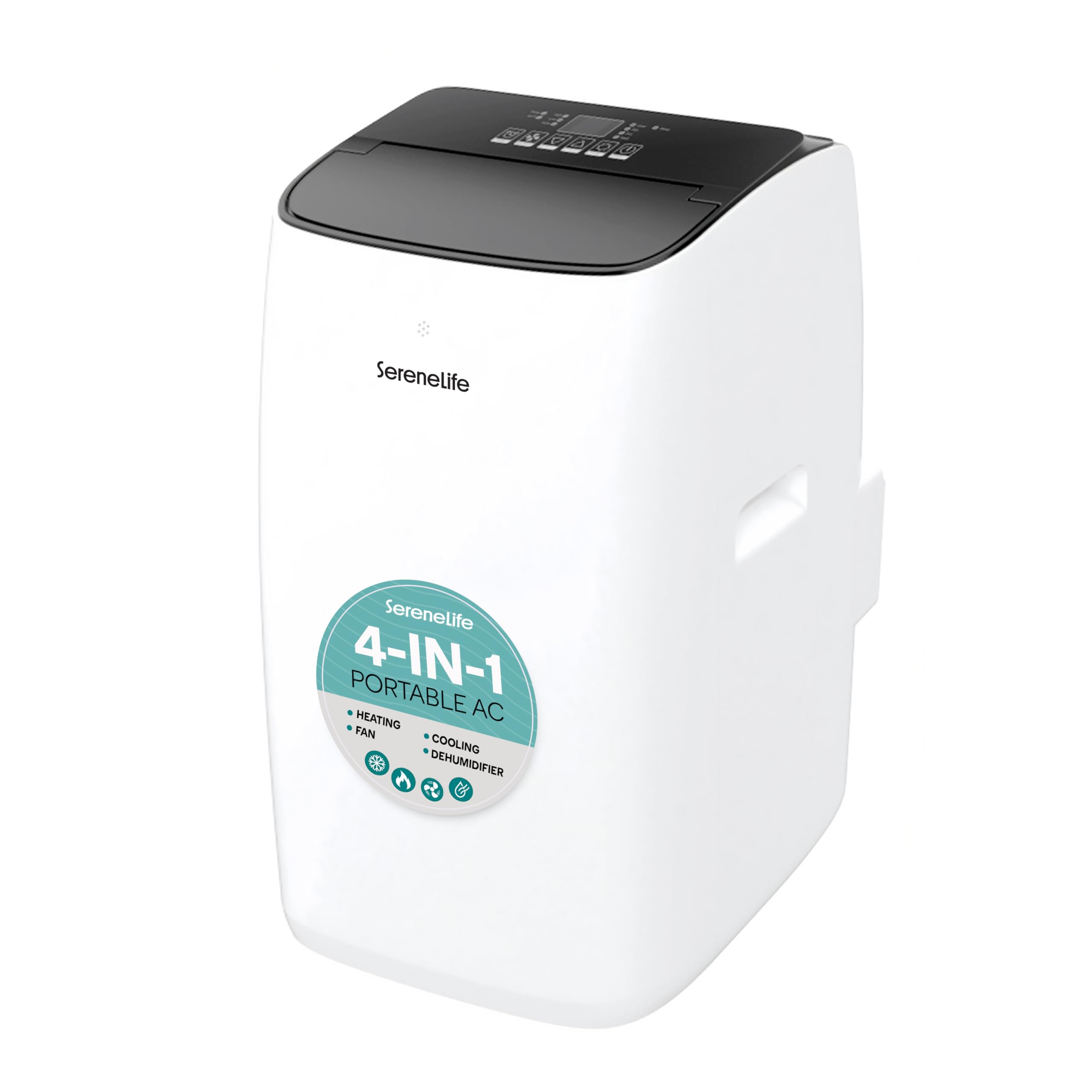
Figure 2.1: SereneLife SLINV12CHPDEU Portable Inverter Air Conditioner. This image shows the front view of the portable air conditioner unit, highlighting its compact and modern design.
3. Opsætning
3.1 Udpakning og placering
- Tag forsigtigt enheden ud af emballagen. Gem emballagen til senere opbevaring eller transport.
- Place the air conditioner on a firm, level surface in the desired room. The unit is equipped with wheels for easy relocation.
- Ensure there is at least 20 cm (8 inches) of space around the unit for proper airflow. Do not place it near heat sources or in direct sunlight.
3.2 Window Kit Installation (Single Hose System)
This unit operates with a single exhaust hose system to vent hot air outside. Proper installation of the window kit is crucial for efficient operation.
- Fastgør udstødningsslangen: Connect one end of the exhaust hose to the air outlet on the back of the unit. Twist or click into place securely.
- Assemble the Window Sealing Kit: The adjustable window slide kit is designed for most vertical and horizontal windows. Adjust the length of the window kit to fit your window opening.
- Installer vinduessættet: Place the assembled window kit into the window opening. Close the window firmly against the kit to create a seal.
- Tilslutning af slange til vinduessæt: Attach the other end of the exhaust hose to the adapter on the window kit. Ensure a tight seal to prevent hot air from re-entering the room.
- Tætningshuller: Use the provided seals or additional sealing materials to minimize any gaps around the window kit and window frame. This is critical for preventing outside air from entering and reducing cooling efficiency.
3.3 Strømtilslutning
- Plug the power cord into a grounded electrical outlet. Do not use extension cords or multi-plugs.
- Sørg for, at stikkontakten er let tilgængelig.
4. Betjeningsvejledning
The SereneLife SLINV12CHPDEU can be controlled via its Feather-Touch panel, remote control, or a smartphone application.
4.1 Kontrolpanel
The Feather-Touch panel on the top of the unit allows direct control of all functions. Refer to the unit's display for current settings and status indicators.
4.2 Fjernbetjening
The included remote control provides convenient access to all functions from a distance. Ensure there are no obstructions between the remote and the unit's receiver.
4.3 driftstilstande
- Cool tilstand: Select this mode for cooling. Adjust the desired temperature using the temperature up/down buttons. The unit will cool the room to the set temperature.
- Varmetilstand: Select this mode for heating. Adjust the desired temperature. The unit will provide supplemental heating.
- Ventilatortilstand: In this mode, the unit circulates air without cooling or heating. Adjust fan speed (Low, Medium, High) as desired.
- Tør (affugtnings) tilstand: This mode reduces humidity in the room. The fan speed is typically fixed to low in this mode.
4.4 Yderligere funktioner
- Timer: Set the unit to turn on or off automatically after a specified period (up to 24 hours).
- Sove mode: Optimizes operation for quietness and energy saving during sleep. The temperature may gradually increase (in cooling mode) or decrease (in heating mode) over time.
- Auto-Swing: Activates the automatic oscillation of the air vents for wider air distribution.
4.5 WiFi App Control
The unit supports control via a smartphone application. Follow these general steps for setup:
- Download appen: Scan the QR code in the manual or search for the recommended app (e.g., SmartLife) in your smartphone's app store.
- Registrer/Log ind: Opret en konto eller log ind på appen.
- Enable WiFi on Unit: Follow the instructions in the unit's specific manual to activate its WiFi pairing mode (usually indicated by a flashing WiFi icon).
- Tilføj enhed: In the app, select "Add Device" or the '+' icon. Choose the appropriate device type (e.g., Air Conditioner).
- Parring: Follow the in-app instructions to connect the unit to your home WiFi network. This may involve selecting your WiFi network and entering the password.
Note: Some users have reported better connectivity using the generic "SmartLife" app and scanning the QR code for device recognition. If the dedicated SereneLife app is unavailable or problematic, try this alternative. Ensure the WiFi indicator on the unit is active during pairing.
5. Vedligeholdelse
Regelmæssig vedligeholdelse sikrer optimal ydeevne og forlænger levetiden på dit klimaanlæg.
5.1 Rengøring af luftfilteret
The unit is equipped with a removable and washable air filter. A dirty filter can reduce efficiency and airflow.
- Sluk og tag stikket ud: Afbryd altid strømmen før rengøring.
- Fjern filter: Locate the air filter (usually at the back or side of the unit) and carefully slide it out.
- Rens filter: Wash the filter under running water (warm, not hot) or use a vacuum cleaner to remove dust. For heavy dirt, a mild detergent can be used.
- Tørt filter: Allow the filter to air dry completely before re-installing. Do not expose to direct sunlight.
- Geninstaller filter: Slide the dry filter back into its position.
Recommendation: Clean the air filter every two weeks, or more frequently if the unit is used often or in dusty environments.
5.2 Draining the Unit
This unit features an auto-evaporation system, which typically eliminates the need for manual draining in most conditions. However, in areas of high humidity, the internal water tank may fill up, and the unit might stop operating to prevent overflow. In such cases, manual draining is required.
- Sluk og tag stikket ud: Afbryd enheden fra strømforsyningen.
- Locate Drain Port: Find the drain port at the bottom rear of the unit.
- Placer container: Placer en lav gryde eller beholder under afløbsporten.
- Fjern aftapningsproppen: Carefully remove the rubber drain plug. Water will begin to flow out.
- Replace Plug: Once all water has drained, securely replace the drain plug.
5.3 Opbevaring
Hvis enheden ikke skal bruges i en længere periode:
- Tøm alt vand ud af enheden.
- Rengør luftfilteret.
- Kør enheden i kun ventilatortilstand i et par timer for at tørre indersiden.
- Tag netledningen ud, og rul den pænt op.
- Dæk enheden med en plastikpose eller et stykke stof for at beskytte den mod støv.
- Opbevar enheden på et køligt, tørt sted.
6. Fejlfinding
Før du kontakter kundesupport, bedes du læse følgende fejlfindingsvejledning for almindelige problemer.
| Problem | Mulig årsag | Løsning |
|---|---|---|
| Enheden tænder ikke | Ingen strømforsyning Netledningen er ikke sat i Strømafbryder udløst Internal water tank full (in Dry mode) | Tjek stikkontakten Ensure plug is firmly inserted Nulstil afbryder Drain the unit (see Section 5.2) |
| Utilstrækkelig køling/opvarmning | Luftfilter snavset Værelsesstørrelsen er for stor Vinduer/døre åbne Exhaust hose not properly installed/sealed Temperature setting too high (Cool) or too low (Heat) | Clean air filter (see Section 5.1) Ensure unit is suitable for room size Luk alle vinduer og døre Verify exhaust hose connection and window kit seal Juster temperaturindstillingen |
| Enheden er støjende | Normale driftslyde Enheden står ikke på en plan overflade Vibrations from internal components | Some noise is normal (44-49 dB) Sørg for, at enheden står på en flad, stabil overflade If persistent squealing/vibration occurs, contact customer support. |
| WiFi app not connecting | Forkert parringsproces App compatibility issues svagt WiFi-signal | Ensure unit is in pairing mode Try using the "SmartLife" app as an alternative (see Section 4.5) Ensure strong WiFi signal near the unit |
| Display shows set temperature, not actual room temperature | Dette er normal drift | The unit's display shows the mål temperature you have set, not the current ambient room temperature. |
7. Specifikationer
| Specifikation | Værdi |
|---|---|
| Mærke | Fredfyldt liv |
| Modelnavn | SLINV12CHPDEU |
| Modelnummer | SLINV12CHPDEU |
| Kølekapacitet | 12000 BTU (British Thermal Units) |
| Speciel funktion | Window kit with single hose |
| Produktmål (D x B x H) | 40P x 45L x 75H centimeter |
| Farve | Hvid |
| Voltage | 220 volt |
| Støjniveau | 44-49 Decibels (Operating Range) |
| Strømkilde | Elektrisk med ledning |
| Formfaktor | Transportabel |
| Inverter type | Med inverter |
| Installationstype | Vindue |
| Udendørsenhed påkrævet | Ingen |
| Air Conditioner Application | Bolig |
| Wattage | 902 watt |
| Varens vægt | 21.3 kilo |
| Kontrolmetode | Application, Touch, Remote Control |
| Inkluderede komponenter | Filter, Product Unit |
| UPC | 842893189888 |
| Energieffektivitet | A+++ |
| Årligt energiforbrug | 675 kilowatt-hours per year |
8. Garanti og support
8.1 Produktgaranti
This SereneLife product is covered by a 30 dages garanti fra købsdatoen. Denne garanti dækker fabrikationsfejl og funktionsfejl ved normal brug. Gem venligst din købsbevis til garantikrav.
8.2 Kundesupport
If you encounter any issues not covered in the troubleshooting section or require further assistance, please contact SereneLife customer support. Refer to the contact information provided on the product packaging or the official SereneLife webwebstedet for de mest opdaterede supportoplysninger.
Når du kontakter support, bedes du have følgende oplysninger klar:
- Model Number (SLINV12CHPDEU)
- Købsdato
- Detaljeret beskrivelse af problemet