
1. Introduktion
This manual provides essential information for the installation, operation, and maintenance of the Generic ZV-446 / T2805310400 Electronic Delay Door Lock Interlock Switch Assembly. This component is designed as a replacement part for compatible Beko washing machines, ensuring the door remains securely locked during operation and releases safely after the cycle. Please read this manual thoroughly before installation and use.
2. Sikkerhedsoplysninger
- Afbryd altid vaskemaskinen fra strømforsyningen, før du forsøger at installere, vedligeholde eller reparere den.
- Installation should only be performed by qualified personnel or individuals with experience in appliance repair.
- Brug passende personlige værnemidler (PPE), såsom handsker og øjenbeskyttelse, under installationen.
- Ensure all connections are secure and correctly made to prevent electrical hazards or malfunction.
- Do not operate the washing machine if the door lock assembly is damaged or not functioning correctly.
3. Pakkens indhold
Kontroller, at alle varer er til stede og ubeskadigede, når du åbner pakken.
- 1 x ZV-446 / T2805310400 Electronic Delay Door Lock Interlock Switch Assembly
4. Specifikationer
| Modelnummer | VAOYHCVWC (Compatible with ZV-446, T2805310400, T2805311700) |
| Del Type | Electronic Delay Door Lock Interlock Switch Assembly |
| Kompatibilitet | Select Beko Washing Machine Models |
| Varens vægt | 1.76 ounce |
| Produktdimensioner | 3.94 x 3.94 x 3.94 tommer |
| Voltage | 1 Kilovolt (as per product data, verify with appliance specifications) |
5. Opsætning og installation
This section outlines the general steps for replacing a washing machine door lock interlock switch. Specific procedures may vary depending on your washing machine model. Always refer to your appliance's service manual for detailed instructions.
5.1 Forberedelse
- Afbryd strømmen: Unplug the washing machine from the electrical outlet. Turn off the circuit breaker if necessary.
- Adgang til dørlåsen: Depending on your washing machine model, you may need to remove the front panel, top panel, or the door seal to access the door lock assembly.
5.2 Removal of Old Door Lock
- Locate Mounting Screws: Identify and remove the screws securing the door lock assembly to the washing machine frame.
- Afbryd ledninger: Carefully disconnect the electrical connectors from the old door lock. Note the orientation of the wires if they are not color-coded or keyed.
- Remove Assembly: Gently pull the old door lock assembly out from its mounting position.
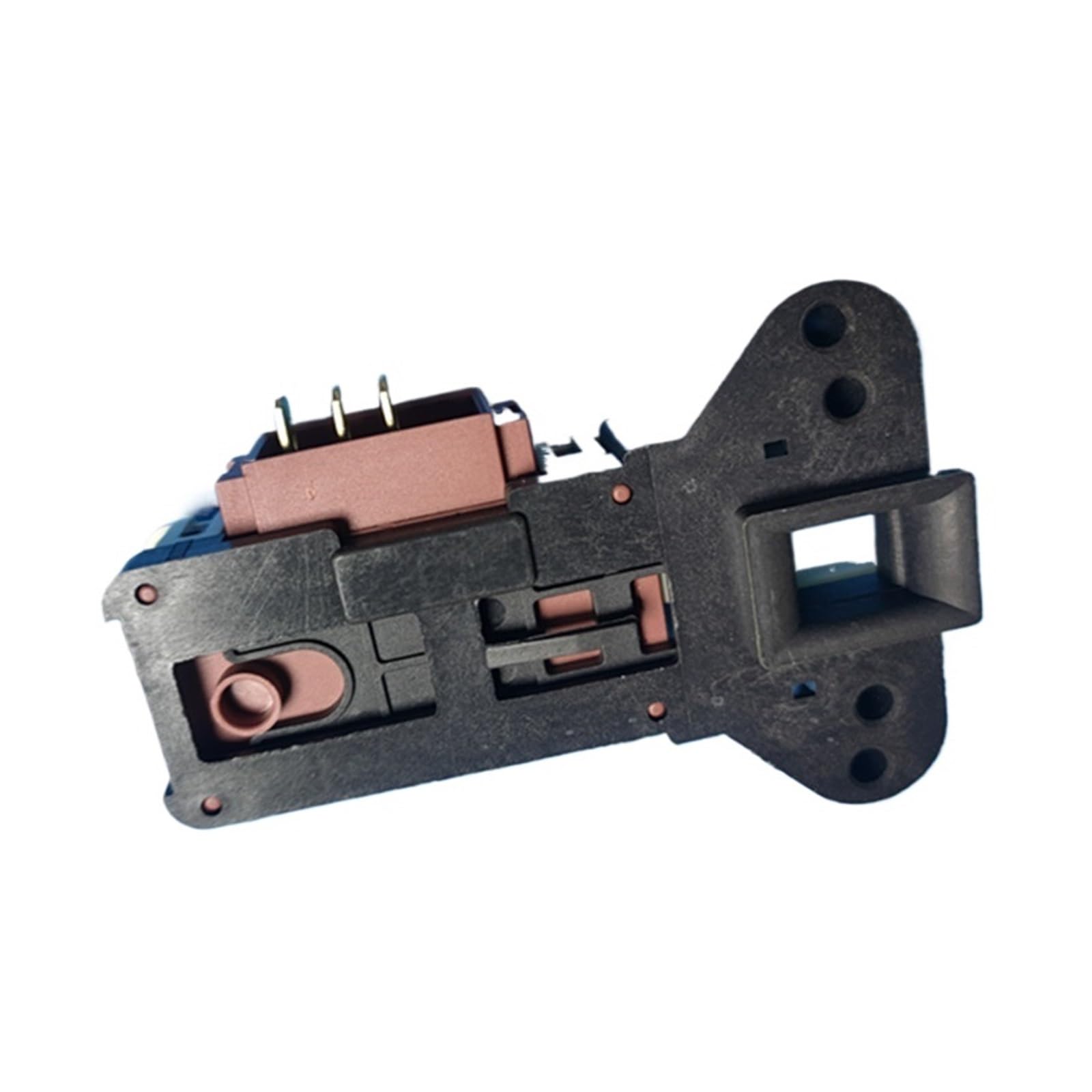
Figur 1: Overview of the ZV-446 / T2805310400 door lock interlock switch assembly. This image shows the main body of the lock with its electrical connector and the latch mechanism.
5.3 Installation of New Door Lock
- Position New Lock: Insert the new ZV-446 / T2805310400 door lock assembly into the mounting opening. Ensure it is correctly aligned.
- Sikre monteringsskruer: Fasten the new door lock assembly with the mounting screws. Do not overtighten.
- Tilslut ledninger: Reconnect the electrical connectors to the new door lock. Ensure a firm and secure connection.

Figur 2: Nærbillede view of the 3-pin electrical connector on the door lock. Ensure proper alignment and secure connection of the wiring harness to these pins during installation.

Figur 3: Side view of the door lock showing the T2805310400 part number. This view highlights the specific model identification for compatibility verification.
5.4 Samling og testning
- Saml panelerne igen: Reattach any panels or the door seal that were removed to access the lock.
- Gendan strøm: Plug the washing machine back into the electrical outlet or restore power at the circuit breaker.
- Test funktionalitet: Run a short wash cycle to ensure the door locks correctly at the beginning of the cycle and unlocks at the end.
6. Betjeningsvejledning
The ZV-446 / T2805310400 Electronic Delay Door Lock Interlock Switch Assembly functions automatically as part of your washing machine's control system. Its primary role is to ensure safety and proper operation.
- Door Locking: Once a wash cycle is selected and started, the electronic delay mechanism will engage, locking the washing machine door. This prevents the door from being opened during high-speed cycles or when water is present.
- Interlock-funktion: The interlock switch ensures that the washing machine cannot operate if the door is not properly closed and locked. This is a critical safety feature.
- Døroplåsning: After the wash cycle is complete and the machine has drained, the electronic delay will disengage, allowing the door to be opened. There may be a short delay (typically 1-3 minutes) after the cycle ends before the door unlocks.
No direct user interaction is required with the door lock assembly itself during normal operation.
7. Vedligeholdelse
The ZV-446 / T2805310400 door lock assembly is designed for durability and typically requires minimal maintenance. However, periodic checks can help ensure its longevity and proper function.
- Visuel inspektion: Periodically inspect the door lock area for any signs of wear, damage, or debris accumulation. Ensure the door latch mechanism is clean and free from obstructions.
- Elektriske forbindelser: If accessible, ensure that the electrical connections to the door lock remain secure and free from corrosion. (Only perform if comfortable and after disconnecting power.)
- Dørpakning: A damaged or improperly seated door seal can affect the door's ability to close and lock correctly. Ensure your washing machine's door seal is in good condition.
Do not attempt to lubricate the internal components of the door lock assembly, as this may interfere with its electronic operation.
8. Fejlfinding
If you experience issues with your washing machine's door lock, refer to the following common problems and solutions. Always disconnect power before inspecting components.
| Problem | Mulig årsag/løsning |
|---|---|
| Døren låser ikke. |
|
| Door does not unlock after cycle. |
|
| Vaskemaskinen starter ikke. |
|
Hvis fejlfindingstrinene ikke løser problemet, anbefales det at kontakte en kvalificeret tekniker til apparater.
9. Garantioplysninger
This product is sold as a replacement part. For specific warranty details, please refer to the terms and conditions provided by your retailer or the manufacturer at the time of purchase. Keep your proof of purchase for any warranty claims.
10. Kundesupport
For further assistance or inquiries regarding the ZV-446 / T2805310400 Electronic Delay Door Lock Interlock Switch Assembly, please contact your original point of purchase or refer to the support resources provided by the washing machine manufacturer for model-specific guidance.