
1. Introduktion
This manual provides essential information for the safe and efficient operation of your PECRON F5000LFP Power Station. The F5000LFP is a high-capacity solar generator designed to provide reliable power for various applications, including emergency home backup, RV use, and off-grid power needs. It features a 5120Wh LiFePO4 battery, 7200W AC output, and supports dual voltage (120V/240V).
2. Sikkerhedsoplysninger
Please read and understand all safety instructions before operating the PECRON F5000LFP Power Station. Failure to follow these instructions may result in electric shock, fire, or serious injury.
- Do not expose to water or moisture: Keep the power station away from rain, splashes, or submersion.
- Arbejd i godt ventilerede områder: Sørg for tilstrækkelig luftgennemstrømning omkring enheden for at forhindre overophedning.
- Undgå ekstreme temperaturer: Do not operate or store the unit in excessively hot or cold environments. Refer to specifications for operating temperature ranges.
- Må ikke skilles ad: Unauthorized disassembly voids the warranty and may cause damage or injury. Contact customer support for service.
- Holdes væk fra børn og kæledyr: Store the unit in a secure location.
- Brug kun godkendt tilbehør: Use only PECRON-approved charging cables, solar panels, and expansion batteries.
- Korrekt bortskaffelse: Dispose of the battery and unit according to local regulations. Do not dispose of in household waste.
3. Pakkens indhold
Kontroller, at alle genstande er til stede ved udpakning:
- 1x PECRON F5000LFP Power Station
- Brugermanual
- AC-opladerkabel
- Detachable Cart (pre-installed or separate assembly required)
Note: If your purchase included solar panels or extra batteries, these items may be shipped separately.
4. Produktfunktioner
- Høj kapacitet: 5120Wh LiFePO4 battery.
- Kraftig AC-udgang: Up to 7200W AC output with 120V/240V dual voltage støtte.
- Rapid Solar Charging: Supports up to 6400W total solar input.
- Uninterruptible Power Supply (UPS): Features 0ms online UPS outlets (two 20A, one 30A) for critical devices.
- Alsidige udgange: 12 output ports including AC, DC (12-40V adjustable 5525 and XT-60), USB-A (18W), and USB-C (100W).
- Støjsvag drift: Operates at a low noise level of 30dB, ideal for quiet environments.
- Portabilitet: Equipped with a detachable cart for easy movement.
- Battery Heating Function: Ensures optimal performance in cold environments.
- Udvidbar kapacitet: Can be expanded up to 35.8kWh by connecting up to 6 FP5000-48V extra batteries.
- Lang levetid: Retains 80% capacity after 4000 full charge cycles.
- Smart App Control: Monitor battery status, customize charging, and manage automation via a dedicated mobile application.
5. Opsætning
5.1 Udpakning og inspektion
Carefully remove the power station from its packaging. Inspect the unit for any signs of damage during transit. If damage is found, contact customer support immediately.
5.2 Indledende opladning
Before first use, fully charge the F5000LFP Power Station. Connect the included AC charging cable to the AC input port on the unit and then to a standard wall outlet. The display will indicate charging status. A full charge typically takes approximately 1.5 hours via AC.
5.3 Detachable Cart Assembly
If the detachable cart is not pre-installed, attach the caster wheels and frame to the base of the power station according to the diagrams provided in the separate cart assembly guide (if applicable). Ensure all connections are secure for safe transport.

Image: The PECRON F5000LFP Power Station shown with its detachable cart, illustrating its portability. The cart allows for easy movement of the unit.
5.4 Expanding Capacity (Optional)
The F5000LFP can be expanded by connecting FP5000-48V extra batteries. Follow the instructions provided with the expansion batteries for proper connection. Ensure the power station is turned off before connecting or disconnecting any expansion units. The system can be expanded up to 35.8kWh with 6 FP5000-48V batteries.

Image: The F5000LFP Power Station with multiple FP5000-48V batteries stacked, demonstrating how the system can be expanded to achieve higher energy capacities like 35.8kWh or 25.6kWh.
6. Betjeningsvejledning
6.1 Tænd/sluk
Press and hold the main power button for a few seconds to turn the unit on or off. The display screen will illuminate upon power-on.
6.2 Brug af AC-udgange
The F5000LFP provides five 3600W AC outlets and one 7200W AC outlet, supporting both 120V and 240V. Press the AC output button to activate the AC ports. Connect your appliances to the appropriate outlets. Ensure the total wattage of connected devices does not exceed the unit's maximum output capacity.

Image: The F5000LFP Power Station in a kitchen setting, powering a refrigerator. Labels indicate 120V input and 240V output, highlighting its dual voltage and high AC output capabilities.
6.3 Brug af DC- og USB-udgange
Press the DC output button to activate the DC and USB ports. The unit features two 18W USB-A ports, one 100W USB-C port, a 12-40V adjustable 5525 port, and an XT-60 port. These ports are suitable for charging mobile devices, laptops, and other DC-powered equipment. The adjustable 5525 and XT-60 ports allow for voltage and current customization to adapt to various devices.
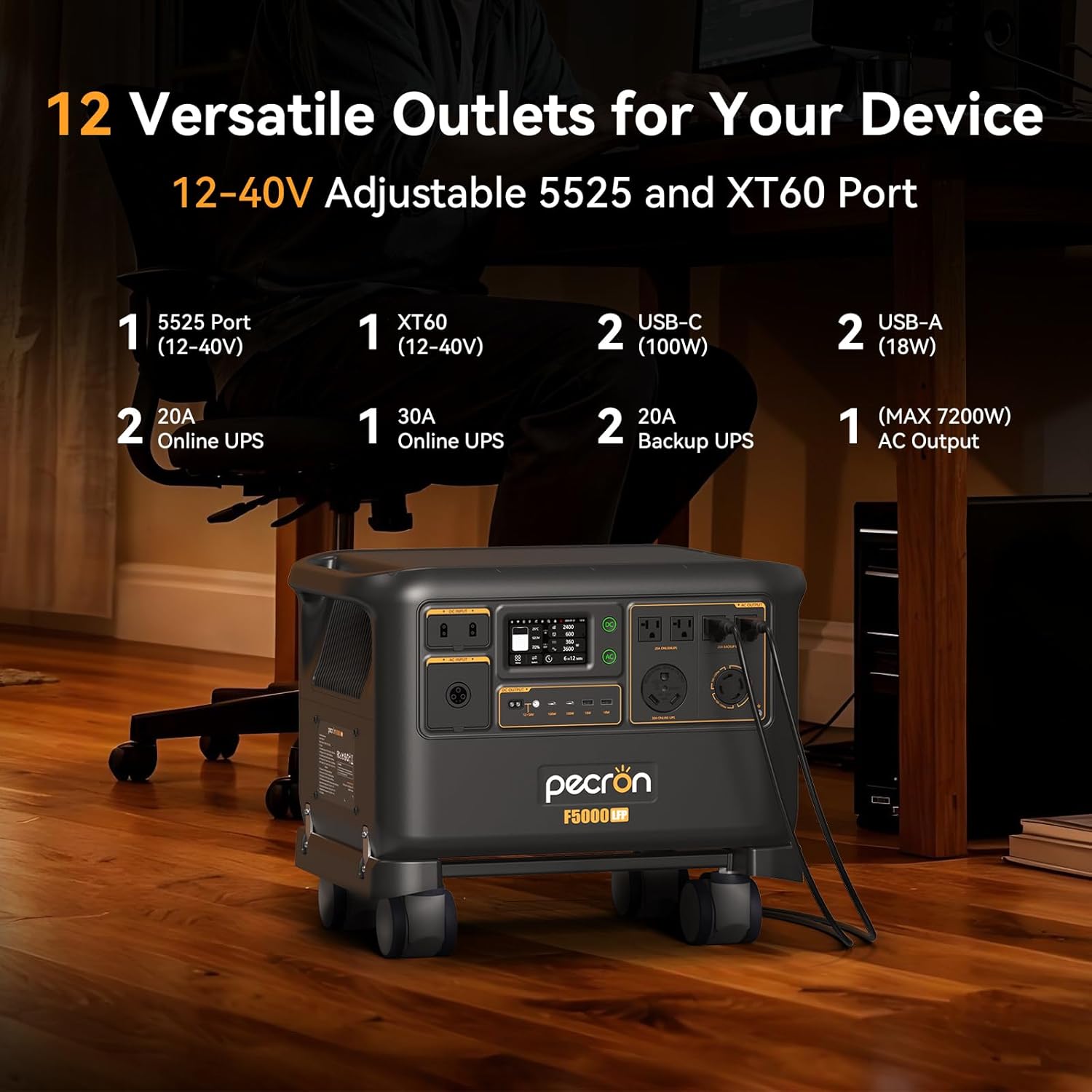
Billede: Et nærbillede view of the F5000LFP's front panel, detailing the various output ports available: 5525 (12-40V), XT60 (12-40V), USB-C (100W), USB-A (18W), 20A Online UPS, 30A Online UPS, and AC outputs.
6.4 Uninterruptible Power Supply (UPS) Mode
The F5000LFP includes two 20A and one 30A 0ms online UPS outlets. When connected to grid power, the unit can act as an online UPS, providing seamless power transfer to connected devices during a power outage. This ensures continuous operation for sensitive electronics like computers, Wi-Fi routers, and medical equipment (e.g., CPAP machines).

Image: The F5000LFP Power Station positioned next to a desk, illustrating its 0ms 30A online UPS capability, providing reliable backup for devices such as computers and Wi-Fi.
6.5 Battery Heating Function
For optimal performance in cold weather, the F5000LFP features a battery heating function. This function helps maintain the battery's temperature within its ideal operating range, ensuring efficient charging and discharging even in sub-zero conditions. Activate this feature via the unit's display or the smart app.
7. Opladningsmetoder
The F5000LFP supports multiple charging methods, which can be combined for faster recharging.
- AC opladning: Connect the power station to a standard wall outlet using the provided AC charging cable. The unit supports up to 3600W AC input.
- Solopladning: Connect compatible solar panels to the two solar charging ports. The F5000LFP supports a maximum total solar input of 6400W (25A per port). This allows for building a sustainable home energy system.
- Generatoropladning: The unit can be charged using a compatible generator. Ensure the generator's output voltage and frequency are within the F5000LFP's input specifications (40-70Hz).
- Bilopladning: A 500W car charger (sold separately) can be used to charge the F5000LFP from a vehicle's 12V outlet.
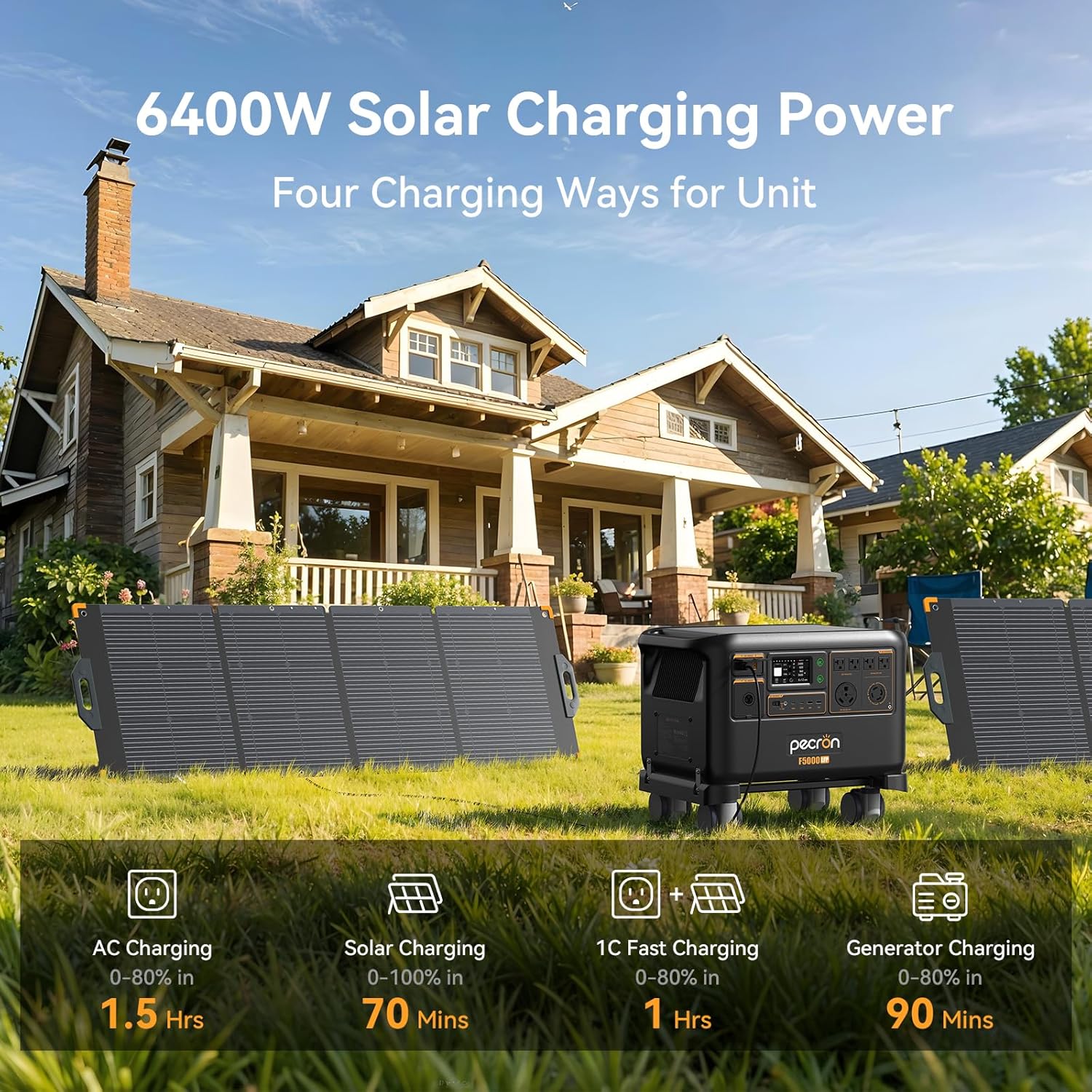
Image: The F5000LFP Power Station placed outdoors with two large solar panels, illustrating its 6400W solar charging capability and various charging methods including AC, solar, 1C fast charging, and generator charging.
8. Smart app-styring
Download the PECRON smart app to unlock advanced control and monitoring features for your F5000LFP Power Station.
- Overvågning i realtid: View battery status, input/output wattage, og resterende køretid.
- Customizable Charging: Set charging schedules to utilize off-peak electricity rates or prioritize solar charging to maximize clean energy use and reduce electricity bills.
- Automation Features: Create custom power usage plans, such as setting the unit to start charging when power drops below a certain percentage or adjusting AC charging speed based on battery level.
- Softwareopdateringer: Receive over-the-air (OTA) updates to enhance functionality and performance.
- Power Usage Statistics: Track historical power consumption and generation data.
- Equipment Records: Access detailed records of the unit's operation and events.
- Memory Output: The unit can automatically resume previous output settings after being restored.

Image: A user interacting with the PECRON smart app on a smartphone, demonstrating easy control and monitoring of the power station's functions, including battery condition, charging plans, and software updates.
9. Vedligeholdelse
Regular maintenance ensures the longevity and optimal performance of your F5000LFP Power Station.
- Rensning: Use a dry, soft cloth to clean the exterior of the unit. Do not use liquid cleaners or solvents.
- Opbevaring: When not in use for extended periods, store the power station in a dry, cool place, away from direct sunlight and extreme temperatures. It is recommended to charge the unit to 50-80% every 3-6 months to maintain battery health.
- Batteriets sundhed: The LiFePO4 battery is designed for over 4000 cycles to 80% capacity. Avoid consistently fully discharging the battery to prolong its lifespan.
- Ventilation: Sørg for, at ventilationsåbningerne er fri for støv og snavs for at forhindre overophedning.
10. Fejlfinding
If you encounter issues with your F5000LFP Power Station, refer to the following common troubleshooting steps:
- Enheden tænder ikke:
- Ensure the battery is not completely depleted. Connect to an AC outlet for charging.
- Press and hold the main power button firmly for several seconds.
- Ingen output fra porte:
- Verify that the specific output (AC, DC, USB) is activated via its respective button.
- Check if the connected device is within the power station's output limits. Overload protection may have been triggered.
- Sørg for, at kablerne er tilsluttet sikkert.
- Opladningsproblemer:
- For AC charging, ensure the cable is properly connected to a working wall outlet.
- For solar charging, verify solar panel connections, ensure panels are in direct sunlight, and check for any shading. Confirm solar input wattage på displayet.
- Check for error messages on the display or in the smart app.
- Usædvanlig støj eller lugt:
- Immediately turn off the unit and disconnect all power sources.
- Contact customer support. Do not attempt to operate the unit.
If the problem persists after following these steps, please contact PECRON customer support.
11. Specifikationer
| Feature | Specifikation |
|---|---|
| Mærke | pecron |
| Modelnavn | F5000LFP |
| Batteritype | LiFePO4 |
| Batterikapacitet | 5120Wh |
| AC Output Wattage | 7200W (Running) |
| Voltage | 120V/240V Dual Voltage |
| Maks. Solindgang | 6400W |
| AC Indgang Wattage | 3600W |
| DC Output (Total) | 1000W |
| Udgangsporte | 6 AC, 6 DC (including USB-A, USB-C, 5525, XT-60) |
| UPS funktion | 0ms Online UPS (20A, 30A) |
| Udvidelsesmuligheder | Up to 35.8kWh with FP5000-48V batteries |
| Støjniveau | 30dB (at 1500W or 1200W charging) |
| Varens vægt | 123.9 pund |
| Produktmål (L x B x H) | 21.7 cm x 15 cm x 13.1 cm |
| Særlige funktioner | Overload Protection, Super Quiet, USB Port, Battery Heating |
12. Garanti og support
12.1 Garantioplysninger
The PECRON F5000LFP Power Station comes with a 3+2 års garanti. Please retain your proof of purchase for warranty claims. For detailed terms and conditions, refer to the warranty card included with your product or visit the official PECRON webwebsted.
12.2 Kundesupport
For technical assistance, troubleshooting, or warranty inquiries, please contact PECRON Customer Support. Contact information can typically be found on the PECRON webwebstedet eller på produktemballagen.