
1. Introduktion
The Senwa Vacuum V100 is an advanced robotic vacuum cleaner designed to provide efficient and effortless cleaning for your home. With powerful suction and intelligent navigation, it effectively cleans various surfaces, from hard floors to carpets, ensuring a spotless environment. Its compact design and user-friendly features make daily cleaning simple and convenient. The V100's effective filtration system captures dust and fine particles, contributing to improved air quality in your living space. This manual provides essential information for the safe and optimal use, maintenance, and troubleshooting of your Senwa Vacuum V100.
Nøglefunktioner:
- Powerful and Efficient Suction: Optimized motor ensures deep cleaning on floors, carpets, and difficult corners, removing dust and dirt in a single pass.
- Lightweight and Maneuverable Design: Easy to transport and use in any space, ideal for quick, effortless cleaning or frequent use.
- Multi-Surface Versatility: Works perfectly on different types of surfaces, adapting to the needs of homes or offices.
- Effective Filtration System: Captures fine particles and helps maintain a cleaner environment, ideal for improving hygiene.
- Easy Maintenance and Durability: Accessible components for quick cleaning and long lifespan, designed for continuous and reliable use.
2. Sikkerhedsoplysninger
Please read all safety instructions carefully before using your Senwa Vacuum V100. Keep this manual for future reference.
- Dette apparat kan bruges af børn i alderen 8 år og derover og personer med nedsatte fysiske, sensoriske eller mentale evner eller mangel på erfaring og viden, hvis de har fået opsyn eller instruktion i brugen af apparatet på en sikker måde og forstår de involverede farer. .
- Børn skal være under opsyn for at sikre, at de ikke leger med apparatet.
- Rengøring og brugervedligeholdelse må ikke udføres af børn uden opsyn.
- Do not use the vacuum cleaner in wet environments or on wet surfaces.
- Do not allow the vacuum cleaner to pick up large objects, liquids, burning or smoking objects (e.g., hot ashes, cigarettes).
- Use only the original charging adapter and charging dock provided by the manufacturer.
- Ensure the charging dock is placed against a wall on a level surface, free from obstacles.
- Fjern løse kabler, små genstande eller skrøbelige genstande fra gulvet før rengøring for at forhindre, at de vikles ind i eller beskadiges.
- Do not operate the vacuum cleaner if it is damaged. Contact customer support for assistance.
- Turn off the vacuum cleaner and unplug it from the charging dock before performing any maintenance or cleaning.
3. Pakkens indhold
Carefully unpack your Senwa Vacuum V100 and check that all items are present and in good condition. If any items are missing or damaged, please contact customer support.
- Senwa Vacuum V100 Robot Vacuum Cleaner (Main Unit)
- Opladningsdock
- Strømadapter
- Sidebørster (2 par)
- Hovedbørste (forinstalleret)
- Skraldespand (forinstalleret)
- Højeffektivt filter (forinstalleret)
- Rengøringsværktøj
- Brugermanual
4. Produktet er slutview
Familiarize yourself with the components of your Senwa Vacuum V100.
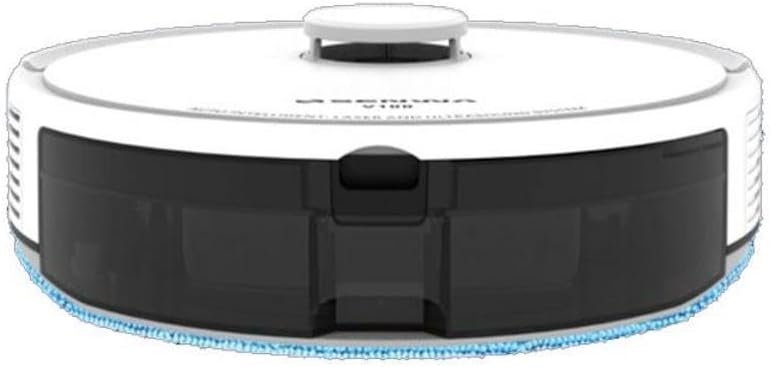
Figure 4.1: Top-Front View of Senwa Vacuum V100
This image shows the top and front of the robot vacuum, highlighting the main body, control button, and dustbin access panel.

Figur 4.2: Side View of Senwa Vacuum V100
Dette billede viser et sideprofile of the robot vacuum, showing a driving wheel, a side brush, and a ventilation grille.

Figur 4.3: Side View of Senwa Vacuum V100 with Dustbin Area
This image illustrates another side view, focusing on the area where the dustbin is typically accessed or removed.
Hovedkomponenter:
- Låg: Beskytter interne komponenter.
- Kontrolknap: Initiates or pauses cleaning, returns to charging dock.
- Skraldespand: Samler snavs og affald.
- Sidebørster: Sweep debris from edges and corners into the vacuum's path.
- Hovedbørste: Agitates and lifts dirt from floors.
- Drivhjul: Allow the robot to move across various surfaces.
- Opladningskontakter: Connect with the charging dock for power.
- Sensorer: Detect obstacles, cliffs, and walls for navigation.
- Opladningsdock: Provides power to recharge the robot.
5. Opsætning
5.1 Udpakning og klargøring
- Remove the robot vacuum and all accessories from the packaging.
- Fjern eventuelle beskyttelsesfilm eller klistermærker fra robotten og opladningsdokken.
- Attach the side brushes by pressing them onto the square posts on the bottom of the robot until they click into place.
5.2 Placing the Charging Dock
- Placer opladningsdokken mod en væg på en hård, plan overflade.
- Sørg for, at der er mindst 0.5 meter (1.6 fod) fri plads på begge sider af docken og 1.5 meter (4.9 fod) foran den.
- Tilslut strømadapteren til opladningsdocken, og sæt den i en stikkontakt. Sørg for, at strømindikatoren på docken lyser.
5.3 Indledende opladning
- Place the robot vacuum onto the charging dock, ensuring the charging contacts on the robot align with those on the dock.
- The robot will begin charging. Allow it to fully charge before its first use (approximately 4-6 hours). The indicator light on the robot will change to indicate a full charge.
6. Betjeningsvejledning
6.1 Start af en rengøringscyklus
- Ensure the robot is fully charged and clear any large obstacles from the cleaning area.
- Press the main control button on the top of the robot once to start an automatic cleaning cycle.
- The robot will automatically navigate and clean your floors.
6.2 Pause/genoptagelse af rengøring
- To pause cleaning, press the main control button once during operation.
- To resume cleaning, press the main control button again.
6.3 Tilbage til ladestationen
- To send the robot back to its charging dock, press and hold the main control button for a few seconds until the robot indicates it is returning.
- The robot will automatically return to the charging dock when its battery is low or when a cleaning cycle is complete.
6.4 Rengøringstilstande (hvis relevant)
Your Senwa Vacuum V100 may feature different cleaning modes for various needs:
- Auto rengøring: The robot intelligently plans a cleaning path for comprehensive coverage.
- Rengøring af pletter: Koncentrerer rengøringen på et specifikt snavset område.
- Kantrensning: Rengør langs vægge og møbelkanter.
Refer to the specific instructions for your model on how to activate these modes, typically via a mobile app or remote control (if included).
7. Vedligeholdelse
Regular maintenance ensures optimal performance and extends the lifespan of your Senwa Vacuum V100.
7.1 Tømning af skraldespanden
Empty the dustbin after each cleaning cycle or when it is full.
- Tryk på udløserknappen til støvbeholderen, og træk støvbeholderen ud.
- Åbn låget til skraldespanden, og tøm indholdet i en skraldespand.
7.2 Rengøring af filteret
Clean the filter weekly or as needed. Replace every 3-6 months.
- Fjern filteret fra støvbeholderen.
- Bank forsigtigt på filteret for at fjerne støv. Vask ikke højeffektivfilteret med vand.
- Rinse the primary filter (if applicable) with water and let it air dry completely before reinserting.
7.3 Rengøring af hovedbørsten
Clean the main brush weekly.
- Fjern hovedbørstedækslet, og løft hovedbørsten ud.
- Brug rengøringsværktøjet til at fjerne hår og snavs, der har viklet sig ind omkring børsten.
- Geninstaller hovedbørsten og dækslet.
7.4 Rengøring af sidebørster
Check side brushes regularly for wear and tear. Replace if damaged.
- Træk sidebørsterne af deres stolper.
- Fjern eventuelt hår eller snavs.
- Sæt børsterne på igen, og sørg for, at de klikker på plads.
7.5 Rengøring af sensorer og opladningskontakter
Wipe sensors and charging contacts monthly with a dry cloth.
- Gently wipe the cliff sensors (located on the bottom of the robot) and wall sensors (on the front bumper).
- Rengør opladningskontakterne på både robotten og opladningsdocken.
8. Fejlfinding
If you encounter issues with your Senwa Vacuum V100, refer to the following common problems and solutions.
| Problem | Mulig årsag | Løsning |
|---|---|---|
| Robotten tænder eller oplader ikke. | Batteriet er helt afladet; opladningskontakterne er snavsede; strømadapteren er ikke tilsluttet. | Ensure the charging dock is powered. Clean charging contacts on both robot and dock. Place robot directly on dock. |
| Robotten sidder ofte fast. | For mange forhindringer; klippesensorerne er beskidte. | Clear loose cables, rugs, and small objects. Clean cliff sensors. |
| Dårlig sugeevne. | Dustbin is full; filter is clogged; main brush is tangled. | Tøm støvbeholderen. Rengør eller udskift filteret. Rengør hovedbørsten. |
| Usædvanlig støj under drift. | Main brush or side brushes are tangled; foreign object inside. | Clean main brush and side brushes. Check for and remove any foreign objects. |
| Robotten vender ikke tilbage til ladestationen. | Charging dock is blocked or out of range; charging contacts are dirty. | Ensure charging dock has clear space. Clean charging contacts. Manually place robot on dock. |
If the problem persists after trying these solutions, please contact Senwa customer support.
9. Specifikationer
| Feature | Detalje |
|---|---|
| Mærke | Senwa |
| Model | V100 |
| Formfaktor | Robotisk |
| Farve | Hvid |
| ASIN | B0GTY5J56M |
| Strømkilde | Genopladeligt batteri |
| Opladningstid | Ca. 4-6 timer |
| Filtreringssystem | Højeffektivt filter |
| Rengøringstilstande | Auto, Spot, Edge (may vary by specific model features) |
10. Garanti og support
The Senwa Vacuum V100 comes with a standard manufacturer's warranty. Please refer to the warranty card included in your package for specific terms and conditions, including the warranty period and coverage details.
For technical support, service, or any questions regarding your product, please contact Senwa customer service through the contact information provided on your warranty card or the official Senwa website. When contacting support, please have your product model (V100) and ASIN (B0GTY5J56M) ready.