
Indledning
Welcome to the VIBOX PC Gamer VTX-8 instruction manual. This guide provides essential information for setting up, operating, maintaining, and troubleshooting your new gaming computer. Please read this manual carefully to ensure optimal performance and longevity of your system.
The VIBOX VTX-8 is a high-performance gaming PC equipped with an AMD Ryzen 5 5500 processor, Nvidia RTX 5060 graphics card, 16GB of RAM, and a 1TB SSD, running on Windows 11 Home. It is designed to deliver an immersive gaming experience and handle demanding tasks with ease.

Image: The VIBOX PC Gamer VTX-8 desktop computer, showcasing its sleek white chassis and internal components.
Opsætning
1. Udpakning og første placering
Carefully remove your VIBOX PC Gamer from its packaging. Ensure all accessories, including the power cable, USB Wi-Fi 6 AX900 and Bluetooth 5.4 adapter, and any included RGB lighting components, are present. Place the PC on a stable, flat surface with adequate ventilation around the chassis.
2. Tilslutning af eksterne enheder
Connect your monitor(s) to the graphics card's HDMI or DisplayPort outputs. Connect your keyboard and mouse to the available USB ports. Plug in any other peripherals such as a headset or external storage devices.
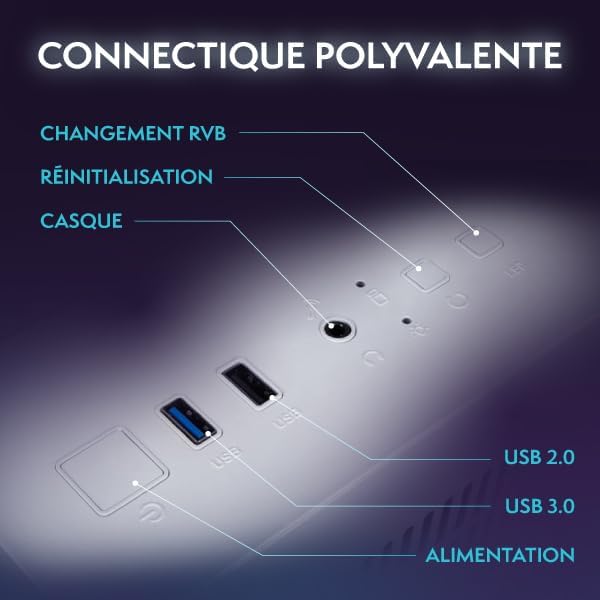
Billede: Et nærbillede view of the versatile connectivity ports on the VIBOX PC Gamer, including USB 2.0, USB 3.0, headset jack, reset button, and RGB change button.
3. Strømtilslutning
Connect the power cable to the PC's power supply unit (PSU) and then to a wall outlet. Ensure the power switch on the PSU (if present) is in the 'ON' position.
4. Første opstart og Windows 11-opsætning
Press the power button on the front of the PC. The system will boot up, and you will be guided through the initial setup process for Windows 11 Home. Follow the on-screen instructions to configure your language, region, network, and user account.
Betjening af din pc
1. Tænd/sluk og genstart
- Tænd: Tryk én gang på tænd/sluk-knappen.
- Luk ned: Klik på Start-knappen, og derefter på Tænd/sluk > Luk ned.
- Genstart: Klik på Start-knappen, og derefter på Tænd/sluk > Genstart.
2. Windows 11 Home Features
Your VIBOX PC Gamer comes pre-installed with Windows 11 Home, optimized for gaming. Key features include:
- DirectStorage: Enables faster game load times.
- AutoHDR: Automatically enhances game graphics for compatible displays.
- Xbox Game Pass Integration: Seamless access to a library of games.
- Optimized CPU Performance: Enhanced performance for gaming and multitasking.

Image: An illustration highlighting the gaming-centric features of Windows 11 Home, including faster load times, AutoHDR, Xbox Game Pass integration, and optimized CPU performance.
3. Netværksforbindelse
Your PC includes a USB Wi-Fi 6 AX900 and Bluetooth 5.4 adapter for wireless connectivity. To connect to Wi-Fi, click the network icon in the taskbar, select your network, and enter the password. For Bluetooth devices, go to Settings > Bluetooth & devices to pair.
4. Gaming and Multimedia
The VIBOX VTX-8 is designed for gaming, photo editing, and video editing. Utilize the powerful Nvidia RTX 5060 graphics card and AMD Ryzen 5 5500 processor for demanding applications.
Opretholdelse
1. Rensning
Regularly clean the exterior of your PC with a soft, dry cloth. For internal components, use compressed air to remove dust from fans and heatsinks. Ensure the PC is powered off and unplugged before cleaning. Pay attention to the air intake and exhaust vents to maintain optimal airflow.
2. Softwareopdateringer
Keep your Windows operating system and graphics drivers updated. Windows updates can be managed via Settings > Windows Update. Graphics drivers can be downloaded from the official NVIDIA webwebsted.
3. Luftstrøm og køling
The VTX-8 features an inverted airflow design and Hex RGB Infinity 120mm fans for efficient cooling. Ensure that the PC's vents are not obstructed to allow proper air circulation. Good airflow is crucial for maintaining system stability and performance, especially during intensive gaming sessions.
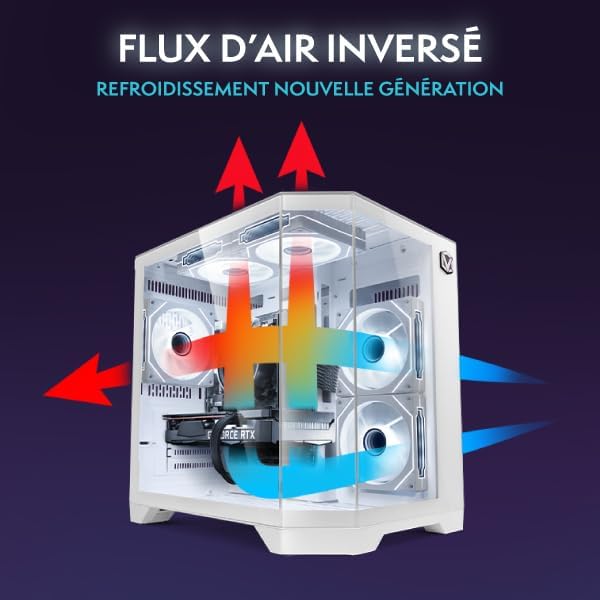
Image: A diagram illustrating the inverted airflow design of the VIBOX PC Gamer, showing how air is drawn in and expelled for next-generation cooling efficiency.

Image: A display of the Hex RGB Infinity 120mm fans, highlighting their customizable multiple colors and RGB modes for personalizing your setup.
Fejlfinding
This section addresses common issues you might encounter with your VIBOX PC Gamer.
Ingen strøm
- Kontroller, om strømkablet er korrekt tilsluttet til både pc'en og stikkontakten.
- Ensure the power switch on the PSU is in the 'ON' position.
- Prøv en anden stikkontakt.
Ingen visning på skærmen
- Verify that the monitor is powered on and correctly connected to the graphics card (not the motherboard's integrated graphics ports, if any).
- Kontroller inputkilden på din skærm.
- Prøv et andet skærmkabel eller en anden skærm, hvis det er muligt.
Performance Issues / Lag
- Ensure all drivers (especially graphics drivers) are up to date.
- Tjek for baggrundsprogrammer, der bruger systemressourcer.
- Monitor CPU and GPU temperatures to prevent thermal throttling. Ensure proper airflow and clean any dust buildup.
Windows Installation Issues (e.g., Bugs, Language Mix)
Some users have reported initial Windows installations being buggy or having mixed languages. If you experience this:
- Immediately run all available Windows Updates. Go to Settings > Windows Update and check for updates repeatedly until no more are found.
- Ensure your display language is correctly set in Settings > Time & Language > Language & Region.
- If issues persist, consider performing a clean reinstallation of Windows 11 Home using official Microsoft media creation tools. This can resolve deep-seated software conflicts.
Blæserstøj
A slight fan noise can be normal, especially under load. However, if you notice an unusual or loud noise from a specific fan:
- Check for any obstructions (cables, dust) that might be hitting the fan blades.
- Ensure fans are securely mounted.
- If the noise is persistent and disruptive, contact VIBOX support.
Specifikationer
| Komponent | Detalje |
|---|---|
| Modelnavn | VTX-8 (V-506) |
| Processor | AMD Ryzen 5 5500 (6 Cores, 3.6 GHz base, up to 4.2 GHz max) |
| Grafikkort | Nvidia GeForce RTX 5060 (8GB GDDR7, HDMI 2.1, DisplayPort) |
| VÆDDER | 16 GB DDR4 (2666 MHz) |
| Opbevaring | 1TB SATA SSD |
| Operativsystem | Windows 11 Home |
| Trådløs forbindelse | USB Wi-Fi 6 AX900 & Bluetooth 5.4 (Dual-band support) |
| Kablet tilslutning | Ethernet, HDMI, DisplayPort, USB |
| Afkølingsmetode | Air Cooling (Hex RGB Infinity 120mm Fans) |
| Case Design | 3-Panel Tempered Glass |
| Dimensioner (L x B x H) | 35 x 28 x 38 cm |
| Maksimal skærmopløsning | 3840x2160 |
| Strømstik type | Type C/EF (European/Hybrid FR-DE plug) |

Image: The VIBOX PC Gamer VTX-8 case with dimensions indicated: 29.5cm (depth), 22cm (width), 37.5cm (height), and 8cm (base height).
Garantioplysninger
Your VIBOX PC Gamer VTX-8 comes with a comprehensive warranty:
- Dele: 2 år
- Arbejdskraft: Livstid
Please retain your proof of purchase for warranty claims. The warranty covers manufacturing defects and hardware failures under normal use conditions. It does not cover damage caused by misuse, accidents, unauthorized modifications, or improper maintenance.
Støtte
For technical assistance, warranty claims, or any questions regarding your VIBOX PC Gamer, please contact VIBOX Gaming customer support. You can typically find contact information on the VIBOX official webhjemmeside eller gennem din forhandler.
For yderligere ressourcer og produktinformation, besøg VIBOX Gaming Store on Amazon.