
OLIXIS OL-CSJ-4.5L3
OLIXIS 50 Pint Dehumidifier User Manual
Model: OL-CSJ-4.5L3
1. Introduktion
Thank you for choosing the OLIXIS 50 Pint Dehumidifier, Model OL-CSJ-4.5L3. This manual provides important information for the safe operation, installation, maintenance, and troubleshooting of your appliance. Please read it thoroughly before use and retain it for future reference.
This dehumidifier is designed to remove excess moisture from indoor air, helping to create a more comfortable and healthier environment. It is suitable for areas up to 3,500 square feet, such as basements, bedrooms, and bathrooms.
2. Sikkerhedsinstruktioner
ADVARSEL: For at mindske risikoen for brand, elektrisk stød eller personskade skal du altid følge disse grundlæggende forholdsregler:
- Læs alle instruktioner før brug af apparatet.
- Sørg for, at strømforsyningen matcher voltage angivet på mærkatet.
- Brug ikke affugteren med en beskadiget netledning eller stik.
- Always plug into a grounded electrical outlet.
- Bloker ikke luftindtag eller -udtag. Hold mindst 20 cm frirum omkring enheden.
- Brug ikke apparatet i nærheden af vand eller i meget våde omgivelser.
- Tag stikket ud af enheden, før du rengør, flytter eller udfører vedligeholdelse.
- Hold børn og kæledyr væk fra apparatet under drift.
- Forsøg ikke selv at reparere eller modificere enheden. Kontakt kvalificeret servicepersonale.
- Always empty the water tank carefully to prevent spills.
3. Produktet er slutview
The OLIXIS 50 Pint Dehumidifier is designed for efficient moisture removal with user-friendly features.

Figure 3.1: Dehumidifier placement in different rooms, highlighting its coverage and operational modes.
Nøglefunktioner:
- Affugtningskapacitet: Up to 50 pints (23.6 liters) per day.
- Dækningsområde: Effective for spaces up to 3,500 square feet.
- Stille drift: Fungerer med mindre end 41 dB.
- Airflow Swing: 75° vertical swing for even air distribution.
- Driftstilstande: Auto, Drying, Sleep, and Air Purification.
- Vandtank: 4.5 Liters (1.19 Gallons) capacity, removable and visual.
- Kontinuerlig dræning: Includes a 3.28 ft (1 meter) drain hose.
- Filter: Removable and washable air filter.
- Smarte funktioner: Automatic defrost, 24-hour timer, automatic restart, adjustable humidity control, child lock.
- Mobilitet: Four 360° swivel casters for easy movement.
4. Opsætning
4.1 Udpakning
Carefully remove the dehumidifier from its packaging. Inspect the unit for any shipping damage. Retain the packaging materials for future storage or transport.
4.2 Placering
Place the dehumidifier on a flat, level surface. Ensure there is at least 8 inches (20 cm) of space around the unit to allow for proper airflow. Do not place it against a wall or near curtains that could obstruct the air inlets or outlets.

Figure 4.1: Dehumidifier dimensions and mobility features.
4.3 Strømtilslutning
Plug the power cord into a grounded electrical outlet. Ensure the outlet meets the electrical requirements of the unit (refer to specifications section).
4.4 Dræningsmuligheder
Din affugter tilbyder to dræningsmetoder:
- Manuel dræning (vandtank): The unit will collect water in its 4.5-liter water tank. When the tank is full, the unit will automatically shut off and an indicator light will illuminate. You must manually empty the tank.
- Kontinuerlig dræning (afløbsslange): For continuous operation without manual emptying, attach the included 3.28 ft drain hose to the continuous drain port on the back of the unit. Ensure the hose is sloped downwards to a suitable drain (e.g., floor drain, sink) to allow gravity to remove water.
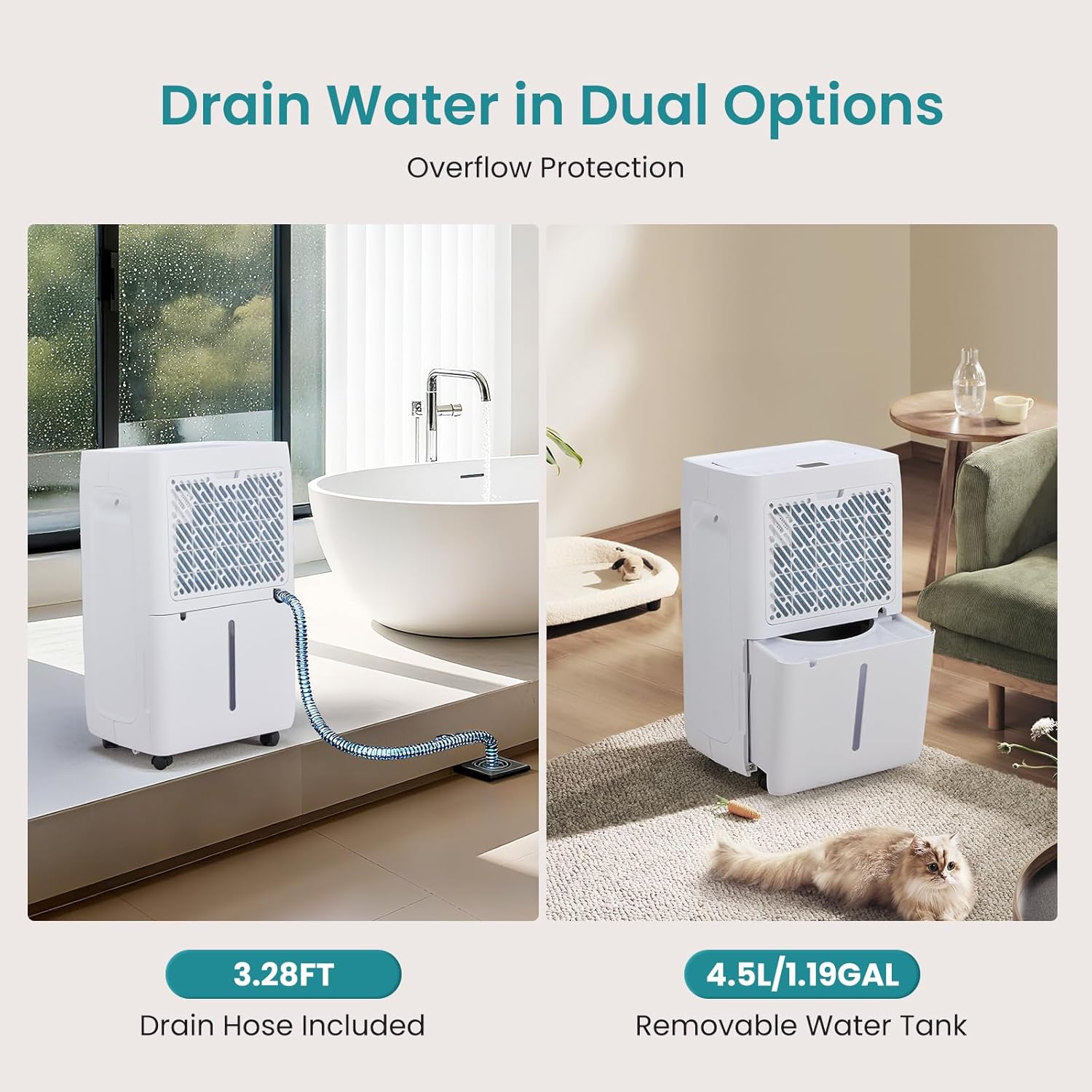
Figure 4.2: Illustration of continuous drainage via hose and manual drainage using the water tank.
5. Betjeningsvejledning
The control panel allows you to manage all functions of your dehumidifier.

Figure 5.1: Intelligent Control Panel.
5.1 Tænd/sluk
- Tryk på Til/Fra knap () for at tænde eller slukke for enheden.
5.2 Valg af tilstand
Tryk på Mode knap () for at gennemgå følgende tilstande:
- Automatisk tilstand: The unit automatically adjusts fan speed (High/Low) and humidity settings to maintain a comfortable humidity level based on the ambient environment.
- Tørretilstand: Operates at high fan speed to quickly reduce humidity, ideal for drying clothes or very damp områder.
- Sove mode: Operates at a lower fan speed for quieter operation, suitable for nighttime use. The display lights may dim.
- Luftrensningstilstand: Activates the air purification function to help reduce airborne contaminants.
5.3 Humidity Level Adjustment
In Auto mode, you can adjust the desired humidity level. Press the Justering af fugtighedsniveau knap () to set the target humidity between 30% and 80% relative humidity (RH) in 5% increments. The unit will operate until the set humidity is reached.
5.4 blæserhastighed
Tryk på Høj/Lav knap () to switch between High and Low fan speeds. This option may be limited in certain modes (e.g., Sleep mode typically uses Low speed).
5.5 Timerindstilling
The 24-hour timer allows you to set the unit to automatically turn on or off after a specified period.
- Sådan indstiller du automatisk slukning: Mens enheden kører, tryk på Timer knap () repeatedly to select the desired number of hours (1-24) until the unit shuts off.
- Sådan indstiller du automatisk tænding: While the unit is off, press the Timer button repeatedly to select the desired number of hours (1-24) until the unit turns on.

Figure 5.2: Timer function and quiet operation.
5.6 Airflow Swing
Tryk på Svinge knap () to activate or deactivate the 75° vertical airflow swing function. When swing is off, you can manually adjust the louvers to a fixed direction.
5.7 Børnelås
For at aktivere børnesikringen skal du trykke på og holde Air Purification / Child Lock knap () for 3 seconds. This will lock the control panel to prevent accidental changes. Repeat the action to unlock.
6. Vedligeholdelse
Regelmæssig vedligeholdelse sikrer optimal ydeevne og forlænger levetiden på din affugter.
6.1 Rengøring af luftfilteret
Luftfilteret bør rengøres hver anden uge eller oftere afhængigt af brug og luftkvalitet. Et snavset filter kan reducere effektiviteten og få enheden til at arbejde hårdere.
- Sluk og tag stikket ud af affugteren.
- Find luftfilterdækslet (normalt på bagsiden eller siden af enheden).
- Fjern filteret.
- Vask filteret med varmt sæbevand. Skyl grundigt.
- Lad filteret lufttørre helt, før det monteres igen. Brug ikke en tørretumbler eller direkte varme.
- Sæt det tørre filter i igen, og luk dækslet.

Figure 6.1: Cleaning the removable air filter and accessing the visual water tank.
6.2 Tømning af vandtanken
If you are using manual drainage, the water tank will need to be emptied when full. The unit will stop operating and an indicator will light up.
- Sluk og tag stikket ud af affugteren.
- Træk forsigtigt vandtanken ud fra enhedens forside.
- Tøm det opsamlede vand.
- Slide the empty tank back into the unit until it clicks into place. Ensure it is properly seated to allow the unit to resume operation.
6.3 Rengøring af enhedens yderside
Tør ydersiden af affugteren af med en blød, damp klud. Brug ikke skrappe kemikalier, slibemidler eller opløsningsmidler, da disse kan beskadige overfladen.
6.4 Opbevaring
If storing the unit for an extended period, ensure the water tank is empty and clean, and the air filter is clean and dry. Coil the power cord neatly. Store the unit upright in a cool, dry place, preferably in its original packaging.
7. Fejlfinding
Før du kontakter kundesupport, bedes du læse følgende fejlfindingsvejledning for almindelige problemer.
| Problem | Mulig årsag | Løsning |
|---|---|---|
| Enheden tænder ikke. | No power; Power cord loose; Water tank full or not properly seated. | Check power outlet; Ensure power cord is securely plugged in; Empty and re-seat water tank. |
| Intet vand opsamles eller lav affugtning. | Air filter dirty; Room temperature too low; Humidity setting too high; Air inlets/outlets blocked. | Clean air filter; Ensure room temperature is above 5°C (41°F); Lower desired humidity setting; Clear obstructions around the unit. |
| Enheden er støjende. | Unit not on a level surface; Air filter dirty; Fan obstruction. | Place on a flat, stable surface; Clean air filter; Check for any foreign objects in the fan area. |
| Vand lækker fra enheden. | Water tank not properly seated; Drain hose loose or clogged (if using continuous drainage). | Re-seat water tank; Check drain hose connection and ensure it's not kinked or blocked. |
| Der opstår frost på spolerne. | Drift ved lave temperaturer. | This is normal. The unit has an automatic defrost function. If frost persists, move the unit to a warmer area. |
8. Specifikationer
| Feature | Detalje |
|---|---|
| Mærke | OLIXIS |
| Modelnummer | OL-CSJ-4.5L3 |
| Affugtningskapacitet | 50 pints (23.6 liter) om dagen |
| Dækningsområde | Op til 3,500 kvadratmeter |
| Vandbeholdervolumen | 4.5 liter (1.19 gallons) |
| Støjniveau | <41 dB |
| Mål (D x B x H) | 23.4D x 32.3B x 52.3H Centimeter |
| Varens vægt | 30.9 pund (14 kg) |
| Strømkabellængde | 4.92 fod (1.5 fod) |
| Afløbsslange længde | 3.28 meter (1 meter) |
| Særlige funktioner | Adjustable Humidity Control, Automatic Defrost, Automatic Restart, Automatic Shutoff, Child Lock, 75° Airflow Swing, 24-Hour Timer |
| Inkluderede komponenter | Dehumidifier Unit, Air Filter, Drain Hose, Power Cord, User Manual |
9. Garanti og support
For warranty information or technical support, please contact OLIXIS customer service. Refer to the contact information provided with your purchase or visit the official OLIXIS webwebsted.
Please have your model number (OL-CSJ-4.5L3) and purchase date available when contacting support.
Ask a question about this manual
Ask about setup, troubleshooting, compatibility, parts, safety, or missing instructions. Manuals+ will review the question and use this page’s manual context to help answer it.