
1. Vigtige sikkerhedsoplysninger
Læs venligst alle instruktioner omhyggeligt, inden du bruger affugteren. Gem denne manual til senere brug.
Elektrisk sikkerhed
- Sørg for, at strømforsyningen matcher voltagsom angivet på enhedens typeskilt.
- Slut altid enheden til en jordet stikkontakt. Brug ikke forlængerledninger eller adapterstik.
- Brug ikke affugteren, hvis netledningen eller stikket er beskadiget.
- Unplug the unit before cleaning, servicing, or moving it.
Generel sikkerhed
- Dette apparat er kun til indendørs brug i private hjem.
- Do not block the air inlet or outlet. Maintain at least 8 inches (20 cm) clearance from walls or furniture.
- Brug ikke enheden i områder, hvor der opbevares brandfarlige væsker eller gasser.
- Hold børn og kæledyr væk fra enheden under drift.
- Brug altid enheden i lodret position.
2. Produktet er slutview
The OLIXIS 30-Pint Dehumidifier is designed to efficiently remove moisture from your indoor environment, covering up to 2,000 sq. ft. It features an intelligent humidity display, multiple operating modes, and convenient drainage options.
Nøglefunktioner
- Energy Star Most Efficient: Up to 30%+ more efficient than standard ENERGY STAR units, reducing energy consumption.
- Intelligent Humidity Display Ring: Visual indicator for current humidity levels (Blue: <45% Dry, Green: 45-65% Comfortable, Red: >65% High Humidity).
- 4-in-1 Operating Modes: Auto, Drying, Sleep, and Air Purification for versatile use.
- 2-liters vandtank: Removable tank with 0.53-gallon capacity for manual drainage.
- Kontinuerlig dræning: Includes a 3.28 ft drain hose for continuous water removal.
- Portabilitet: Equipped with four 360° swivel casters for easy movement.
- Automatisk afrimning: Prevents frost buildup in colder conditions.
- 24-timers timer: Allows for scheduled automatic shut-off or start-up.
Produktkomponenter
Gør dig bekendt med hoveddelene i din affugter.
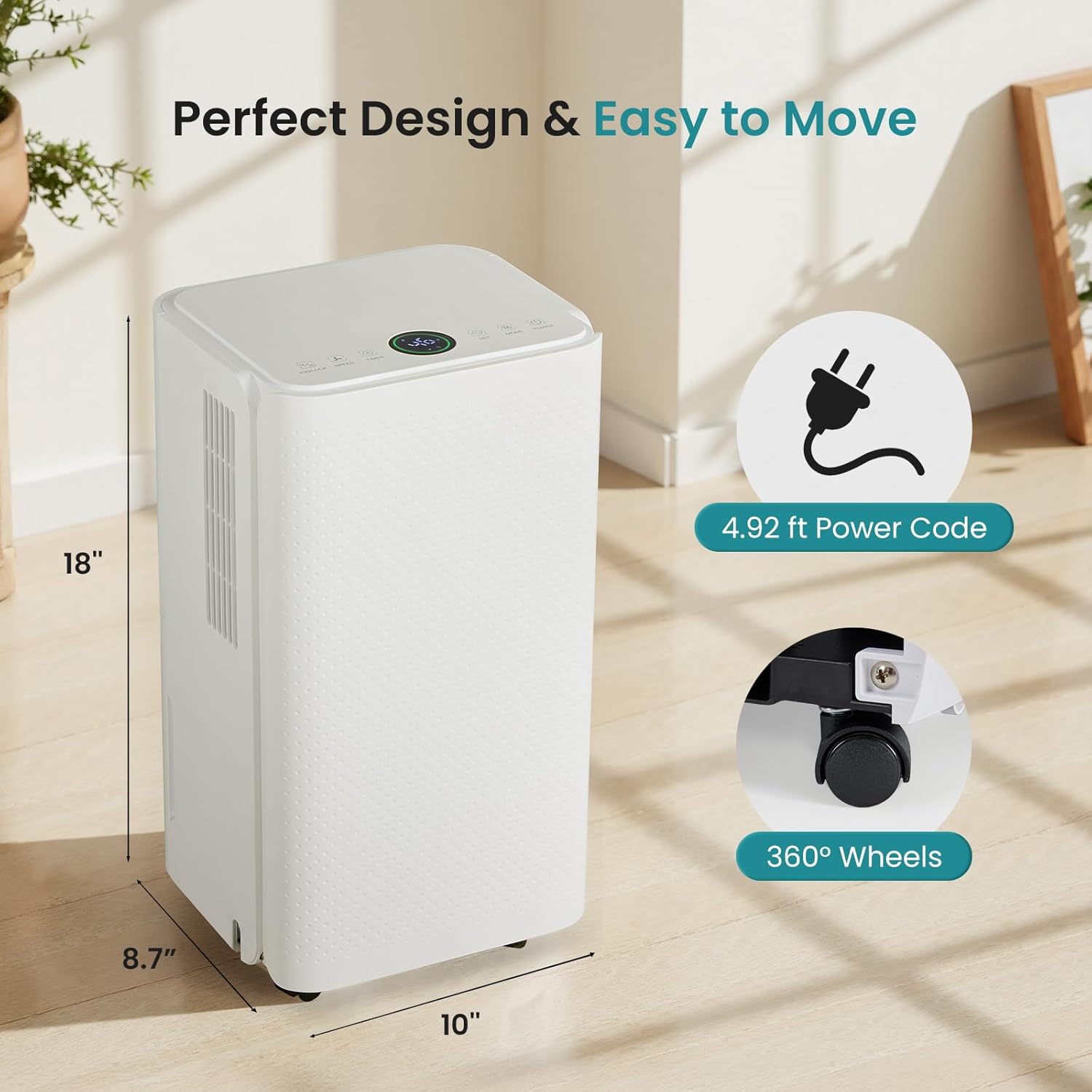
Image: The dehumidifier showing its dimensions (8.7"D x 10"W x 18"H), 4.92 ft power cord, and 360° wheels.
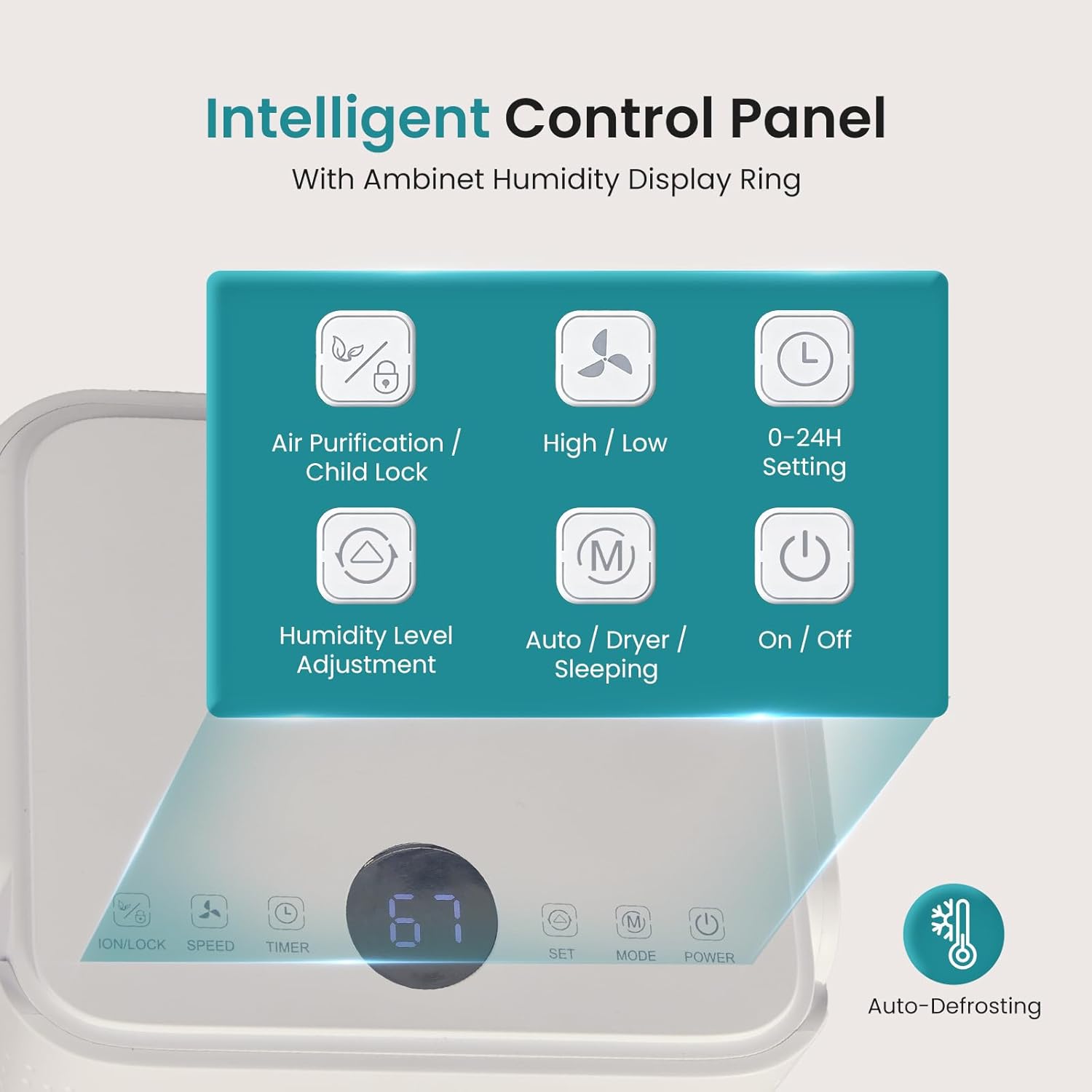
Image: Close-up of the intelligent control panel with buttons for Air Purification/Child Lock, High/Low fan speed, 0-24H Setting, Humidity Level Adjustment, Auto/Dryer/Sleeping mode, and On/Off. An auto-defrost icon is also visible.
3. Opsætningsvejledning
Udpakning
- Tag forsigtigt affugteren ud af emballagen.
- Fjern alt emballagemateriale, inklusive tape eller beskyttelsesfilm.
- Check for any shipping damage. If the unit is damaged, do not operate it and contact customer support.
Placering
- Placer affugteren på en flad, stabil overflade.
- Sørg for, at der er mindst 20 cm plads omkring enheden for at sikre korrekt luftgennemstrømning.
- Undgå at placere enheden i nærheden af varmekilder eller i direkte sollys.
- For optimal ydeevne skal alle døre og vinduer i det rum, hvor affugteren er i drift, lukkes.

Image: The dehumidifier shown in different household settings, illustrating its suitability for various rooms such as bathrooms, living rooms, bedrooms, and kitchens.
Strømtilslutning
- Sæt netledningen i en jordet 120V/60Hz stikkontakt.
- The unit will beep once, and the display will show the current humidity level.
Afløbsmuligheder
Your dehumidifier offers two drainage methods: manual emptying of the water tank or continuous drainage using the included hose.

Image: The dehumidifier demonstrating two drainage options: a 3.28 ft drain hose connected for continuous drainage, and the removable 2L (0.53 GAL) water tank for manual emptying.
Manuel dræning (vandtank)
- Når vandtanken er fuld, slukker enheden automatisk, og en indikatorlampe lyser.
- Træk forsigtigt vandtanken ud fra enhedens forside.
- Tøm det opsamlede vand.
- Skub den tomme tank tilbage i enheden, indtil den klikker på plads. Enheden genoptager driften.
Kontinuerlig dræning (afløbsslange)
- Find afløbsudløbet på bagsiden af enheden.
- Remove the rubber stopper from the drain outlet.
- Connect the included 3.28 ft drain hose to the outlet. Ensure a secure connection.
- Route the other end of the hose to a suitable drain (e.g., floor drain, large bucket) ensuring it is sloped downwards for gravity drainage.
- The unit will now continuously drain water without the need to empty the tank.
4. Betjeningsvejledning
Kontrolpanel overview
The control panel is located on the top of the unit and features an intelligent humidity display ring.

Image: The intelligent humidity-sensing display ring showing different colors based on humidity levels: Blue for <45% humidity, Green for 45-65% humidity, and Red for >65% humidity.
- Power knap: Tænder eller slukker enheden.
- Mode knap: Cycles through operating modes: Auto, Drying, Sleep, Air Purification.
- Justering af fugtighedsniveau: Use the up/down arrows to set your desired humidity level (typically between 30% and 80% relative humidity).
- Hastighedsknap: Justerer ventilatorhastigheden mellem høj og lav.
- Timer knap: Sets the 0-24 hour timer for automatic start-up or shut-off.
- Air Purification / Child Lock Button: Press once to activate air purification. Press and hold for 3 seconds to activate/deactivate child lock.
Driftstilstande
- Automatisk tilstand: The unit automatically adjusts fan speed and operation based on the ambient humidity to maintain the set humidity level.
- Tørretilstand: Operates at high fan speed to quickly reduce humidity, ideal for drying clothes or very damp områder.
- Sove mode: Operates at a low fan speed with reduced noise (approx. 38dB) and dimmed display lights for quiet nighttime operation.
- Luftrensningstilstand: Activates the air filter to reduce airborne contaminants.
Video: A short demonstration of the OLIXIS 30-Pint Dehumidifier operating quietly in a bedroom, highlighting its low noise level suitable for sleep mode.
Indstilling af timeren
24-timers timeren giver dig mulighed for at planlægge, hvornår enheden skal tændes eller slukkes.
- Automatisk slukning: While the unit is running, press the Timer button. Use the up/down arrows to set the desired number of hours (1-24) after which the unit will turn off.
- Auto Start-Up: While the unit is in standby mode, press the Timer button. Use the up/down arrows to set the desired number of hours (1-24) after which the unit will turn on.
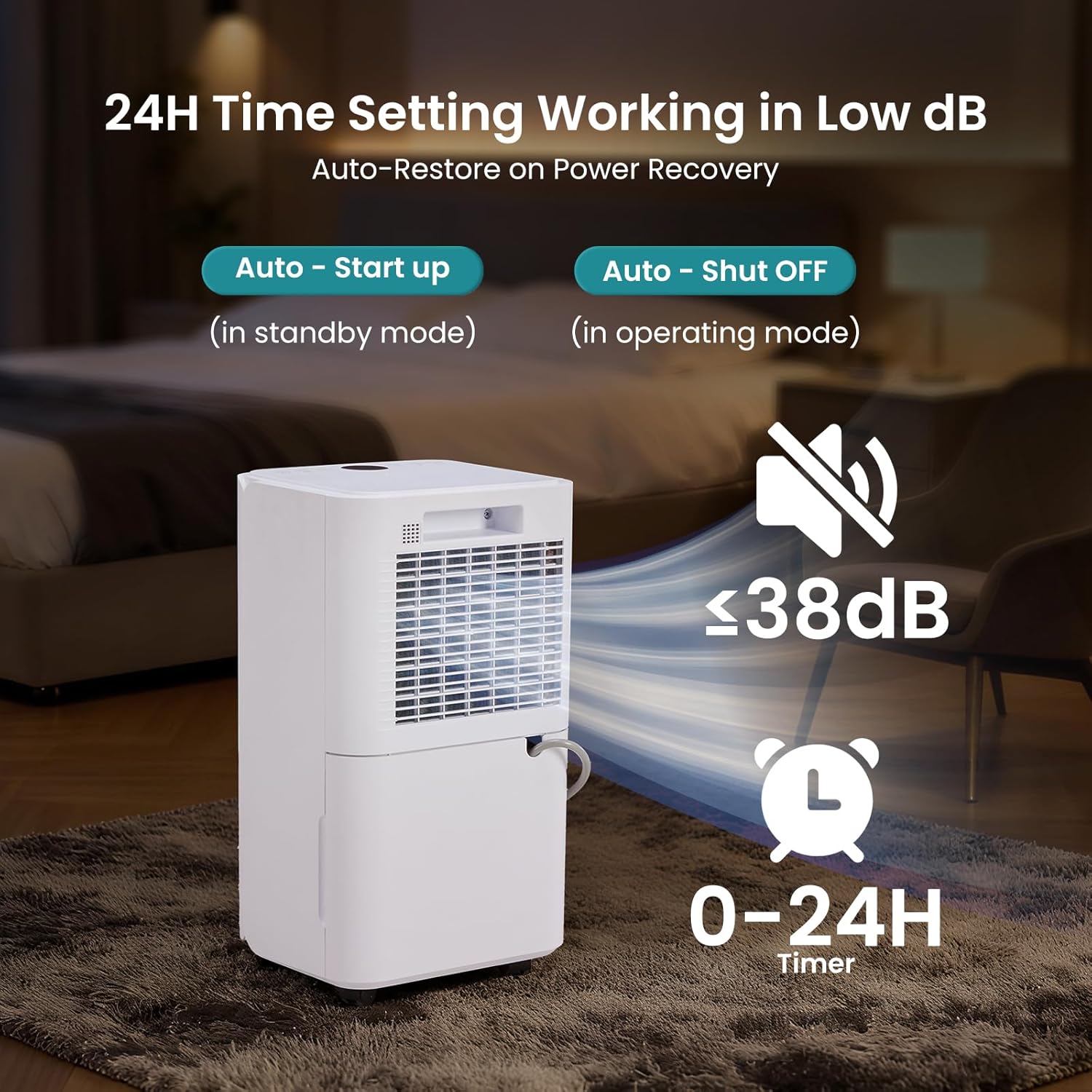
Image: The dehumidifier operating with a visual representation of low noise (<38dB) and a 0-24H timer function for auto start-up and auto shut-off.
5. Vedligeholdelse
Regelmæssig vedligeholdelse sikrer optimal ydeevne og forlænger levetiden på din affugter.
Rengøring af luftfilteret
The removable air filter should be cleaned every two weeks or more frequently depending on usage and air quality.
- Sluk for affugteren, og tag stikket ud af stikkontakten.
- Find luftfilteret på bagsiden eller siden af enheden.
- Træk forsigtigt filteret ud.
- Vask filteret med varmt sæbevand eller støvsug det for at fjerne støv og snavs.
- Skyl grundigt, og lad filteret lufttørre helt, før det monteres igen.
- Sæt tørfilteret i enheden igen.
Rengøring af vandtanken
Rengør vandtanken med jævne mellemrum for at forhindre vækst af skimmelsvamp og meldug.
- Remove the water tank as described in the "Manual Drainage" section.
- Vask tanken med varmt vand og et mildt rengøringsmiddel.
- Skyl grundigt og tør det, inden det sættes tilbage i enheden.
Opbevaring af affugteren
Hvis enheden ikke skal bruges i en længere periode:
- Tag stikket ud af enheden, og tøm vandtanken helt.
- Rengør luftfilteret og enhedens yderside.
- Rul netledningen pænt op.
- Opbevar affugteren i oprejst position på et køligt, tørt sted, væk fra direkte sollys og ekstreme temperaturer.
6. Fejlfinding
Se dette afsnit for almindelige problemer og deres løsninger.
| Problem | Mulig årsag | Løsning |
|---|---|---|
| Affugteren tænder ikke. | No power supply. Power cord not plugged in. Full water tank. | Ensure unit is plugged into a live outlet. Empty water tank and reinsert correctly. |
| Intet vand opsamlet. | Ambient humidity is too low. Temperature is too low. Air filter is clogged. | Check current humidity level. Unit may not operate below 41°F (5°C). Clean air filter. |
| Enheden er støjende. | Unit is not on a level surface. Air filter is clogged. | Placer enheden på en plan, stabil overflade. Rengør luftfilteret. |
| Vand lækker fra enheden. | Water tank not inserted correctly. Drain hose connection is loose or blocked. | Reinsert water tank firmly. Check drain hose for secure connection and clear any blockages. |
| Dehumidifier runs continuously. | Desired humidity level is set too low. Room size is too large. | Increase the desired humidity setting. Ensure room is within recommended coverage area. |
7. Specifikationer
Technical details for the OLIXIS 30-Pint Dehumidifier.
| Feature | Specifikation |
|---|---|
| Mærke | OLIXIS |
| Modelnavn | 30 pint affugter |
| Modelnummer | OL-CSJ-2L3 |
| Affugtningskapacitet | 30 pints om dagen |
| Dækning af gulvareal | Op til 2000 kvadratmeter |
| Tankvolumen | 2 liter (0.53 gallons) |
| Produktmål (D x B x H) | 8.7 cm x 10 cm x 18 cm |
| Varens vægt | 22 pund |
| Antal hastigheder | 2 (Høj/Lav) |
| Særlige funktioner | Adjustable Humidity Control, Automatic Defrost, Automatic Restart, Automatic Shutoff, Child Lock, Smart Humidity Ring |
| Inkluderede komponenter | Air Filter, Drain Hose, Power Cord, User Manual |
| Materiale | Metal |
| UPC | 700476342597 |

Image: Certifications for the OLIXIS Dehumidifier, including Energy Star, ETL Certified, and FCC Certified, along with a Child Lock icon.
8. Garanti og support
For warranty information and customer support, please refer to the warranty card included with your product or contact OLIXIS customer service directly. Ensure you have your model number (OL-CSJ-2L3) and proof of purchase available when contacting support.