
Indledning
Tak for købetasing the Aiwa 14-inch Portable Media Player Travel Kit. This device is designed to provide versatile entertainment on the go, allowing you to enjoy DVDs, CDs, and other media without relying on internet connectivity. This manual provides essential information for setting up, operating, and maintaining your portable media player.
Sikkerhedsoplysninger
Læs venligst alle sikkerhedsinstruktioner omhyggeligt, inden du bruger dette produkt. Gem denne manual til senere brug.
- Udsæt ikke enheden for regn, fugt eller ekstreme temperaturer.
- Undgå at placere enheden i nærheden af varmekilder eller i direkte sollys.
- Use only the provided power adapters (AC/DC and car adapter) to charge the device.
- Forsøg ikke at skille enheden ad eller ændre den. Overlad al service til kvalificeret personale.
- Handle discs carefully to prevent scratches or damage.
- Sørg for tilstrækkelig ventilation, når apparatet er i brug.
Pakkens indhold
Bekræft at alle varer er til stede i din pakke:
- Aiwa 14-inch Portable Media Player (Main Unit)
- Fjernbetjening
- Kablede hovedtelefoner
- Beskyttende bæretaske
- AC/DC strømadapter
- Bilstrømadapter (12V)
- Brugermanual
Produkt overview
Familiarize yourself with the components and controls of your portable media player.
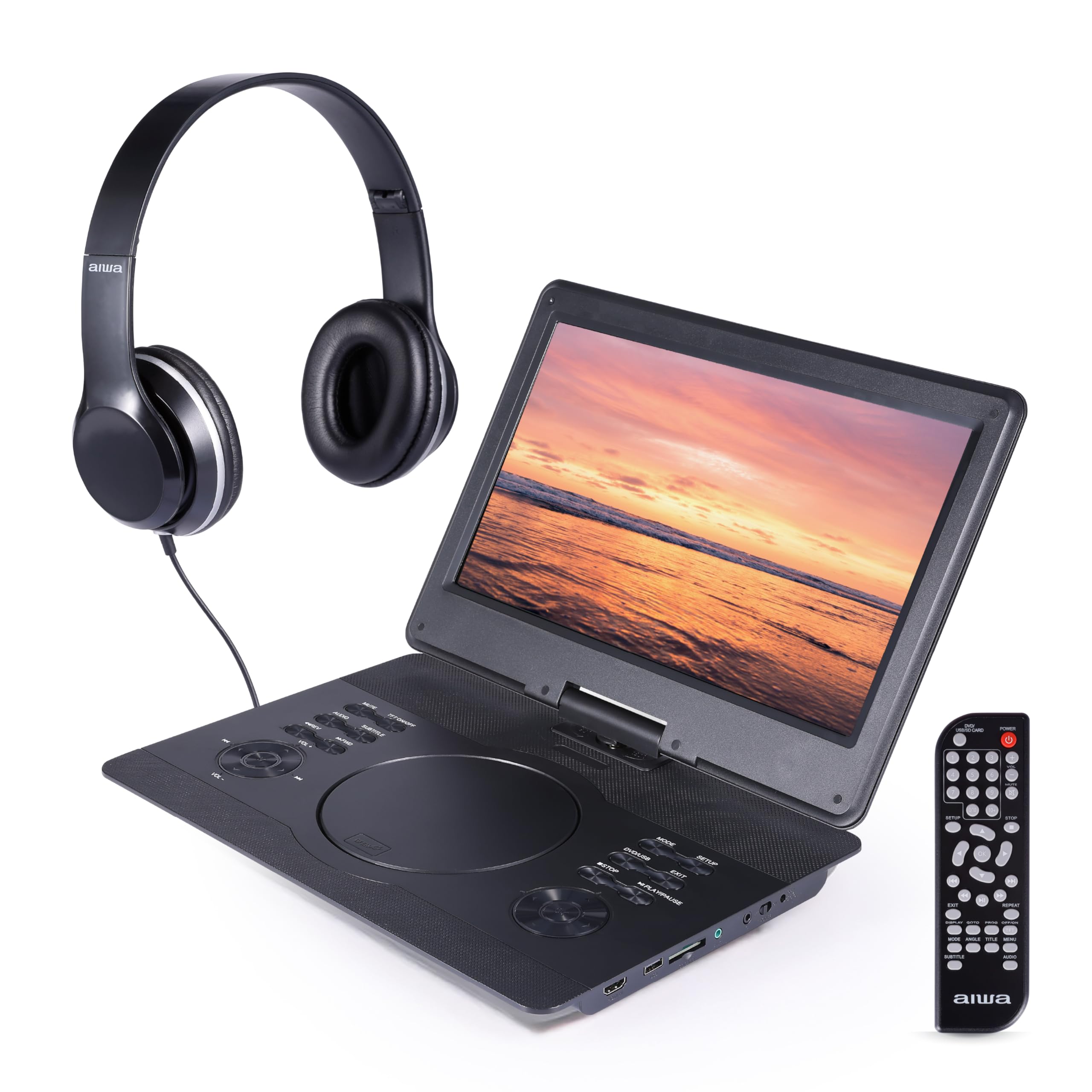
Figur 1: Front view of the Aiwa Portable Media Player with included remote control.

Figur 2: Side view showing the open disc tray and headphone connection.
Hovedenhedens funktioner:
- 14-inch Swiveling LCD Screen: Giver fleksibel viewing angles and can fold flat.
- Diskbakke: Til isætning af dvd'er og cd'er.
- Kontrolknapper: Play/Pause, Stop, Skip, Volume, Menu, Setup, Mode, etc.
- Indbyggede stereohøjttalere: Til lydafspilning uden hovedtelefoner.
- HDMI -indgang: Connect external devices like gaming consoles or streaming sticks.
- USB-port: Til afspilning af medier fra USB-flashdrev.
- SD-kortplads: Til afspilning af medier fra SD-hukommelseskort.
- Hovedtelefonstik: Til privat lytning.
- Strømindgang: For connecting AC/DC or car adapters.

Figur 3: The screen can swivel and fold flat for compact use.
Opsætning
1. Opladning af batteriet
- Connect the AC/DC power adapter to the DC IN port on the player and then to a wall outlet.
- Opladningsindikatorlampen lyser. En fuld opladning tager typisk 2-3 timer.
- Alternatively, use the car power adapter to charge the device in a vehicle.
2. Tænd/sluk
- For at tænde skal du trykke på og holde nede MAGT knappen på enheden eller fjernbetjeningen.
- For at slukke, skal du trykke på og holde nede MAGT knappen igen.
3. Tilslutning af hovedtelefoner
- Plug the included wired headphones into the HOVEDTELEFON stikket på siden af afspilleren.
- The built-in speakers will automatically mute when headphones are connected.
4. Using the Carrying Bag

Figur 4: The included carrying bag for transport and protection.
- Place the media player and its accessories into the protective carrying bag for safe transport.
Drift
1. Disc Playback (DVD/CD)
- Åbn dækslet til diskskuffen.
- Placer forsigtigt en DVD eller CD på spindlen med etiketsiden opad.
- Luk dækslet til diskbakken godt.
- The player will automatically detect the disc and begin playback or display the disc menu.
- Use the control buttons on the unit or remote (Play/Pause, Stop, Skip, Menu, etc.) to navigate and control playback.
2. USB/SD-kortafspilning
- Sæt et USB-flashdrev i USB-porten eller et SD-kort i SD-kortstikket.
- Tryk på MODE button on the unit or remote to select USB or SD mode.
- Naviger gennem din fileved hjælp af retningsknapperne og tryk på SPIL/INDGÅ for at vælge og afspille medier.
3. HDMI-indgang
- Connect an external device (e.g., gaming console, streaming stick) to the HDMI-IN port on the player using an HDMI cable (not included).
- Tryk på MODE button on the unit or remote to select HDMI input.
- The player's screen will display the content from the connected HDMI device.
4. Skærmjustering

Figur 5: The screen can be swiveled and tilted for optimal viewing.
- The screen can swivel up to 180 degrees and tilt for various viewing vinkler.
- It can also be folded flat against the base unit, transforming the device into a tablet-like form factor.
5. Lydstyrkekontrol
- Juster lydstyrken ved hjælp af VOL+ og VOL- buttons on the unit or the remote control.
Opretholdelse
Rengøring af enheden
- Wipe the screen and exterior surfaces with a soft, dry, lint-free cloth.
- For genstridige mærker, let dampda kluden med vand eller et mildt, ikke-slibende rengøringsmiddel.
- Brug ikke skrappe kemikalier eller slibende materialer, da de kan beskadige overfladen.
- Keep the disc tray and ports free of dust and debris.
Opbevaring
- When not in use, store the player in its protective carrying bag in a cool, dry place.
- Undgå opbevaring i områder med ekstreme temperaturer eller høj luftfugtighed.
Fejlfinding
Hvis du støder på problemer, kan du se følgende almindelige problemer og løsninger:
| Problem | Mulig årsag | Løsning |
|---|---|---|
| Ingen strøm | Battery depleted; Power adapter not connected or faulty. | Charge the battery using the AC/DC or car adapter. Ensure connections are secure. |
| Disken afspilles ikke / fejlen "Ingen disk" | Disken er isat forkert; Disken er snavset eller ridset; Inkompatibelt diskformat. | Ensure disc is inserted label-side up. Clean the disc. Try a different disc. Verify disc is DVD/CD/VCD format. |
| Ingen lyd | Volume too low; Headphones connected; Mute function active. | Increase volume. Disconnect headphones if using speakers. Check if mute is active on remote. |
| Dårlig billedkvalitet | Disc quality; Screen viewing angle; Low resolution content. | Ensure disc is clean and undamaged. Adjust screen angle. Note that native resolution is 800x480. |
| Fjernbetjening virker ikke | Batteries depleted; Obstruction between remote and player; Remote sensor blocked. | Replace remote batteries. Ensure clear line of sight to the player's IR sensor. |
Specifikationer
| Feature | Detalje |
|---|---|
| Mærke | Ingen |
| Modelnummer | AI7017-BLK-T37-6 |
| Skærmstørrelse | 14 tommer |
| Display Type | LCD |
| Indfødt opløsning | 800x480 |
| Understøttelse af medietyper | DVD, CD, CD-R, DVD-R, VCD, USB, SD Card |
| Forbindelse | HDMI Input, USB Port, SD Card Slot, Headphone Jack |
| Lyd | Built-in Stereo Speakers, Headphone Output |
| Strømkilde | Rechargeable Battery, AC/DC Adapter, Car Adapter (12V) |
| UPC | 021331134455 |
Garantioplysninger
This product is covered by a limited manufacturer's warranty. Please refer to the warranty card included in your package or contact customer support for details regarding warranty terms and conditions.
Kundesupport
For technical assistance, troubleshooting, or warranty inquiries, please contact Aiwa customer support. Contact information can typically be found on the product packaging or the official Aiwa webwebsted.