
1. Introduktion
Thank you for choosing the ORIA Projection Alarm Clock. This manual provides detailed instructions for setting up, operating, and maintaining your new alarm clock. Please read this manual thoroughly before use to ensure proper function and to maximize your user experience.
2. Produktet er slutview
The ORIA Projection Alarm Clock features an 8.5-inch LED display, a 180° rotatable projector, 17 RGB night light modes, and multiple alarm settings. It is designed for use in bedrooms, offering clear time display and ambient lighting.

Billede 2.1: Forside view of the ORIA Projection Alarm Clock, highlighting its 8.5-inch display and overall dimensions (approximately 9.1 inches wide and 3.7 inches high).
3. Opsætning
3.1 Strømtilslutning
Connect the provided 1.5m Type-C cable to the clock and a compatible USB power adapter (not included). The clock will power on automatically.
3.2 Memory Backup
The clock includes a built-in battery backup to preserve your settings during a power outage. No additional batteries are required for memory function, but the clock requires continuous USB-C power for display and projection.

Image 3.1: Illustration of the clock's power input (Type-C), memory function (internal battery backup), and options for 12/24-hour time format and Celsius/Fahrenheit temperature display.
4. Betjeningsvejledning
4.1 Indstilling af klokkeslæt og dato
- Tryk og hold på MODE knappen for at gå ind i tidsindstillingstilstand.
- Brug UP og NED knapperne for at justere timetallet, og tryk derefter på MODE for at bekræfte.
- Gentag for minutter, år, måned og dag.
- Trykke MODE igen for at afslutte indstillingstilstand.
4.2 12/24 Hour Format Switching
I normal tidsvisningstilstand skal du trykke på UP knappen for at skifte mellem 12-timers og 24-timers tidsformater.
4.3 Skift af temperaturenhed
I normal tidsvisningstilstand skal du trykke på NED knappen til at skifte mellem temperaturenheder Celsius (°C) og Fahrenheit (°F).
4.4 Alarmindstilling
The clock supports three alarm modes: Monday-Friday, Monday-Saturday, and Everyday.
- Tryk på ALARM knappen for at gå ind i alarmindstillingstilstand.
- Brug UP og NED knapperne for at justere alarmens time, og tryk derefter på ALARM for at bekræfte.
- Gentag for alarmminutter.
- Bruge UP/NED to select the alarm mode (1-5, 1-6, 1-7), then press ALARM for at bekræfte.
- Trykke ALARM igen for at afslutte indstillingstilstand.
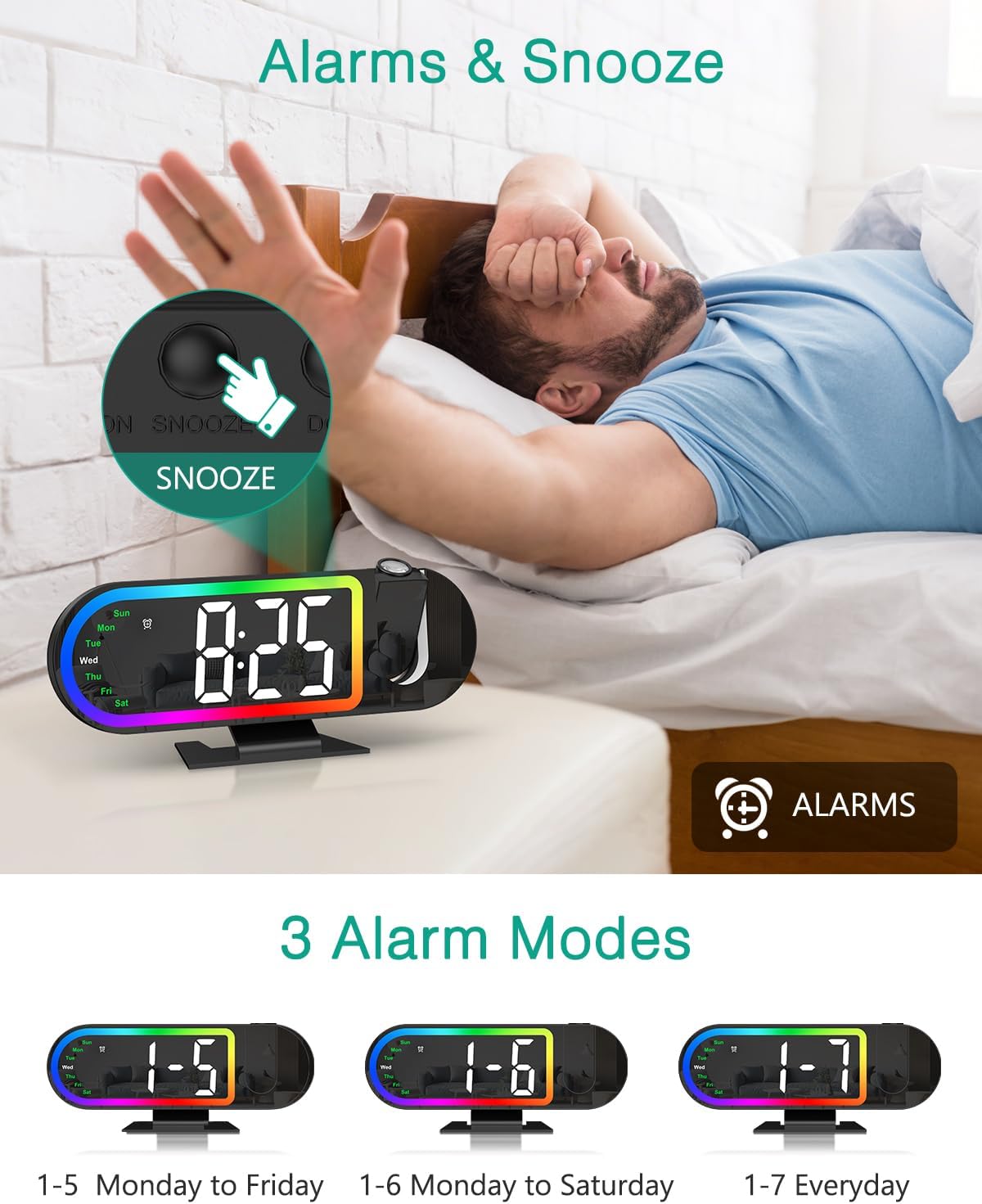
Image 4.1: The alarm clock displaying the time with an illustration of the snooze button and the three available alarm modes (Monday-Friday, Monday-Saturday, Everyday).
4.5 Snooze -funktion
Når alarmen lyder, skal du trykke på den store SLUM button on the back of the clock to activate snooze. The default snooze duration is 5 minutes. You can customize the snooze duration from 1 to 60 minutes in the alarm settings.
4.6 Projektionsfunktioner
The clock features a 180° rotatable HD projector that displays the time on your ceiling or wall. The projection distance ranges from 1.6ft to 16ft.
- Projection On/Off: Tryk på FREMSKRIVNING knappen for at tænde eller slukke for projektionen.
- Juster projektionslysstyrke: While projection is on, short press the FREMSKRIVNING button to cycle through High, Low, and Off brightness levels.
- Roter projektion: Tryk og hold på FREMSKRIVNING button for 3 seconds to switch the projection orientation by 180°. This allows you to adjust the display for optimal viewing.
Note: The projection is available only in red color.
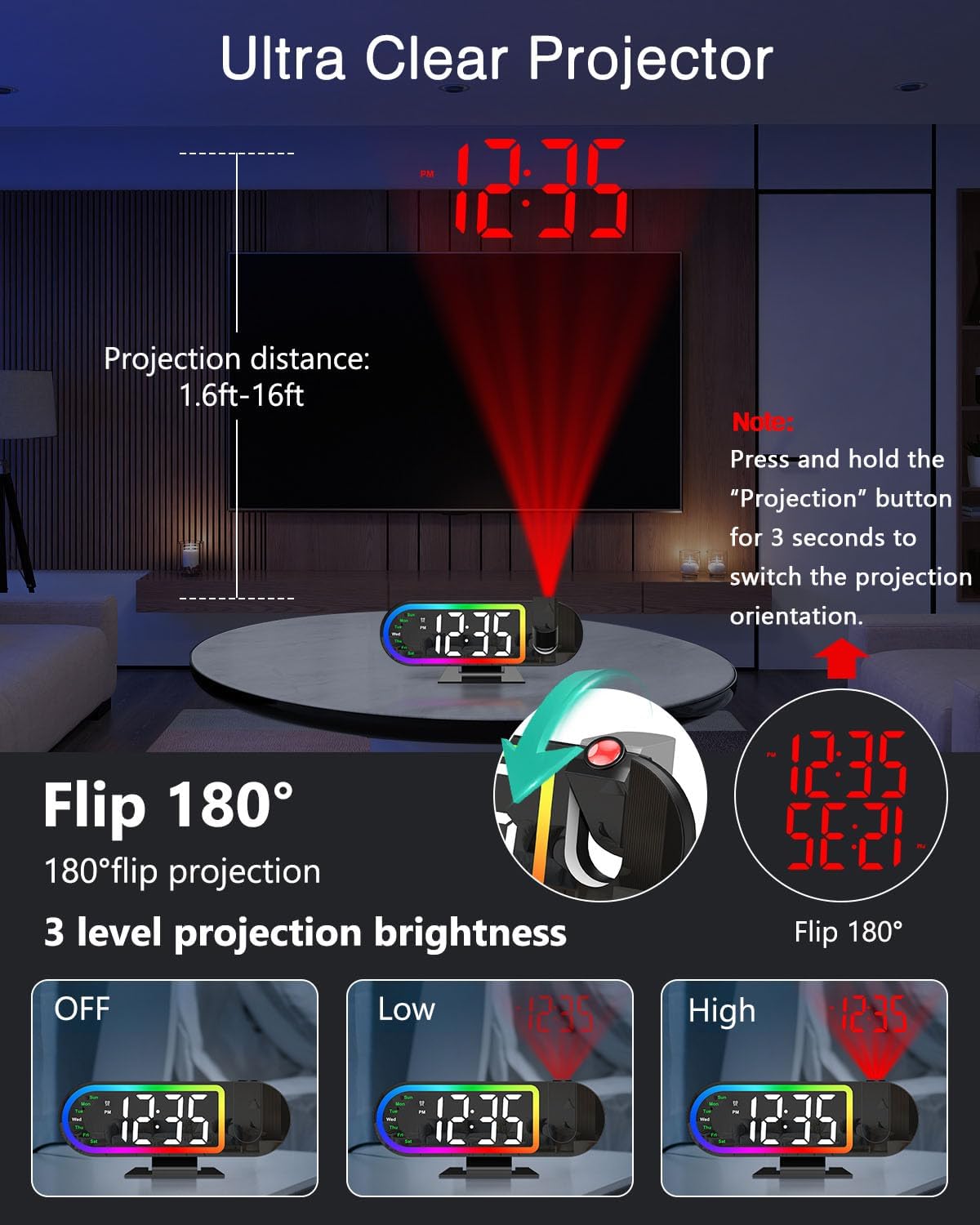
Image 4.2: Demonstrates the projection distance range (1.6ft-16ft), the 180° flip feature for projection orientation, and the three projection brightness levels (Off, Low, High).
4.7 Display Brightness and Auto-Night Mode
The 8.5-inch LED display has 4 brightness levels (High/Medium/Low/Off).
- Juster skærmens lysstyrke: Tryk kort på DIMMER button to cycle through High, Medium, Low, and Off brightness levels for the main display.
- Auto-Night Mode: Enable Night Mode to automatically dim the screen from 6:00 PM to 6:00 AM. This time range is customizable. Refer to the full manual for detailed customization steps.

Image 4.3: Illustrates the four screen brightness levels (High, Medium, Low, Off) and the automatic night mode function, which dims the display during specified hours.
4.8 17 RGB Night Light Modes
The clock features 17 vibrant RGB lighting options to enhance your room's ambiance.
- Change Night Light Mode: Tryk på RGB button to cycle through the 17 different RGB lighting modes, including various monochrome colors, gradients, flowing effects, and breathing patterns.

Image 4.4: Displays the alarm clock with its RGB border light, showcasing various color options and dynamic lighting effects available.
4.9 Produktvideoguide
Video 4.1: An official product video demonstrating the ORIA Projection Alarm Clock's features, including its projection capabilities and display. This video is 16 seconds long.
5. Vedligeholdelse
- Rengør uret med en blød, tør klud. Brug ikke slibende rengøringsmidler eller opløsningsmidler.
- Keep the clock away from water and high humidity.
- Undgå at placere uret i direkte sollys eller i nærheden af varmekilder.
6. Fejlfinding
| Problem | Mulig årsag | Løsning |
|---|---|---|
| Urvisningen er slukket. | Ingen magt eller magt outage. | Ensure the Type-C cable is securely connected to a power source. If there was a power outage, the display will return when power is restored (settings are saved by backup battery). |
| Projektionen er svag eller uklar. | Incorrect brightness setting or projection distance. | Adjust projection brightness (High/Low). Ensure the clock is within the 1.6ft-16ft projection range. |
| Alarmen lyder ikke. | Alarmen er ikke indstillet eller slukket. | Verify alarm settings and ensure the alarm is enabled for the desired days. |
| Tid/dato er forkert. | Initial setup error or time zone issue. | Re-enter time and date settings as per section 4.1. |
7. Specifikationer
- Mærke: ORIA
- Modelnummer: OUS-WA183
- Skærmtype: Digital LED
- Skærmstørrelse: 8.5 tommer
- Fremskrivning: 180° Rotatable, Red Color, Adjustable Brightness (High/Low/Off)
- Projektionsafstand: 1.6 - 16 meter
- Natlys: 17 RGB-tilstande
- Skærmens lysstyrke: 4 Levels (High/Medium/Low/Off) + Auto-Night Mode
- Alarmtilstande: Mon-Fri, Mon-Sat, Everyday
- Snooze-varighed: 1-60 minutter (kan tilpasses)
- Strømkilde: USB-C (adapter not included)
- Hukommelse backup: Built-in battery (retains settings during power outage)
- Dimensioner: 3.74 cm B x 9.13 cm H (omtrentlig)
8. Garanti og support
ORIA is committed to providing high-quality products and customer satisfaction. Your ORIA Projection Alarm Clock comes with the following support:
- 1-års garanti: Dækker fabrikationsfejl og funktionsfejl ved normal brug.
- 90-Day Free Replacements: For eligible issues within 90 days of purchase.
- 30 dages gratis returnering: For eligible returns within 30 days of purchase.
- 24/7 kundesupport: Assistance available around the clock for any inquiries or issues.
- Livsvarig teknisk support: Løbende teknisk assistance i hele dit produkts levetid.
For support, please visit the official ORIA website or contact our customer service team through your purchase platform.