
SQUATZ SQWPVH15WH
Squatz 2-in-1 Walking Pad Treadmill with Handlebar & Vibration Plates User Manual
Model: SQWPVH15WH
Vigtige sikkerhedsinstruktioner
Læs alle instruktioner omhyggeligt, før du bruger dette apparat. Gem denne manual til fremtidig reference.
- Placer altid løbebåndet på en flad, stabil overflade.
- Sørg for tilstrækkelig fri plads omkring løbebåndet (mindst 2 meter bagved og 0.6 meter på hver side).
- Hold børn og kæledyr væk fra løbebåndet under drift.
- Brug ikke løbebåndet, hvis ledningen eller stikket er beskadiget, eller hvis det ikke fungerer korrekt.
- Wear appropriate athletic footwear. Do not use the treadmill barefoot or in socks.
- Den maksimale brugervægtkapacitet er 119.75 kg (264 lbs). Overskrid ikke denne grænse.
- Kontakt en læge, før du starter et træningsprogram.
- Unplug the treadmill from the power outlet when not in use or before cleaning.
Produkt overview
The Squatz 2-in-1 Walking Pad Treadmill with Handlebar & Vibration Plates is designed for versatile home or office fitness. It functions as both a walking pad and a vibration plate, offering options for walking, balance training, and light recovery. This model includes a foldable handlebar for stability and a device holder for convenience.
Inkluderede komponenter:
- Squatz Walking Pad Treadmill
- Fjernbetjening
- Power Cable (US / Canada Plug)
- L Spanner
- Silikone olie
Opsætningsinstruktioner
The Squatz 2-in-1 Walking Pad Treadmill arrives fully assembled, requiring minimal setup before first use.
- Udpakning: Tag forsigtigt løbebåndet ud af emballagen.
- Placering: Placer løbebåndet på en fast, plan overflade. Sørg for, at der er tilstrækkelig plads omkring enheden til sikker betjening.
- Opsætning af styr: If using the handlebar, unfold it into the upright position until it locks securely. The device holder can be attached to the handlebar.
- Strømtilslutning: Connect the power cable to the treadmill and then plug it into a grounded electrical outlet.
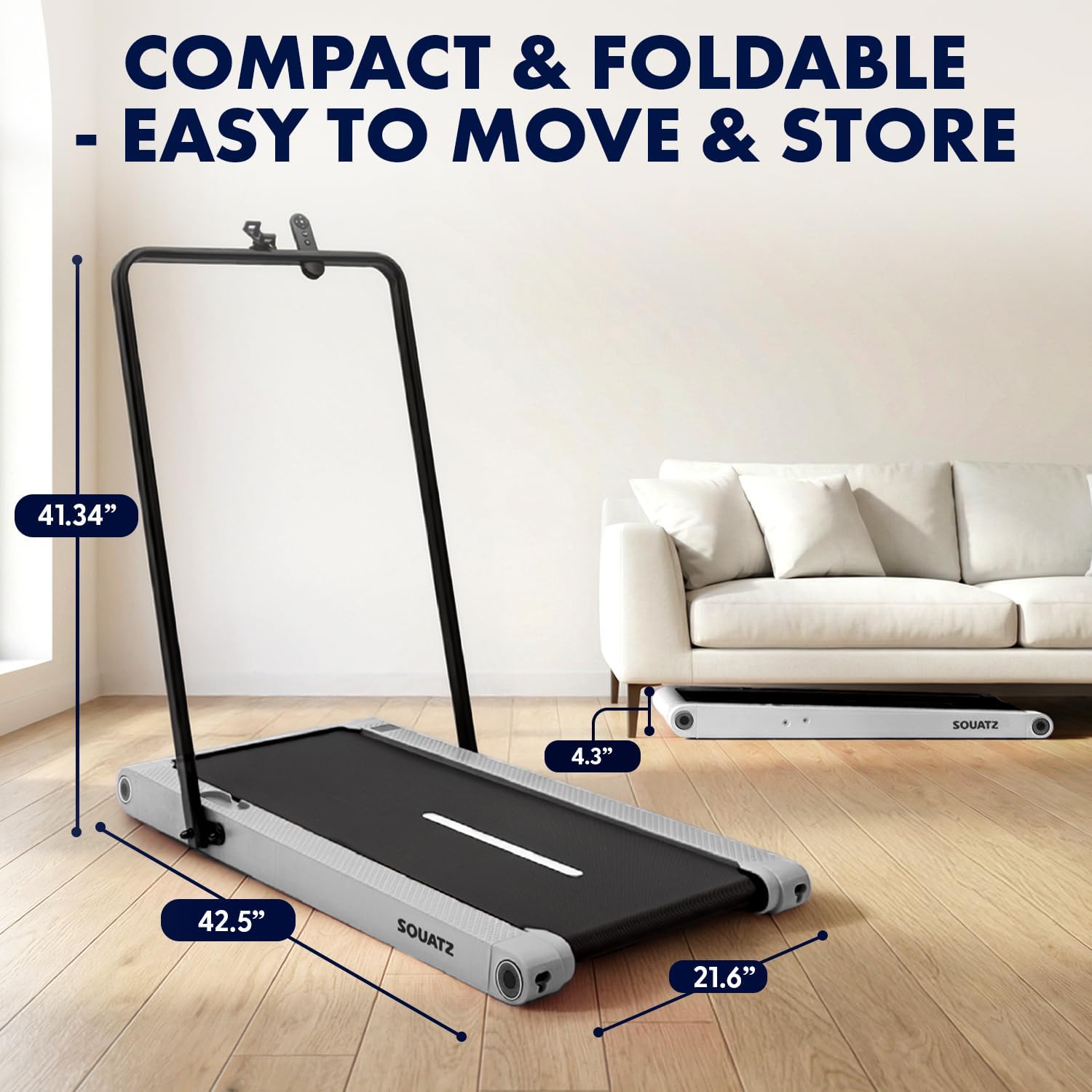
Image: The treadmill shown with its dimensions (42.5 inches length, 21.6 inches width, 4.3 inches height when flat, 41.34 inches height with handlebar up) and its compact storage capability under a sofa.
Betjeningsvejledning
Tænd/sluk
- To power on, plug in the treadmill and press the power button on the remote control or the unit.
- To power off, press the power button again. Always unplug the unit when not in use.
Driftstilstande

Image: Visual representation of the three primary operating modes: Walking Mode (0.5 MPH min. speed), Running Mode (3.7 MPH max. speed), and Vibration Mode (4 mode adjustable). A person is shown walking on the pad at a standing desk, another running with the handlebar, and a third performing squats on the pad in vibration mode.
- Gåtilstand: Ideal for light activity, with a minimum speed of 0.5 MPH.
- Løbstilstand: For more intense workouts, reaching a maximum speed of 3.7 MPH.
- Vibrationstilstand: Activates built-in vibration plates for muscle activation, balance training, or recovery.
Vibration Training
The treadmill features integrated vibration plates with 4 adjustable modes.

Billede: Fire eks.amples of vibration fitness: Gentle Vibration (person sitting), Moderate Vibration (person squatting), Strong Vibration (person standing with phone), and Intense Vibration (person standing with hands on hips). Red glowing areas indicate vibration.
- Use the remote control to select between Gentle, Moderate, Strong, and Intense vibration levels.
- Vibration training can be used independently or in conjunction with walking.
Kontrol og visning
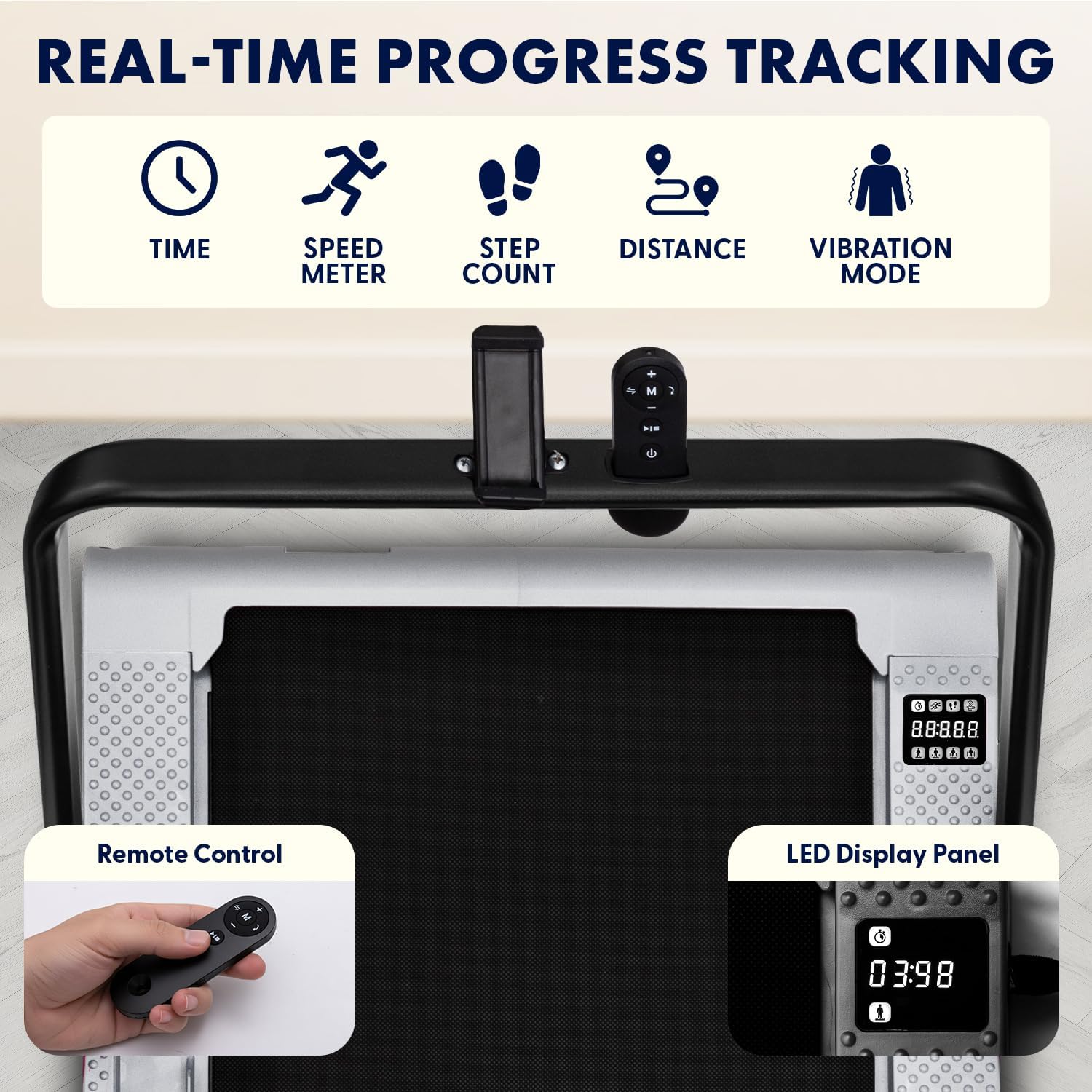
Image: Close-up of the treadmill's LED display panel showing time, speed, step count, distance, and vibration mode indicators. A remote control is also shown, featuring power, speed adjustment, and mode selection buttons.
- LED skærmpanel: Tracks real-time data including time, calories burned, speed, and distance.
- Fjernbetjening: Use the remote to power on/off, adjust speed, select operating modes, and choose from 12 preset programs.
- Forudindstillede programmer: The treadmill offers 12 pre-programmed workouts for varied training sessions. Refer to the remote control instructions for program selection.
Bluetooth and App Integration
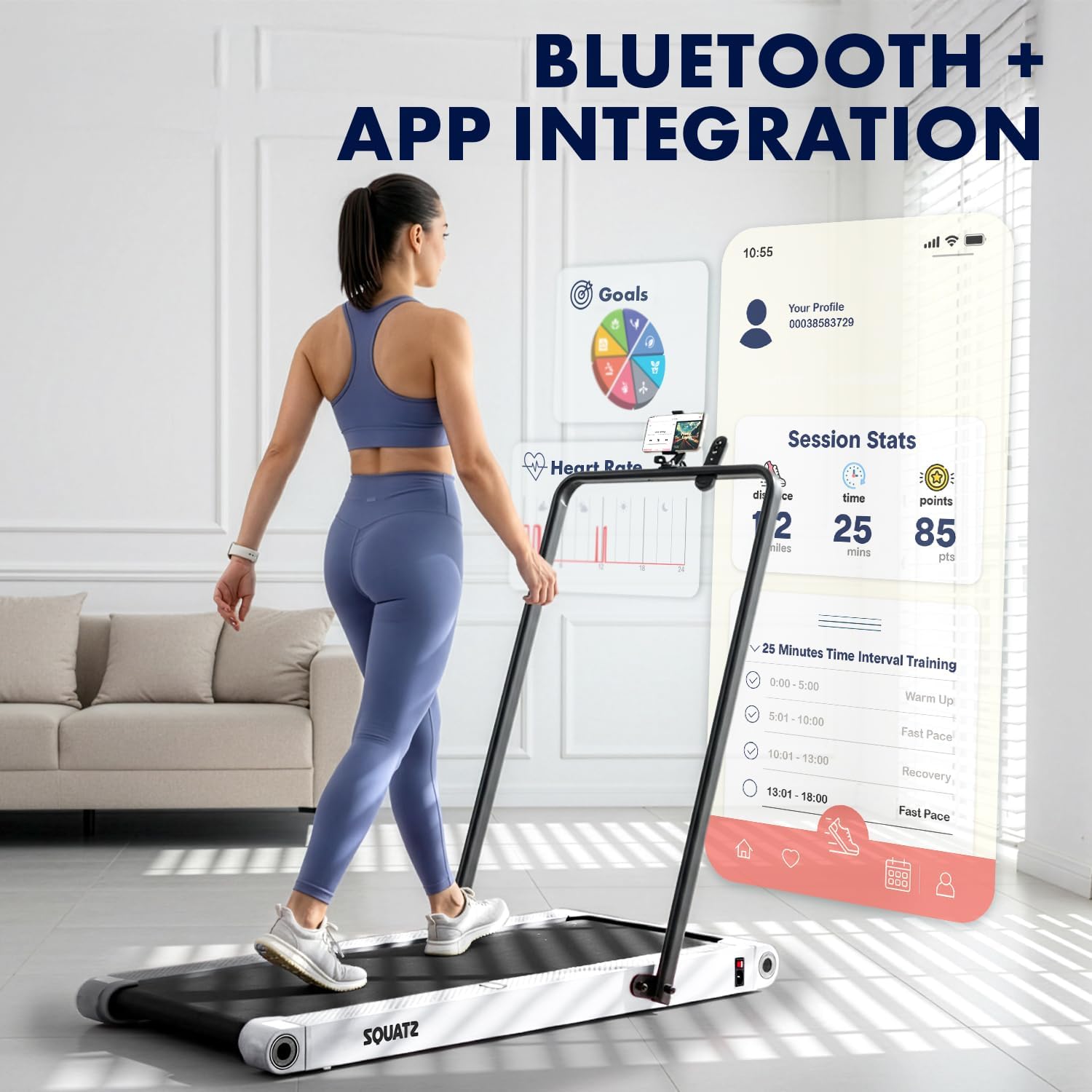
Image: A person walking on the treadmill while looking at a smartphone displaying a fitness app interface. The app shows session statistics like distance, time, and points, along with workout goals and interval training options.
- The treadmill supports Bluetooth connectivity for integration with a compatible fitness app.
- Download the official Squatz fitness app (if available) to track progress, set goals, and access additional workout features.
- Follow the app's instructions for pairing your device with the treadmill.
Opretholdelse
Regelmæssig vedligeholdelse sikrer dit løbebånds levetid og optimale ydeevne.
Rensning
- Tag altid stikket ud af løbebåndet før rengøring.
- Tør skærmen og de udvendige overflader af med en blød kludamp klæde. Undgå slibende rengøringsmidler.
- Periodically vacuum under the treadmill to remove dust and debris.
Bæltesmøring
- The running belt requires periodic lubrication with the provided silicone oil to reduce friction and extend belt life.
- Refer to the specific instructions included with the silicone oil for application frequency and method. Generally, apply a small amount under the belt every few months, depending on usage.
Fejlfinding
Hvis du støder på problemer med dit løbebånd, kan du se følgende almindelige problemer og løsninger:
| Problem | Mulig årsag | Løsning |
|---|---|---|
| Løbebåndet tænder ikke | Power cable not connected; Outlet issue; Power button not pressed | Ensure power cable is securely plugged into treadmill and a working outlet. Press the power button on the unit or remote. |
| Belt stops or slips during use | Belt requires lubrication; Belt tension is incorrect; Overload | Apply silicone oil to the belt. Check belt tension (refer to maintenance section). Ensure user weight does not exceed maximum capacity. |
| Fjernbetjening virker ikke | Low battery; Obstruction; Not paired | Replace remote control battery. Ensure no obstructions between remote and treadmill. Re-pair remote if necessary (refer to remote instructions). |
| Usædvanlig støj fra motoren | Debris under belt; Motor issue | Unplug and carefully check for debris under the belt. If noise persists, contact customer support. |
If the problem persists after attempting these solutions, please contact Squatz customer support.
Specifikationer

Billede: Udsnit view of the treadmill highlighting the 1.0 HP motor, shock absorber, and indicating a speed range of 0.5-3.7 MPH.

Image: Close-up of the treadmill's anti-slip, multi-layer running belt, showing its dimensions (39.3 inches length, 15 inches width) and indicating support for up to 264 lbs.
| Feature | Detalje |
|---|---|
| Modelnummer | SQWPVH15WH |
| Produktmål (L x B x H) | 108D x 54.9W x 105H Centimetres (with handlebar up) |
| Varens vægt | 14 kg |
| Materiale | Polypropylene (PP), Powder Coated Steel |
| Motor hestekræfter | 1.0 HK (børsteløs) |
| Hastighedsområde | 0.5 - 3.7 miles i timen |
| Maksimal vægtanbefaling | 119.75 kg (264 lbs) |
| Støjniveau | ≤45 dB |
| Løbebåndets dimensioner | 39.3 x 14.9 cm |
| Vibrationsplader | Integrated, 4 adjustable modes |
| Vise | LED (Time, Calories, Speed, Distance) |
| Kontrollere | Fjernbetjening |
| Montering påkrævet | No (Arrives fully assembled) |
| UPC | 842893184166 |
Garanti og support
Garantioplysninger
This Squatz Walking Pad Treadmill comes with a 1 års garanti from the date of purchase. This warranty covers manufacturing defects under normal use. It does not cover damage caused by misuse, accident, unauthorized modification, or improper maintenance.
Kundesupport
For technical assistance, warranty claims, or any questions regarding your Squatz product, please contact our customer support team. Have your model number (SQWPVH15WH) and proof of purchase ready when contacting support.
Kontaktoplysninger: Please refer to the contact details provided on the Squatz official webwebstedet eller din købsdokumentation for at finde de mest opdaterede supportkanaler.