
1. Introduktion
Thank you for choosing the Sharp 40HF2265E Full HD Google TV. This manual provides essential information for setting up, operating, and maintaining your television. Featuring integrated Google TV, HDR10 support, Dolby Digital audio, and Bluetooth connectivity, your new TV offers a rich entertainment experience. Please read this manual thoroughly before use to ensure proper operation and to maximize your viewnydelse.

Billede 1.1: Forside view of the Sharp 40HF2265E Full HD Google TV.
2. Hvad er der i æsken
Pak forsigtigt dit fjernsyn ud, og kontroller, at alle følgende dele er inkluderet:
- Sharp 40HF2265E Television
- Strømkabel
- Fjernbetjening (kræver 2 AAA-batterier, medfølger ikke altid)
- Brugervejledning (dette dokument)
- Garantikort
If any items are missing or damaged, please contact your retailer or Sharp customer support immediately.
3. Opsætning
3.1 Montering af stativ
To install the TV stand, place the TV screen-down on a soft, flat surface to prevent scratches. Align the stand feet with the corresponding slots on the bottom of the TV and secure them with the provided screws. Ensure the stand is firmly attached before placing the TV upright.

Billede 3.1: Forside view of the TV with stand feet attached.
3.2 Vægmontering
If you prefer to wall-mount your TV, you will need a VESA-compatible wall mount (not included). The Sharp 40HF2265E supports a VESA mounting standard of 200 x 200 mm. Refer to the wall mount's instructions for installation. Always ensure the wall can support the weight of the TV and the mount.

Billede 3.2: Bagside view of the TV, highlighting VESA mounting points and ports.
3.3 Tilslutning af eksterne enheder
Connect your external devices to the appropriate ports on the back and side of the TV. The TV features multiple HDMI, USB, and other connectivity options.
- HDMI-porte: Til tilslutning af Blu-ray-afspillere, spillekonsoller, set-top-bokse osv.
- USB-porte: Til tilslutning af USB-lagerenheder for at afspille medier eller til softwareopdateringer.
- Ethernet-port: Til en kablet internetforbindelse.
- Antenne-/kabelindgang: Til tilslutning af en antenne eller et kabel-tv-signal.
- Lydudgang: Til tilslutning af eksterne lydsystemer.
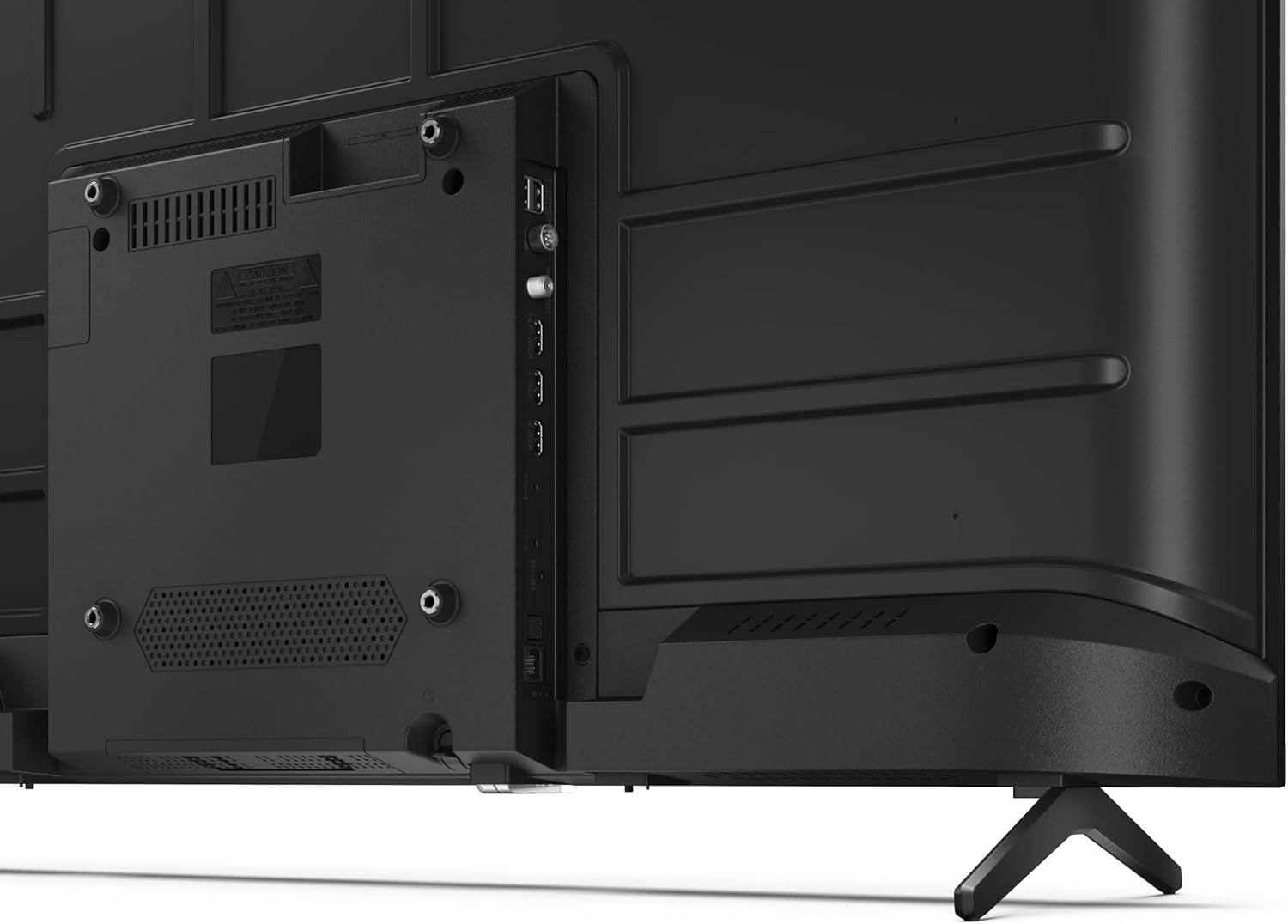
Billede 3.3: Detaljeret view af tv'ets tilslutningsporte.
3.4 Første opstart og Google TV-opsætning
After connecting all necessary cables, plug the power cable into an electrical outlet. Press the power button on the remote control or on the TV. Follow the on-screen instructions to complete the initial setup, including network connection, Google account login, and channel scanning.
4. Betjening
4.1 Fjernbetjeningsfunktioner
The remote control allows you to navigate the TV's features. Common buttons include Power, Volume Up/Down, Channel Up/Down, Input Source, Home (Google TV), Navigation (directional arrows, OK), Back, and Google Assistant.
4.2 Google TV-grænseflade
Your Sharp TV runs on Google TV, providing a personalized home screen with content recommendations from your subscriptions. Use the remote's navigation buttons to browse movies, shows, apps, and your library.

Image 4.1: The Google TV home screen on the Sharp 40HF2265E.
4.3 Indgangsvalg
To switch between connected devices (e.g., HDMI 1, HDMI 2, TV tuner), press the 'Input' or 'Source' button on your remote control and select the desired input from the on-screen menu.
4.4 Billed- og lydindstillinger
Access the TV's settings menu to adjust picture modes (Standard, Vivid, Cinema, Game), brightness, contrast, color, and sound modes (Standard, Music, Movie, Speech). The TV supports HDR10 for enhanced contrast and color, and Dolby Digital for rich audio.

Image 4.2: Visual representation of HDR (High Dynamic Range) technology.
4.5 Google Assistant and Chromecast
Use the built-in Google Assistant for voice control. Press the Google Assistant button on your remote and speak your commands, such as searching for content, controlling smart home devices, or getting information. Chromecast allows you to cast content directly from compatible devices like smartphones or tablets to your TV.

Image 4.3: Google Assistant integration for voice commands.
4.6 Bluetooth-forbindelse
Pair Bluetooth-enabled devices such as headphones or soundbars with your TV for a wireless audio experience. Navigate to the TV's settings menu, select 'Remotes & Accessories', and then 'Pair new device' to connect.
5. Vedligeholdelse
5.1 Rengøring af tv'et
Always unplug the TV before cleaning. Use a soft, dry cloth to wipe the screen and TV body. For stubborn marks, lightly dampRengør kluden med vand eller en specialiseret skærmrens. Brug aldrig slibende rengøringsmidler, voks eller opløsningsmidler.
5.2 Softwareopdateringer
Your Google TV may receive automatic software updates. Ensure your TV is connected to the internet to receive these updates, which can improve performance and add new features. You can also manually check for updates in the settings menu.
6. Fejlfinding
Hvis du støder på problemer med dit tv, kan du bruge følgende almindelige løsninger:
- Ingen strøm: Kontroller, om strømkablet er korrekt tilsluttet både tv'et og stikkontakten. Sørg for, at stikkontakten fungerer.
- Intet billede/lyd: Bekræft, at den korrekte inputkilde er valgt. Kontroller alle kabelforbindelser (HDMI, antenne). Prøv at genstarte tv'et.
- Fjernbetjeningen virker ikke: Udskift batterierne (2 AAA). Sørg for, at der ikke er nogen forhindringer mellem fjernbetjeningen og tv'ets IR-sensor.
- Problemer med netværksforbindelse: For Wi-Fi, check your router and ensure the TV is within range. For wired connections, check the Ethernet cable. Try restarting your router and the TV.
- Problemer med billedkvaliteten: Juster billedindstillingerne (lysstyrke, kontrast, skarphed). Sørg for, at inputkilden leverer et signal af høj kvalitet.
For more complex issues, consult the comprehensive troubleshooting section in the full digital manual or contact Sharp customer support.
7. Specifikationer
Below are the technical specifications for the Sharp 40HF2265E Full HD Google TV:

Image 7.1: Dimensions of the Sharp 40HF2265E TV.
| Feature | Specifikation |
|---|---|
| Mærke | Skarp |
| Modelnummer | 40HF2265E |
| Modelnavn | HF-serien |
| Model årgang | 2025 |
| Skærmstørrelse | 40 tommer (81 centimeter) |
| Displayteknologi | LED |
| Opløsning | 1080p (Full HD) |
| Opdateringshastighed | 60 Hz |
| Aspektforhold | 16:9 |
| Kontrastforhold | 100000:1 |
| Skærmfinish | Mat |
| Svartid | 8 millisekunder |
| Baggrundslys teknologi | LED |
| Supported HDR Format | HDR10, HLG |
| Forbedring af billedkvalitet | Dynamic Contrast, HDR10, HLG |
| Motion Enhancement Technology | Motion Interpolation |
| Operativsystem | Google TV |
| Internet Applications | Apple TV, Google TV, Hulu, Prime Video, YouTube |
| Særlige funktioner | Bluetooth, Chromecast, Dolby Digital, HD Tuner |
| Forbindelsesteknologi | Ethernet, USB, Wi-Fi |
| Trådløs teknologi | Bluetooth |
| Bluetooth version | 5.0 |
| Screen Mirroring Technology | Chromecast, Google Cast |
| Total HDMI-porte | 3 |
| Samlede USB 2.0-porte | 2 |
| Number of Composite Video Inputs | 1 |
| Lydindgang | Mini composite/CVBS + audio input |
| Total Audio Output Ports | 2 |
| Lydudgangstilstand | Stereoanlæg |
| Lydkodning | DD |
| Integrated Surround Sound Format | Dolby AC-4, Dolby Digital, Dolby Digital Plus |
| Maksimal højttalerudgangseffekt | 16 watt (2x8W) |
| Antal lydkanaler | 2.0 |
| Broadcast System | DVB-T2/C/S/S2 |
| Videokodning | MKV |
| Produktdimensioner (DxBxH) | 8.4P x 89.2L x 50.9H cm |
| Varens vægt | 5.4 kilo |
| Vægt uden stativ | 5.4 kilo |
| Base Bredde | 765 millimeter |
| VESA Monteringsstandard | 200 x 200 mm |
| Strømforbrug | 37 watt |
| Voltage | 230 volt |
| Remote Control Battery Size | AAA |
| Remote Control Battery Quantity | 2 |
| Parental Control Technology | Kindersicherung Über Google Tv |
| Tilgængelighed af reservedele i EU | 7 år |
8. Garanti og support
8.1 Produktgaranti
The Sharp 40HF2265E television comes with a 2-year manufacturer's warranty. Please refer to the included Warranty Card for detailed terms and conditions regarding coverage and service. Keep your proof of purchase for warranty claims.
8.2 Kundesupport
If you require further assistance, have questions not covered in this manual, or need technical support, please contact Sharp customer service. Contact information can typically be found on the Warranty Card or the official Sharp webwebsted.