
Indledning
Welcome to the Motorola Moto Watch user manual. This guide provides comprehensive instructions to help you set up, operate, maintain, and troubleshoot your new smartwatch. Please read this manual carefully to ensure proper use and to fully utilize all features of your device.
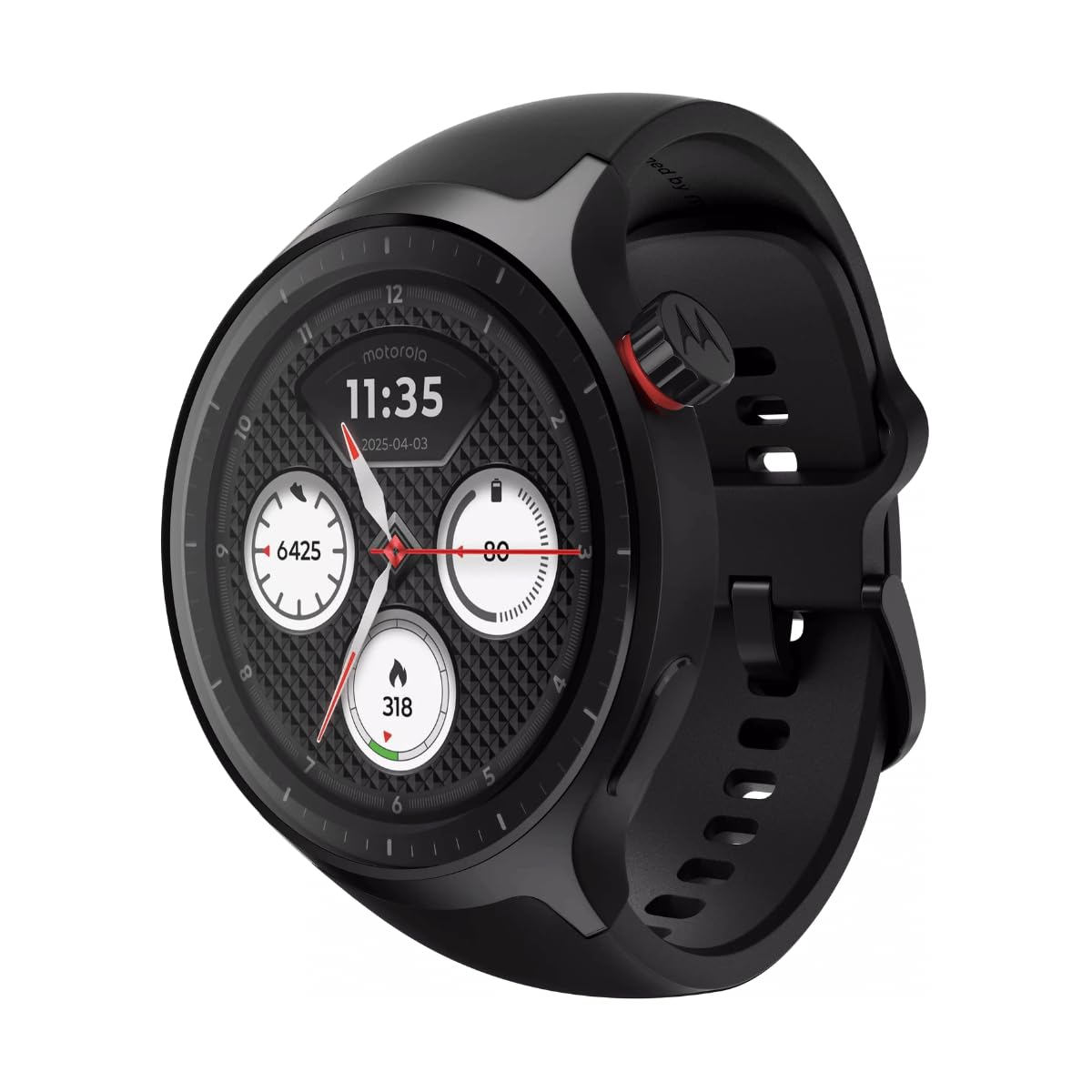
Figur 1: Forside view of the Motorola Moto Watch, showing the digital display with time, date, steps, heart rate, and calories burned.
Opsætning
1. Opladning af enheden
Before initial use, fully charge your Moto Watch. Connect the charging cable to the watch's charging contacts and a USB power source. A full day's battery can be achieved with approximately 5 minutes of charging.

Figur 2: Bagside view of the Motorola Moto Watch, highlighting the optical heart rate sensor and magnetic charging contacts.
2. Indledende parring
- Sørg for, at din smartphones Bluetooth er aktiveret.
- Download and install the official Motorola Moto Watch application from your device's app store.
- Open the app and follow the on-screen instructions to pair your watch. This typically involves selecting your watch from a list of available devices and confirming a code on both the watch and phone.
3. Justering af båndet
The Moto Watch comes with a 22mm silicone band. Adjust the band to a comfortable fit on your wrist, ensuring the sensors on the back of the watch maintain good contact with your skin for accurate readings.

Figur 3: Vinklet view of the Motorola Moto Watch, showcasing the watch face, side button, and the silicone strap.
Betjeningsvejledning
Display og navigation
The Moto Watch features a vibrant 1.4-inch OLED display. Navigate through menus and features by swiping across the screen and tapping to select. The physical crown on the side can also be used for navigation and selection.
- Stryg op/ned: Scroll through notifications or menu options.
- Stryg til venstre/højre: Få adgang til hurtige widgets eller forskellige urskiver.
- Tryk på: Vælg et element, eller åbn et program.
- Press Crown: Return to the watch face or open the app drawer.
Aktivitets- og velværesporing
Powered by Polar, the Moto Watch offers comprehensive activity and wellness tracking. Key features include:
- Heart Rate Monitoring: Kontinuerlig pulsmåling.
- Søvnsporing: Overvåger søvntages og kvalitet.
- Trintæller: Tracks daily steps and distance.
- GPS: Built-in GPS for accurate outdoor activity tracking without a phone.
- Træningstilstande: Various modes for different exercises.
Opkald og notifikationer
Receive and manage calls and notifications directly from your wrist. The watch includes a built-in microphone and speaker for clear communication.
- Indgående opkald: Answer or decline calls directly on the watch.
- Meddelelser: View messages, emails, and app alerts.

Figur 4: Sideprofile of the Motorola Moto Watch, illustrating its slim design and the functional crown.
Opretholdelse
Rengøring af dit ur
Regularly clean your Moto Watch and band to ensure optimal performance and hygiene.
- Wipe the watch face and body with a soft, damp, fnugfri klud.
- For the silicone band, use mild soap and water, then rinse thoroughly and dry.
- Undgå at bruge skrappe kemikalier eller slibende materialer.
Vandmodstand
The Moto Watch is water-resistant. It is suitable for everyday use and can withstand splashes, rain, and brief immersion. However, it is not recommended for high-speed water sports or diving. Ensure the watch is dry before charging.
Fejlfinding
If you encounter issues with your Moto Watch, refer to the following common solutions:
- Uret tænder ikke: Sørg for, at uret er fuldt opladet. Tilslut det til opladeren i mindst 30 minutter.
- Kan ikke parres med telefon:
- Sørg for, at Bluetooth er aktiveret på din telefon.
- Genstart både dit ur og din telefon.
- Make sure the Moto Watch app is updated to the latest version.
- Unøjagtige pulsmålinger: Ensure the watch is snug on your wrist and the sensors are clean and in direct contact with your skin.
- Kort batterilevetid:
- Reducer skærmens lysstyrke.
- Deaktiver unødvendige notifikationer eller funktioner.
- Ensure background apps are closed on the watch.
Specifikationer
| Feature | Detalje |
|---|---|
| Mærke | Motorola |
| Model | PG38C08254 |
| Display Type | Digital (1.4-inch OLED) |
| Æske diameter | 47 millimeter |
| Båndmaterialetype | Silikone |
| Bånd farve | Sort |
| Båndbredde | 22 millimeter |
| Båndlængde | 20 Centimeter |
| Vandmodstandsniveau | Water Resistant (Underwater protection) |
| Varens vægt | 8.5 gram |
| Særlige funktioner | Activity & Wellness Tracking (Polar-powered), GPS, Built-in Microphone & Speaker, Corning Gorilla Glass 3 |
| Inkluderede komponenter | Brugsanvisning, ladekabel |
| UPC | 840493615073 |
Garantioplysninger
The Motorola Moto Watch comes with a 1 års garanti from the date of purchase. This warranty covers manufacturing defects under normal use. Please retain your proof of purchase for warranty claims. For detailed terms and conditions, refer to the warranty card included in your product packaging or visit the official Motorola support webwebsted.
Støtte
For yderligere assistance, teknisk support eller til view frequently asked questions, please visit the official Motorola support webwebsted. Du kan også finde yderligere ressourcer og kontaktoplysninger der.