
Indledning
The QFX R-58 is a portable retro-style radio designed for versatile audio entertainment. It features AM, FM, and Shortwave (SW) radio bands, Bluetooth connectivity for wireless audio streaming, and a built-in MP3 player supporting USB and TF card media. Power options include a rechargeable internal battery, USB charging, and supplemental solar charging for extended use. This manual provides essential information for operating and maintaining your device.
Nøglefunktioner:
- Multibåndsradio: Access AM, FM, and Shortwave frequencies.
- Bluetooth-forbindelse: Stream lyd trådløst fra kompatible enheder.
- MP3-afspilning: Play music directly from USB drives or TF (MicroSD) cards.
- Genopladeligt batteri: Integreret batteri til bærbar brug.
- Solopladning: Supplemental solar panel for charging in well-lit conditions.
- Udtrækkelig antenne: Improves radio reception.
- Hovedtelefonstik: Til privat lytning.
Opsætning
1. Batteriinstallation
The QFX R-58 uses a replaceable 18650 lithium-ion battery. Ensure the battery is correctly inserted before first use.
- Find batterirummet på bagsiden af radioen.
- Slide the 'OPEN' latch to open the battery cover.
- Isæt 18650-batteriet, og sørg for korrekt polaritet (+/-).
- Luk batteridækslet forsvarligt.
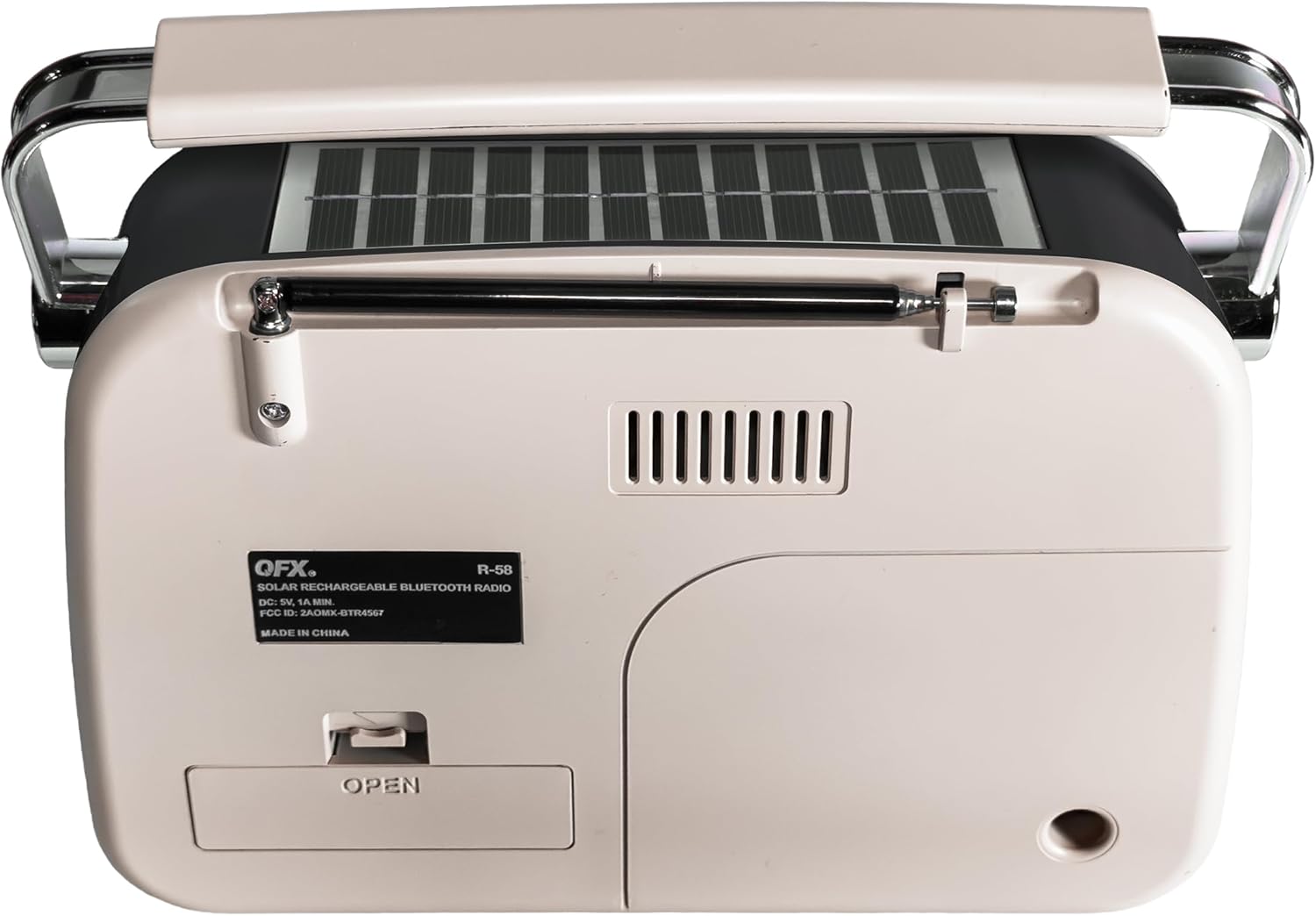
Figur 1: Tilbage view of the QFX R-58 radio, highlighting the battery compartment.
2. Opladning af batteriet
The radio can be charged via USB-C or its integrated solar panel.
- USB-C opladning: Connect a USB-C cable to the DC-5V input port on the side of the radio and to a compatible USB power source (e.g., wall adapter, computer). The 'CHARGE' indicator light will illuminate.
- Solopladning: Place the radio with the solar panel facing direct sunlight. This provides supplemental charging and is most effective in bright conditions. The 'CHARGE' indicator light may glow dimly or brightly depending on light intensity.

Figure 2: Side panel with USB-C charging port and charge indicator.
3. Antenneforlænger
For optimal radio reception, extend the retractable antenna.
- Gently pull the antenna upwards from its housing until fully extended.
- Adjust the angle and direction of the antenna for the best signal reception.
Betjeningsvejledning
1. Tænd/sluk og lydstyrkekontrol
- At tænde radioen ON, rotate the ON/OFF Volume Wheel upwards.
- At tænde radioen SLUKKET, rotate the ON/OFF Volume Wheel downwards until it clicks.
- Adjust the volume by rotating the ON/OFF Volume Wheel.
2. Selecting Modes (Radio/Music/Bluetooth)
Use the toggle switch on the side panel to select your desired mode:
- MUSIK: For USB/TF card MP3 playback.
- FM: Til FM-radiomodtagelse.
- ER: For AM radio reception.
- SW: For Shortwave radio reception.
To activate Bluetooth mode, press the 'M' (Mode) button until you hear the Bluetooth pairing prompt.
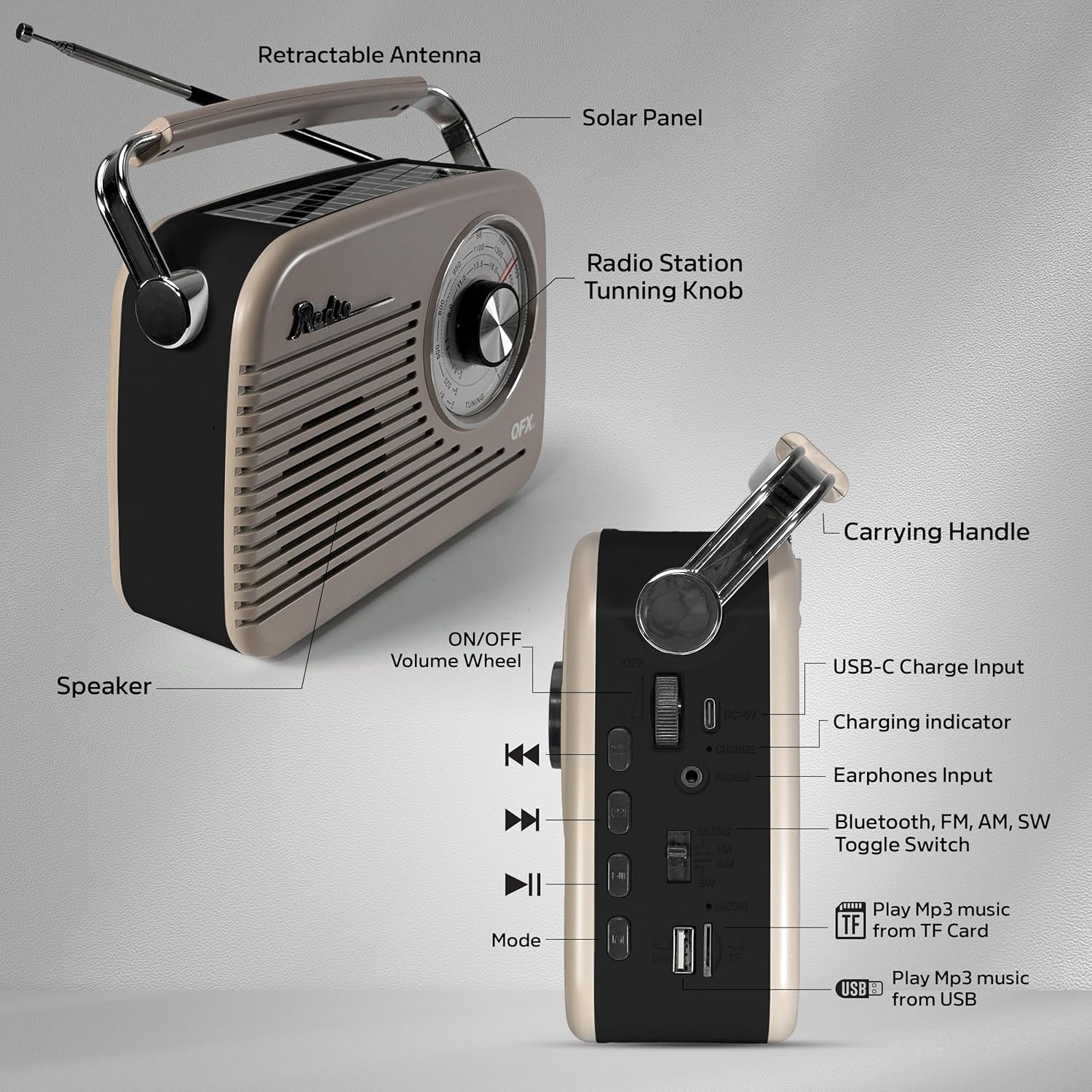
Figure 3: Labeled diagram of the QFX R-58 controls.
3. Radiobetjening (AM/FM/SW)
- Select the desired band (FM, AM, or SW) using the toggle switch.
- Drej på Tuningknap on the front panel to scan for radio stations.
- Extend and adjust the retractable antenna for optimal signal clarity.

Figure 4: Adjusting the radio tuning knob.
4. Bluetooth-parring
- Press the 'M' (Mode) button until the radio announces "Bluetooth". The Bluetooth indicator light will flash.
- Aktiver Bluetooth på din mobilenhed, og søg efter tilgængelige enheder.
- Select "QFX R-58" from the list of devices to pair.
- Once paired, the radio will confirm with an audible prompt, and the Bluetooth indicator light will remain solid.
Figure 5: Bluetooth pairing with a mobile device.
5. USB/TF Card MP3 Playback
- Sæt et USB-flashdrev i USB-porten eller et TF-kort (MicroSD) i TF-kortstikket.
- Switch the mode toggle to 'MUSIC'. The radio will automatically detect and begin playing MP3 files.
- Use the playback control buttons (Previous, Play/Pause, Next) to manage your music.
6. Brug af hovedtelefoner
- Plug 3.5mm headphones into the 'PHONES' jack on the side panel for private listening.
- Den interne højttaler vil automatisk slå lyden fra, når der tilsluttes hovedtelefoner.
Opretholdelse
- Rensning: Brug en blød, tør klud til at rengøre radioens yderside. Undgå slibende rengøringsmidler eller opløsningsmidler.
- Batteripleje: If the radio will not be used for an extended period, remove the 18650 battery to prevent leakage. Store the battery in a cool, dry place.
- Solpanel: Keep the solar panel clean and free of dust or debris to ensure efficient supplemental charging.
- Opbevaring: Store the radio in a dry environment, away from extreme temperatures and direct sunlight when not in use.
Fejlfinding
| Problem | Mulig årsag | Løsning |
|---|---|---|
| Ingen strøm/Radioen tænder ikke | Batteriet er afladet eller forkert installeret. | Charge the battery via USB-C. Ensure the 18650 battery is correctly inserted with proper polarity. |
| Dårlig radiomodtagelse | Antennen er ikke strakt ud, eller signalet er dårligt i området. | Fully extend the antenna and adjust its position. Try moving the radio to a different location. |
| Bluetooth ikke parring | Radioen er ikke i Bluetooth-tilstand, eller enheden er for langt væk. | Ensure the radio is in Bluetooth mode (indicated by flashing light). Keep your device within 10 meters (33 feet) of the radio. |
| USB/TF-kort afspiller ikke | Incorrect mode selected or unsupported file format. | Switch to 'MUSIC' mode. Ensure files are in MP3 format. Check if the USB drive or TF card is properly inserted. |
| Solar charging indicator is dim | Utilstrækkeligt sollys. | Move the radio to an area with direct, strong sunlight. Note that solar charging is supplemental. |
Specifikationer
| Feature | Detalje |
|---|---|
| Mærke | QFX |
| Modelnavn | R-58-IVY |
| Forbindelsesteknologi | Bluetooth |
| Højttaler type | Enkel højttaler |
| Yderligere funktioner | USB Port, TF Card Slot, Solar Panel |
| Varedimensioner (D x B x H) | 9.06" D x 2.95" B x 7.87" H |
| Varens vægt | 2.31 pund |
| UPC | 606540005392 |
Garanti og support
For garantioplysninger og kundesupport henvises til den dokumentation, der fulgte med dit køb, eller besøg den officielle QFX webwebsted. Gem din købsbevis i tilfælde af garantikrav.