
1. Produktet er slutview
The ULANZI MA93 is a versatile 10000mAh battery grip designed to extend the operational time of your camera and provide stable handheld or tabletop support. It features an integrated tripod, a real-time LCD battery display, and a universal 1/4-inch screw mount for broad compatibility.
Nøglefunktioner:
- 10000mAh kapacitet: Provides extended power for long shooting sessions.
- LCD-skærm i realtid: Viser den nøjagtige resterende batteriprocenttage (1-100%).
- Integrated Hidden Tripod: Fold-out legs provide instant tabletop stability.
- Universal 1/4"-20 Mount: Compatible with action cameras, mirrorless cameras, and smartphone rigs.
- Ergonomisk design: Comfortable for handheld use, reducing fatigue during extended vlogging or shooting.
- Indbygget ladekabel: Allows for effortless charging of connected devices.
- Rejseklar: 10000mAh (approx. 37 Wh) capacity is within FAA carry-on limits for U.S. domestic flights.
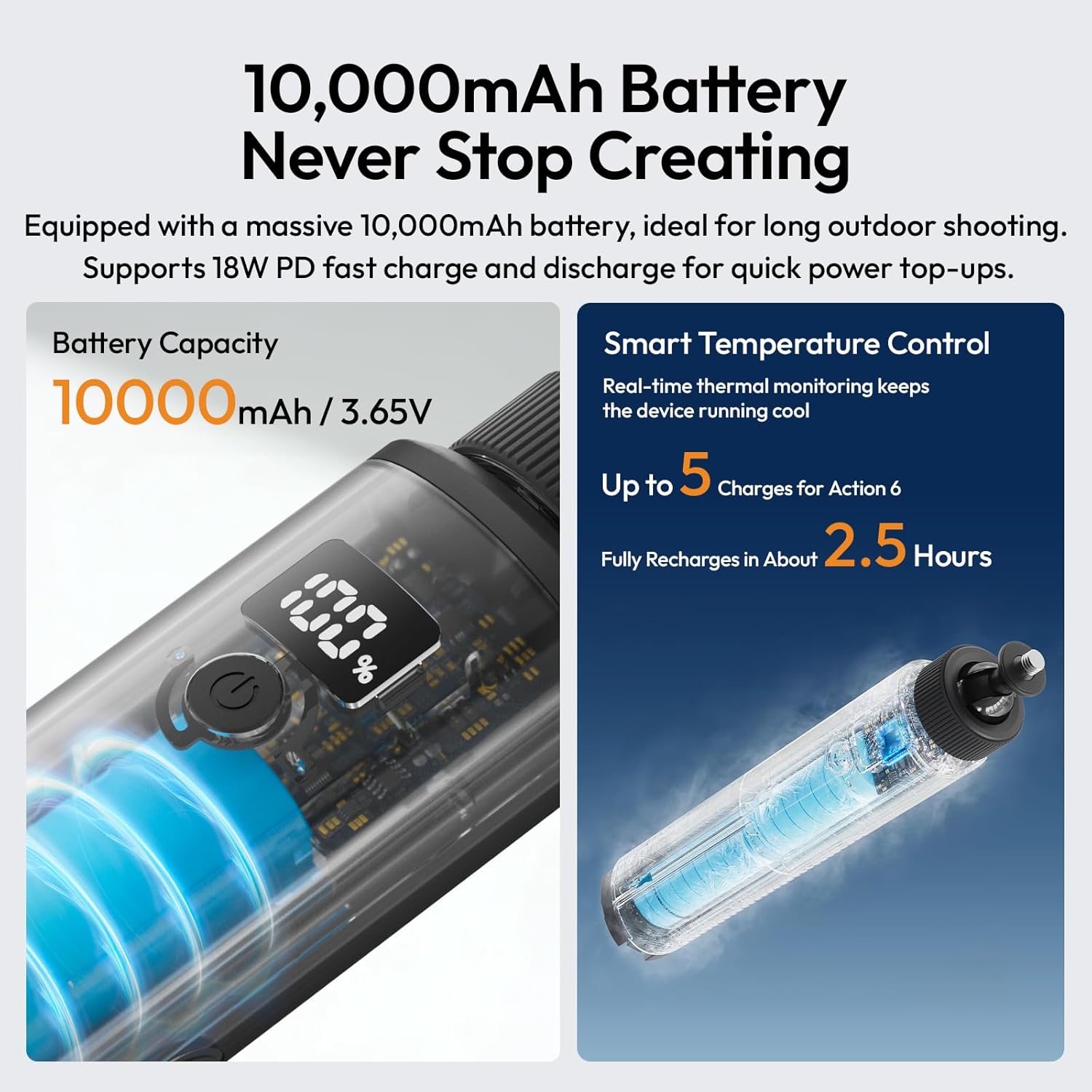
Image 1.1: The ULANZI MA93 Battery Grip with a camera attached, demonstrating its use as a handheld power source.
2. Pakkens indhold
Bekræft at alle varer er til stede i pakken:
- ULANZI MA93 Handheld Battery Grip x 1
- (Additional accessories may vary based on specific product bundles)
3. Komponentidentifikation

Image 3.1: Diagram showing the ULANZI MA93 Battery Grip with its main features highlighted, including the LCD display, power button, and integrated cable.
- 1/4"-20 Skruemontering: Located at the top for attaching cameras and accessories.
- LCD-skærm: Viser batteriprocenttage.
- Power knap: Aktiverer displayet og starter opladning.
- Integreret USB-C-kabel: For connecting to devices for power.
- USB-C indgangsport: For charging the MA93 battery grip.
- Hidden Tripod Legs: Fold out from the base for tabletop stability.
- 1/4"-20 gevindhul: Located at the bottom for mounting on larger tripods or stands.
4. Opsætningsvejledning
4.1 Charging the Battery Grip
- Locate the USB-C input port on the side of the MA93 Battery Grip.
- Connect a USB-C charging cable (not included) to this port and to a compatible USB power adapter (e.g., 18W PD fast charger).
- LCD-displayet viser opladningsstatus og den aktuelle batteriprocent.tage.
- A full charge takes approximately 2.5 hours with an 18W PD charger.

Image 4.1: The LCD screen displaying battery percentage during charging, indicating the 10000mAh capacity and fast charging capability.
4.2 Attaching a Camera or Device
- Ensure your camera or device has a standard 1/4"-20 threaded hole.
- Align the 1/4"-20 screw mount on top of the MA93 with the threaded hole on your device.
- Rotate the camera or the grip until it is securely fastened. Do not overtighten.
- For devices requiring power, connect the integrated USB-C cable from the grip to your device's charging port.
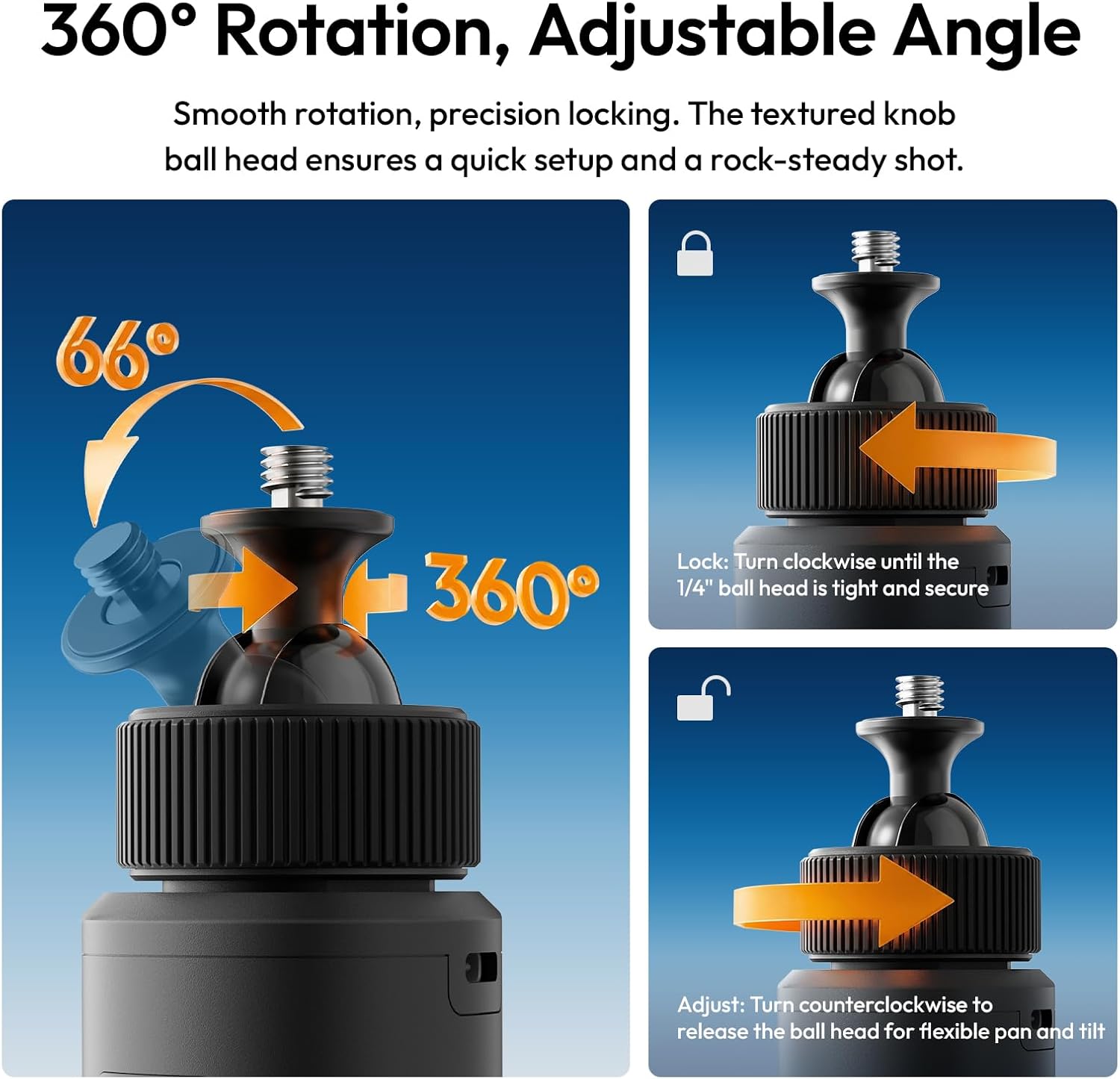
Image 4.2: A camera securely mounted on the ULANZI MA93 Battery Grip, ready for use.
4.3 Deploying the Integrated Tripod
- Locate the three hidden legs at the bottom of the grip.
- Gently pull the three support feet outwards until they are fully extended and locked into position.
- Place the grip on a flat, stable surface for tabletop use.
- To retract, push the legs back into the grip until they are flush.

Image 4.3: The ULANZI MA93 Battery Grip with its integrated tripod legs extended, supporting a camera on a flat surface.
5. Betjeningsvejledning
5.1 Kontrol af batteriniveau
Tap the power button once to activate the LCD display. The screen will show the exact remaining battery percentage (1-100%). The display will automatically turn off after a few seconds to conserve power.

Image 5.1: Close-up of the MA93's LCD screen indicating a full 100% charge.
5.2 Powering/Charging External Devices
- Connect your camera, smartphone, or other compatible device to the MA93 using the integrated USB-C cable.
- Press the power button on the MA93 to initiate power delivery. The grip will begin charging the connected device.
- The MA93 supports pass-through charging, allowing it to be charged while simultaneously powering an external device.
5.3 Adjusting the Camera Angle (360° Rotation)
The top 1/4"-20 mount features a ball head for flexible positioning:
- For at justere: Turn the textured knob counter-clockwise to loosen the ball head. Adjust your camera to the desired angle (360° pan, 66° tilt).
- At låse: Turn the textured knob clockwise until the ball head is tight and secure, preventing movement.

Image 5.2: Illustration of the 360-degree rotation and adjustable angle feature of the MA93's ball head mount.
6. Vedligeholdelse
- Keep the device clean and dry. Avoid exposure to water or excessive humidity.
- Brug en blød, tør klud til at rengøre ydersiden. Brug ikke skrappe kemikalier eller slibende materialer.
- Store the grip in a cool, dry place when not in use.
- Undgå at tabe enheden eller udsætte den for kraftige stød.
- Forsøg ikke at skille eller reparere enheden selv, da dette vil ugyldiggøre garantien.
7. Fejlfinding
| Problem | Mulig årsag | Løsning |
|---|---|---|
| Device not charging from MA93. |
|
|
| MA93 not charging. |
|
|
| LCD-skærmen virker ikke. |
|
|
| Tripod legs not deploying/retracting smoothly. |
|
|
8. Specifikationer
| Feature | Detalje |
|---|---|
| Modelnavn | MA93 Battery Grip |
| Batterikapacitet | 10000mAh (approx. 37 Wh) |
| Input/Output | 18W PD Fast Charge/Discharge (USB-C) |
| Monteringsgrænseflade | Universal 1/4"-20 Screw Mount (top), 1/4"-20 Threaded Hole (bottom) |
| Vise | Real-time LCD Percentage Display |
| Integrerede funktioner | Hidden Tripod, Built-in USB-C Cable |
| Produktdimensioner | 8.86" D x 1.66" B x 2.29" H |
| Varens vægt | 12 ounce |
| Kompatible enheder | Cameras, Action Cameras, MagSafe Phones (with adapter) |
| Fabrikant | Shenzhen Vijim Technology Co.,Ltd. |
9. Garanti og support
9.1 Garantioplysninger
The ULANZI MA93 Battery Grip comes with a 12 måneders garanti fra købsdatoen. Denne garanti dækker fabrikationsfejl og funktionsfejl ved normal brug. Den dækker ikke skader forårsaget af misbrug, ulykker, uautoriserede ændringer eller naturkatastrofer.
Gem venligst dit købsbevis for garantikrav.
9.2 Kundesupport
For technical assistance, warranty claims, or product inquiries, please contact ULANZI customer support through the official ULANZI webwebstedet eller dit købssted.
You can also visit the official ULANZI Store on Amazon for more information and products: ULANZI Official US Store
10. Produktvideoer
ULANZI MA93 Handheld Battery Grip Overview
Video 10.1: An official video from ULANZI demonstrating the features and usage of the MA93 Handheld Battery Grip.