
Indledning
Tak for købetasing the FERIETELF T29 Drone with Camera. This manual provides essential information for the safe operation, setup, and maintenance of your drone. Please read this manual thoroughly before operating the drone to ensure proper use and to prevent damage or injury.
The T29 Drone features a 1080P HD camera, WiFi FPV live video transmission, voice and gesture control, and a foldable design for portability. It comes with two batteries and a carrying case for convenience.
Sikkerhedsretningslinjer
Prioritér altid sikkerhed, når du betjener din drone. Manglende overholdelse af disse retningslinjer kan resultere i personskade, beskadigelse af dronen eller materielle skader.
- Brug dronen i åbne områder, væk fra mennesker, dyr, bygninger og forhindringer.
- Do not fly near airports or restricted airspace. Check local regulations before flying.
- Hold altid frit udsyn til dronen.
- Undgå at flyve i stærk vind eller ugunstige vejrforhold.
- Sørg for, at batterierne er fuldt opladet og korrekt installeret før hver flyvning.
- Hold fingre og løstsiddende tøj væk fra roterende propeller.
- Brug ikke dronen under påvirkning af alkohol eller narkotika.
- Børn bør kun betjene dronen under direkte opsyn af voksne.
Pakkens indhold
Bekræft at alle varer er til stede i din pakke:
- FERIETELF T29 Drone
- Fjernbetjening
- 1080P HD-kamera (integreret)
- Genopladelige dronebatterier (x2)
- USB opladningskabel
- Reserve propeller
- Propellerbeskyttere
- Skruetrækker
- Brugervejledning (dette dokument)
- Bæretaske
Opsætning
1. Udfoldning af dronen
Gently unfold the drone arms until they lock into position. Ensure all four arms are fully extended.
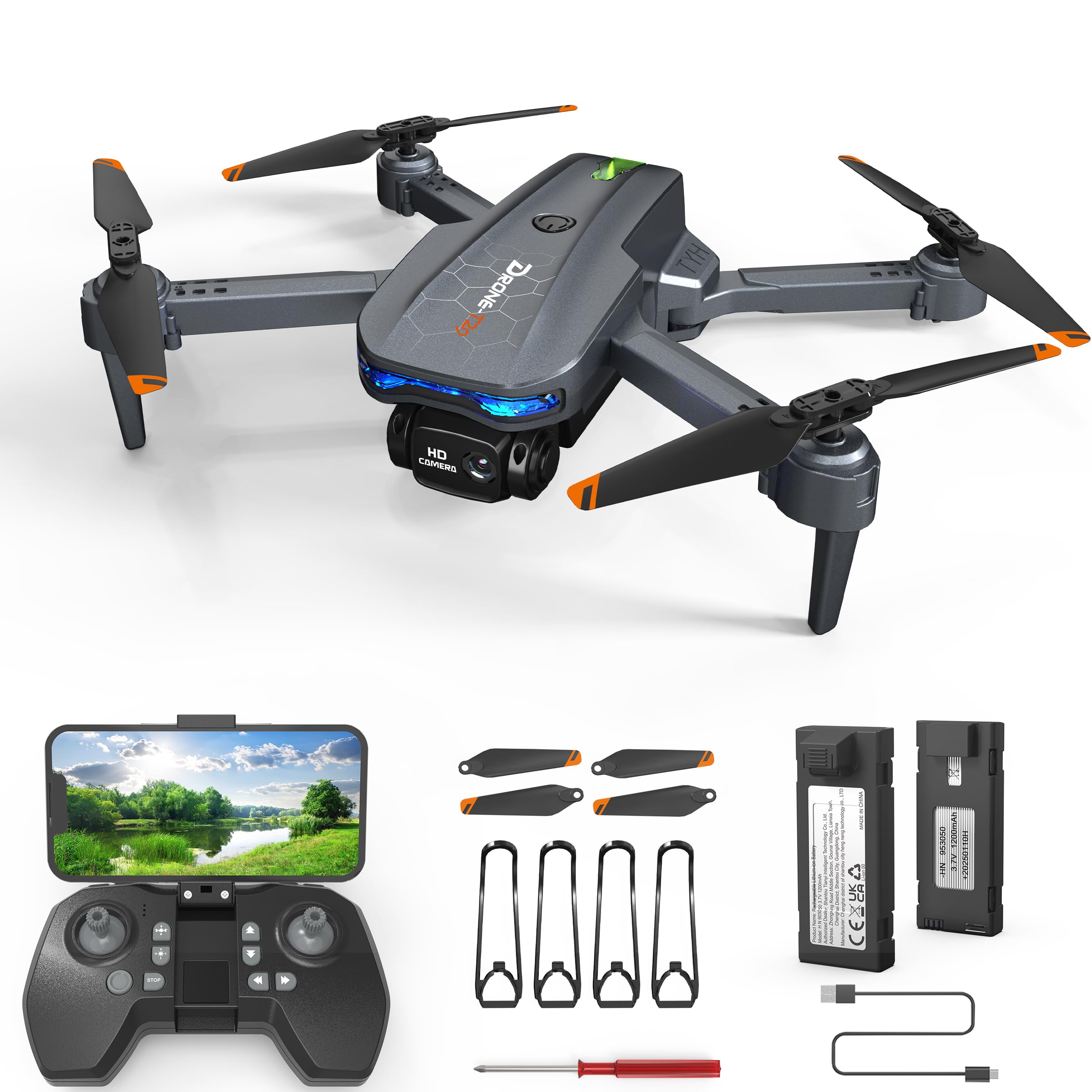
Image: The FERIETELF T29 Drone with its arms unfolded, ready for flight. The propellers are visible at the end of each arm.
2. Installing Propeller Guards
For beginner pilots, it is recommended to install the propeller guards. Attach each guard to the corresponding motor arm by snapping it into place.
3. Opladning af dronens batteri
Connect the drone battery to the USB charging cable. Plug the USB cable into a 5V/1A USB adapter (not included). The indicator light on the cable will show charging status. A full charge typically takes 60-90 minutes.
- Opladningsindikator: Red light ON during charging, OFF when fully charged.
Vigtig: Always use the provided charging cable. Do not leave batteries unattended while charging. Disconnect once fully charged.
4. Installation af dronebatteriet
Insert the fully charged battery into the battery compartment on the back of the drone until it clicks securely into place.
5. Installation af batterier i fjernbetjeningen
Open the battery cover on the back of the remote controller. Insert 3 x AAA batteries (not included) according to the polarity markings. Close the battery cover.
Betjeningsvejledning
1. Tænd og parring
- Placer dronen på en flad, plan overflade.
- Tryk og hold tænd/sluk-knappen på dronen nede, indtil indikatorlamperne blinker.
- Tænd fjernbetjeningen. Indikatorlampen på fjernbetjeningen blinker.
- Push the left joystick (throttle) up to the maximum position, then pull it down to the minimum position. The drone and remote lights will become solid, indicating successful pairing.
2. Calibrating the Gyroscope
After pairing, place the drone on a flat surface. Push both joysticks down and to the right simultaneously for 2-3 seconds. The drone lights will flash rapidly and then become solid, indicating successful calibration.
3. Connecting to WiFi FPV (First Person View)
- Download the "FERIETELF Drone" app from your smartphone's app store (iOS/Android).
- Tænd for dronen.
- Go to your smartphone's WiFi settings and connect to the network named "FERIETELF-T29-XXXXXX".
- Open the FERIETELF Drone app. You should see the live video feed from the drone's camera.
4. Start og landing
- Start med én knap: Press the One-Key Take-off button on the remote controller. The drone will automatically ascend to a certain height and hover.
- Manuel start: Push both joysticks down and outwards to start the propellers. Then, gently push the left joystick (throttle) upwards to ascend.
- One-key landing: Press the One-Key Landing button. The drone will slowly descend and land automatically.
- Manuel landing: Gently pull the left joystick (throttle) downwards to descend. Once landed, pull both joysticks down and inwards to stop the propellers.
5. Grundlæggende flyvekontrol
| Joystick/knap | Fungere |
|---|---|
| Venstre joystick (op/ned) | Ascend / Descend (Throttle) |
| Venstre joystick (venstre/højre) | Rotate Left / Rotate Right (Yaw) |
| Højre joystick (op/ned) | Fly Forward / Fly Backward (Pitch) |
| Højre joystick (venstre/højre) | Fly Left / Fly Right (Roll) |
| Trim knapper | Adjust drone drift (forward/backward, left/right) |
6. Stemmekontrol
With the app connected, activate voice control. Speak commands such as "Take off", "Land", "Forward", "Backward", "Left", "Right". Ensure you are in a quiet environment for best results.
7. Bevægelseskontrol
In the app, enable gesture control. Perform specific hand gestures in front of the drone's camera to trigger actions:
- "V" Gesture: Tag et billede.
- Palmebevægelse: Start/stop videooptagelse.
Ensure good lighting and a clear view of your hand for accurate gesture recognition.
8. Hovedløs tilstand
Press the Headless Mode button on the remote. In this mode, the drone's orientation is relative to the pilot, making it easier to control regardless of which way the drone is facing. Press again to exit.
9. Hastighedsjustering
Press the Speed button to cycle through different speed modes (low, medium, high). Adjust according to your skill level and flying environment.
Opretholdelse
- Rensning: Use a soft, dry cloth to clean the drone and remote controller. Do not use water or solvents.
- Propelinspektion: Regularly check propellers for damage (cracks, bends). Replace damaged propellers immediately using the provided screwdriver and spare parts.
- Batteripleje:
- Opbevar batterier på et køligt, tørt sted.
- Undlad at overoplade eller overaflade batterier.
- If not used for an extended period, charge batteries to about 50% capacity.
- Opbevaring: When not in use, fold the drone and store it in its carrying case to protect it from dust and damage. Remove batteries from the remote controller if storing for long periods.
Fejlfinding
| Problem | Mulig årsag | Løsning |
|---|---|---|
| Dronen reagerer ikke på fjernbetjeningen. | Not paired; low battery (drone/remote). | Re-pair drone and remote. Charge drone battery. Replace remote batteries. |
| Drone driver afsted under flyvning. | Gyroscope not calibrated; uneven surface at take-off; wind interference. | Recalibrate gyroscope on a flat surface. Use trim buttons to adjust. Fly in calm conditions. |
| Propellerne drejer ikke. | Drone not powered on; propellers obstructed; motor issue. | Ensure drone is on. Check for obstructions. Contact support if motors are faulty. |
| Ingen FPV-videofeed. | Not connected to drone's WiFi; app not open; weak signal. | Verify WiFi connection. Restart app. Move closer to drone. |
| Kort flyvetid. | Batteriet er ikke fuldt opladet; gammelt batteri; aggressiv flyvning. | Ensure full charge. Consider replacing old batteries. Fly more conservatively. |
Specifikationer
- Model: TY29
- Mærke: FERIETELF
- Dimensioner (udfoldet): 30.5 x 25.4 x 4.8 cm (12 x 10 x 1.9 tommer)
- Vægt: 185 gram
- Kamera: 1080P HD
- Forbindelse: Wi-Fi FPV
- Kontrolfunktioner: Voice Control, Gesture Control, Headless Mode, One-Key Take-off/Landing
- Batterier: 2 x Lithium Ion (P76 type, included)
- Batterier til fjernbetjening: 3 x AAA (medfølger ikke)
- Fabrikant: SHANTOU TIANYI INTELLIGENT TECHNOLOGY CO.,LTD.
Garantioplysninger
This product comes with a standard manufacturer's warranty. For specific details regarding warranty coverage, duration, and claims process, please refer to the warranty card included in your product packaging or contact FERIETELF customer support directly. Keep your proof of purchase for warranty validation.
Kundesupport
If you encounter any issues or have questions not covered in this manual, please contact FERIETELF customer support. For the most up-to-date contact information, please visit the official FERIETELF webwebstedet eller se kontaktoplysningerne på din produktemballage.
Online ressourcer: For additional tips, FAQs, and video tutorials, please visit the official FERIETELF support page.