
1. Introduktion
Thank you for choosing the Audizio Arco Active Tower Speaker. This manual provides essential information for the safe and correct operation of your new audio system. Please read it thoroughly before use and retain it for future reference.
2. Sikkerhedsinstruktioner
- Strømforsyning: Sørg for, at strømforsyningen voltage matches the requirements specified on the speaker.
- Ventilation: Bloker ikke ventilationsåbninger. Installer i overensstemmelse med producentens anvisninger.
- Vand og fugt: Udsæt ikke dette apparat for regn eller fugt. Placer ikke genstande fyldt med væsker, såsom vaser, oven på apparatet.
- Varmekilder: Må ikke installeres i nærheden af varmekilder såsom radiatorer, varmeapparater, komfurer eller andre apparater (inklusive ampløftere), der producerer varme.
- Rensning: Rengør kun med en tør klud.
- Service: Overlad al service til kvalificeret servicepersonale. Service er påkrævet, når apparatet er blevet beskadiget på nogen måde.
3. Pakkens indhold
Carefully unpack the box and ensure all items are present and in good condition. If any item is missing or damaged, contact your retailer immediately.
- Audizio Arco Active Speaker
- Front Panel (Speaker Grille)
- Højttalerstativ
- Fjernbetjening
- Strømkabel
- Instruktionsmanual (dette dokument)
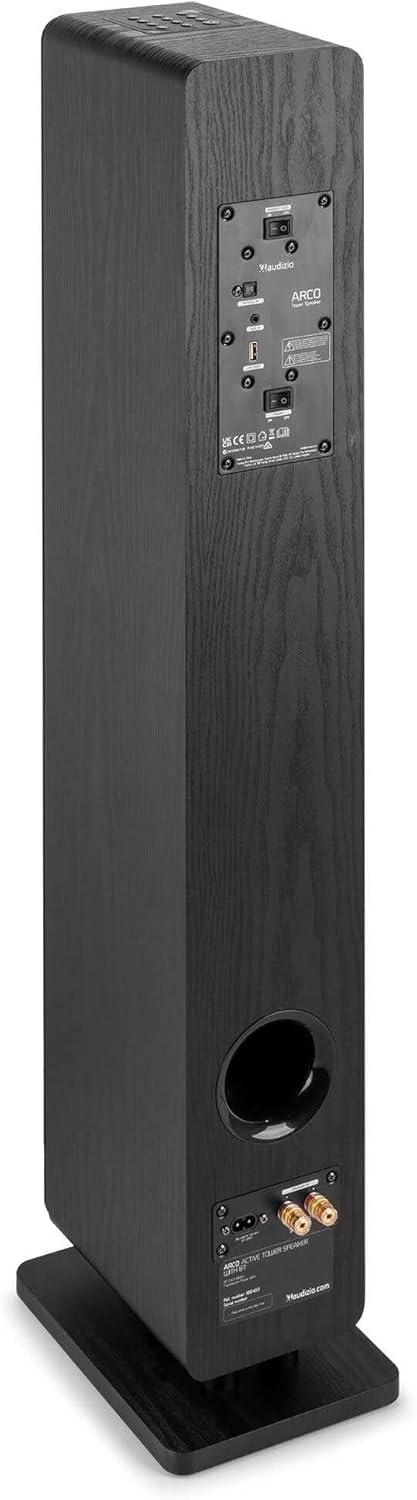
Image: All components included in the Audizio Arco package, including the speaker, remote control, and various connection cables.
4. Produktet er slutview
Front View (with Grille)

Image: The Audizio Arco speaker from the front, with the black fabric grille covering the drivers. The top panel shows control buttons, and the base features subtle LED lighting.
Front View (without Grille)

Image: The Audizio Arco speaker with the front grille removed, showcasing the tweeter and three 4-inch woofer/subwoofer drivers. The top panel controls and LED-lit base are also visible.
Bag View (Connections and Controls)

Image: The back panel of the Audizio Arco speaker, featuring the power input, optical input, AUX input, USB port, and speaker output terminals for passive speakers. Control switches are also visible.
Fjernbetjening

Billede: En detaljeret view of the Audizio Arco remote control, showing buttons for power, mute, Bluetooth, link (TWS), input selection, playback controls, volume adjustment, and bass/treble settings.
Base LED Lighting

Image: A close-up of the speaker's base, illustrating the integrated ambient LED lighting feature that illuminates the area beneath the speaker.
5. Opsætning
5.1 Assembling the Speaker
- Carefully remove the speaker and its stand from the packaging.
- Attach the speaker stand to the base of the speaker using the provided screws. Ensure it is securely fastened.
- If desired, attach the front panel (grille) to the front of the speaker. It is held in place magnetically.
5.2 Strømtilslutning
- Connect the power cable to the AC IN port on the rear of the speaker.
- Sæt den anden ende af strømkablet i en passende stikkontakt.
5.3 Indledende placering
Place the speaker on a stable, flat surface. For optimal sound, position it in a location where sound can propagate freely without obstruction. Avoid placing it directly against a wall if possible, to allow for better bass response.
6. Betjeningsvejledning
6.1 Tænd/sluk
Tryk på Magt button on the top panel of the speaker or on the remote control to turn the speaker on or off.
6.2 Indgangsvalg
Tryk på Input button on the top panel or the remote control to cycle through available input sources: Bluetooth, USB, AUX, Optical.
6.3 Bluetooth-forbindelse
- Vælge Bluetooth as the input source. The speaker will enter pairing mode, indicated by a flashing LED.
- Aktiver Bluetooth på din mobilenhed (smartphone, tablet osv.) og søg efter tilgængelige enheder.
- Select "Audizio ARCO" from the list of devices.
- Once paired, the LED indicator will stop flashing and remain solid. You can now stream audio from your device.
6.4 USB-afspilning
- Indsæt et USB-flashdrev med lyd files ind i USB porten på bagsiden af højttaleren.
- Vælge USB som inputkilde.
- Højttaleren vil automatisk begynde at afspille lyd files from the USB drive. Use the remote control for playback functions (play/pause, skip track).
6.5 AUX-indgang
- Tilslut en ekstern lydenhed (f.eks. MP3-afspiller, CD-afspiller) til AUX IN (3.5mm) port on the rear of the speaker using an appropriate audio cable.
- Vælge AUX som inputkilde.
- Audio from your connected device will now play through the speaker.
6.6 Optisk indgang
- Connect your TV or other audio source with an optical output to the OPTISK IN (Toslink) port on the rear of the speaker using an optical cable.
- Vælge Optisk som inputkilde.
- Ensure your TV's audio output settings are configured for PCM stereo output if you experience no sound.
6.7 Ægte trådløs stereo (TWS) parring
The Audizio Arco speaker supports TWS functionality, allowing you to pair two Arco speakers wirelessly for a stereo sound experience.
- Ensure both Audizio Arco speakers are powered on and not connected to any Bluetooth device.
- På én højttaler (dette vil være den primære højttaler) skal du trykke på og holde FORBINDELSE button on the remote control or the TWS button on the top panel until you hear a pairing tone.
- The primary speaker will search for the secondary speaker. Once connected, you will hear a confirmation tone, and the LED indicators on both speakers will synchronize.
- Tilslut nu din Bluetooth-enhed til den primære højttaler som beskrevet i afsnit 6.3. Lyden afspilles i stereo gennem begge højttalere.
6.8 LED-lysstyring
The ambient LED light at the base of the speaker can be controlled via the remote control. Refer to the remote control diagram for the specific button.
6.9 Tone Control (Remote Control)
Brug BASS+ / BASS- og TBL+ / TBL- buttons on the remote control to adjust the bass and treble levels to your preference. The FLAD button resets the tone settings to default.
7. Vedligeholdelse
7.1 Rengøring
- Tag altid stikket ud af stikkontakten før rengøring.
- Brug en blød, tør klud til at tørre højttalerens yderside af.
- Do not use liquid cleaners, aerosols, or abrasive chemicals, as these may damage the finish.
- For the speaker grille, use a soft brush or vacuum cleaner with a brush attachment to gently remove dust.
7.2 Opbevaring
If storing the speaker for an extended period, unplug it from the power source and store it in a cool, dry place, away from direct sunlight and extreme temperatures.
8. Fejlfinding
| Problem | Mulig årsag | Løsning |
|---|---|---|
| Ingen strøm | Strømkabel ikke tilsluttet; Strømudtag ikke aktivt. | Ensure power cable is securely connected to speaker and outlet. Test outlet with another device. |
| Ingen lyd | Incorrect input selected; Volume too low; Mute activated; Source device issue. | Select correct input. Increase volume. Deactivate mute. Check audio output of source device. |
| Bluetooth-parring mislykkes | Speaker not in pairing mode; Device too far; Already paired to another device. | Ensure speaker is in Bluetooth pairing mode. Move device closer. Disconnect from other devices. |
| No sound from Optical input | TV audio output settings incorrect; Optical cable damaged. | Set TV audio output to PCM stereo. Check optical cable for damage and ensure secure connection. |
| TWS-parring mislykkes | Højttalere er ikke i TWS-parringstilstand; For langt fra hinanden. | Ensure both speakers are in TWS pairing mode (not connected to Bluetooth). Move speakers closer. |
9. Specifikationer
| Feature | Specifikation |
|---|---|
| Mærke | Audizio |
| Modelnavn | ARCO Active Tower |
| Højttaler type | Active Hi-Fi Speaker (Floor-standing) |
| Max udgangseffekt | 160 watt |
| Forbindelsesteknologi | Bluetooth 5.4, Optical (Toslink), USB, AUX (3.5mm) |
| Lydudgangstilstand | Stereoanlæg |
| Frekvensrespons | 20000 Hz (Upper limit, typical for full-range speakers) |
| Woofer Driver Size | 3 x 4 tommer |
| Input bindtage | 230 volt |
| Kontrolmetode | Fjernbetjening, knapper på enheden |
| Særlige funktioner | Ambient LED light, TWS (True Wireless Stereo) function |
| Mål (D x B x H) | 24 cm x 17 cm x 95.5 cm |
| Varens vægt | 9.85 kilo |
| Kompatible enheder | Smartphones, Televisions, Tablets |
10. Garanti og support
10.1 Garantioplysninger
Audizio products are manufactured to high quality standards. This product is covered by a manufacturer's warranty, the terms of which may vary by region. Please refer to your purchase documentation or contact your local retailer for specific warranty details.
10.2 Kundesupport
Should you require technical assistance or have questions regarding your Audizio Arco speaker, please contact your retailer or visit the official Audizio webwebsted for supportressourcer og kontaktoplysninger.

