
Indledning
Thank you for choosing the Cecotec Conga X80 Pro Robot Vacuum and Mop. This intelligent cleaning device is designed to provide efficient and thorough cleaning for your home, combining powerful vacuuming with advanced mopping capabilities. Please read this manual carefully before using the product to ensure proper operation, maintenance, and safety.
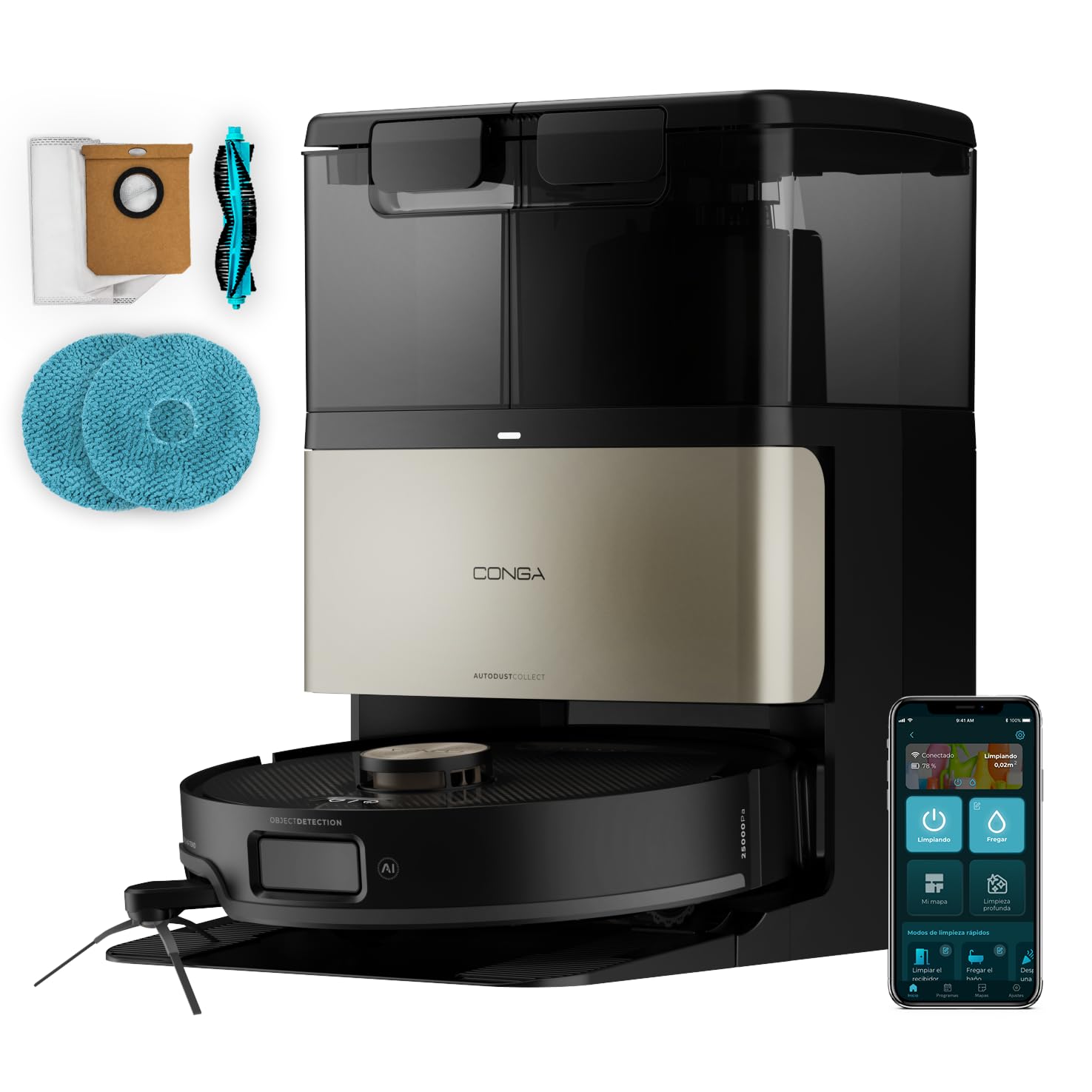
The Cecotec Conga X80 Pro Robot Vacuum and Mop, ready for use.
Opsætning og installation
1. Udpakning og komponenter
Fjern forsigtigt alle komponenter fra emballagen. Sørg for, at alle dele er til stede:
- Conga X80 Pro Robot Vacuum Cleaner
- Self-Emptying and Mop Disinfection Base (All-in Home Station)
- Mopping Cloths (Mops)
- Dust Bag (pre-installed in the base)
- Strømkabel
- Instruktionsmanual (dette dokument)
2. Positioning the All-in Home Station
Place the self-emptying and mop disinfection base against a wall in an open area, ensuring at least 1 meter (3 feet) of clear space on both sides and 1.5 meters (5 feet) in front. Plug the power cable into the base and a power outlet. The base will automatically charge the robot and manage its water and dust.

The robot vacuum docked at its self-emptying and cleaning station, highlighting the convenience of the All-in-Home station.
3. Første opladning
Place the robot onto the charging contacts of the All-in Home Station. Ensure the robot is properly aligned. Allow the robot to fully charge before its first use. The indicator lights on the robot and base will show the charging status.
4. App Connectivity (Bluetooth & Wi-Fi)
Download the official Cecotec Conga app from your smartphone's app store. Open the app and follow the on-screen instructions to connect your Conga X80 Pro. The robot supports both Bluetooth and 2.4 GHz Wi-Fi networks for easy and quick pairing with your devices.

A person using the mobile app to control the robot, showing personalized room cleaning settings.
Betjeningsvejledning
1. Intelligent Navigation and Mapping
The Conga X80 Pro utilizes advanced AI and LaserEye navigation to precisely map your home and navigate even in cluttered environments. It identifies small objects, different floor types, and dirt levels to make optimal cleaning decisions. The robot maps your house in real-time and adapts its cleaning strategy.
The robot navigating a living room, with graphical overlays indicating its intelligent, adaptive cleaning and obstacle avoidance (Conga Rover 2.0).
2. Vacuuming Function (25000 Pa Suction)
The robot features an ultra-powerful suction of 25000 Pa, effectively removing dust, debris, and pet hair from all surfaces, including high-pile carpets and tile grout. The Hairless Brush system is designed to prevent tangles, making maintenance easier and ensuring deep cleaning.

A dog next to the robot, with kibble scattered on a carpet, emphasizing the 25000 Pa suction power for deep cleaning.

Close-up of the Hairless Brush removing tangled hair, demonstrating its anti-tangle design. Note: Anti-tangle effectiveness varies with hair type and length.
3. Mopping Function (Perfect Wash & DuoXtend)
Experience superior mopping with the Perfect Wash system. The Spin mops are continuously moistened with clean water to effectively remove stubborn stains like grease, oil, and liquids. The DuoXtend technology ensures thorough cleaning:
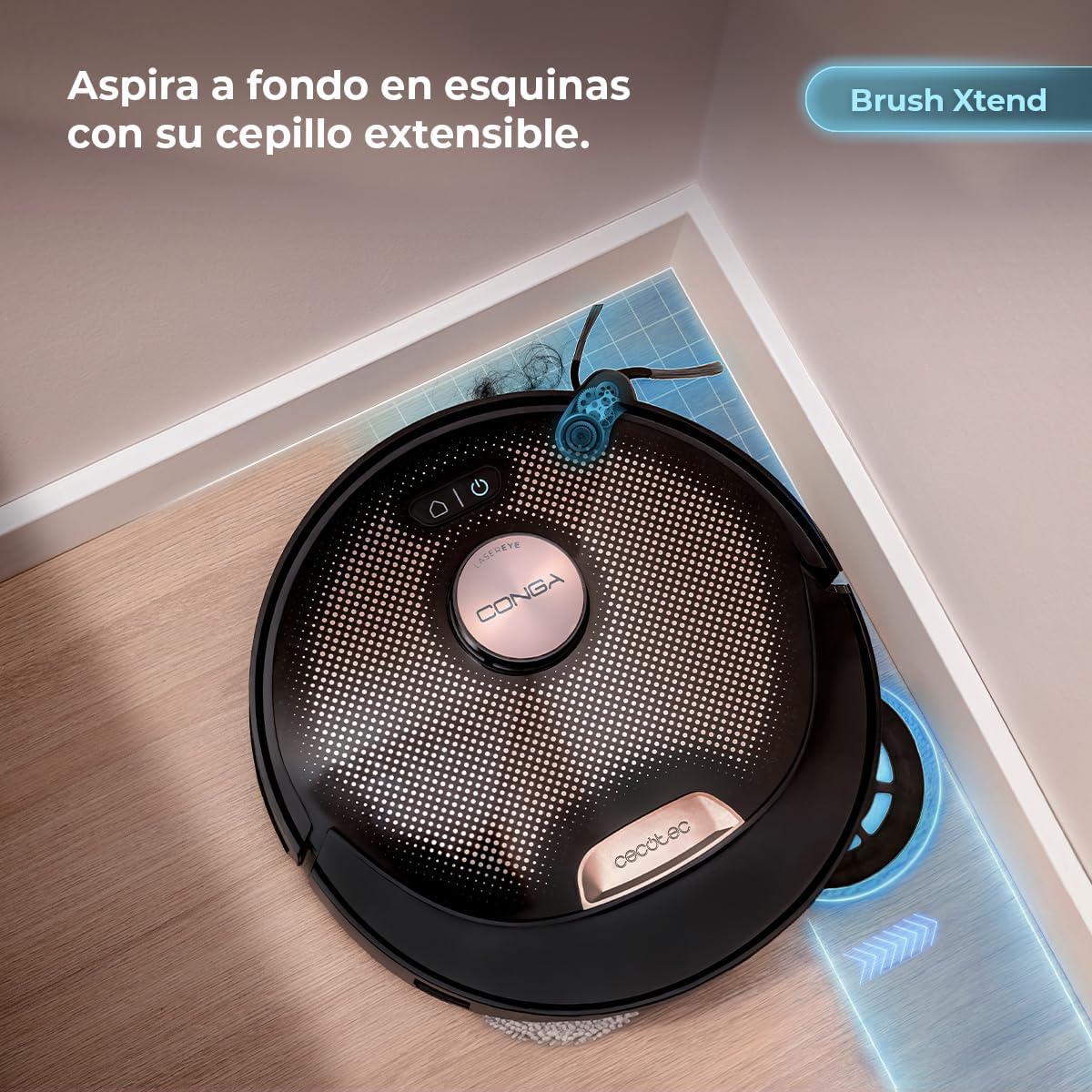
- BrushXtend: Extends to clean edges and hard-to-reach areas, such as chair legs.
- SpinXtend: Extends the mopping action under furniture.
- Spin Up: Mops automatically lift when detecting carpets to prevent wetting them.

The robot mopping a floor, leaving a clean path behind, with dirty paw prints visible, highlighting the Perfect Wash system.

The robot cleaning a corner, demonstrating its extendable BrushXtend feature for thorough edge cleaning.

The robot mopping under furniture, showcasing its extendable SpinXtend mop for reaching low and difficult areas.

The robot with its mopping pads lifted, illustrating the Spin Up feature for carpet protection during mopping.
4. Cleaning Modes and Scheduling
Use the mobile app to select various cleaning modes, define specific cleaning zones, set no-go zones, and schedule cleaning tasks. The app allows for personalized cleaning by rooms, ensuring your home is cleaned exactly as you prefer.

The robot cleaning a large area, with an overlay indicating its ability to clean up to 240 m² on a single charge.
Opretholdelse
Regular maintenance ensures optimal performance and extends the lifespan of your Conga X80 Pro.
1. All-in Home Station Maintenance
The All-in Home Station provides comprehensive maintenance for your robot:
- Selvtømning: The station automatically empties the robot's dustbin into a sealed dust bag, providing up to 100 days of hands-free dust management. Replace the dust bag when full.
- Mop Disinfection: The SpinCare technology drains dirty water, disinfects the mopping pads with hot water and soap (70°C), and then dries them with hot air to prevent germ growth and odors.
- Vandpåfyldning: The station automatically refills the robot's water tank with clean water.

The self-emptying station with an icon indicating up to 100 days of maintenance-free dust management. Actual duration may vary based on environmental conditions and usage habits.

The robot's mopping pads being disinfected with hot water and soap at the station, with a bacteria icon, showing the Thermal Clean feature.

Close-up of the mopping pads being dried with hot air at the station, preventing odors and germ growth.
2. Cleaning the Hairless Brush
While the Hairless Brush is designed to minimize tangles, it is recommended to periodically check and clean it to remove any accumulated hair or debris. Use the cleaning tool provided to cut and remove tangled hair.
3. HEPA Filter Cleaning/Replacement
The robot is equipped with a HEPA filter. Regularly tap out dust from the filter. Replace the HEPA filter every 3-6 months, or more frequently depending on usage, to maintain optimal filtration performance.
4. Rengøring af sensorer
Wipe the robot's sensors (cliff sensors, wall sensors, LaserEye sensor) with a dry, soft cloth to ensure accurate navigation and prevent malfunctions.
Fejlfinding
If you encounter any issues with your Conga X80 Pro, please refer to the following common solutions:
| Problem | Mulig årsag | Løsning |
|---|---|---|
| Robotten starter eller reagerer ikke. | Lavt batteri; Strømafbryder slukket; Robot sidder fast. | Ensure robot is fully charged; Turn on the main power switch; Clear any obstructions. |
| Dårlig rengøringsevne. | Full dustbin; Clogged filter; Tangled brushes; Dirty sensors. | Empty dustbin; Clean/replace HEPA filter; Clean Hairless Brush; Wipe sensors. |
| Robotten kan ikke vende tilbage til ladestationen. | Base obstructed; Robot too far; Base not powered. | Ensure clear space around base; Manually place robot near base; Check power connection to base. |
| Problemer med app-forbindelse. | Incorrect Wi-Fi password; Router issues; Robot not in pairing mode. | Verify Wi-Fi credentials (2.4 GHz only); Restart router; Follow app instructions for pairing mode. |
For more detailed troubleshooting, please refer to the full PDF instruction manual or contact Cecotec customer support.
Tekniske specifikationer
| Feature | Detalje |
|---|---|
| Mærke | Cecotec |
| Modelnavn | Conga X80 Pro |
| Modelnummer | A01_EU01_122037 |
| Særlige funktioner | Anti-collision, Self-emptying, Wireless, Intelligent Mapping |
| Controller type | App kontrol |
| Filtertype | HEPA |
| Batterisammensætning | Lithium Ion |
| Voltage | 220 volt |
| Strømkilde | Batteri |
| Medfølgende batterier | Ja |
| Støvposekapacitet | 3 Liters (in self-emptying base) |
| Anbefalede anvendelser | Hard and wet floor cleaning, narrow corners, remote scheduling |
| Overfladeanbefaling | Alle overflader |
| Tilgængelighed af reservedele i EU | 10 år |
| Fremstillingsår | 2026 |
| Oprindelsesland | Spanien |
Garantioplysninger
The Cecotec Conga X80 Pro comes with a 3 års garanti. Please retain your proof of purchase for warranty claims. For specific terms and conditions, refer to the official Cecotec warranty policy or contact customer support.
Support og yderligere information
For additional assistance, detailed instructions, or to purchase replacement parts, please visit the official Cecotec webwebsted eller kontakt deres kundeserviceafdeling.
- Officiel Cecotec Webwebsted: Cecotec-mærkebutik på Amazon
- Full Instruction Manual (PDF): Download PDF
- Data Transparency Statement (PDF): Download PDF
Always ensure you are using official Cecotec accessories and parts to maintain product performance and warranty validity.