
1. Introduktion
Thank you for choosing the Baseus FC41 145W 25000mAh Power Bank. This high-capacity portable charger is designed to provide ultra-fast charging for a wide range of devices, including laptops, smartphones, and tablets. Featuring a powerful 145W output and two integrated USB-C cables, it offers convenience and reliability for users on the go. This manual provides essential information for safe and efficient use of your power bank.
2. Sikkerhedsoplysninger
- Udsæt ikke powerbanken for ekstreme temperaturer (over 60 °C/140 °F eller under 0 °C/32 °F), direkte sollys eller ild.
- Undgå at tabe, skille ad eller forsøge at reparere enheden selv.
- Holdes væk fra vand, fugt og ætsende materialer.
- Brug kun certificerede opladningskabler og adaptere.
- Opbevares utilgængeligt for børn.
- Bortskaf powerbanken i henhold til lokale regler. Bortskaf den ikke med husholdningsaffaldet.
- Hvis powerbanken hæver, afgiver en lugt eller bliver for varm, skal du straks stoppe brugen.
3. Produktet er slutview
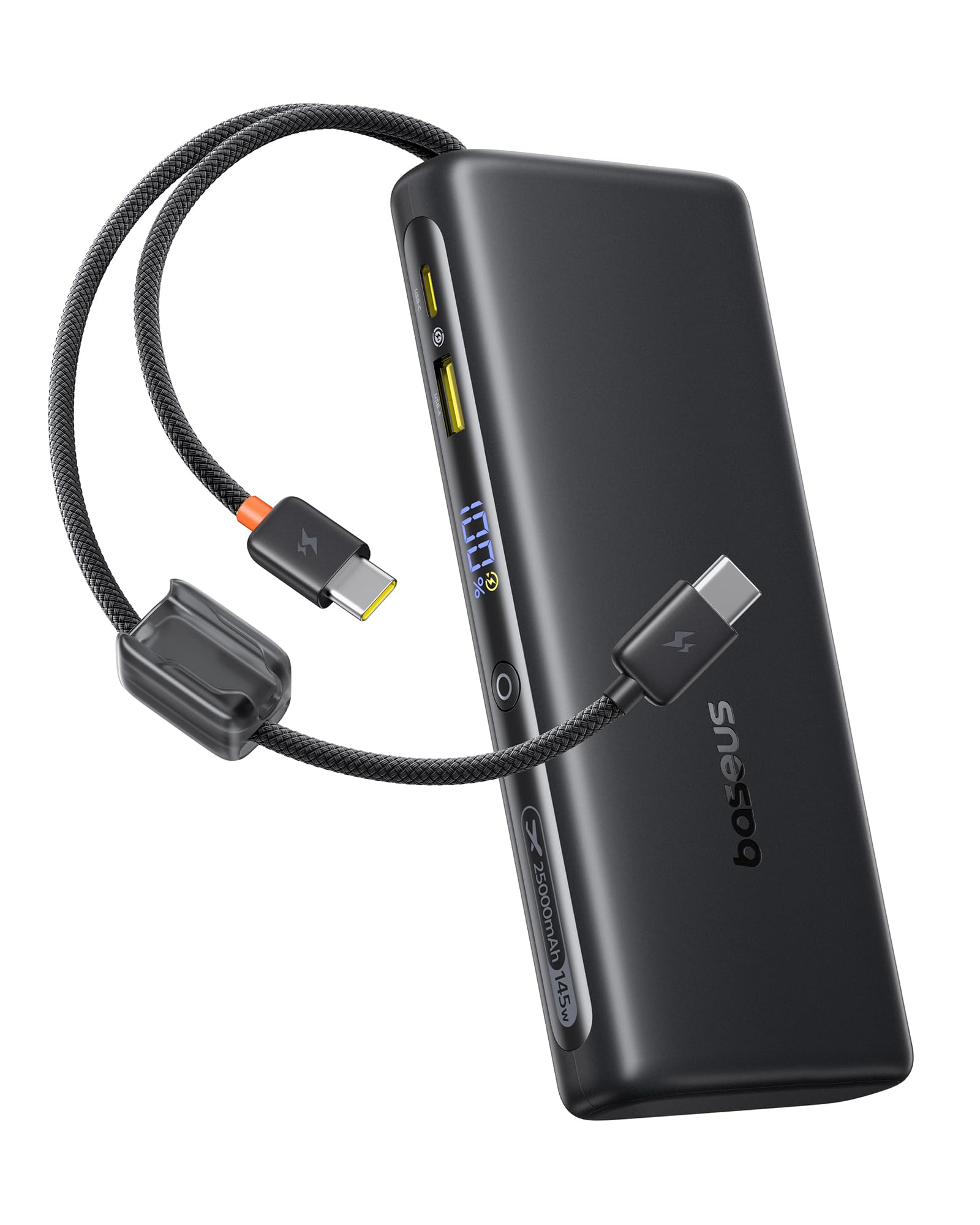
The Baseus FC41 Power Bank features a sleek design with multiple ports and integrated cables for maximum versatility.
Pakkens indhold
- Baseus FC41 145W 25000mAh Power Bank
- Brugermanual
Komponenter
The power bank includes the following key components:
- Digital skærm: Viser batteriprocent i realtidtage og ladestatus.
- Integrated USB-C1 Cable: Supports up to 140W output/65W input.
- Integrated USB-C2 Cable: Supports up to 100W output/65W input.
- USB-C-port: Supports up to 100W output/65W input.
- USB-A-port: Understøtter op til 22.5W udgangseffekt.
- Power knap: Activates the display, initiates charging, and toggles low-power mode.

4. Opsætning
4.1 Første opladning af powerbanken
Before first use, fully charge your Baseus FC41 Power Bank. This ensures optimal battery performance and longevity.
- Connect a USB-C power adapter (not included) to either of the integrated USB-C cables or the external USB-C port on the power bank.
- Sæt strømadapteren i en stikkontakt.
- The digital display will show the charging progress. A full charge from 0% to 100% typically takes approximately 4 hours with a 65W input.
- Once fully charged, the display will show 100%. Disconnect the power bank from the charger.

5. Betjeningsvejledning
5.1 Opladning af dine enheder
The Baseus FC41 Power Bank can charge various devices using its multiple output options.
Using Integrated USB-C Cables
- The integrated USB-C1 cable provides up to 140W output, ideal for laptops like MacBook Pro/Air.
- The integrated USB-C2 cable provides up to 100W output, suitable for laptops, tablets, and smartphones.
- Simply pull out the desired integrated USB-C cable and connect it to your device's USB-C charging port. The power bank will automatically begin charging.
Using External Ports
- USB-C-port: Connect your device using a compatible USB-C to USB-C cable. This port supports up to 100W output.
- USB-A-port: Connect your device using a compatible USB-A to USB-C/Lightning cable. This port supports up to 22.5W output.
Samtidig opladning
The power bank can charge up to four devices simultaneously. The BPS 2.0 technology intelligently distributes power for maximum efficiency.
- When charging a single device via USB-C1, it can reach up to 140W.
- When charging a laptop (e.g., 100W) and a smartphone (e.g., 45W) simultaneously, the total output can reach 145W.


5.2 Kontrol af batteriniveau
Press the power button once to activate the digital display, which will show the remaining battery percentage.
5.3 Lavstrømstilstand
For charging low-current devices such as Bluetooth earbuds or smartwatches, double-press the power button to activate low-power mode. This prevents the power bank from automatically shutting off due to low power draw.
5.4 Integrated Cables as Lanyard
The integrated USB-C cables are designed to also function as a durable lanyard, allowing for convenient carrying or attachment to a backpack.

6. Vedligeholdelse
6.1 Rengøring
Tør powerbanken af med en blød, tør klud. Brug ikke flydende rengøringsmidler eller slibende materialer.
6.2 Opbevaring
Opbevar powerbanken et køligt og tørt sted, væk fra direkte sollys og ekstreme temperaturer. Ved langtidsopbevaring anbefales det at holde batteriet opladet til omkring 50-70%.
6.3 Pleje af batterier
For at forlænge batteriets levetid, undgå at aflade powerbanken helt ofte. Genoplad den, når batteriniveauet er lavt.
7. Fejlfinding
- Powerbanken oplader ikke: Ensure the charging cable and adapter are properly connected and functional. Try a different cable or adapter.
- Enheden oplades ikke fra powerbanken: Ensure the power bank has sufficient charge. Check if the cable connecting the device to the power bank is securely connected and compatible. Press the power button to activate charging.
- Langsom opladning: Ensure your device and cable support fast charging protocols. If charging multiple devices, the total output power is shared, which may reduce individual charging speeds.
- Digitalt display virker ikke: Press the power button to activate the display. If it remains unresponsive, contact customer support.
- Powerbanken bliver varm under brug: It is normal for the power bank to generate some heat during high-power charging. If it becomes excessively hot, discontinue use and contact customer support.
8. Specifikationer
| Feature | Detalje |
|---|---|
| Modelnummer | E0028H |
| Batterikapacitet | 25000mAh |
| Output Wattage | 145W (maks.) |
| Input Wattage | 65W (maks.) |
| Batteritype | Lithium Ion |
| Antal battericeller | 5 |
| Produktdimensioner | 16.5 x 7.4 x 2.5 cm |
| Produktets vægt | 506 g |
| Farve | Sort |
| Speciel funktion | CCC Certification |
| Kompatible enheder | Google Pixel 10 Pro XL/10 Pro/9 Pro/8 Series, MacBook Pro/Air; HP/Dell/Asus/Lenovo Laptops, Samsung Galaxy S25/S24/S23/S22 Series, iPhone 17/16/15 Pro/Pro Max Series |
| Strømkilde | Elektrisk med ledning |
| UPC | 810196184848 |
| GTIN | 810196184848 |
9. Garanti og support
9.1 Garantioplysninger
Dette Baseus-produkt leveres med en 24 måneders garanti. We also offer lifetime customer service and a 45-day money-back guarantee. Please retain your proof of purchase for warranty claims.
9.2 Kundesupport
For any questions, technical support, or warranty claims, please contact Baseus customer service through the retailer where you purchased the product or visit the official Baseus webwebsted for kontaktoplysninger.