
Indledning
This manual provides detailed instructions for the setup, operation, and maintenance of your AT&T DECT 6.0 Cordless Phone, model BL108-3. Please read this guide thoroughly to ensure proper use and to take full advantage of all features, including Smart Call Blocker, Bluetooth Connect to Cell, and the digital answering machine.
Pakkens indhold
Bekræft, at din pakke indeholder følgende varer:
- Basisenhed
- 3 trådløse håndsæt
- 3 strømadaptere
- 2 Chargers (for additional handsets)
- Telefonledning
- 6 battericeller
- Hurtig startvejledning
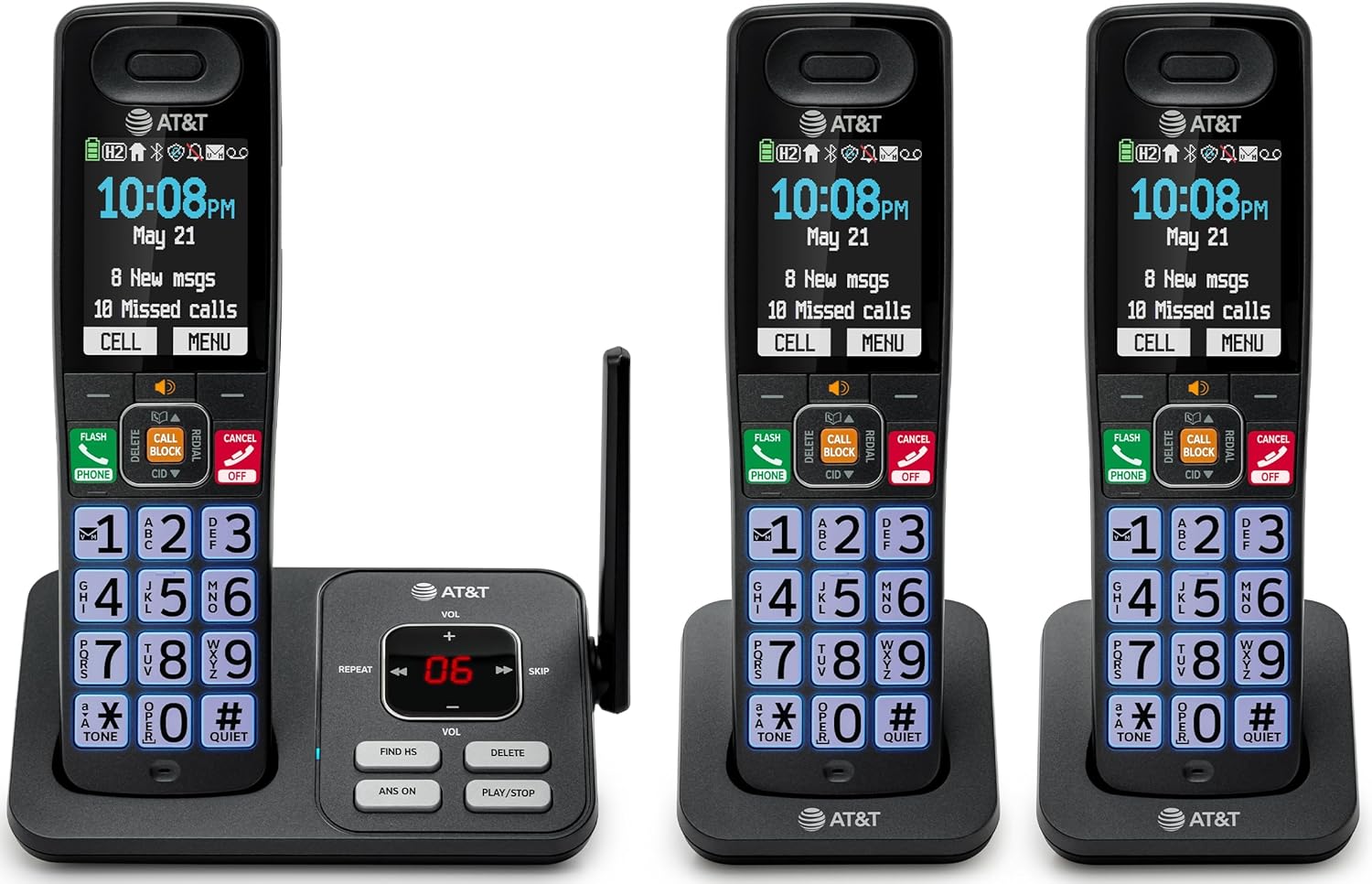
Image: The complete AT&T BL108-3 cordless phone system, showing the base unit and three handsets.
Opsætning
1. Base Unit and Power Connection
- Placer baseenheden på en flad, stabil overflade.
- Tilslut den ene ende af telefonledningen til TEL LINE-stikket på baseenheden.
- Tilslut den anden ende af telefonledningen til et telefonstik i væggen.
- Plug one power adapter into the POWER jack on the base unit.
- Plug the other end of the power adapter into an electrical outlet not controlled by a wall switch.
2. Installation og opladning af håndsættets batteri
- Åbn batteridækslet på bagsiden af hvert håndsæt.
- Insert the provided battery cells, ensuring correct polarity (+ and -).
- Luk batterirummets dæksel.
- Place each handset in its respective charger or the base unit cradle. The CHARGE light on the handset will illuminate.
- Lad håndsættene oplade i mindst 10 timer før første brug.
3. Additional Charger Setup
- Plug the power adapters for the additional chargers into electrical outlets not controlled by a wall switch.
- Place the additional handsets into these chargers to charge.
Betjeningsvejledning
Foretage og modtage opkald
- For at foretage et opkald: Tryk TELEFON, og ring derefter op til nummeret.
- Sådan besvarer du et opkald: Tryk på TELEFON eller en hvilken som helst opkaldstast.
- Sådan afsluttes et opkald: Tryk på FRA/ANNULLER or place the handset in the cradle.
Smart opkaldsbloker
The Smart Call Blocker feature automatically filters out robocalls. You can also manually block unwanted numbers.
- To block a number during a call: Press the dedicated OPKALDSBLOK nøgle.
- The block directory can store up to 1,000 entries.

Image: A close-up of the handset displaying the "Smart Call Block" screen, with the "CALL BLOCK" button highlighted on the base unit.
Bluetooth-forbindelse til mobil
Pair your smartphone with the BL108-3 system to make and receive mobile calls through any of the cordless handsets.
- Tryk på på baseenheden MENU, then navigate to "Bluetooth" and select "Pair Cell".
- Aktiver Bluetooth på din smartphone, og søg efter tilgængelige enheder.
- Select the AT&T phone from the list on your smartphone to pair.
- Once paired, mobile calls can be made and received using the cordless handsets.

Image: A visual representation of the "Connect to Cell" feature, showing a handset on a nightstand wirelessly connected to a smartphone.
Video: Demonstrates the seamless Bluetooth connection to a cell phone, allowing calls to be made and received through the AT&T cordless handset.
Digital telefonsvarer
The integrated digital answering system records up to 22 minutes of messages.
- For at afspille beskeder: Tryk på SPIL/STOP on the base unit or handset.
- To skip messages: Press SPRINGE.
- Sådan sletter du beskeder: Tryk på SLET.

Image: The phone's base unit and handset displaying an incoming message on the answering system, with a visual of a message being left.
Opkalds-ID-annoncering
The handset speaks the caller's name aloud, allowing you to screen calls without picking up the phone.
- Ensure Caller ID service is subscribed through your telephone service provider.
- The feature is active by default.

Image: The handset and base unit showing a call coming in, with a speech bubble indicating "Call from Johnson" to illustrate the Caller ID Announce feature.
Intercom mellem håndsæt
You can use the handsets to communicate with each other, or transfer calls.
- Sådan starter du et intercom-opkald: Tryk på SAMTALEANLÆG on a handset, then select the desired handset number.
- Sådan viderestilles et opkald: Tryk på under et eksternt opkald SAMTALEANLÆG, select the handset, and then hang up after the other handset answers.

Image: Two handsets, one on the base and one on a charger, with arrows indicating communication between them, illustrating the intercom feature.
Telefonbogsregister
Gem op til 1500 navne og numre i telefonbogen til hurtig opkald.
- Sådan tilføjer du en post: Tryk på MENU, navigate to "Phonebook", then "Add New Entry".
- To dial from phonebook: Press TELEFON, så DIR, select the entry, and press TELEFON igen.

Image: The handset screen showing a phonebook list with alphabetical navigation, demonstrating the phonebook directory feature.
Fuld-duplex håndsæthøjttalertelefon
Allows both parties to speak and be heard simultaneously during a speakerphone call.
- Sådan aktiverer du højttalertelefonen under et opkald: Tryk på HØJTTALER.
- For at skifte tilbage til håndsættilstand: Tryk på TELEFON.

Image: A person using the handset in speakerphone mode while working on a laptop, with speech bubbles indicating a two-way conversation.
Stille tilstand
Temporarily silences all handset and base unit ringers for a set period.
- For at aktivere: Tryk og hold nede #ROLIGE på håndsættet.
- For at deaktivere: Tryk og hold #ROLIGE igen.

Image: The handset screen showing "Quiet mode on" with a sleeping person in the background, illustrating the Quiet Mode feature.
ECO-tilstand
Reduces power consumption for optimal battery performance.
- ECO mode is typically enabled by default to conserve energy.
- Refer to the full user manual for options to adjust or disable this feature if needed.

Image: The handset and base unit in a setting with wind turbines in the background, and the screen showing "ECO mode", symbolizing energy efficiency.
Indbygget lommelygte
For safety at night or in emergencies, the handset includes a built-in flashlight.
- To activate the flashlight: Locate the flashlight button on the side of the handset and press it.

Image: A close-up of the handset's side, showing the flashlight beam and the "FLASHLIGHT" label, indicating its location and function.
Opretholdelse
- Rensning: Rengør telefonen og baseenheden med en blød, tør klud.amp klud. Brug ikke rengøringsspray eller skrappe kemikalier.
- Batteripleje: For optimal battery life, fully charge the handsets for 10 hours before first use. If the phone will be unused for an extended period, remove the batteries.
- Miljøforhold: Undgå at udsætte telefonen for ekstreme temperaturer, direkte sollys eller fugt.
Fejlfinding
| Problem | Løsning |
|---|---|
| Ingen klartone |
|
| Håndsættet oplades ikke |
|
| Dårlig opkaldskvalitet eller støj |
|
| Cannot make/receive Bluetooth calls |
|
Specifikationer
| Feature | Detalje |
|---|---|
| Mærke | AT&T |
| Modelnummer | BL108-3 |
| Telefontype | Cordless (DECT 6.0) |
| Farve | Sort |
| Håndsæt inkluderet | 3 |
| Vise | 2.4" Color Backlit Display |
| Type svarsystem | Digital (op til 22 minutters optagetid) |
| Opkaldsblokering | Smart Call Blocker (up to 1,000 entries) |
| Bluetooth | Connect to Cell (smartphone pairing) |
| Telefonens standbytid | 6 dage |
| Vis nummer | Yes, with Announce feature |
| Telefonbogskapacitet | Up to 1500 names and numbers |
| Højttalertelefon | Fuld-duplex håndsæthøjttalertelefon |
| Dimensioner (basisenhed) | 5.63 x 2.99 x 7.4 tommer (L x B x H) |
| Strømkilde | Elektrisk med ledning |
| Materiale | Plast |
| UPC | 650530034121 |

Image: Diagram showing the dimensions of the AT&T BL108-3 base unit and a handset.
Garantioplysninger
Your AT&T BL108-3 Cordless Phone comes with a 1-års begrænset garanti. Please retain your purchase receipt as proof of purchase. For detailed warranty terms and conditions, refer to the full user manual or contact AT&T customer support.
Støtte
For further assistance, technical support, or to order replacement parts, please visit the official AT&T support website or contact their customer service. You can often find FAQs and additional resources online.
- Online support: Besøg AT&T Wireless Support (or search for AT&T Landline Phone Support).
- Kundeservice: Refer to your Quick Start Guide for specific contact numbers.


