
ANCEL DS500 Elite
ANCEL DS500 Elite OBD2 Scanner and Extension Cable User Manual
Model: DS500 Elite | Mærke: ANCEL
1. Introduktion
This manual provides detailed instructions for the ANCEL DS500 Elite OBD2 Bidirectional Scan Tool and its accompanying 3.3ft (1m) extension cable. It covers product features, setup, operation, maintenance, troubleshooting, and specifications to ensure optimal use of your diagnostic equipment.
2. Pakkens indhold
Kontroller venligst, at alle nedenstående varer er inkluderet i din pakke:
- 1 x ANCEL DS500 Elite Bidirectional Scan Tool
- 1 x ANCEL OBD2 Scanner Extension Cable (3.3ft/1m)
3. Produktfunktioner
The ANCEL DS500 Elite is designed for comprehensive vehicle diagnostics, offering advanced features for professional and enthusiast use.
3.1. DS500 Elite Scan Tool Highlights
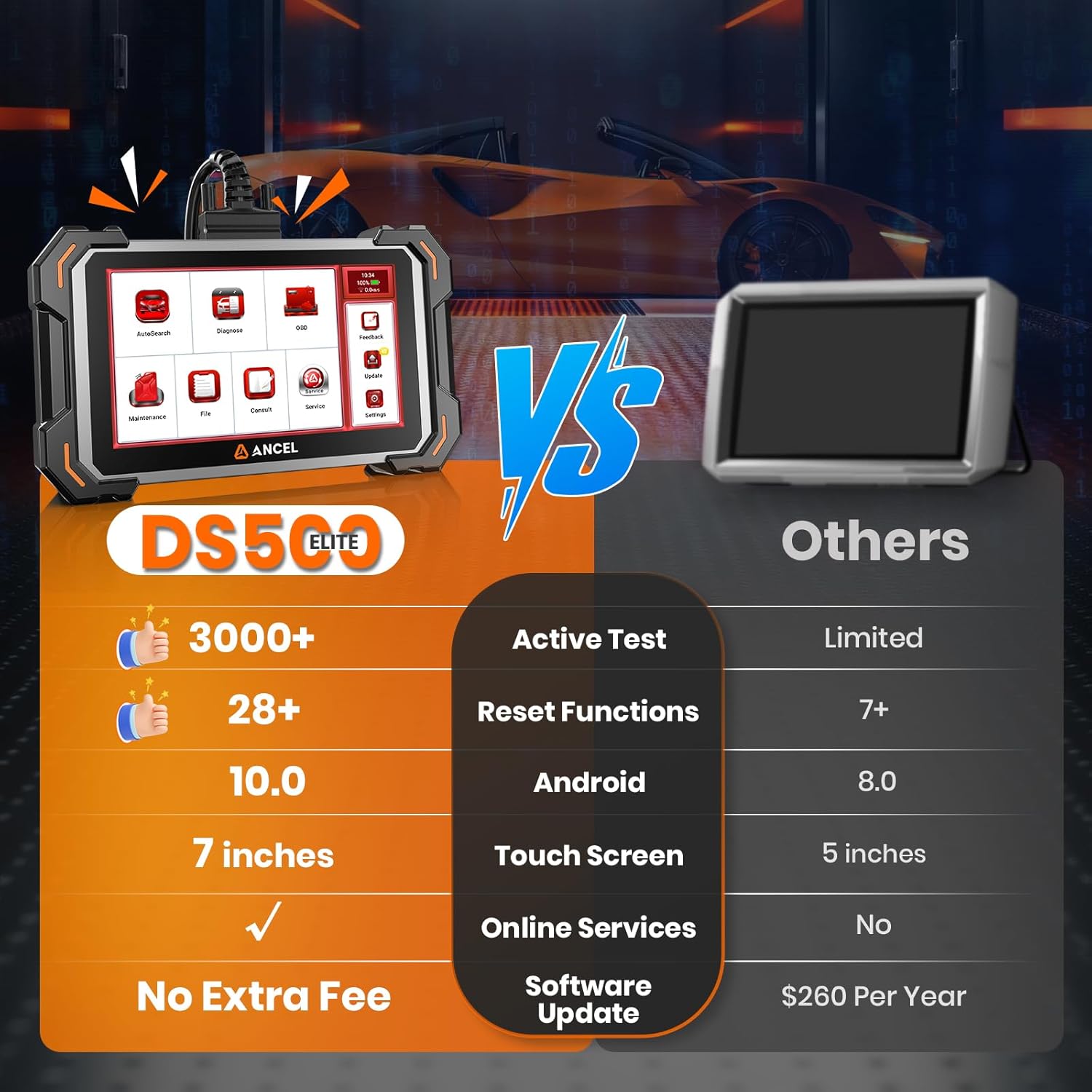
- Extensive Active Test Commands: Over 3,000 active test commands for in-depth system diagnostics.
- Avanceret tovejsstyring: Ability to send commands to vehicle systems and monitor their responses.
- Comprehensive Maintenance Services: Supports 28+ maintenance and calibration functions.
- Livstids gratis opdateringer: Ensures compatibility with evolving vehicle systems and diagnostic features without subscription fees.
- Professionel support: Direct access to engineering team via online chat and feedback sections.
- Upgraded Hardware: Features a 2.0GHz Cortex-A53 Quad-Core processor, Android 10.0 OS, 2GB RAM, 32GB ROM, 7-inch 1024x600 resolution touch screen, and a 3150mAh battery.

Billede: ANCEL DS500 Elite hardware specifications, highlighting the 2.0GHz Cortex-A53 Quad-Core processor, Android 10.0 operating system, 2GB RAM, 32GB ROM, 7-inch 1024x600 resolution display, and 3150mAh battery.
3.2. OBD2 Extension Cable Features
- Udvidet rækkevidde: 1 meter (3.3 ft) length provides flexibility for movement during diagnostics.
- Holdbarhed: Tensile and oil-resistant housing suitable for workshop environments.
- Dobbelt grænseflade: 16-pin dual interface compatible with most standard OBD2 diagnostic ports.
- Stabil transmission: Thickened round wire design prevents fracture and ensures stable data transmission.

Billede: Features of the ANCEL OBD2 extension cable, including multi-angle bending, flexibility, durability, thickened round wire to prevent fracture, and faster, more stable transmission.
4. Opsætningsvejledning
Follow these steps to connect and begin using your ANCEL DS500 Elite scan tool:
- Find OBD2-porten: Identify the 16-pin OBD2 diagnostic port in your vehicle. This is typically located under the dashboard on the driver's side.
- Connect the Extension Cable (Optional): If using the extension cable, plug one end into the vehicle's OBD2 diagnostic port.
- Connect the Scan Tool: Plug the other end of the extension cable (or the scan tool directly if not using the extension) into the VCI (Vehicle Communication Interface) or Main Test Cable port on the ANCEL DS500 Elite.
- Power On and Diagnose: The scan tool will power on automatically once connected to the vehicle. Follow the on-screen prompts to start your diagnostic session.
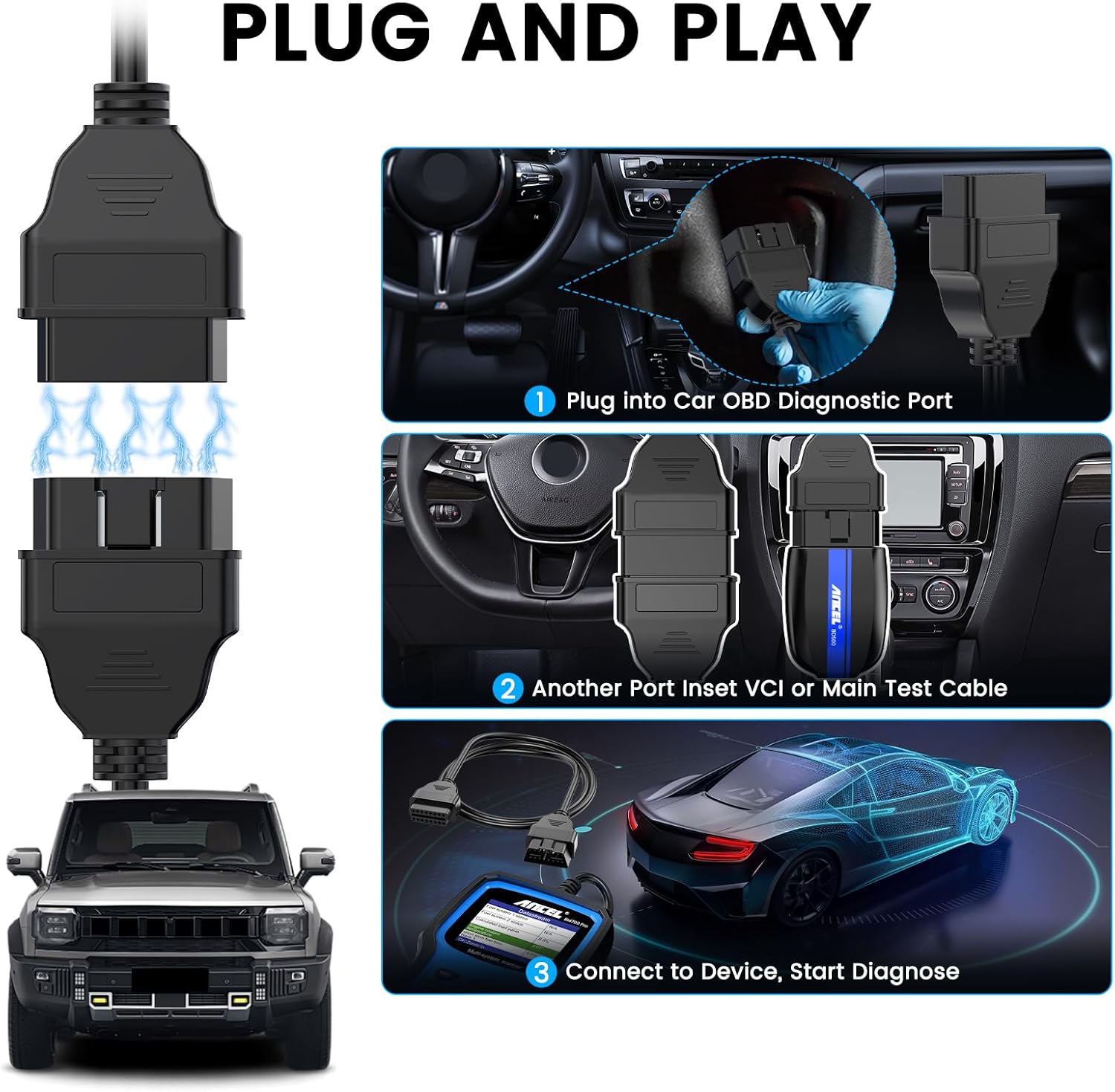
Billede: Visual guide for the 'Plug and Play' setup, showing how to connect the OBD2 scanner to the car's diagnostic port and then to the DS500 Elite device.
5. Betjeningsvejledning
The ANCEL DS500 Elite offers a range of diagnostic and maintenance functions. Navigate through the intuitive touch screen interface to access these features.
5.1. Bidirectional Control and Active Tests
This function allows you to send commands to various vehicle components and monitor their operation, aiding in precise fault diagnosis.
- Fuel Pump Command: Diagnose hard-start issues by commanding the fuel pump.
- Cooling Fan Cycle: Check for overheating by cycling the cooling fan.
- Power Window/Mirror Actuation: Troubleshoot electrical faults in windows and mirrors.
- Other Tests: Includes tests for fuel injectors, rearview mirror control, and light control.
Billede: Illustration of bidirectional control capabilities, demonstrating how the DS500 Elite can activate components like fuel injectors, power windows, rearview mirrors, and vehicle lights for diagnostic purposes.
5.2. Maintenance Services and Calibration Functions
The DS500 Elite supports over 28 maintenance services to assist with routine vehicle upkeep and system calibration.
- Olie nulstilling: Reset oil and service lights after routine maintenance.
- Batteritilpasning: Register new batteries for proper system operation.
- DPF-regenerering: Perform Diesel Particulate Filter regeneration to clear clogged filters.
- TPMS Calibration: Calibrate Tire Pressure Monitoring System sensors after tire rotations.
- Bremse nulstilling: Reset brake systems after pad replacements.
- SAS kalibrering: Relearn steering angle sensors after alignments.
- Andre tjenester: Includes IMMO Reset, Gear Learning, ABS Bleeding, Air Suspension Reset, NOx Sensor Reset, AFS Reset, ETA Activation, Seat Calibration, Airbag Reset, and more.

Billede: Overview of the 28+ hot reset services available on the ANCEL DS500 Elite, including DPF Regeneration, AdBlue Reset, Oil Life Reset, EGR Adaptation, IMMO Reset, Gear Learning, Battery Matching, SAS Calibration, A/F Ratio Reset, ABS Bleeding, Air Suspension Reset, NOx Sensor Reset, AFS Reset, ETA Activation, Brake-pad Reset, Seat Calibration, and Airbag Reset.
5.3. Full System Deep Scan
Perform a comprehensive scan of all available electronic control units (ECUs) to uncover critical data and diagnostic trouble codes (DTCs).
- Læs koder: Hent aktuelle, ventende og permanente diagnostiske fejlkoder.
- Slet koder: Clear diagnostic trouble codes after repairs.
- View Frysestativ: Access a snapshot of vehicle conditions when a fault code was set.
- Live data: Monitor real-time sensor data and parameters.
- I/M parathed: Kontroller status for emissionsrelaterede monitorer.
- Fordampningslækagetest: Udfør test på systemet til begrænsning af fordampningsemissioner.
- System Coverage: Includes IMMO, SAS, ESP, BCM, HVAC, EBS, ACM, TPMS, Airbag, Engine, ABS, Transmission, and more.
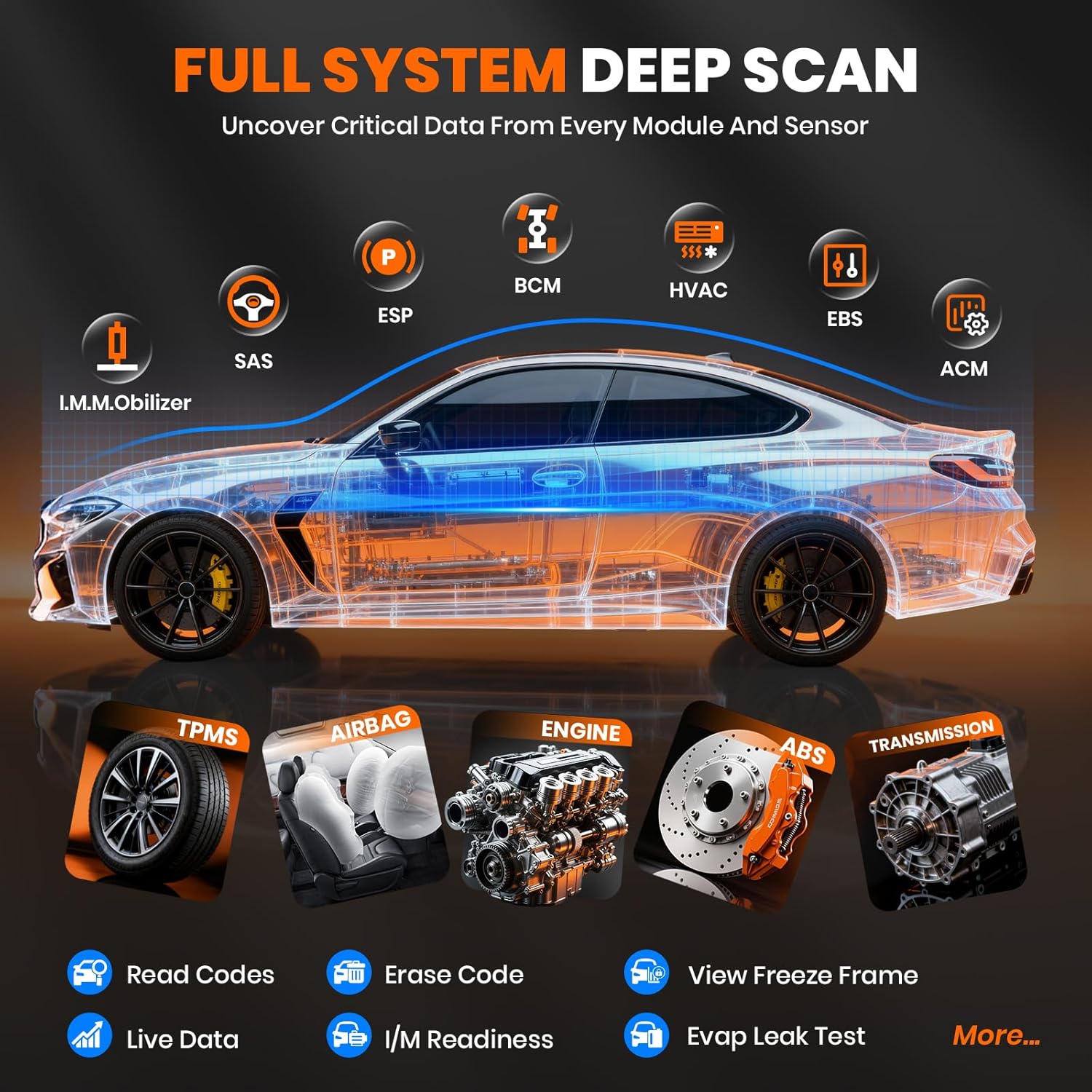
Billede: Diagram illustrating the full system deep scan capability of the ANCEL DS500 Elite, covering various modules such as IMMO, SAS, ESP, BCM, HVAC, EBS, ACM, TPMS, Airbag, Engine, ABS, and Transmission, along with functions like Read Codes, Erase Code, View Freeze Frame, Live Data, I/M Readiness, and Evap Leak Test.
6. Vedligeholdelse
6.1. Softwareopdateringer
The ANCEL DS500 Elite comes with lifetime free software updates. Regularly check for updates to ensure your tool has the latest vehicle compatibility and diagnostic features. Connect the device to a Wi-Fi network and navigate to the 'Update' section in the main menu to download and install available updates.
6.2. Enhedspleje
- Hold enheden ren og fri for støv og fugt.
- Undgå at tabe enheden eller udsætte den for ekstreme temperaturer.
- Store the device and cable in a safe place when not in use.
- The extension cable's housing is designed to be tensile and oil-resistant; however, avoid unnecessary exposure to harsh chemicals.
7. Fejlfinding
If you encounter issues while using the ANCEL DS500 Elite, refer to the following common problems and solutions:
- Enheden tændes ikke: Ensure the device is securely connected to the vehicle's OBD2 port. Check the vehicle's battery voltage.
- Kommunikationsfejl med køretøjet: Verify that the OBD2 connector is fully inserted. Ensure the vehicle's ignition is in the ON position (engine off). Check for any blown fuses in the vehicle's OBD2 circuit.
- Fejl i softwareopdatering: Ensure a stable internet connection during updates. Free up storage space if necessary. Restart the device and try again.
- Unøjagtige aflæsninger eller funktioner, der ikke fungerer: Ensure the vehicle's make, model, and year are correctly selected in the software. Perform a software update to ensure the latest vehicle database is installed.
For persistent issues, please contact ANCEL customer support.
8. Specifikationer
8.1. ANCEL DS500 Elite Scan Tool
- Processor: 2.0GHz Cortex-A53 Quad-Core
- Operativsystem: Android 10.0
- Hukommelse: 2GB RAM, 32GB ROM
- Vise: 7-inch Touch Screen, 1024x600 resolution
- Batteri: 3150mAh, 3.8V
- Forbindelse: Wi-Fi til opdateringer
8.2. OBD2 Extension Cable
- Længde: 100 cm (39.37 inches / 3.3 ft)
- Connector Type: 16-pin OBD2 Dual Interface
- Dimensions (Connector Head): Cirka 4.3 cm (1.69 tommer) x 5 cm (1.97 tommer) x 2 cm (0.787 tommer)
- Materiale: Tensile and oil-resistant housing
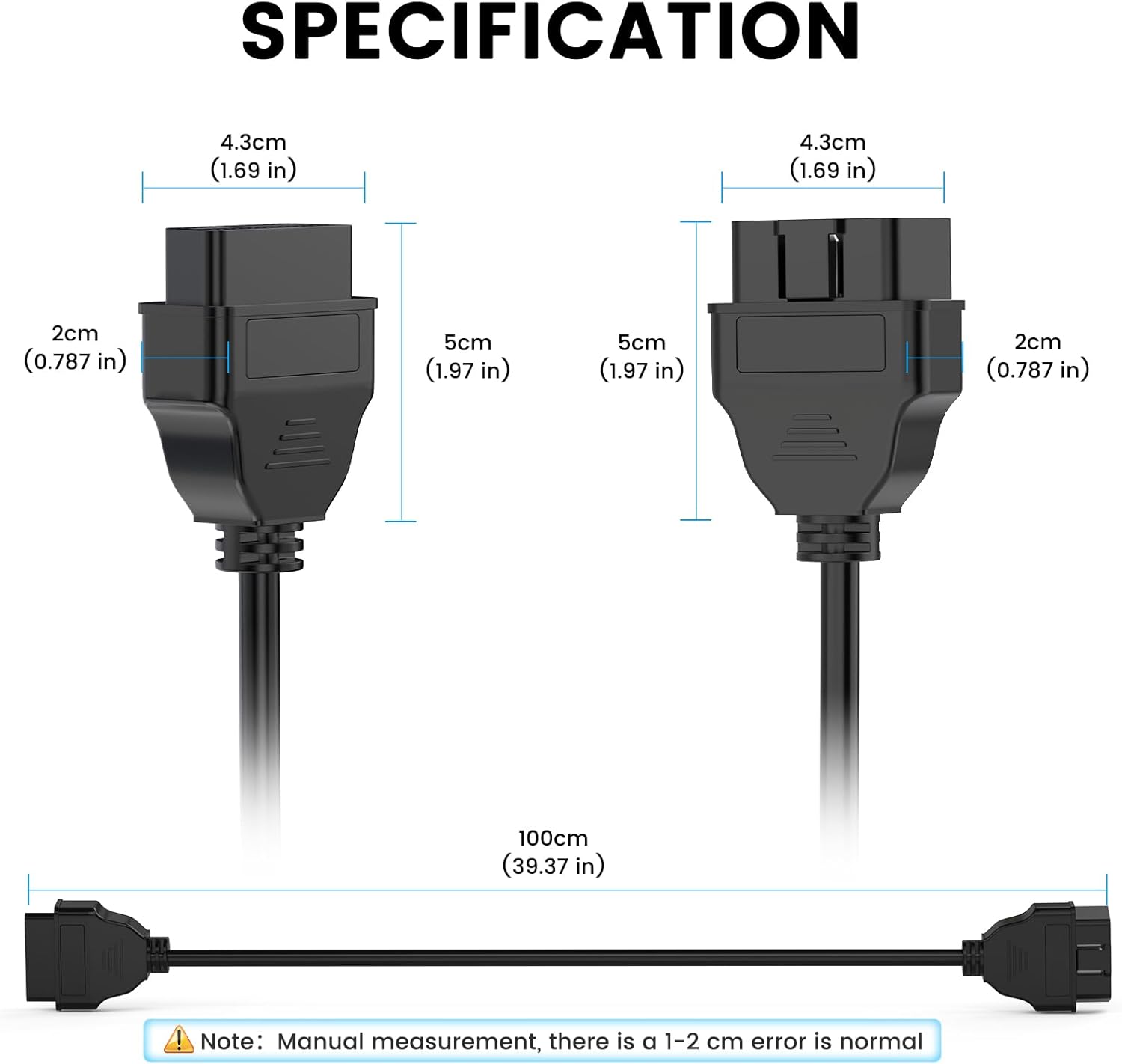
Billede: Detailed dimensions of the ANCEL OBD2 extension cable, showing the length of 100cm (39.37 inches) and the approximate measurements of the connector heads.
9. Kundesupport
For technical assistance, warranty information, or any inquiries regarding your ANCEL DS500 Elite scan tool, please contact ANCEL customer support:
- Online chat: Access the online chat window directly on your device for immediate assistance from our professional engineering team.
- Feedback Section: Utilize the feedback section on the device to report issues or provide suggestions.
- Webwebsted: Besøg den officielle ANCEL webwebsted for supportressourcer og kontaktoplysninger.
Ask a question about this manual
Ask about setup, troubleshooting, compatibility, parts, safety, or missing instructions. Manuals+ will review the question and use this page’s manual context to help answer it.