
1. Introduktion
This manual provides essential information for setting up, operating, maintaining, and troubleshooting your GMKtec K15 AI Mini PC. The K15 is a compact, high-performance barebone mini computer featuring an Intel Ultra 5 125U processor, designed for a wide range of applications from home entertainment to professional workloads.
Please read this manual thoroughly before using the device to ensure proper operation and to maximize its lifespan.
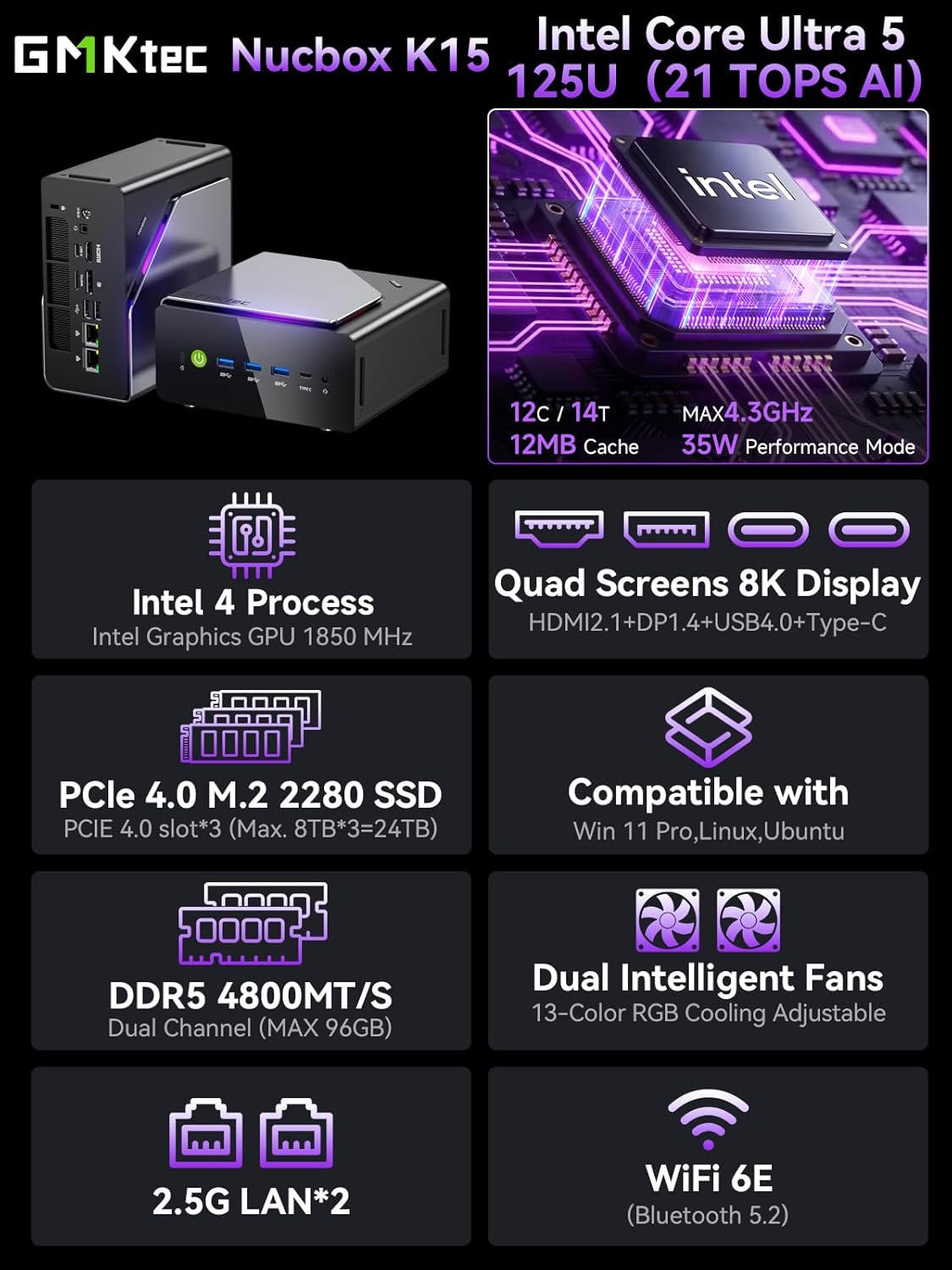
Billede 1.1: Overview of GMKtec K15 Mini PC features, including Intel Ultra 5 125U CPU, 8K display support, PCIe 4.0 SSD, DDR5 RAM, dual intelligent fans, 2.5G LAN, and WiFi 6E.
2. Pakkens indhold
Bekræft at alle varer er til stede i pakken:
- 1 x GMKtec Nucbox K15 Mini PC
- 1 x strømadapter
- 1 x VESA-beslag med skruer
- 1 x HDMI kabel
- 1 x Brugermanual (dette dokument)
3. Fysisk overview
Familiarize yourself with the ports and components of your GMKtec K15 Mini PC.

Image 3.1: Detailed diagram showing the front and rear I/O ports of the GMKtec K15 Mini PC.
Frontpanel
- Power knap: For at tænde eller slukke for enheden.
- USB 3.2 Gen2 Ports (x3): Til tilslutning af højhastigheds-USB-enheder.
- Full-Function Type-C Port (USB4): Supports data transfer, video output (DP1.4), and power delivery (PD3.0).
- 3.5 mm lydstik: Til høretelefoner eller højttalere.
- Nulstil knap: For system reset (use a pin).
Bagpanel
- DC strømindgang: Tilslut den medfølgende strømadapter.
- Kensington Lock Slot: Til sikkerhedslåsning.
- 3.5 mm lydstik: Til lydudgang.
- USB 4 port: Understøtter dataoverførsel og videooutput.
- HDMI-port (2.1): Til tilslutning til en skærm.
- OCuLink Port: High-speed direct connection for external graphics or 10G NICs.
- DisplayPort (1.4): Til tilslutning til en skærm.
- USB 2.0-porte (x2): Til tilslutning af standard USB-enheder.
- 2.5G Ethernet Ports (x2): Til kabelbaserede netværksforbindelser med høj hastighed.
- Ventilatortilstandsknap: To adjust fan speed/mode.

Image 3.2: The OCuLink port on the GMKtec K15 Mini PC, designed for high-speed external graphics card connections.
4. Opsætningsvejledning
The GMKtec K15 is a barebone system, meaning RAM, SSD, and operating system are not pre-installed. Follow these steps to prepare your Mini PC for first use.
4.1 Installing RAM and SSD
The K15 supports dual-channel DDR5-4800MHz RAM (up to 128GB) and three PCIe 4.0 x4 M.2 2280 SSDs (up to 24TB total storage).
- Sluk: Ensure the Mini PC is powered off and disconnected from the power adapter.
- Åbent chassis: Carefully open the Mini PC chassis. Refer to the specific instructions provided with your device for opening the case.
- Installer RAM: Locate the DDR5 SO-DIMM slots. Align the RAM module notch with the slot key and insert it firmly at a 45-degree angle. Push down until the clips on both sides lock the module in place.
- Installer SSD: Locate the M.2 2280 PCIe 4.0 x4 slots. Insert the M.2 SSD into the slot at a slight angle, then gently push it down and secure it with the provided screw.
- Luk chassis: Carefully close the Mini PC chassis, ensuring all connections are secure.

Image 4.1: Internal layout of the GMKtec K15 Mini PC, illustrating the locations for DDR5 RAM and three M.2 2280 PCIe 4.0 x4 SSDs.
4.2 Tilslutning af eksterne enheder
- Vise: Connect your monitor(s) to the HDMI, DisplayPort, or USB4 Type-C ports using appropriate cables. The K15 supports up to four displays simultaneously.
- Tastatur og mus: Tilslut dit USB-tastatur og din mus til alle tilgængelige USB-porte.
- Netværk: For wired internet, connect an Ethernet cable to one of the 2.5G LAN ports. For wireless, ensure your WiFi 6E router is configured.
- Magt: Connect the power adapter to the DC Power Input port on the rear panel, then plug the adapter into a power outlet.
4.3 Installation af operativsystem
Since the K15 is a barebone system, an operating system (OS) is not included. You will need to install your preferred OS (e.g., Windows 11 Pro, Linux, Ubuntu) from a bootable USB drive. Refer to the OS manufacturer's instructions for installation.
5. Betjening
5.1 Tænd/sluk
- Tænd: Tryk på tænd/sluk-knappen på frontpanelet.
- Sluk: From within your operating system, select the shutdown option. Alternatively, press and hold the power button for 5 seconds to force a shutdown (use only when necessary).
5.2 Skærmkonfiguration
The K15 supports up to four simultaneous displays via HDMI 2.1 (8K@60Hz), DisplayPort 1.4 (8K@30Hz), and dual USB4 Type-C ports (DP1.4/PD3.0). Configure your display settings within your operating system to extend, duplicate, or use only one screen.

Image 5.1: A GMKtec K15 Mini PC setup demonstrating connection to multiple 4K/8K displays for enhanced multitasking.
5.3 Netværksforbindelse
- wired: The dual 2.5GbE LAN ports provide high-speed wired network access.
- Trådløs: Integrated Wi-Fi 6E offers fast and stable wireless connectivity. Configure Wi-Fi settings through your operating system.
- Bluetooth: Bluetooth 5.2 allows connection to wireless peripherals such as keyboards, mice, and audio devices.
5.4 AI Processing with NPU
The Intel Ultra 5 125U processor includes a dedicated Neural Processing Unit (NPU) for accelerating AI tasks. This NPU enhances performance for machine learning applications, real-time analytics, and AI-driven creative workloads, reducing CPU load and improving efficiency.

Image 5.2: Visual representation of the K15's Intel AI Boost with Dedicated NPU, highlighting its benefits for AI-enhanced creativity and efficient computing.
6. Vedligeholdelse
- Rensning: Regularly clean the exterior of the Mini PC with a soft, dry cloth. Use compressed air to clear dust from vents and ports. Ensure the device is powered off before cleaning.
- Softwareopdateringer: Keep your operating system, drivers, and applications updated to ensure optimal performance and security.
- Ventilation: Sørg for, at Mini PC'en er placeret et godt ventileret område for at forhindre overophedning. Bloker ikke luftventilerne.
7. Fejlfinding
If you encounter issues with your GMKtec K15 Mini PC, refer to the following common solutions:
| Problem | Mulig løsning |
|---|---|
| No power / Device does not turn on | Check power adapter connection. Ensure the power outlet is functional. Press the power button firmly. |
| Ingen skærmudgang | Verify monitor connection and input source. Try a different HDMI/DP cable or port. Ensure RAM and SSD are correctly installed. |
| Langsom ydeevne | Check for background processes. Ensure sufficient RAM and SSD space. Update drivers. Monitor system temperature. |
| Problemer med netværksforbindelse | For wired: Check Ethernet cable and router. For wireless: Verify Wi-Fi password, router status, and signal strength. Update network drivers. |
| Periferiudstyr ikke genkendt | Try a different USB port. Reinstall device drivers. Restart the Mini PC. |
Hvis problemet fortsætter, bedes du kontakte kundesupport.
8. Specifikationer
Detailed technical specifications for the GMKtec K15 AI Mini PC:
| Feature | Detalje |
|---|---|
| Mærke | GMKtec |
| Modelnavn | K15 |
| CPU model | Intel Core Ultra 5 125U (12 Cores/14 Threads) |
| CPU hastighed | Op til 4.3 GHz |
| Grafik | Integrated Intel Graphics GPU (Max 1.85GHz) |
| RAM type | DDR5 RAM (Dual-channel, 4800 MHz) |
| Maksimal RAM-kapacitet | 128 GB |
| Opbevaring | 3x M.2 2280 PCIe 4.0 x4 SSD slots (Max 24TB total) |
| Video output | HDMI 2.1 (8K@60Hz), DisplayPort 1.4 (8K@30Hz), 2x USB4 Type-C (DP1.4/PD3.0) |
| Netværk | 2x 2.5GbE LAN, Wi-Fi 6E, Bluetooth 5.2 |
| USB-porte | 3x USB 3.2 Gen2, 2x USB 2.0, 2x USB4 Type-C |
| Andre havne | OCuLink, 2x 3.5mm Audio Jack, Kensington Lock |
| Operativsystem | None (Barebone) |
| Farve | Jern grå |
9. Garantioplysninger
The GMKtec K15 AI Mini PC comes with a 1 års garanti from the date of purchase. This warranty covers manufacturing defects and hardware malfunctions under normal use. It does not cover damage caused by misuse, accidents, unauthorized modifications, or improper installation of components.
Gem venligst dit købsbevis for garantikrav.
10. Kundesupport
For technical assistance, warranty claims, or any questions regarding your GMKtec K15 AI Mini PC, please contact our support team:
- E-mail support: support@gmktec.com (Tilgængelig 24/7)
- Amazon Support: For purchases made on Amazon, you can also contact support through your Amazon account. Navigate to "Your Orders" and select "Ask Product Question" for the GMKtec K15.
11. Produktvideo
Se denne officielle video for et visuelt overblikview of the GMKtec K15 AI Mini PC, highlighting its features and capabilities.
Video 11.1: Officiel produktvideovisningasing the GMKtec K15 AI Mini PC Intel Ultra 5 125U with Oculink port and other features.


