
1. Introduktion
Tak for købetasing the Generic 2.1 Sound Bar Speaker MV9933. This manual provides essential information for the safe and efficient operation of your new sound bar. Please read this manual thoroughly before use and retain it for future reference.
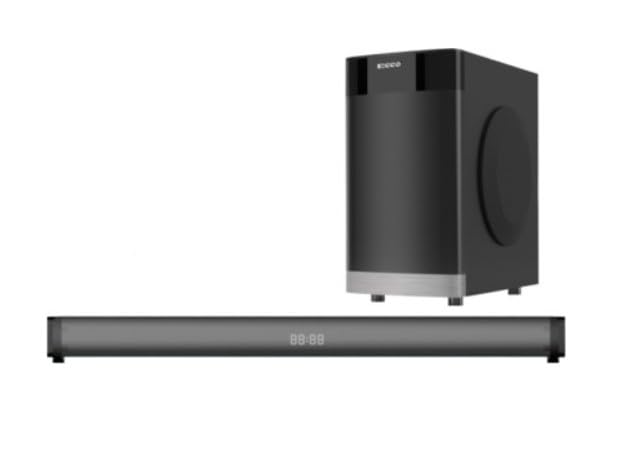
Billede 1.1: Forside view of the Generic 2.1 Sound Bar Speaker MV9933. This image displays the sleek, modern design of the sound bar, typically featuring a speaker grille and control panel.
2. Sikkerhedsoplysninger
For at sikre sikker drift og forhindre skader skal følgende forholdsregler overholdes:
- Udsæt ikke soundbaren for regn, fugt eller ekstreme temperaturer.
- Åbn ikke c'enasing. Overlad al service til kvalificeret personale.
- Sørg for korrekt ventilation omkring enheden.
- Brug kun den strømadapter, der fulgte med enheden.
- Keep the sound bar away from heat sources and direct sunlight.
- Undgå at placere tunge genstande på soundbaren.
3. Pakkens indhold
Bekræft at alle varer er til stede i pakken:
- Generic 2.1 Sound Bar Speaker MV9933
- Strømadapter
- Fjernbetjening (med batterier)
- Audio Cable (e.g., AUX cable)
- Brugermanual
Note: Specific cable types may vary. Check your packaging for exact contents.
4. Opsætning
4.1 Udpakning
Fjern forsigtigt alle komponenter fra emballagen. Gem emballagen til senere transport eller opbevaring.
4.2 Placering
Place the sound bar on a stable, flat surface, preferably directly in front of your television or display. Ensure there is adequate space around the unit for proper ventilation.
4.3 Tilslutning af strøm
- Tilslut strømadapteren til DC IN-porten på bagsiden af soundbaren.
- Sæt den anden ende af strømadapteren i en stikkontakt.
- The sound bar will enter standby mode, indicated by an LED light.
4.4 Tilslutning af lydkilder
The sound bar supports multiple input options. Choose the connection method best suited for your device.
4.4.1 Bluetooth-forbindelse
- Press the "MODE" button on the sound bar or remote control until "BT" (Bluetooth) mode is selected.
- The sound bar will enter pairing mode, indicated by a flashing LED.
- On your mobile device or computer, enable Bluetooth and search for "MV9933" or "Generic Sound Bar".
- Select the sound bar from the list of available devices to pair. A solid LED indicates a successful connection.
4.4.2 AUX-forbindelse (3.5 mm)
- Connect one end of the 3.5mm audio cable to the AUX OUT port of your audio source (e.g., TV, smartphone).
- Connect the other end of the 3.5mm audio cable to the AUX IN port on the back of the sound bar.
- Press the "MODE" button on the sound bar or remote control until "AUX" mode is selected.
4.4.3 Optical Connection (if available)
- Connect an optical audio cable (not always included) from the OPTICAL OUT port of your TV or audio source to the OPTICAL IN port on the sound bar.
- Press the "MODE" button on the sound bar or remote control until "OPT" (Optical) mode is selected.
- Ensure your TV's audio output settings are configured for "Optical" or "PCM" format.
4.4.4 USB Playback (if available)
- Indsæt et USB-flashdrev, der indeholder kompatibel lyd files ind i USB-porten på soundbaren.
- Press the "MODE" button on the sound bar or remote control until "USB" mode is selected.
- Soundbaren begynder automatisk at afspille lyd files fra USB-drevet.
5. Betjeningsvejledning
5.1 Tænd/sluk
Tryk på MAGT knappen på soundbaren eller fjernbetjeningen for at tænde eller slukke enheden.
5.2 Valg af tilstand
Tryk på MODE button on the sound bar or remote control to cycle through available input sources: Bluetooth, AUX, Optical, USB.
5.3 Lydstyrkekontrol
Brug VOL+ og VOL- knapperne på soundbaren eller fjernbetjeningen til at justere lydstyrkeniveauet.
5.4 Playback Controls (Bluetooth/USB)
- Afspil/pause: Tryk på AFSPIL/PAUSE knap.
- Næste nummer: Tryk på NÆSTE knap.
- Forrige nummer: Tryk på FORR knap.
5.5 LED-indikator
The LED indicator on the sound bar provides information about the current status:
- Ensfarvet blå: Bluetooth tilsluttet.
- Blinker blåt: Bluetooth-parringstilstand.
- Solid grøn: AUX-tilstand.
- Solid hvid: Optical mode.
- Ensfarvet lilla: USB-tilstand.
- Rød: Standbytilstand.
6. Vedligeholdelse
6.1 Rengøring
Wipe the exterior of the sound bar with a soft, dry cloth. Do not use liquid cleaners or abrasive materials, as they may damage the finish.
6.2 Opbevaring
If storing the sound bar for an extended period, disconnect it from power and store it in a cool, dry place, preferably in its original packaging.
7. Fejlfinding
| Problem | Mulig årsag | Løsning |
|---|---|---|
| Ingen strøm | Strømkabel ikke tilsluttet; Strømudtag ikke aktivt. | Sørg for, at strømkablet er korrekt tilsluttet. Test stikkontakten med en anden enhed. |
| Ingen lyd | Forkert inputtilstand; Lydstyrken er for lav; Lydkablet er ikke tilsluttet korrekt. | Select the correct input mode. Increase volume. Check audio cable connections. Ensure TV audio output is set correctly (e.g., PCM for Optical). |
| Bluetooth ikke parring | Soundbaren er ikke i parringstilstand; Enheden er for langt væk; Interferens. | Ensure sound bar is in Bluetooth pairing mode (flashing LED). Move device closer. Avoid sources of interference. |
| Fjernbetjening virker ikke | Batterierne er opbrugt; Blokering mellem fjernbetjening og soundbar. | Replace remote control batteries. Ensure clear line of sight to the sound bar's IR receiver. |
8. Specifikationer
| Feature | Detalje |
|---|---|
| Modelnavn | MV9933 (EC0258) |
| Mærke | Generisk |
| Højttaler type | 2.1 Channel Sound Bar, Multimedia |
| Farve | Sort |
| Produktmål (D x B x H) | 75D x 10W x 8H centimeter |
| Indtastningsmuligheder | Bluetooth, AUX (3.5mm), Optical, USB |
| Inkluderede komponenter | Sound Bar Speaker, Power Adapter, Remote Control, Audio Cable |
9. Garanti og support
This product comes with a standard manufacturer's warranty. For detailed warranty terms and conditions, please refer to the warranty card included in your package or contact your retailer.
For technical support or service inquiries, please contact the retailer where you purchased the product or refer to the contact information provided on the product packaging.