
1. Introduktion
This manual provides essential information for using your REDMI Note 15 Pro+ 5G smartphone. Please read it carefully to ensure proper operation and to maximize the device's features. Keep this manual for future reference.

Image: The REDMI Note 15 Pro+ 5G smartphone in Mirage Blue, showcasing dens elegante design.
2. Hvad er der i æsken
Bekræft, at alle varer er til stede i din produktemballage:
- REDMI Note 15 Pro+ 5G Smartphone
- Oplader
- USB Type-C-kabel
- SIM-udskubningsværktøj
- Garantikort
- Brugervejledning (dette dokument)
- Beskyttende etui
3. Opsætning
3.1. Isætning af SIM-kortet
- Find SIM-kortbakken på siden af din enhed.
- Sæt SIM-kortudkastningsværktøjet i det lille hul ved siden af bakken, og tryk forsigtigt, indtil bakken springer ud.
- Placer dit/dine Nano-SIM-kort i bakken med de gyldne kontakter nedad.
- Skub forsigtigt bakken tilbage i enheden, indtil den klikker på plads.

Billede: Bagside view of the REDMI Note 15 Pro+ 5G, indicating the location of the SIM card tray.
3.2. Første opstart og grundlæggende opsætning
- Press and hold the Power button until the REDMI logo appears.
- Følg instruktionerne på skærmen for at vælge dit sprog og din region, oprette forbindelse til Wi-Fi og konfigurere din Google-konto.

Billede: Forside view of the REDMI Note 15 Pro+ 5G, displaying the screen during initial setup.
3.3. Opladning af enheden
Connect the provided USB Type-C cable to the phone's charging port and the other end to the 100W HyperCharge adapter. Plug the adapter into a power outlet. The device supports 100W fast charging and 22.5W reverse charging.

Image: Visual representation of the 6500mAh Silicon-Carbon battery and 100W HyperCharge technology.
4. Betjening af din enhed
4.1. Skærmfunktioner
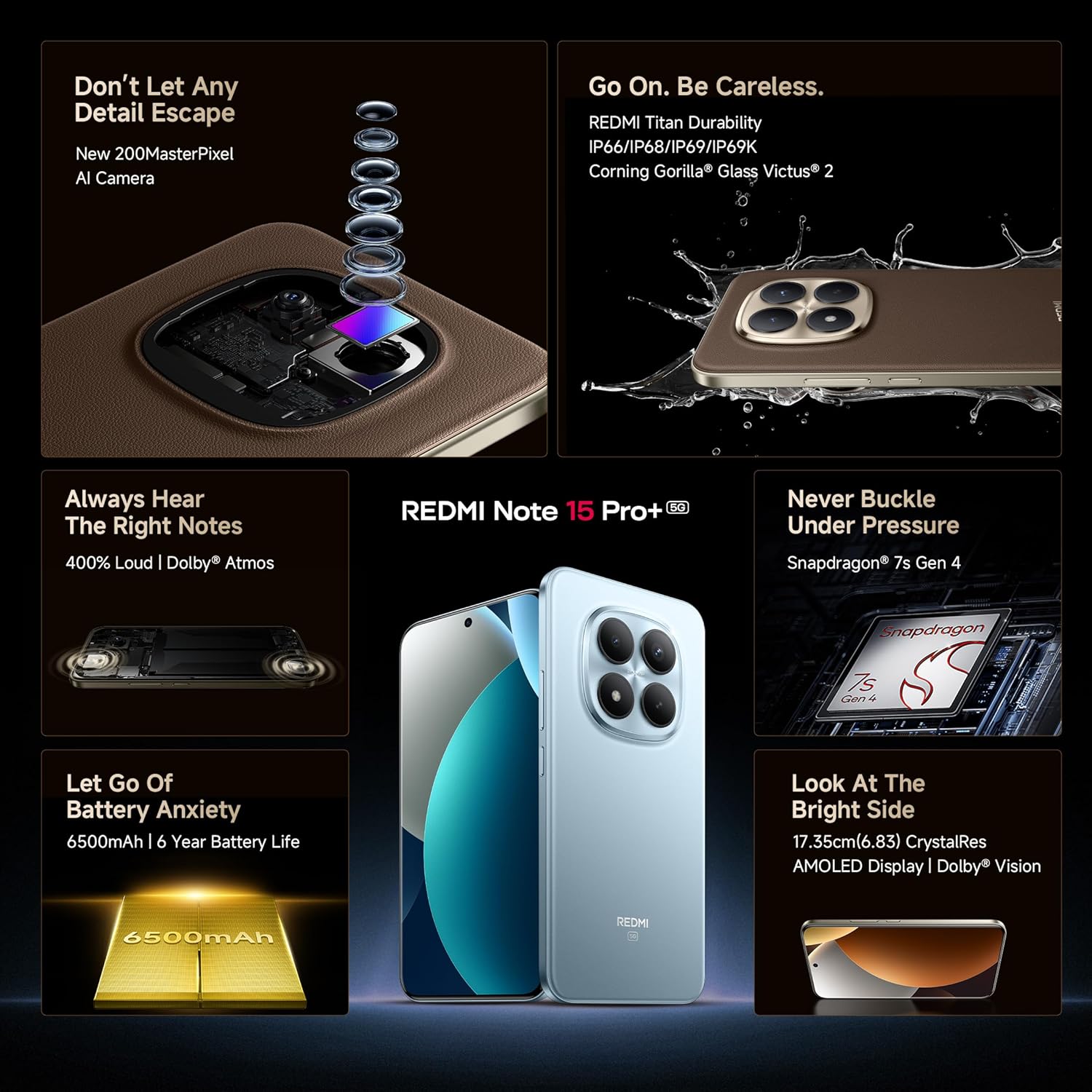
The REDMI Note 15 Pro+ 5G features a 6.83-inch Quad curved 1.5K CrystalRes AMOLED display with 3200 nits peak brightness. It supports a 120Hz adaptive refresh rate for smooth visuals and Eye Protect 2.0 with Triple TÜV Certifications to reduce eye strain.

Image: The vibrant 1.5K Quad-curved AMOLED display of the REDMI Note 15 Pro+ 5G, highlighting its brightness.

Image: Information on the advanced eye protection features, including TÜV triple certification, for comfortable viewing.
4.2. Kamerasystem
Capture stunning photos and videos with the advanced 200MP OIS camera system. It features a 1/1.4" sensor for exceptional detail and clarity, even in low light. The camera supports 4K video recording, ultra-sharp details, steady videos with OIS, and portraits with natural depth.

Billede: Overview of the 200MasterPixel OIS Camera system, emphasizing its clarity and capabilities.
Billede: Et nærbillede view of the 200MP camera module, showing its intricate lens arrangement.
4.3. Præstation
Powered by the Snapdragon 7s Gen 4 processor, the device delivers smooth and efficient performance for gaming and multitasking. The IceLoop cooling technology helps maintain optimal temperatures during intensive use.

Image: Graphic illustrating the Snapdragon 7s Gen 4 processor, highlighting its advanced performance.
4.4. Lyd
Experience immersive sound with symmetric stereo speakers and Dolby Atmos support, providing up to 400% louder and clearer audio for media consumption and calls.

Image: Diagram showing the symmetric stereo speakers and Dolby Atmos sound enhancement.
4.5. Software og AI-funktioner
The REDMI Note 15 Pro+ 5G runs on Android 15 with Xiaomi HyperOS 2, offering a seamless and intelligent cross-device experience. It includes AI features like Circle to Search, Gemini Assistance, and Xiaomi HyperAI Tools for enhanced user interaction. The device also supports Xiaomi Offline Communication for device-to-device calling without cellular or Wi-Fi in certain zones.

Image: The Xiaomi HyperOS 2 logo, representing the device's operating system.

Image: Visuals demonstrating AI features such as Circle to Search and Gemini Assistance on the smartphone.

Image: Illustration of the Xiaomi Offline Communication feature, showing device-to-device calling without network.
5. Vedligeholdelse
5.1. Rengøring af din enhed
Brug en blød, fnugfri klud til at rengøre skærmen og kabinettet på din telefon. Undgå at bruge skrappe kemikalier eller slibende materialer, der kan beskadige overfladen. Ved genstridige pletter, tør let afampRengør kluden med vand eller en skærmrenser beregnet til elektronik.
5.2. Softwareopdateringer
Tjek regelmæssigt for og installer softwareopdateringer for at sikre, at din enhed har de nyeste funktioner, sikkerhedsrettelser og forbedringer af ydeevnen. Naviger til Indstillinger > Om telefonen > MIUI-version for at søge efter opdateringer.
5.3. Batteripleje
The device is equipped with a 6500mAh Silicon-Carbon battery designed for long life, supporting 1600 charge cycles. To prolong battery health:
- Undgå ekstreme temperaturer.
- Lad ikke batteriet aflades helt, før det genoplades.
- Use the original 100W HyperCharge adapter and cable for optimal charging.
5.4. Holdbarhed og beskyttelse
The REDMI Note 15 Pro+ 5G features a high-strength fiberglass back panel and Corning Gorilla Glass Victus 2 for enhanced durability. It boasts IP66/IP68/IP69/IP69K protection against dust and water, making it resistant to drops, splashes, and high-pressure water jets.
Image: Visual highlighting the durability features, including Corning Gorilla Glass Victus 2 and IP69K water resistance.
6. Fejlfinding
6.1. Enheden tænder ikke
- Sørg for, at batteriet er opladet. Tilslut opladeren, og vent et par minutter, før du forsøger at tænde.
- Tryk og hold tænd/sluk-knappen nede i mindst 10-15 sekunder for at fremtvinge en genstart.
6.2. Apps der går ned eller fryser
- Luk den problematiske app, og åbn den igen.
- Ryd appens cache og data (Indstillinger > Apps > [Appnavn] > Lager > Ryd cache/Ryd data).
- Genstart din enhed.
6.3. Problemer med netværksforbindelse
- Slå flytilstand til og fra.
- Kontroller, om dit SIM-kort er isat korrekt.
- Nulstil netværksindstillinger (Indstillinger > Forbindelse og deling > Nulstil Wi-Fi, mobilnetværk og Bluetooth).
6.4. Fabriksindstilling
Hvis problemerne fortsætter, skal du muligvis udføre en fabriksnulstilling. Advarsel: Dette vil slette alle data på din enhed. Sikkerhedskopier vigtige data, før du fortsætter.
- Gå til Indstillinger > Om telefonen > Fabriksindstilling.
- Følg instruktionerne på skærmen for at bekræfte nulstillingen.
7. Specifikationer
| Feature | Detalje |
|---|---|
| Mærke | Redmi |
| Modelnavn | REDMI Note 15 Pro+ 5G |
| Operativsystem | Android 15, Xiaomi HyperOS |
| RAM-hukommelse | 12 GB |
| Lagerkapacitet | 256 GB |
| Farve | Mirage Blue |
| Display Type | AMOLED, 1.5K Quad curved, 3200 nits peak brightness |
| Processor | Snapdragon 7s Gen 4 |
| Batteristrøm | 6500 mAh |
| Opladning | 100W HyperCharge, 22.5W Reverse Charging |
| Kamera | 200MP OIS Camera |
| Vand/støv modstand | IP66/IP68/IP69/IP69K |
| Dimensioner | 16.3 x 7.8 x 0.8 centimeter |
| Vægt | 207 gram |
| Connector Type | USB Type C |
| Cellulær teknologi | 5G |
8. Garanti og support
8.1. Garantioplysninger
Your REDMI Note 15 Pro+ 5G comes with a 1 års producentgaranti for the device and 6 måneders producentgaranti for in-box accessories, including batteries, from the date of purchase.
8.2. Producent og importør
Fabrikant: DBG Technology (India) Pvt Ltd, PLOT NO-2, BAWAL, SECTOR-8, Rewari, Haryana, 123501.
Importør: Xiaomi Technology India Private Limited, Building Orchid. Block E, Embassy Tech Village, Marathahalli Outer Ring Road, Devarabisanahalli, Bengaluru 560103.
8.3. Online support
For additional support, FAQs, and service center locations, please visit the official Redmi webwebsted eller Redmi-butik på Amazon.
9. Sikkerhedsoplysninger
Overhold følgende sikkerhedsretningslinjer for at forhindre skader på din enhed eller personskade på dig selv:
- Do not expose the device to extreme temperatures, direct sunlight, or fire.
- Undgå at tabe enheden eller udsætte den for kraftige stød.
- Brug kun godkendte opladere og tilbehør.
- Forsøg ikke selv at skille enheden ad eller reparere den. Kontakt autoriseret servicepersonale.
- Keep the device away from water and liquids, despite its water resistance, to prevent potential damage.
- Bortskaf enheden og dens batteri på en ansvarlig måde i henhold til lokale regler.