
Indledning
This manual provides detailed instructions for the operation and maintenance of your Mesqool CR1031 Portable FM Radio. Please read this manual thoroughly before using the device to ensure proper function and to maximize your listening experience. This radio features FM reception, NOAA weather alerts, Bluetooth connectivity, microSD playback, dual alarms, and a sleep timer.
Produkt overview
The Mesqool CR1031 is a versatile portable radio designed for various listening needs. It includes a 2.4-inch color display, an 8W speaker, and multiple input options.
Komponenter og kontroller

Billede: Forside og side view of the Mesqool CR1031 radio highlighting key components.
- Lydstyrkeknap: Justerer lydudgangsniveauet.
- microSD-kortspor: Til afspilning af lyd files from a microSD card (not included).
- Headphone Jack / Reset Hole: 3.5mm audio output for private listening; small hole for device reset.
- USB-C-port: For charging the internal battery and powering the device.
- Indbygget 3000mAh batteri: Provides portable power.
- Højttaler: 8W speaker for audio output.
- Kontrolknapper: Mode, SOS, WX (Weather), Menu, Back, Preset, Enter, Scan, Play/Pause, Next/Previous Track.
- Teleskopantenne: For improved FM and NOAA signal reception.
Opsætning
Opladning af batteriet
Before first use, fully charge the radio. Connect the provided USB-C cable to the radio's USB-C port and the other end to a compatible USB power adapter (included) or a computer's USB port. The 2.4-inch color display will indicate charging status. A full charge ensures cordless listening for extended periods.

Image: The radio connected to a laptop via USB-C for charging, illustrating its rechargeable capability.
Første gang tændt
Tryk og hold på Magt button to turn the radio on. The display will light up, showing the current time and mode.
Betjeningsvejledning
Betjening af FM-radio
- Vælg FM-tilstand: Tryk på MODE button until "FM Radio" is displayed.
- Automatisk scanning: Tryk på SCAN button to automatically search for and save available FM stations. The radio can store up to 40 presets.
- Manuel indstilling: Brug Forrige/Næste nummer knapperne til manuelt at indstille til en bestemt frekvens.
- Adgang til forudindstillinger: Tryk på FORUDINDSTILLING knappen, og brug derefter Forrige/Næste nummer buttons to navigate through saved stations. Press ENTER at vælge.
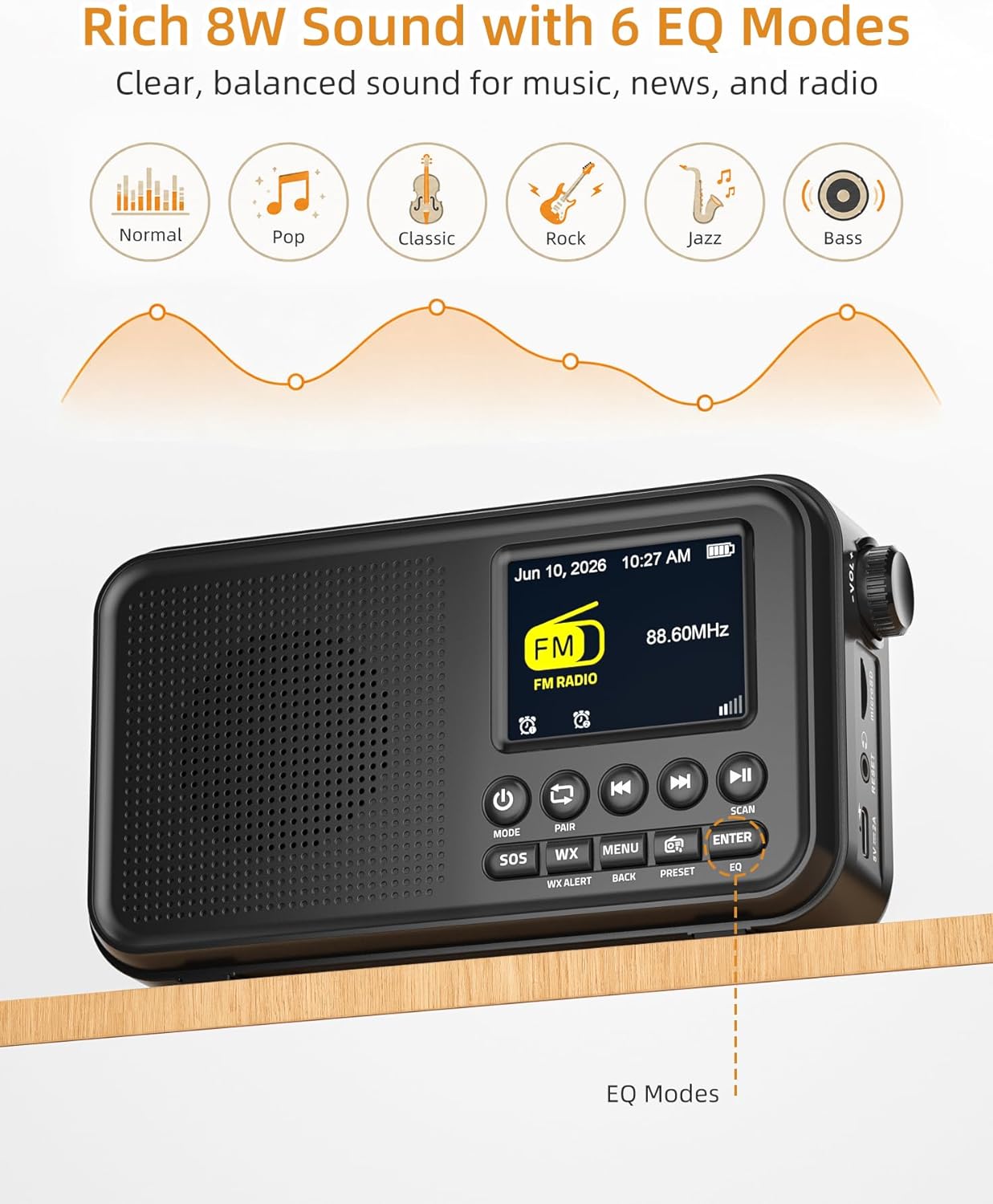
Image: The radio displaying FM mode and options for EQ settings.
NOAA Vejr Alert
The radio includes a built-in U.S. NOAA Weather Band for receiving weather alerts.
- Select WX Mode: Tryk på WX button to switch to the NOAA Weather Band.
- Kanalvalg: The radio will automatically scan for the strongest NOAA channel. You can manually cycle through channels using the Forrige/Næste nummer knapper.
- Aktiver advarsler: Ensure the WX Alert function is enabled (check menu settings if necessary) to receive automatic weather alerts.

Image: The radio displaying NOAA Weather Band information in an outdoor environment.
Bluetooth-forbindelse
Stream lyd trådløst fra dine kompatible enheder.
- Vælg Bluetooth-tilstand: Tryk på MODE button until "Bluetooth" is displayed. The radio will enter pairing mode, indicated by a flashing Bluetooth icon.
- Par enhed: On your smartphone, tablet, or laptop, enable Bluetooth and search for "Mesqool CR1031" (or similar device name) in the list of available devices. Select it to pair.
- Afspil lyd: Once paired, you can play audio from your device, and it will stream through the radio's speaker.

Image: A user connecting their smartphone to the radio via Bluetooth, demonstrating wireless audio streaming.
microSD-afspilning
Afspil lyd files directly from a microSD card.
- Indsæt microSD-kort: Gently insert a microSD card (up to 64GB, not included) into the microSD card slot until it clicks into place.
- Select microSD Mode: Tryk på MODE button until "microSD" or "Card Playback" is displayed.
- Afspilningskontrol: Brug Afspil/pause og Forrige/Næste nummer knapper til at styre afspilning.
Dobbelte alarmer
Set two independent alarms to wake up to FM radio or a buzzer.
- Adgang til alarmindstillinger: Tryk på MENU button and navigate to the "Alarm" settings.
- Set Alarm 1/2: Select Alarm 1 or Alarm 2. Set the desired time, alarm source (FM radio or buzzer), and volume.
- Aktiver alarm: Ensure the alarm is enabled in the settings.
- Udsæt: When an alarm sounds, press any button (except Power) to activate snooze for extra rest.

Image: The radio illustrating its dual alarm feature, with one alarm set for a meeting and another for waking up.
Sleep Timer
Fall asleep to your favorite radio station with the sleep timer function.
- Access Sleep Timer: Tryk på MENU button and navigate to the "Sleep Timer" settings.
- Indstil varighed: Choose a duration from 15, 30, 45, 60, 90, or 120 minutes. The radio will automatically turn off after the selected time.
EQ-tilstande
Customize your audio experience with 6 equalizer modes.
- Access EQ Settings: Tryk på EQ button (or navigate via the MENU).
- Vælg tilstand: Choose from Normal, Pop, Classic, Rock, Jazz, or Bass to match your listening preference.
Officiel produktvideo
Video: An official product video demonstrating the FM Radio, Bluetooth, and NOAA Weather Alert features of the Mesqool CR1031.
Opretholdelse
- Rensning: Brug en blød, tør klud til at rengøre radioens yderside. Brug ikke slibende rengøringsmidler eller opløsningsmidler.
- Opbevaring: Opbevar radioen et køligt, tørt sted væk fra direkte sollys og ekstreme temperaturer.
- Batteripleje: For optimal battery life, avoid fully discharging the battery frequently. Recharge regularly, especially if storing for long periods.
- Vandeksponering: Denne enhed er ikke vandtæt. Undgå udsættelse for vand eller høj luftfugtighed.
Fejlfinding
| Problem | Mulig årsag | Løsning |
|---|---|---|
| Ingen strøm/Tænder ikke | Batteriet er fladt; strømadapteren er ikke tilsluttet. | Charge the battery using the USB-C cable. Ensure the power adapter is properly connected. |
| Poor FM/NOAA reception | Antennen ikke strakt ud; Område med svagt signal. | Fully extend the telescopic antenna. Try repositioning the radio for better signal. |
| Bluetooth ikke parring | Radio not in pairing mode; Device Bluetooth off. | Ensure the radio is in Bluetooth mode and the icon is flashing. Check Bluetooth settings on your device. |
| microSD card not recognized | Card inserted incorrectly; Incompatible format; Card corrupted. | Reinsert the card correctly. Ensure the card is formatted to FAT32. Try a different microSD card. |
| Ingen lyd | Lydstyrken er for lav; Lydløs aktiveret; Hovedtelefoner tilsluttet. | Increase volume. Check if headphones are plugged in. Ensure the device is not muted. |
Specifikationer
- Mærke: Mesqool
- Modelnummer: CR1031
- Farve: Sort
- Produktdimensioner: 6.65 cm L x 1.85 cm B x 3.62 cm H
- Varens vægt: 0.77 pund
- Strømkilde: Corded Electric, Battery Powered (3000mAh rechargeable battery included)
- Forbindelse teknologi: USB, Bluetooth 5.0
- Tuner teknologi: FM/Vejrbånd
- Understøttede radiobånd: NOAA | FM | WB
- FM-frekvensområde: 87.5-108 MHz
- NOAA Frequency: 162.400 - 162.550 MHz
- Skærmtype: 2.4" farveskærm
- Særlige funktioner: Portable, Rechargeable, SOS Alarm, Auto Scan, 40 FM Presets, 8W Sound, microSD Playback, Dual Alarms, Sleep Timer, 6 EQ Modes (Normal, Pop, Classic, Rock, Jazz, Bass)
- Kompatible enheder: Smartphone, tablet, bærbar computer
- Voltage: 5 volt
- Materiale: Acrylonitril Butadien Styren (ABS)
Garanti og support
Garantioplysninger
The Mesqool CR1031 Portable FM Radio comes with a 2-Year Replacement/Refund Warranty for any quality problems. Please retain your proof of purchase for warranty claims.
Inkluderede komponenter
Produktpakken indeholder:
- Mesqool CR1031 Portable FM Radio
- USB-C ladekabel
- Strømadapter
- Brugermanual (dette dokument)

Image: The package contents of the Mesqool CR1031, showing the radio, manual, power adapter, and USB-C cable.
Kundesupport
For further assistance or inquiries, please refer to the contact information provided on the product packaging or the official Mesqool webwebsted.


