
Indledning
Thank you for choosing the Reshow Cassette Player 12. This portable device allows you to enjoy your favorite cassette tapes and convert them into digital files. This manual provides essential information for the safe and efficient use of your new cassette player.
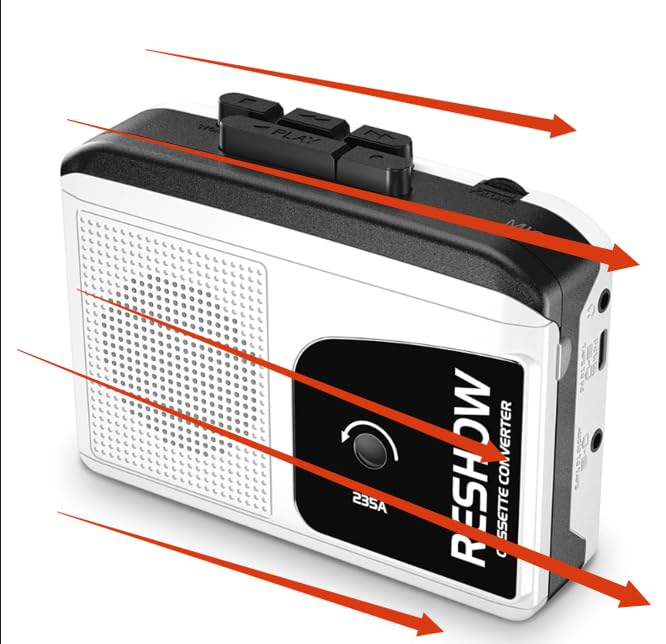
Image: Reshow Cassette Player 12
Pakkens indhold
- Reshow Cassette Player 12
- USB-C kabel
- Brugervejledning (dette dokument)
Opsætning
Tænd for enheden
The Reshow Cassette Player 12 can be powered via the included USB-C cable or by batteries (not included).
- USB-C strøm: Connect the USB-C cable to the player's USB-C port and the other end to a compatible USB power adapter (not included) or a computer's USB port.
- Batteristrøm: Open the battery compartment (location not specified in data, typically on the back or side) and insert the required batteries, ensuring correct polarity.
Isætning af et kassettebånd
- Locate the cassette compartment door.
- Gently open the compartment door.
- Insert your cassette tape with the open edge facing the player's head mechanism.
- Close the compartment door until it clicks securely.
Betjeningsvejledning
Afspilning af en kassette
- Ensure the cassette player is powered on and a tape is inserted.
- Tryk på SPIL knappen for at starte afspilningen.
- Adjust the volume using the volume control dial (location not specified, typically on the side).
- Tryk på for at stoppe afspilningen STOP knap.
- Brug HURTIG FREM og SPOLE TILBAGE knapper til at navigere gennem båndet.
Using the Built-in Speaker and Headphone Jack
- Indbygget højttaler: Audio will play automatically through the integrated speaker when no headphones are connected.
- Hovedtelefonstik: Connect standard 3.5mm headphones (not included) to the headphone jack for private listening. Connecting headphones will automatically mute the built-in speaker.
Converting Cassettes to Digital Files (MP3)
The Reshow Cassette Player 12 can convert your analog tapes to digital files using a computer and appropriate software (not included).
- Connect the cassette player to your computer using the supplied USB-C cable.
- Your computer should recognize the device as an audio input.
- Open your preferred audio recording software (e.g., Audacity, available separately).
- Configure the software to record from the USB audio input device.
- Start playback on the cassette player and begin recording in your software.
- Once recording is complete, stop playback and recording, then save your digital file (e.g., MP3 format).
Opretholdelse
Rengøring af enheden
- Tør afspillerens yderside af med en blød, tør klud.
- Brug ikke flydende rengøringsmidler eller slibende materialer.
- Rengør tapehovedet og trykkrullen let med en vatpind regelmæssigt.ampberiget med isopropylalkohol for at sikre optimal lydkvalitet og båndlevetid.
Opbevaring
Store the cassette player in a cool, dry place away from direct sunlight and extreme temperatures when not in use.
Fejlfinding
| Problem | Mulig årsag | Løsning |
|---|---|---|
| Afspilleren tænder ikke. | Ingen strøm eller lave batterier. | Check USB-C connection or replace batteries. |
| Ingen lyd under afspilning. | Volume too low, headphones connected, or tape issue. | Increase volume, disconnect headphones, or check tape for damage. |
| Dårlig lydkvalitet. | Dirty tape head or worn tape. | Clean the tape head (see Maintenance). Try a different tape. |
| Tape gets stuck or chewed. | Damaged tape or dirty pinch roller. | Do not use damaged tapes. Clean the pinch roller (see Maintenance). |
| Cannot convert to digital. | Incorrect software settings or cable issue. | Ensure USB-C cable is properly connected. Verify audio input settings in your recording software. |
Specifikationer
- Model: Cassette Player 12
- Fabrikant: Vis igen
- Strømkilde: USB-C or Batteries (type not specified, typically AA or AAA)
- Lydudgang: Built-in speaker, 3.5mm headphone jack
- Forbindelse: USB-C for power and digital conversion
- Pakkedimensioner: 7.52 x 4.49 x 1.81 tommer
- Varens vægt: 10.8 ounce
- ASIN: B0GCF4WMZ6
- Første tilgængelige: 24. december 2025
Garanti og support
Oplysninger vedrørende produktgaranti og kundesupport blev ikke givet i de tilgængelige data. Se venligst produktemballagen eller producentens officielle webwebsted for detaljer.