
1. Introduktion
The DEPSTECH DS320 Dual Lens Borescope Camera is an advanced inspection tool designed for examining hard-to-reach areas. It features a 4.3-inch IPS screen for clear viewing, dual lenses for versatile inspection angles, IP67 waterproofing for use in wet environments, and a 16.5ft semi-rigid cable for flexible maneuverability. This manual provides essential information for the safe and effective operation and maintenance of your borescope.
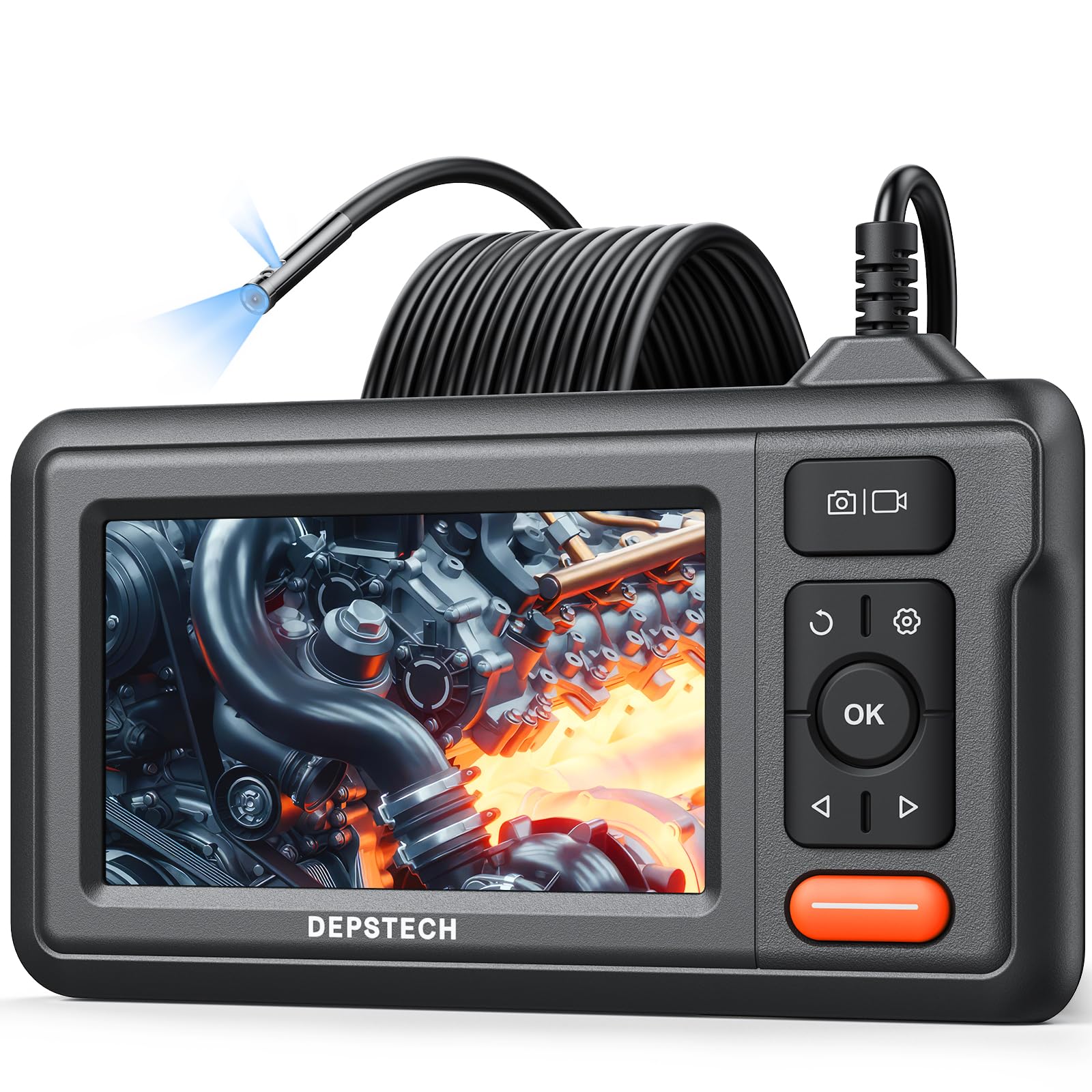
Figure 1: DEPSTECH DS320 Dual Lens Borescope Camera.
2. Sikkerhedsoplysninger
Læs og forstå alle sikkerhedsinstruktioner, før du bruger dette produkt. Manglende overholdelse af disse instruktioner kan resultere i elektrisk stød, brand eller alvorlig personskade.
- Brug ikke enheden i eksplosive atmosfærer, f.eks. i nærheden af brandfarlige væsker, gasser eller støv.
- Hold enheden væk fra børn.
- Do not modify or disassemble the device. Repairs should only be performed by authorized personnel.
- Ensure the camera probe is clean and free from debris before and after use.
- Udsæt ikke enheden for ekstreme temperaturer eller direkte sollys i længere perioder.
- The camera probe is IP67 waterproof, but the main unit is not. Avoid immersing the main unit in water.
3. Pakkens indhold
Bekræft at alle varer er til stede i din pakke:
- DS320 Endoscope with 16.5ft Semi-Rigid Cable
- Accessory Kit (Hook and Magnet)
- Type-C opladerkabel
- Brugermanual

Figure 2: Package contents including the borescope, cable, and accessories.
4. Produktet er slutview
The DEPSTECH DS320 is designed for ease of use and high performance in various inspection scenarios.
4.1. Hovedenhedens funktioner
- 4.3-tommer IPS-skærm: Provides a clear, high-definition display with a 178° viewing angle for real-time inspection footage.
- Intuitive kontroller: Easy-to-use buttons for navigation, image capture, video recording, and light adjustment.
- Ergonomisk design: Comfortable to hold for extended periods during inspections.
- Lang batterilevetid: Equipped with a battery providing approximately 3 hours of continuous operation.

Figure 3: The 4.3-inch IPS color display for clear viewing.
4.2. Kameraprobefunktioner
- Dobbelt linsesystem: Features a front-facing camera and a side-facing camera, allowing for comprehensive inspection without repositioning the probe.
- Bluart 3.0-teknologi: Enhances image clarity, processing speed, and low-light performance for sharp and vivid images.
- IP67 vandtæt: The camera probe is resistant to water and dust, making it suitable for wet and dirty environments.
- Justerbare LED-lys: Seven adjustable LED lights provide optimal illumination in dark areas.
- 16.5ft Semi-Rigid Cable: Offers flexibility to navigate tight spaces while maintaining its shape for precise positioning.

Figure 4: The dual lens system with front and side cameras.

Figur 5: Eksample of 180° image rotation for easier viewing.
5. Opsætning
5.1. Opladning af enheden
Before first use, fully charge the borescope. Connect the provided Type-C charging cable to the device's charging port and a suitable USB power adapter (not included). The charging indicator will show the charging status.
5.2. Fastgørelse af sonden
The semi-rigid cable is pre-attached to the main unit. Ensure the connection is secure before use.
5.3. Tænd/sluk
Press and hold the power button (usually marked with a power symbol) for a few seconds to turn the device on or off. The screen will illuminate upon successful power-on.
6. Betjeningsvejledning
6.1. Grundlæggende betjening
Once powered on, the live feed from the camera will appear on the IPS screen. Use the navigation buttons (up/down/left/right) and the OK button to interact with the menu and settings.

Figure 6: The borescope ready for immediate use.
6.2. Using Dual Lenses
The DS320 features both a front camera and a side camera. Use the dedicated button (often labeled with a camera icon or 'M' for mode) to switch between the front viewside view, or a split-screen display if available. This allows for comprehensive inspection of an area without needing to rotate the probe.
6.3. Justering af LED-lysstyrke
The camera probe is equipped with adjustable LED lights. Use the brightness adjustment buttons (often marked with '+' and '-' or arrow icons) on the main unit to increase or decrease the illumination level. This helps in achieving optimal visibility in varying light conditions.

Figure 7: IP67 waterproof camera head with adjustable LED lights.
6.4. Optagelse af fotos og videoer
To capture an image, press the photo button (usually a camera icon). To record video, press the video button (usually a video camera icon). Ensure a compatible memory card (not included) is inserted for saving media. The device supports recording in 720p resolution.

Figure 8: Screen interface for capturing photos and recording videos.
6.5. Brug af tilbehør
The accessory kit includes a hook and a magnet. These can be attached to the camera probe to retrieve small objects or to maneuver the probe in difficult areas. Carefully attach them to the camera head as instructed in the accessory guide.

Figure 9: Included hook and magnet accessories.
6.6. Produktvideo overview
For a visual guide on the product's features and usage, please watch the official product video below.
Video 1: Official DEPSTECH Borescope Product Video, demonstrating key features and applications.
7. Vedligeholdelse
7.1. Rensning
After each use, especially in dirty or wet environments, clean the camera probe with a soft, damp cloth. For stubborn dirt, a mild detergent can be used. Ensure the probe is completely dry before storage. Do not use abrasive cleaners or solvents. The main unit should be wiped with a dry cloth.
7.2. Opbevaring
Store the borescope in a cool, dry place, away from direct sunlight and extreme temperatures. Use the original packaging or a protective case to prevent damage to the screen and probe cable.
7.3. Batteripleje
To prolong battery life, avoid fully discharging the battery frequently. If storing the device for an extended period, charge it to approximately 50-70% every few months.
8. Fejlfinding
| Problem | Mulig årsag | Løsning |
|---|---|---|
| Enheden tænder ikke. | Lavt batteri. | Oplad enheden med det medfølgende Type-C-kabel. |
| Intet billede på skærmen. | Camera cable not properly connected or damaged. | Ensure the camera cable is securely connected. If still no image, contact support. |
| Billedet er sløret eller uklart. | Linsen er snavset; utilstrækkelig belysning. | Clean the camera lens. Adjust the LED brightness using the controls on the main unit. |
| Kan ikke gemme billeder/videoer. | No memory card inserted; memory card full or corrupted. | Insert a compatible memory card. Check if the card has sufficient space or try formatting it (this will erase all data). |
9. Specifikationer
| Feature | Detalje |
|---|---|
| Modelnummer | DS320DL-5MM |
| Vise | 4.3 tommer IPS-skærm |
| Kamera type | Dobbeltlinse (foran og på siden) |
| Vandtæt vurdering | IP67 (kun probe) |
| Kabellængde | 16.5 feet (Semi-Rigid) |
| Belysning | 7 justerbare LED -lys |
| Billedkvalitet | HD (720p for video recording) with Bluart 3.0 Technology |
| Batteri | 1 A battery required (included), approx. 3 hours operating time |
| Varens vægt | 1.46 pund |
| Pakkedimensioner | 8.31 x 6.5 x 3.07 tommer |
10. Garanti og support
This DEPSTECH product comes with a standard manufacturer's warranty. For detailed warranty information, product support, or technical assistance, please refer to the warranty card included in your package or visit the official DEPSTECH website. You may also contact DEPSTECH customer service directly for assistance.
DEPSTECH Authorized Store: Besøg butik