
1. Introduktion
This manual provides essential information for setting up, operating, maintaining, and troubleshooting your CHUWI Hi10 X2 2-in-1 Laptop Tablet. Please read it thoroughly before using your device.
Hvad er der i æsken
- Hi10 X2 Tablet
- Magnetisk tastatur
- Etui med stativ
- Oplader sæt
- Brugervejledning (dette dokument)

Image 1.1: CHUWI Hi10 X2 Tablet with Magnetic Keyboard and Case.
2. Opsætning
2.1 Indledende opladning
Before first use, fully charge your CHUWI Hi10 X2 tablet using the provided charger set. Connect the charger to the Type-C port on the tablet and plug it into a power outlet. The charging indicator light will illuminate.
2.2 Attaching the Magnetic Keyboard and Case
Align the tablet with the magnetic connectors on the keyboard. The magnets will secure the tablet in place. The case with stand can be adjusted to your preferred viewvinkel.
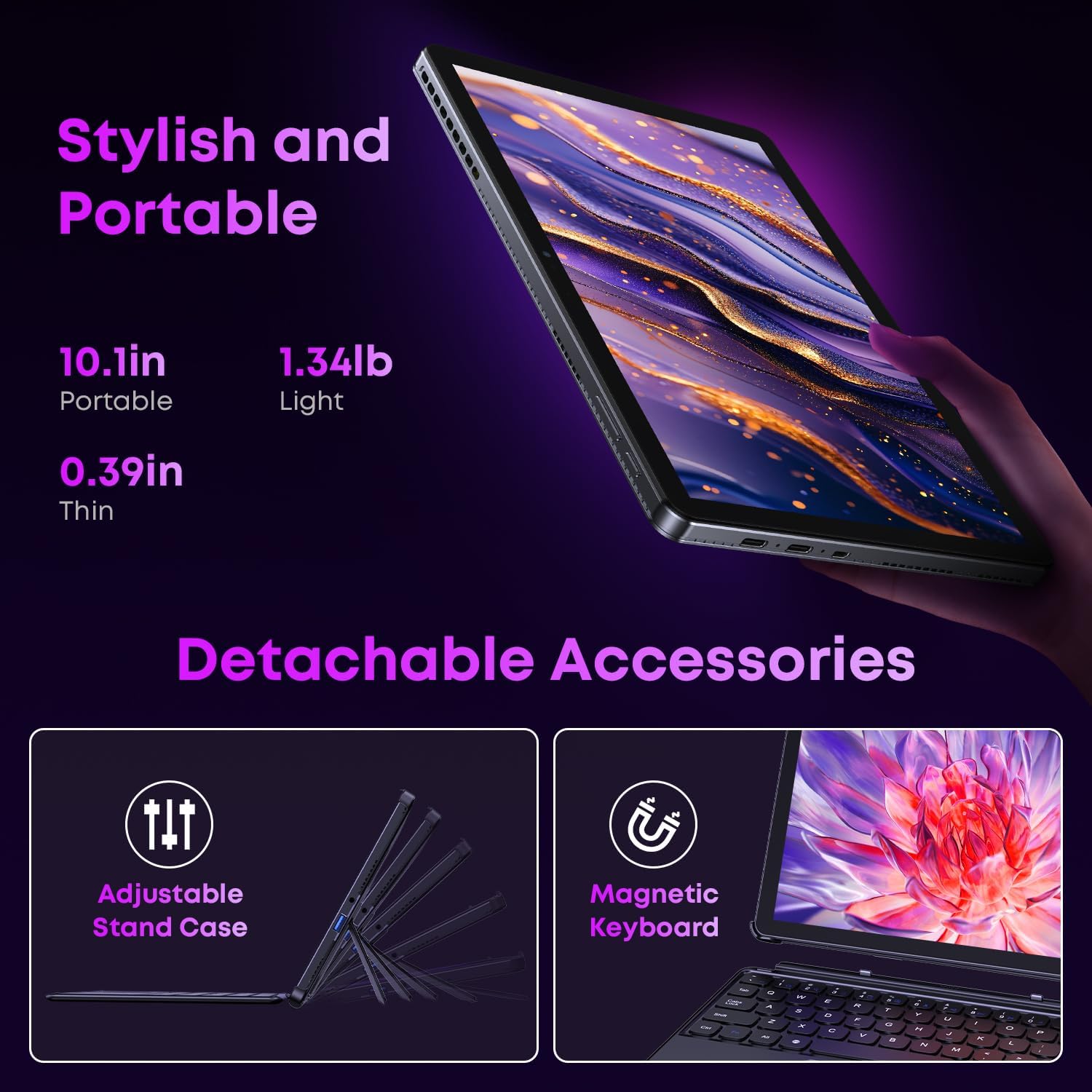
Image 2.1: Detachable accessories including the magnetic keyboard and adjustable stand case.
2.3 First Boot-Up and Windows Activation
Press and hold the power button until the screen turns on. Follow the on-screen instructions to complete the initial Windows 11 setup. If your Windows system arrives unactivated, please send the serial number (located on the back of the device) to CHUWI support via Amazon for your activation key.
2.4 Tilslutning til Wi-Fi
During setup, you will be prompted to connect to a Wi-Fi network. Select your network and enter the password. The device supports Wi-Fi 6 for fast and stable connections.
3. Betjeningsvejledning
3.1 Tænd/sluk og dvaletilstand
- Tænd: Tryk på tænd/sluk-knappen, og hold den nede, indtil skærmen lyser.
- Sluk: From the Windows Start menu, select Power > Shut down.
- Sove mode: Briefly press the power button to enter or exit sleep mode.
3.2 Brug af berøringsskærmen
The 10.1-inch HD touchscreen supports 10-point multi-touch gestures. Use taps, swipes, and pinches for navigation and interaction with applications.

Image 3.1: The 10.1-inch HD touchscreen display.
3.3 Laptop and Tablet Modes
The magnetic keyboard allows for seamless switching between laptop and tablet modes. Attach the keyboard for typing and productivity, or detach it for a pure tablet experience.
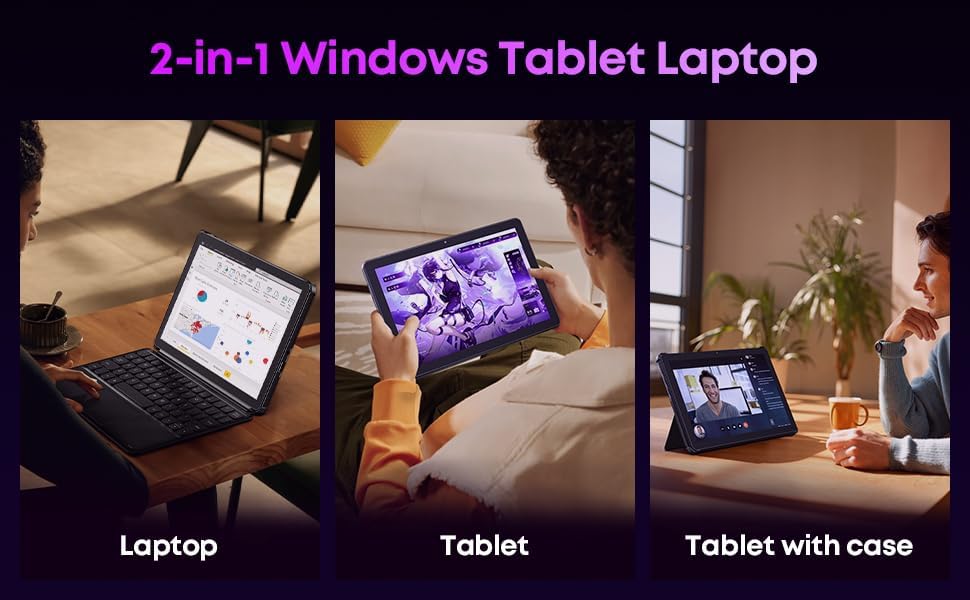
Image 3.2: Usage scenarios demonstrating laptop, tablet, and tablet with case modes.
3.4 Forbindelse
- USB-porte: The tablet features a full-featured Type-C port and a USB 3.2 Gen1 port for data transfer and connecting peripherals.
- Micro HDMI: Connect to external monitors or TVs using the Micro HDMI port for extended display options, supporting up to 4K video output.
- Bluetooth 5.3: Pair with wireless headphones, mice, and other Bluetooth accessories.
- Wi-Fi 6: Enjoy high-speed internet connectivity for streaming and browsing.
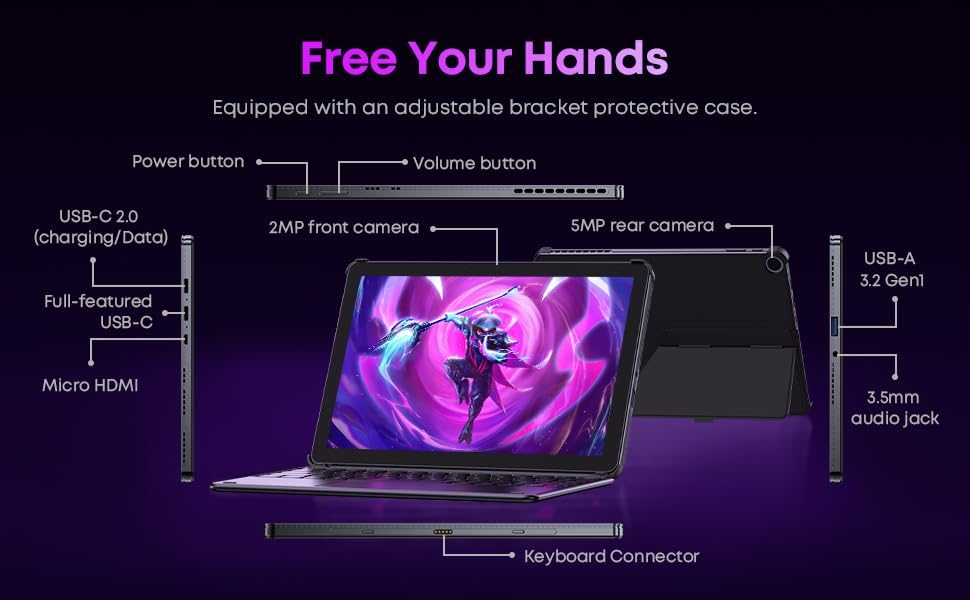
Billede 3.3: Detaljeret view of the tablet's ports and connectors.
3.5 Kamerabrug
The tablet is equipped with a 5MP autofocus rear camera for capturing photos and videos, and a 2MP front camera for video calls and selfies.

Image 3.4: Camera and wireless connectivity features.
3.6 Processor and Storage
Powered by a 10th Gen Intel Core i3 processor (up to 3.9GHz) and 8GB RAM, the tablet handles multitasking efficiently. The 256GB SSD provides ample storage and fast access to your files.

Image 3.5: Intel 10th Gen Core i3 Processor details.
3.7 Produkt overview Video
Video 3.6: En overview of the CHUWI Hi10 X2 2-in-1 Laptop Tablet, highlighting its features and functionality.
4. Vedligeholdelse
4.1 Rengøring af enheden
Brug en blød, fnugfri klud til at rengøre skærmen og tablettens kabinet. Tør let ved genstridige pletter.ampRengør kluden med vand eller en skærmrengøringsopløsning. Undgå skrappe kemikalier eller slibende materialer.
4.2 Pleje af batterier
To prolong battery life, avoid exposing the tablet to extreme temperatures. It is recommended to keep the battery charge between 20% and 80% for optimal longevity. Avoid fully discharging the battery frequently.
4.3 Softwareopdateringer
Regularly check for and install Windows updates to ensure your system has the latest security patches and performance improvements. Go to Settings > Windows Update.
4.4 Lagerstyring
Periodisk vedrview og slet unødvendige files and applications to free up storage space on the 256GB SSD. This helps maintain optimal device performance.
5. Fejlfinding
5.1 Enheden tændes ikke
- Ensure the device is fully charged. Connect the charger and wait a few minutes before attempting to power on.
- Tryk og hold tænd/sluk-knappen nede i 10-15 sekunder for at udføre en hård nulstilling.
5.2 Problemer med Wi-Fi-forbindelse
- Genstart din Wi-Fi-router og tabletten.
- Tjek om andre enheder kan oprette forbindelse til det samme Wi-Fi-netværk.
- Forget the network in Windows settings and reconnect.
5.3 Skærmen reagerer ikke på berøring
- Genstart tabletten.
- Sørg for, at skærmen er ren og fri for snavs.
5.4 Keyboard Not Working
- Ensure the tablet is correctly aligned and securely connected to the magnetic keyboard.
- Genstart tabletten.
For yderligere assistance, se venligst supportafsnittet.
6. Specifikationer
| Feature | Specifikation |
|---|---|
| Mærke | CHUWI |
| Modelnavn | Hi10 X2 |
| Processor | Intel Core i3 (10th Gen, up to 3.9 GHz) |
| Operativsystem | Windows 11 Home |
| VÆDDER | 8 GB |
| Opbevaring | 256 GB SSD |
| Skærmstørrelse | 10.1 tommer |
| Skærmopløsning | 1280x800 pixels |
| Forbindelse | Wi-Fi 6, Bluetooth 5.3 |
| Havne | Full-featured Type-C, USB 3.2 Gen 1, Micro HDMI, 3.5mm Audio Jack |
| Kameraer | 5MP Autofocus Rear, 2MP Front |
| Vægt | 1.3 pund (ca. 0.59 kg) |
| Dimensioner (L x B x T) | 9.6 cm x 6.49 cm x 0.39 cm |
| Batterikapacitet | 3400 mAh |
7. Garantioplysninger
The CHUWI Hi10 X2 2-in-1 Laptop Tablet comes with a 1 års begrænset garantiDenne garanti dækker fabrikationsfejl og funktionsfejl ved normal brug. Gem venligst din købsbevis til garantikrav.
For detailed warranty terms and conditions, please refer to the official CHUWI webwebsted eller kontakt kundesupport.
8. Support
If you encounter any issues not covered in the Troubleshooting section, or require assistance with Windows activation, please contact CHUWI customer support. You can typically find support contact information on the official CHUWI website or through your purchase platform (e.g., Amazon seller messaging).
Når du kontakter support, bedes du have din enheds serienummer og købsbevis klar.